Skip to: |

Newegg.com - A great place to buy computers, computer parts, electronics, software, accessories, and DVDs online. With great prices, fast shipping, and top-rated customer service - once you know, you Newegg.

If you are reading this message, Please click this link to reload this page.(Do not use your browser's "Refresh" button). Please email us if you're running the latest version of your browser and you still see this message.

Newegg.com - Computer Parts, Laptops, Electronics, HDTVs, Digital Cameras and More!

  • | Wish List
  • Help
Home
Home > 
Computer Hardware > 
Input Devices > 
Mice > 
ROCCAT > 
Item#: N82E16826436003

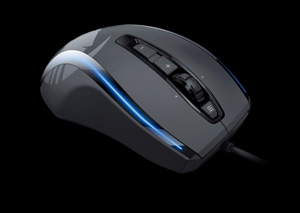
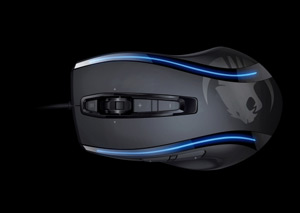
ROCCAT Kone[+] ROC-11-801 Black 8 Buttons Tilt Wheel USB Wired Laser 6000 dpi Gaming Mouse

  • 8 Buttons Tilt Wheel
  • USB Wired
  • Laser
  • Pin It
  • Email this page
ICON Loading...


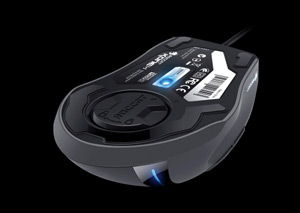
With a 6000dpi Pro-Aim Laser Sensor and its integrated Tracking & Distance Control Unit (TDCU), the further development of the prize-winning ROCCAT Kone Gaming Mouse has unbelievably more power under the hood. Its maximum precision and ultimate tracking are beyond comparison.

The massive upgrade made to the driver and the introduction of the Easy-Shift[+] button has also turned the Kone[+] into a real customizable marvel at the same time. No other mouse offers as many configuration options as the ROCCAT Kone.
 

  • newegg Maximum Performance The revolutionary 6000dpi Pro-Aim Laser Sensor, in conjunction with its 10.5 megapixel resolution and 1000Hz polling rate, offers maximum precision, even transmitting lightning fast mouse movements with up to 30Gs of acceleration and with speeds of up to 200ips (5.08m/s) without loss or lag. Thanks to the Tracking and Distance Control Unit, which is now integrated in the laser sensor, the ROCCAT Kone[+] can also calculate the lift-off distance as well as fine-tune the sensor to suit the mousepad. The result: optimal tracking.
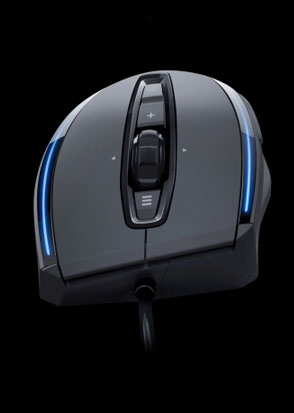
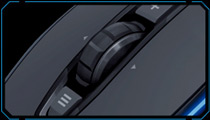
  • newegg Ergonomic Hybrid Shell The highly praised hybrid shell for right-handers, including the Soft-Touch Surface, have been retained, but really useful core improvements have been made that further increase the comfort of Kone’s successor. The mouse wheel is completely new: distinctive notch positions are perfect for gaming, and the wider design makes it easier to control. The button above the mouse wheel has been made larger and you’ll now find a nicely-sized toggle switch below the mouse wheel. The result: maximum gaming comfort.
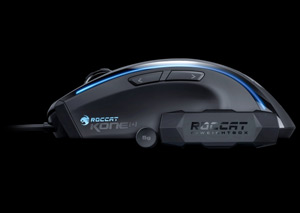
  • newegg 22 Mouse Functions Thanks to the Easy-Shift[+] button, all the buttons – including the mouse wheel – can be assigned two functions such as macros or other functions. As a result, you now have 22 functions available at any one time instead of the usual 12.
  • newegg 5 Game Profiles You can configure your button assignments, including macros, DPI settings, the sensor sensitivity level and your lighting settings too, and save them to any one of 5 profiles on the 576kB of onboard memory. This allows you to customize your mouse to suit individual games. You can associate each profile with a particular application so the right button assignments, DPI and color settings, etc., are automatically loaded when you start the game. When a profile is set as the Windows Profile, the ROCCAT Kone[+] will always switch to this profile when you return to Windows after leaving a game or app. Additional profiles can be saved on your hard drive whenever you want, and then loaded to any one of the 5 profile slots using the driver menu.
  • newegg Macro Manager Creating and editing your own command sequences is made easy thanks to the highly praised Macro Manager. Predefined macro presets for the top 20 PC games as well as several office apps make it even easier to customize the mouse – plus the new Loop Function now makes it possible to loop macros indefinitely.
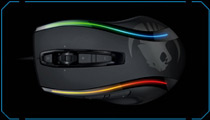
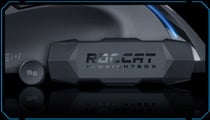
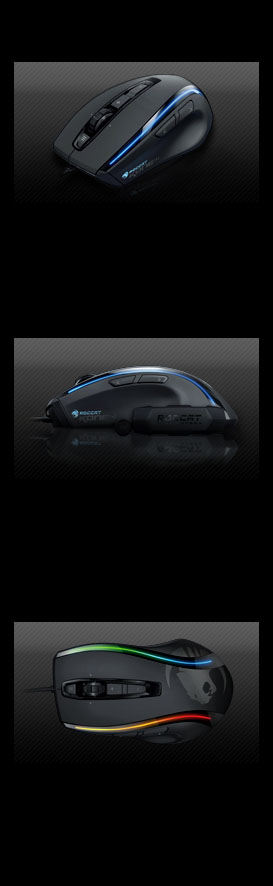
  • newegg More Thoughtful Features Four multicolor LEDs, together with the enhanced lightpipes and configurable effects, can light up, alternate or pulsate in more than four different colors at the same time. It’s a real eye-catcher on any desktop. Plus, the famous ROCCAT voice gives immediate feedback when you change DPI settings, profiles, the volume level or sensitivity setting. As you don’t need to look at an additional display on the screen or on the mouse itself, nothing will distract from the gameplay. It really is as easy at that. And a weight system comprising 4 x 5g weights is included, allowing you to customize the weight in four stages to suit your preferences.
Learn more about Kone[+]

Model

Brand
ROCCAT
Name
Kone[+]
Model
ROC-11-801
Type
Wired

Spec

Interface
USB
Hand Orientation
Right Hand
Tracking Method
Laser
Buttons
8
Scrolling Capability
Tilt Wheel
Color
Black
Maximum dpi
6000 dpi

OS / System Requirement

Operating System Supported
Windows XP 32bit,
Vista 32/64 bit,
Windows 7 32/64 bit
System Requirement
USB 2.0 Port
Internet connection (for driver installation)

Features

Features
EASY-SHIFT[+] BUTTON DUPLICATOR
for 22 directly accessible mouse functions

4-LED LIGHT SYSTEM
for individual colors + effects

TRACKING & DISTANCE CONTROL UNIT
ultimate tracking; minimizes pick-up-flight

ROCCAT DRIVER + MACRO MANAGER
incl. Macro Presets for games & apps

ONBOARD MEMORY (576KB)
store 5 Game Profi les with macros

4 EASY-TO-CLIP-IN WEIGHTS (4X5G)
for individual weight adjustment

8 MOUSE BUTTONS
programmable + solid 4D mouse wheel

ULTRA QUIET
low friction mouse feet

Packaging

Package Contents
ROCCAT Kone[+] Max Customization Gaming Mouse
Weight System with 4 weights
ROCCAT ID Card
Quick Install Guide

Quick Info

Warranty

  • Limited Warranty period (parts): 1 year
  • Limited Warranty period (labor): 1 year


Customer Reviews of Kone[+]

Do you own this product? Write a Review

Filter Results

Go
  • N/A
  • 2/23/2013 11:09:54 PM
  • Tech Level: Somewhat High
  • Ownership: more than 1 year
  • Verified Owner

5 out of 5 eggsGood

Pros: Everything but the two cons.

Cons: The tiger logo is coming off and the mouse wheel squeaks like crazy.

Did you find this review helpful? Yes No

  • dkev
  • 2/19/2013 10:10:20 PM
  • Tech Level: High
  • Ownership: 1 day to 1 week

5 out of 5 eggsLove it

Pros: Very comfortable, drivers built into the firm ware.

Cons: The back thumb button is like the mouses version of a shift key. So It's not usable on its own. Which sucks because that's my melee button. But that's a nit pick.

Other Thoughts: I've had my Deathadder for several years and I have been trying to find a suitable replacement. I tried them all. None of them were as comfortable. Until I bought the Kone. If feels so much better built and is even more comfortable then the deathadder. I set the lighting to solid. It looks better I think. The side thumb buttons are in the perfect position and don't feel like I'm gonna break them if I hit them too hard. Just a great mouse. I love it.

Did you find this review helpful? Yes No

  • philly b
  • 2/14/2013 12:09:38 AM
  • Tech Level: High
  • Ownership: 1 month to 1 year
  • Verified Owner

5 out of 5 eggsGreat mouse!

Pros: The software for this mouse is a control freaks DREAM! The surface scan feature is great. You can optimize the color schemes in so many ways... precision is everything and 6000dpi is really overkill. Playing FPS games at 3200dpi with this is a PLEASURE!

Cons: none come to mind!

Did you find this review helpful? Yes No

  • N/A
  • 2/9/2013 8:26:53 AM
  • Tech Level: Somewhat High
  • Ownership: 1 week to 1 month
  • Verified Owner

5 out of 5 eggsSo Far, So GREAT!

Pros: I have not owned this mouse for very long but, so far this mouse exceeds way above ANY mouse I have EVER owned previously!

I have not been able to experience the use of every function that this mouse has but, so far everything works to expectations and more!

This is Definitely the most comfortable mouse my hand has had in its grips ever!

Cons: Absolutely nothing so far!

Other Thoughts: The best, and it looks Amazing! The lights add a unique flair to it that I like! I have always been a Logitech mouse user but, I had lost all "compassion" for their mouse/boards after being disappointed supremely with the illuminated keyboard and the G400 mouse! Major FAIL! This mouse ROCKS!

Did you find this review helpful? Yes No

  • sherbanater
  • 2/4/2013 4:21:59 AM
  • Tech Level: Somewhat High
  • Ownership: 1 day to 1 week
  • Verified Owner

4 out of 5 eggsRoccat Kone(+)

Pros: Great build quality.
Perfect size for medium to large hands.
lighting effects.
easyshift (why hasn't anyone thought of this before?)
6000 DPI
Tracking Control Unit.
Fantastic Software

Cons: Lights really dont flow correctly on the bottom right side...
No driver disk, Getting software from website was a pain!

Other Thoughts: probably the most brilliant mouse ever,
software is awesome once its set-up.
easyshift is such a smart feature.
lights are awesome.
Price VS. Performance...A+

Did you find this review helpful? Yes No

  • Alienguru1
  • 2/3/2013 11:33:25 AM
  • Tech Level: High
  • Ownership: 1 month to 1 year
  • Verified Owner

5 out of 5 eggsWatch out Razor

Pros: -Comfortable
-Light effects are amazing
-Customization
-Dynamic color reactions to environment on screen
-Design is perfect
-On the fly DPI change
-ROCCAT TALK FX
-Weights for the perfect feel
-Made in Germany

Cons: -Mouse Wheel is kinda stiff(I rarely use MW in games anyway)
-Price, I guess(you pay for the quality and features)

Other Thoughts: I used to have a Razor and it was a great mouse. However, it was old and had a bad connection where the cable met the mouse. I was looking into Logitech, Razor and all the other mainstream US makers. Then I saw this. I had never heard of ROCCAT before a few weeks ago. WOW!!! I am so glad that I found this brand. The Kone[+] is everything that I have every wanted or dreamed of in a mouse. This is the Mercedez Benz of Mice, toppled on by the Kone XTD. The only difference between the [+] and the XTD is the DPI max. The Kone[+] offers all of the same awesome FX features. Combined with my ROCCAT Isku FX Keyboard, the two of these are perfect harmony. ROCCAT TALK FX software allows the mouse and keyboard to talk to each other. Seriously, buy this mouse now.

Did you find this review helpful? Yes No

  • N/A
  • 1/29/2013 1:33:11 PM
  • Tech Level: High
  • Ownership: 1 month to 1 year

5 out of 5 eggsMakes the competition look like rats

Pros: Looks amazing, about 40 different colors for each light
Profiles, change color and what the buttons do
Extremely Comfortable
Basic Mac Compatibility, cant edit profiles and auto profile change does not work, but manual and functionality works great.

Cons: Does not work with Rasberry Pi, albeit thats because i could not install the driver(did not even detect it)

1 out of 1 people found this review helpful. Did you? Yes No

  • Anony
  • 1/24/2013 1:15:52 PM
  • Tech Level: Somewhat High
  • Ownership: 1 week to 1 month

5 out of 5 eggsGood mouse

Pros: Nice size, friend with claw grip recommends it, and I lay my hand flat on it and it feels nice.

Lights are bright and vibrant.

Clicks are short, but extremely confident (clicky.)

Easy-shift is more then just useful, it's game changing.

Tilt wheel is not going to deviate from where you push it.

Everything clicks very confidently and you can feel the quality.

High DPI, no cursor jump after a full month of use.

Adjustable weight! :3

Using alongside a ROCCAT Isku FX, it's simply brilliant.

Drivers, while a bit of a pain, have not crashed once and are, with a bit of practice and plenty of tinkering, very useful in the customization process.

Cons: ... I don't really know, the only problem I've had is the cursor stopped working at one point and I thought the mouse broke, but it turned out to be nothing but a hair blocking the optical. So... Overly sensitive optical?

That and the scroll wheel is a tiny bit of a pain to push down. Left and right is fine, up and down is smooth and comfortable, but pushing it down can result in finger pains if done for an extended amount of time.

Other Thoughts: Well worth $75, you get quality.

Did you find this review helpful? Yes No

  • thetruepk
  • 1/13/2013 7:32:58 PM
  • Tech Level: Somewhat High
  • Ownership: 1 month to 1 year
  • Verified Owner

5 out of 5 eggsGREAT mouse

Pros: Solid feel in your hand, Looks nice, And the weights really help sometimes

Cons: Leds are little dim for my taste.

Other Thoughts: Good mouse even tho the led con is there. I would buy it again

Did you find this review helpful? Yes No

  • UhnDun
  • 12/7/2012 4:11:58 PM
  • Tech Level: Average
  • Ownership: 1 day to 1 week
  • Verified Owner

4 out of 5 eggsReally nice mouse

Pros: - Multi-button programing
- Store up to 4 macro profiles
- Lighting strips that you can set to vary in lighting effects - pretty cool if your in to that
- Weight system

Cons: - Comfort
The comfort was pretty good with 1 exception, they tried to make the mouse flexible so you can use a claw grip or a palm grip. The problem with this is i found myself struggling to find the right comfortable position.

Other Thoughts: Overall a good mouse, just not for me.

Did you find this review helpful? Yes No

ICON Loading...
Are you an E-Blast Insider? Subscribe Newegg e-Blast

Buzz

Rockin Roc

5 out of 5 eggs
Just what the doctored ordered.
-6000 DPI
-Macro settings
-Volume control
-Tracking system
-loss-less connection
-Weight ...
— Bahdur 9/24/2011

What a Beast

5 out of 5 eggs
Wonderful DPI settings. 100-6000 DPI. SO many macros to choose from, it'll take you weeks to figure out your 20+ ...
— iND Firefly 9/15/2011


PayPal
Shop without retyping payment details. Secure shopping made faster.
Check out with PayPal.

Financing


Home
Home > 
Computer Hardware > 
Input Devices > 
Mice > 
ROCCAT > 
Item#: N82E16826436003
LOADING... LOADING...
Shop by Region: United States | Canada | China
Follow us:   RSS Feeds Youtube
VeriSign Reliability Seal1This site protected by Trustwave's Trusted Commerce program Inc500
Policy & Agreement | Privacy Policy  © 2000-2013 Newegg Inc.  All rights reserved.
If the Adobe Reader does not appear when you click on a link for a PDF file, you can download Adobe Reader from the Adobe web site. nassau