Skip to: |

Newegg.com - A great place to buy computers, computer parts, electronics, software, accessories, and DVDs online. With great prices, fast shipping, and top-rated customer service - once you know, you Newegg.

If you are reading this message, Please click this link to reload this page.(Do not use your browser's "Refresh" button). Please email us if you're running the latest version of your browser and you still see this message.

Newegg.com - Computer Parts, Laptops, Electronics, HDTVs, Digital Cameras and More!

  • | Wish List
  • Help
Home
Home > 
Computer Hardware > 
Input Devices > 
Mice > 
ROCCAT > 
Item#: N82E16826436007

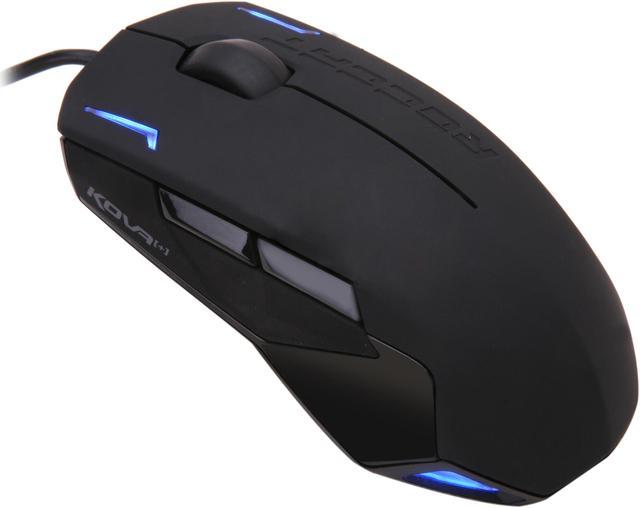
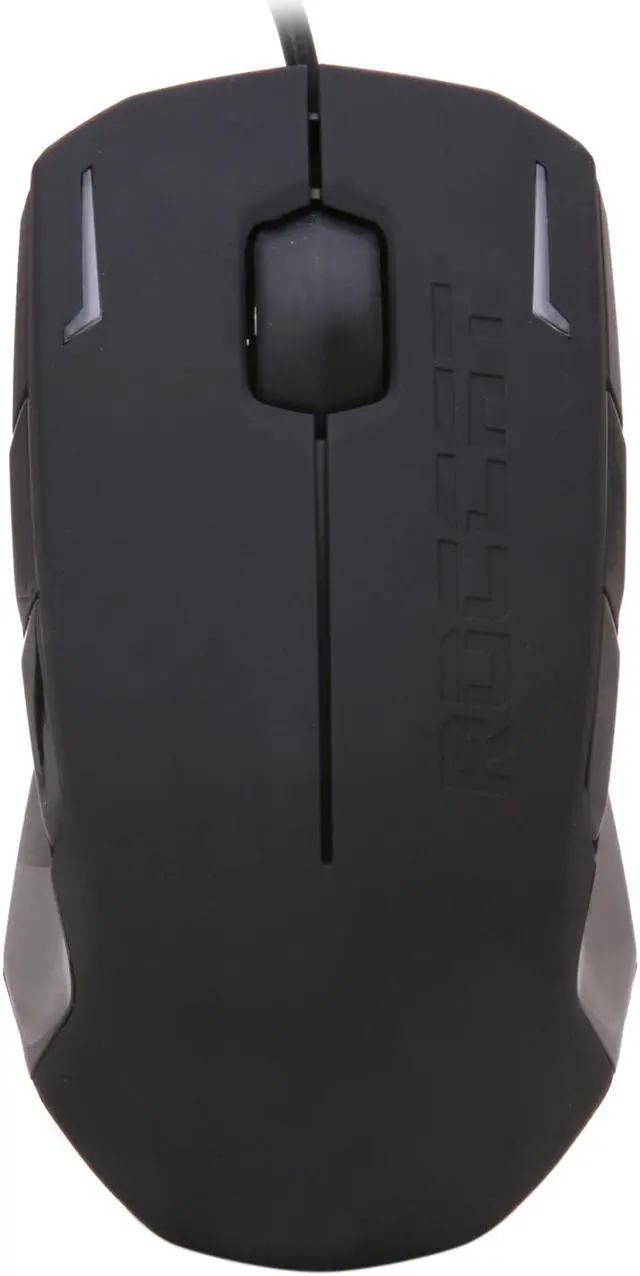
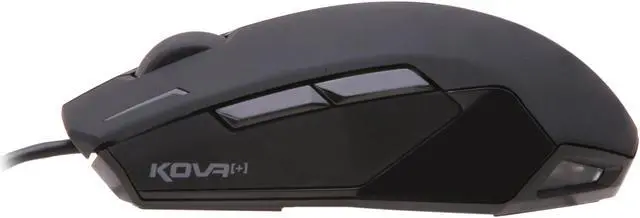
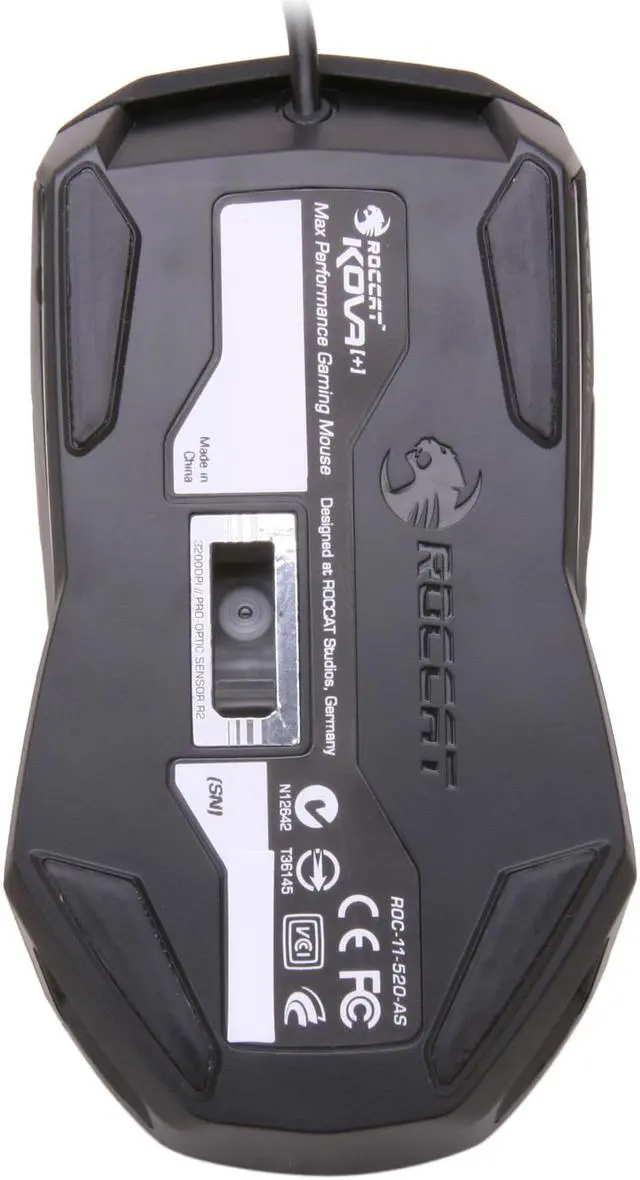
ROCCAT Kova+ ROC-11-520 Black 7 Buttons 1 x Wheel USB Wired Optical 3200 dpi Gaming Mouse

  • 7 Buttons 1 x Wheel
  • USB Wired
  • Optical
  • Pin It
  • Email this page
ICON Loading...


Armed with the latest proven ROCCAT technological innovations, the successor to the ROCCAT Kova is equipped to the teeth. The new ROCCAT Kova[+] unites powerful technology with intelligent software and an advanced V-shaped design for left or right-handed use.


  • newegg EASY-SHIFT[+] BUTTON The Easy-Shift[+] button doesn't just give you access to seven mouse buttons plus the mouse wheel – you also get access to 16 additional functions at the touch of a button. The Easy-Shift[+] button is similar to the shift key on a keyboard. If you hold down the Easy-Shift[+] button while pressing one of the other standard mouse buttons, you can program a second function (dual-assignment).
  • newegg LAG-FREE PRECISION The 3200dpi Pro-Optic R2 Gaming Sensor plays in the Champions' League of optical sensors, offering lag-free precision. ROCCAT increased maximum speed to 130 inches per second and raised maximum acceleration to 30G. And like the current generation of ROCCAT gaming mice, the polling rate clocks in at an unprecedented 1000Hz.
  • newegg V-SHAPE FOR LEFT OR RIGHT-HANDED USE The Kova[+] sits nicely in both the left and right hand. Thanks to a slightly raised ridge on the upper casing, you can control the Kova[+] with maximum precision. The Griptech side areas extend all the way to the top of the Kova[+], letting you hold the mouse securely when lifting it. In addition, the new Soft-Touch Coating offers amazing grip, complementing the non-slip performance of the familiar solid rubber Griptech side areas. As part of the ROCCAT Smart Desktop Management System (SDMS), the Kova[+] Max Performance Gaming Mouse fits seamlessly into the angular, stealth-look of the series. SDMS has become a byword for performance-focused gaming with its series of perfectly-coordinated products that offer optimum handling and improved ergonomics.
  • newegg ROCCAT DRIVER The Kova[+] now also comes with a feature-rich driver package, allowing precise adjustment of the sensitivity and dpi settings. All seven buttons plus the mouse wheel can be assigned a multitude of functions and custom macros, as well as predefined ROCCAT Presets. The Creating Game Profiles option makes things easier when starting a game, as the Game Profiles function automatically loads settings specific to the particular game during start-up.
  • newegg MULTICOLOR LIGHT SYSTEM A multicolor LED system allows the mouse to light up in seven different colors – plus the mouse can be further personalized with color rotation and other lighting effects using the driver. You can even assign colors to profiles, so when you switch profiles the color changes, too.
  • newegg SOUND FEEDBACK The Kova[+] also features Sound Feedback – a new feature first introduced on the ROCCAT Kone[+]. The mouse informs you of any changes to the dpi, profile or sensitivity settings by reading them aloud. This means there are no additional displays to distract you from gameplay, so your full attention can remain on screen.

Learn more about Kova+

Model

Brand
ROCCAT
Name
Kova+
Model
ROC-11-520
Type
Wired

Spec

Interface
USB
Hand Orientation
Both Hands
Tracking Method
Optical
Buttons
7
Scrolling Capability
1 x Wheel
Color
Black
Maximum dpi
3200 dpi

OS / System Requirement

Operating System Supported
Windows XP/Windows Vista 32/64-bit/Windows 7 32/64-bit
System Requirement
USB 2.0 port
Internet connection for driver installation

Features

Features
Maximum Precision Pro-Optic Gaming Sensor can be configured at 400, 800, 1600 or 3200dpi

Easy-Shift[+] Button Duplicator assign two function to the buttons for 8 additional functions

Ergonomic V-Shape for left or right-handers

Roccat Driver + Macro Manager including predefined Macro Presets for games, multimedia + office apps

Soft-Touch Coating for comfort + confident control

Roccat Griptech Side Areas with non-slip stabilization zones

Rubberized Mouse Wheel for optimum grip + comfort

Customizable Light System choose your own favorite custom color

Sound Feedback profile, dpi and sensitivity changes are read aloud

7 (+2) Mouse Buttons preset with the most important main functions

Packaging

Package Contents
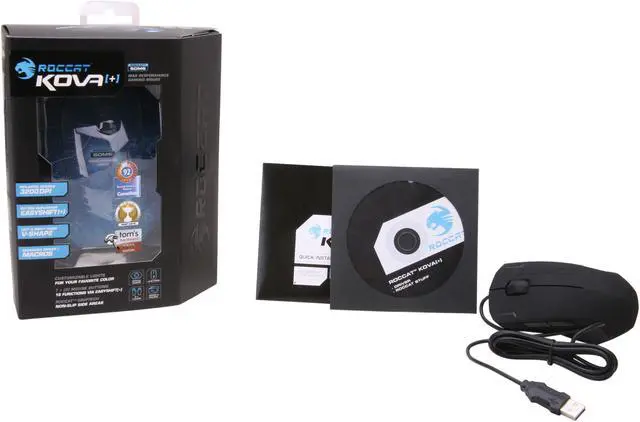
ROCCAT Kova[+] - Max Performance Gaming Mouse
ROCCAT ID Card
Quick Install Guide
Instructions in EN, DE, FR, ES, PL, RU, TR, DK, FI, SE

Quick Info

Warranty

  • Limited Warranty period (parts): 1 year
  • Limited Warranty period (labor): 1 year


Customer Reviews of Kova+

Do you own this product? Write a Review

Filter Results

Go
  • N/A
  • 4/29/2013 11:01:49 AM
  • Tech Level: Somewhat High
  • Ownership: 1 month to 1 year
  • Verified Owner

5 out of 5 eggsLove it

Pros: Favourite mouse I have owned. I've owned the Deathadder, m60 and G500. The lights are a nice visual feature. Side buttons are in ideal locations for my size of hands. I don't know if it is a placebo effect but my FPS game has greatly improved as I find I have better accuracy with this mouse.

Cons: It is a smaller mouse so large hands may have issues with it.
Top thumb button does not macro to any of my games.

Other Thoughts: Highly recommend it, especially if it goes on sale.

Did you find this review helpful? Yes No

  • N/A
  • 4/11/2013 6:51:50 AM
  • Tech Level: High
  • Ownership: 1 day to 1 week
  • Verified Owner

3 out of 5 eggs

Pros: Nice look with the customizable leds, nice feel to it.

Cons: Accuracy is garbage. On horizontal and vertical lines it was decent but on diagonals it was extremely unaccurate.

Mouse wheel click takes an insane amount of force. this is a HUGE nono for me. I use mousewheel click all the time.

Did you find this review helpful? Yes No

  • Eightbitninja
  • 3/22/2013 9:27:02 AM
  • Tech Level: Average
  • Ownership: 1 day to 1 week
  • Verified Owner

5 out of 5 eggsMe likey

Pros: 1.) Sexy design
2.) LED's come in multiple colors
3.) Lots of customization options
4.) Price (definitely worth the 40-50 bucks)
5.) Can be used with either hand (right or left)
6.) Comes in a nice box
7.) Never needs batteries (Wired)

Cons: 1.) For some reason when I put the installation disk in. The program never loads up. I had to download the drivers online.. I'm running Windows 7 64-bit.

Other Thoughts: I've only had this mouse for about a day or so. I've heard it has had some issues with others, hopefully that wont happen with mine.

Did you find this review helpful? Yes No

  • Blasronin
  • 3/19/2013 2:15:24 PM
  • Tech Level: High
  • Ownership: 1 month to 1 year

3 out of 5 eggsKova + more like Bull $

Pros: The design of the mouse gives the user a choice which explains why I purchased this mouse in another store. I would put my newegg community on point with this device. To have a choice for coloring and its configuration is a plus, the feel is sturdy and its a great mouse for web surfers and media artist. Read my cons and I will save you a headache and cash. $$

Cons: OK here comes the boom, if your running Windows 7 64 Bit your in for a surprise. It seems they did not make this mouse 64 Bit friendly, It has compatibility issues. The drivers install successfully but the software goes into idle, then it will hang until you end task it. You get 7 buttons but you can only assign in a gaming 4 buttons. That's ridiculous, LMC (Left Mouse Click)+RMC+Wheel+1st Thumb buttons. So the last three remaining buttons are just there for brag rights. This is more like a MEDIA mouse not a gamer mouse, and their TECH SUPPORT? send in a email LOL no contact phone number. The best assist you would get is try installing the mouse content from your program files 86 folder. And install it in your user profile name app section to see if it helps LOL. There are no more updates for drivers and no firm ware update.

Other Thoughts: Always check the top gaming mouse from 2012 and 2013 and you would find them listed here in newegg. Do your research first and get your good prices here.

Did you find this review helpful? Yes No

  • bwat47
  • 11/28/2012 10:43:17 AM
  • Tech Level: High
  • Ownership: 1 week to 1 month
  • Verified Owner

4 out of 5 eggsGreat Mouse, but a few driver issues

Pros: The hardware is great. Its a very nice looking mouse, great quality on the scroll wheels and side buttons. I got this mouse because its similar in size and feel to my old razor deathadder's (didn't want to buy razor again because their build quality is rather poor, thumb buttons always break)

I'm very satisfied with the build quality and performance of the mouse. Its great for people with smaller hands and people that like lightweight mice.

Cons: At first glance the driver looks great, has all the options you need, laid out clearly, and isn't a horrific bloated mess like razor's synapse driver.

However I ran into a few annoying issues. Applying settings in the driver doesn't seem to work at all unless you right click it and run as administrator, even then applying settings takes a very long time for some reason. I'm running windows 8, but I'd imagine the UAC issue affects windows 7 too. The driver works alright besides this one annoying issue, the only reason I didn't give this mouse 5 stars.

Also the scroll wheel simply does not work properly if you aren't running with a 1000hz polling rate, very strange issue. If the polling rate is set to 500hz scrolling simply doesn't respond often, at 1000 it works perfectly. Not a *huge* issue since this mouse does default to 1000hz.

Other Thoughts: I will probably buy roccat again, I just hope they can improve their drivers. Its also nice that they have linux drivers, I don't currently run linux on my gaming pc but may dual boot when steam is released for it.

1 out of 1 people found this review helpful. Did you? Yes No

  • DrHappyAngry
  • 10/27/2012 12:53:24 PM
  • Tech Level: High
  • Ownership: 1 day to 1 week
  • Verified Owner

5 out of 5 eggsPerfect for small handed Linux user

Pros: I've got smaller hands, and this mouse is a perfect fit. It has a smoothe feel to it, and all the buttons feel naturally in reach. Obviously this is depends on your hand size. Also has great Linux support. Drivers are mainline kernel, and utilities are installable. The nice thing is you can save the settings to the mouse itself, so it works consistently in a dual or multi boot environment, or if you plug the mouse into another computer. The company is extrememly GNU friendly, and fully opensources their drivers and utilities.

Cons: I had to build the utilities from source. Not a problem for me, but could be harder for less experienced Linux users. The directions to build the tools are well outlined for both fedora and ubuntu in their instructions.

1 out of 1 people found this review helpful. Did you? Yes No

  • Xander
  • 10/10/2012 10:10:45 AM
  • Tech Level: Average
  • Ownership: 1 day to 1 week
  • Verified Owner

3 out of 5 eggsGood Mouse/Bad support

Pros: This mouse is very smooth when used under a game pad. Looks very sleek, but the buttons are kind of edgy. For those who have big hands a bigger mouse could be better.

Cons: The installation disc that came with the mouse wouldn't run on PC. Had to download drivers online. Roccat customer support is lacking.

Other Thoughts: As mentioned above the installation auto-run file wouldn't work. My Anti Virus detected the auto-run file as a trojan. When I contacted Roccat Support they said that the CD doesn't work because it was originally made for Windows XP ( I use Windows 7) and they haven't changed it since the Kova [+] was first produced. Even though on the box of the kova under system requirements it clearly states windows vista and windows 7 both 32/64 bit. I ask for a new disc just to have a concrete copy and they said it was impossible to send me a new one.

0 out of 1 people found this review helpful. Did you? Yes No

  • N/A
  • 9/22/2012 3:04:26 PM
  • Tech Level: High
  • Ownership: 1 day to 1 week
  • Verified Owner

5 out of 5 eggsThe Best

Pros: This mouse is very fluid and extremely elegant. The flat black and glossy black look awesome, the LED lights add to it. The software is great and works great. The DPI is amazing and very accurate. The weighted scroll wheel feels expensive and sturdy.

Cons: If I had to say anything it would be that there is no LED time out feature which means they either always have to be on or off no time out light my ROCCAT keyboard has. My keyboard I can have dim or go completely off after a certain amount of time and a simple hit of the key wakes it back up.

I think maybe in ROCCATS next software release for the Kova + should definitely include this feature.

1 out of 1 people found this review helpful. Did you? Yes No

  • .
  • 9/7/2012 4:44:20 PM
  • Tech Level: Somewhat High
  • Ownership: 1 month to 1 year
  • Verified Owner

4 out of 5 eggsExcellent

Pros: Great mouse looks good, moves good, works great in games. I love the lighting and how you can change the colors.

Cons: When I first got it, it was buggy but once you figure it out it's great. Also, the plastic sides get dirt and stuff on them but no big deal.

Did you find this review helpful? Yes No

  • N/A
  • 8/20/2012 12:06:20 PM
  • Tech Level: Average
  • Ownership: 1 week to 1 month
  • Verified Owner

5 out of 5 eggsMy ideal mouse (if it didn't glitch)

Pros: Perfect hand posture mouse (no edges on the sides)

Perfect tracking for low DPI users (pro-optical)

Scroll wheel is comfortable to scroll

Cons: I don't know if it happens to everyone, but I returned mine only because I was getting a 1:1 glitch.

You have to get used to press the right side buttons (pretty hard to do)

Apparently the scroll down function sometimes initiates a x-y unbalancing.

You lose 1:1 and sometimes the speed changes.

I would have kept this mouse if it didn't have this problem

Other Thoughts: My ideal mouse (needs some upgrading)

Truly needs a new edition that can fix that glitching and try to maybe change some things

Did you find this review helpful? Yes No

ICON Loading...
Are you an E-Blast Insider? Subscribe Newegg e-Blast

Buzz

Kova+ :)

5 out of 5 eggs
Looks nice,the different colors are nice eye candy.Very lite.The easyshift feature is great,can mute or lower and raise sound ...
— Jowo2271 5/25/2012

Kova+++++++

5 out of 5 eggs
-Weight is good, not too heavy or too light.
-Grippy coating is a nice touch, feels good in my hands.
-Lights are a ...
— Pleased 8/17/2012


PayPal
Shop without retyping payment details. Secure shopping made faster.
Check out with PayPal.

Financing


Home
Home > 
Computer Hardware > 
Input Devices > 
Mice > 
ROCCAT > 
Item#: N82E16826436007
LOADING... LOADING...
Shop by Region: United States | Canada | China
Follow us:   RSS Feeds Youtube
VeriSign Reliability Seal1This site protected by Trustwave's Trusted Commerce program Inc500
Policy & Agreement | Privacy Policy  © 2000-2013 Newegg Inc.  All rights reserved.
If the Adobe Reader does not appear when you click on a link for a PDF file, you can download Adobe Reader from the Adobe web site. nassau