Skip to: |

Newegg.com - A great place to buy computers, computer parts, electronics, software, accessories, and DVDs online. With great prices, fast shipping, and top-rated customer service - once you know, you Newegg.

If you are reading this message, Please click this link to reload this page.(Do not use your browser's "Refresh" button). Please email us if you're running the latest version of your browser and you still see this message.

Newegg.com - Computer Parts, Laptops, Electronics, HDTVs, Digital Cameras and More!

  • | Wish List
  • Help
Search all
Search
Home
Home > 
Computer Hardware > 
Printers / Scanners & Supplies > 
Inkjet Printers > 
Canon USA > 
Item#: N82E16828102471

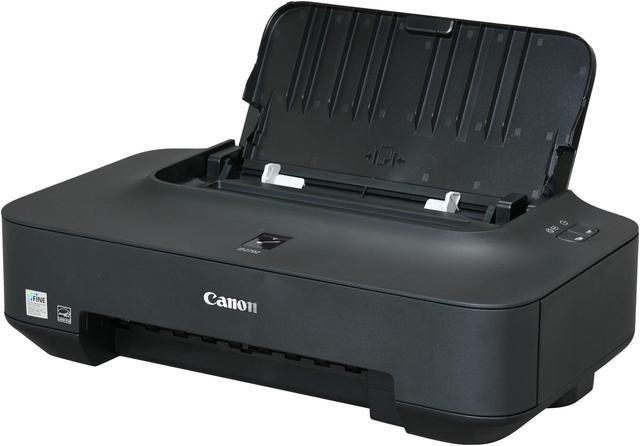
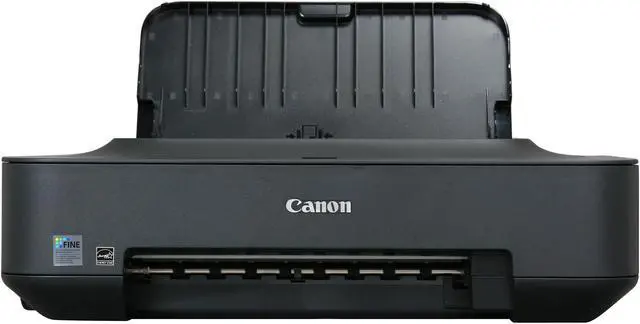
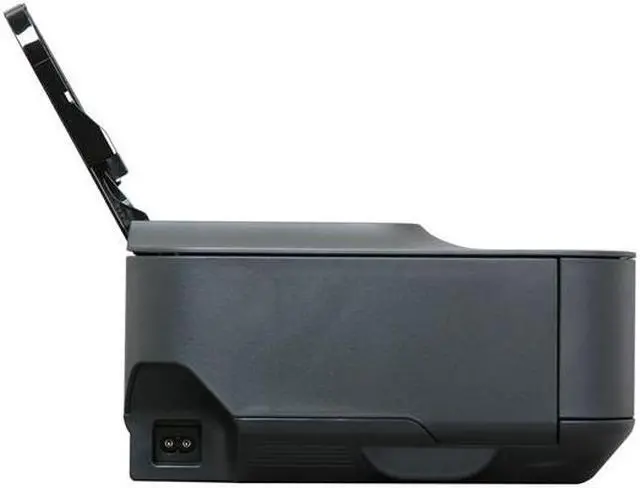
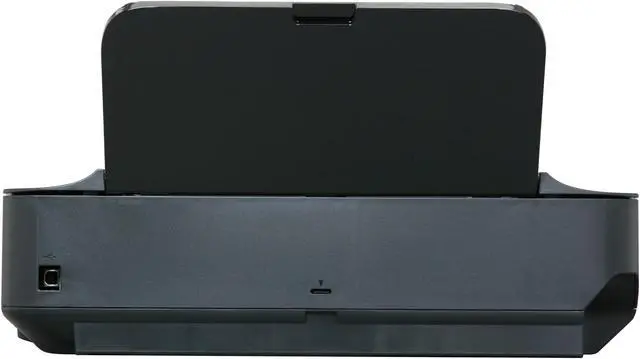
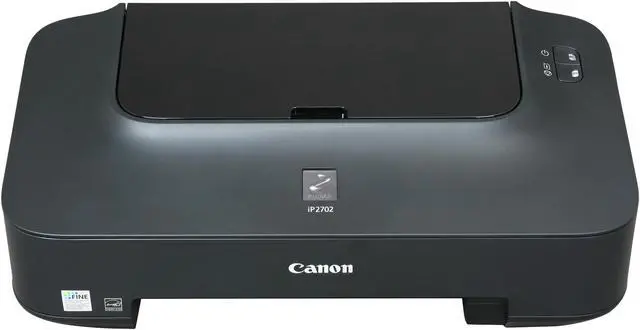
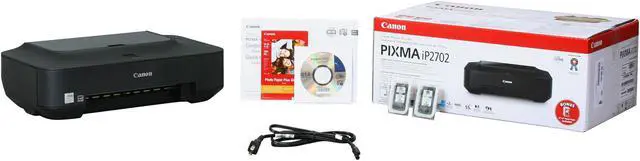
Canon PIXMA iP series iP2702 Black: Approx. 7.0 ipm Black Print Speed 4800 x 1200 dpi Color Print Quality InkJet Photo Color Printer w/ 5 sheets Photo Paper

  • Black: Approx. 7.0 ipm Black Print Speed
  • Color: Approx. 4.8 ipm Color Print Speed
  • Pin It
  • Email this page
ICON Loading...

If you're looking for a product with a sophisticated look and compact design that can print photo lab quality at a great value you need look no further than the PIXMA iP2702 Inkjet Photo Printer.

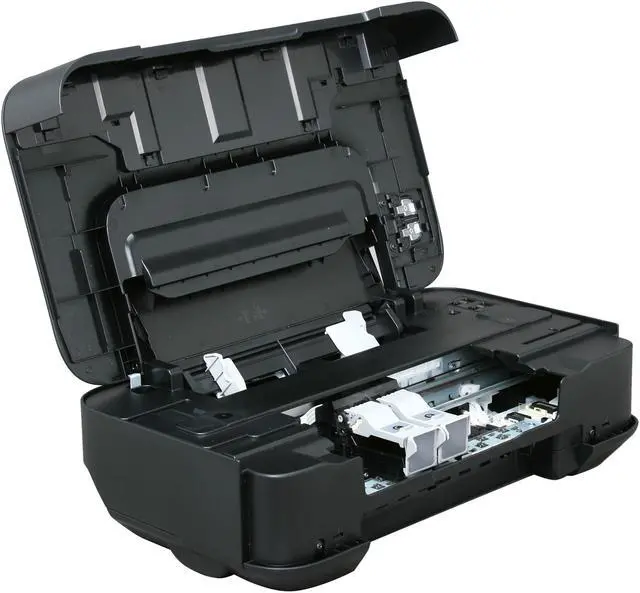
This stylish machine fits almost anywhere while you easily print beautiful, borderless5 photos up to 8.5" x 11", pages off the web through Easy-WebPrint EX or documents all with amazing quality. This is made possible thanks to its FINE Cartridges which contain pigment black ink for laser-quality text and dye ink for smooth, natural photos. The ChromaLife100+ system enables your photos to last up to 300 years when using genuine Canon ink and paper and stored in archival-quality photo album. Printing and automatically correcting your photos has never been easier thanks to Auto Photo Fix II which can be accessed through the popular EasyPhoto-Print EX software. So you can make the most out of your photos and easily print as many as you want!

  • newegg Quality & Speed Realize the power of 4800 x 1200 maximum color dpi thanks to Canon Full-photolithography Inkjet Nozzle Engineering (FINE) with a print head firing ink droplets as small as 2pl. The result is incredible quality and detail in both your business documents and photos. The two genuine Canon ink cartridges contain specially-formulated inks for great document and photo quality, one black & white cartridge for crisp text and one multi-color cartridge for beautiful photos. Both are easy to use and replace. As for speed, you’ll print a borderless, 4" x 6" photo in approximately 55 seconds.
  • newegg ChromaLife100+ The ChromaLife100+ system combines enhanced FINE print head technology with select genuine Canon photo papers and inks for beautiful borderless photos that will last up to 300 years when stored in an archival-quality photo album.
  • newegg Auto Photo Fix II Built-in Auto Photo Fix II technology automatically categorizes your images into one of five types - Portrait, Scenery, Night Scenery, Snapshot with Scenery, and Snapshot with Night Scenery - then applies optimal image and multi-zone exposure correction. So, unexposed areas of the photo will be optimized, area by area and faces that are backlit and under-exposed will automatically be brightened with correct color cast to help ensure more accurate skin tones for gorgeous images.
  • newegg Fun Print Projects Imagine and explore all the possibilities with Creative Park. You'll find lots of fun materials you can download and print for FREE! Enjoy creative crafts such as 3D Paper Crafts, Scrapbooking, Greeting Cards and so much more!
  • newegg Readers' Choice Award For the 7th year in a row, Canon U.S.A. is proud to have received the 2010 Readers' Choice Award for Service & Reliability from PCMag.com for Printers. (Logos are trademarks of Ziff Davis, Inc. Used under license. Reprinted from www.pcmag.com, September 7, 2010, with permission. © 2010 Ziff Davis, Inc. All Rights Reserved.)

Learn more about the Canon USA iP2702

Model

Brand
Canon
Series
PIXMA iP series
Model
iP2702
Part#
4103B022
Recommended Use
Photo

Printer SPEC

Print Technology
InkJet
Output Type
Color
Black Print Speed
Black: Approx. 7.0 ipm
Color Print Speed
Color: Approx. 4.8 ipm
Black Print Quality
600 x 600 dpi
Color Print Quality
4800 x 1200 dpi
Number of Nozzles
Color: 1,152 / Black: 320 / Total: 1,472

Paper Handling / Media

Input Capacity, std.
Auto Sheet Feeder: 100 sheets
Media sizes supported
4" x 6", 5" x 7", 8" x 10", Letter, Legal, U.S. #10 Envelopes

Hardware SPEC

Noise Level (Approx.)
Approx. 47.0 dB(A)
Power Consumption
11 W (0.7 W Standby)

Ports

USB Ports
Yes

Compatibility

Windows Compatible
Windows 7, Windows Vista , Windows XP/2000
Macintosh Compatible
Mac OS X v10.4.11 - v10.6.x

Physical SPEC

Dimensions
17.6" x 9.8" x 5.2"
Weight
7.5 lbs.

Hardware SPEC

Software Included
Setup Software & User's Guide CD-ROM
iP2702 Printer Driver
Easy-PhotoPrint EX
Easy-Web Print EX (Windows only)
Solution Menu

Manufacturer Warranty

Parts
1 year limited
Labor
1 year limited

Quick Info

Warranty

  • Limited Warranty period (parts): 1 year
  • Limited Warranty period (labor): 1 year


Customer Reviews of the Canon USA iP2702

Do you own this product? Write a Review

Filter Results

Go
  • GaboKrocket
  • 5/17/2013 1:23:29 PM
  • Tech Level: Somewhat High
  • Ownership: 1 month to 1 year
  • Verified Owner

5 out of 5 eggsPERFECT

Pros: PRICE- AMAZING heck for the same price you cant even buy a dinner in a movie. Black and white-FAST prints in seconds
Easy to use

Cons: Color printing takes a few more seconds then B&W but still its only in a few seconds to print. I LOVE THIS THING

Other Thoughts: IF YOUR THINKING ABOUT GETTING IT BUY IT TOTALLY WORTH IT.

Did you find this review helpful? Yes No

  • N/A
  • 5/6/2013 11:45:50 AM
  • Tech Level: Somewhat High
  • Ownership: more than 1 year
  • Verified Owner

5 out of 5 eggsCanon iP2702

Pros: Cheap and works out of the box. No set-up headaches.

Cons: Used mainly for printing USPS and UPS labels which it does handily, so no cons for this unit.

Other Thoughts: When you run out of black ink simply go to preferences and swap to color cartridge for printing. This will extend the capability and no need to order ink. When out of ink just throw the printer in the trash and buy another. You can purchase another printer for near the cost of replacement ink cartridges.

1 out of 1 people found this review helpful. Did you? Yes No

  • N/A
  • 4/13/2013 7:36:34 AM
  • Tech Level: High
  • Ownership: 1 day to 1 week
  • Verified Owner

4 out of 5 eggsNo printer comes with a USB cable!

Pros: Set up easily enough, and so far works fine. It's a $35 printer...not sure how much magic you expect. Does what it's supposed to do.

Cons: Considering the price, none. Sure, it would be nice if it had separate ink cartridges for each color, but that doesn't happen at this price point. And yes, we all know the game that all printer manufacturers play with the printer cost vs. ink cost, and their anti-consumer practices of trying *very* hard to make sure you can't buy reasonably-priced ink elsewhere. But everybody does it, so pretty much everybody sucks the same.

Other Thoughts: I am SO sick and tired of seeing people post "Oh Em Gee it didn't even come with the USB cable!"

NO PRINTER COMES WITH A USB CABLE. EVER. IT HAS BEEN THIS WAY FOR DECADES, WHEN PRINTERS DIDN'T COME WITH PARALLEL CABLES EITHER.

Seriously people...have you *never* bought a printer before? Is this "printing technology" new to you? Maybe a $1,000 printer comes with a cable...don't know. But all the normal, consumer-grade printers you'll see? THEY DON'T COME WITH F%CKING CABLES. NEVER HAVE. NOT NEWS.

And no, there's nothing special about one USB cable over another. If it worked with your last printer, it will work with your next printer.

If you well and truly are buying your first-ever printer, then just go and buy a USB cable and stop whining. But for people to list their tech level as a 4 or 5 and then complain that there's no USB cable? Sorry...if you're stupid enough to think printers come with USB cables, your tech level is 0.

11 out of 14 people found this review helpful. Did you? Yes No

  • N/A
  • 4/11/2013 5:41:04 AM
  • Tech Level: High
  • Ownership: 1 week to 1 month
  • Verified Owner

4 out of 5 eggscheap and works

Pros: small enough to put in my rear seat of my truck for mobile printing,price was right,easy to install drivers and get up and running....

Cons: did not come with USB cord... what gives

2 out of 6 people found this review helpful. Did you? Yes No

  • GeneD
  • 4/7/2013 2:41:11 PM
  • Tech Level: High
  • Ownership: 1 month to 1 year
  • Verified Owner

4 out of 5 eggsBasic & affordable

Pros: Small footprint, easy to set up, decent quality & speed. Color photos are pretty good!

When you replace the cartridges you are also replacing the inkjet nozzles so you won't ever have to throw away the printer because a few nozzles became permanently clogged!

Cons: Could be quieter but the noise is also reassuring! 3-in-1 color cartridge increases ongoing cost.

Did you find this review helpful? Yes No

  • Mister Frenchie
  • 3/25/2013 6:20:42 PM
  • Tech Level: Somewhat High
  • Ownership: 1 month to 1 year
  • Verified Owner

5 out of 5 eggsPrinter

Pros: Inexpensive, gets the job done.

Cons: None

Other Thoughts: Perfect for basic printing needs

Did you find this review helpful? Yes No

  • N/A
  • 3/3/2013 7:46:20 AM
  • Tech Level: Average
  • Ownership: 1 week to 1 month
  • Verified Owner

5 out of 5 eggsNice

Pros: Small. Prints excellent B&W documents. Very good color on all media. Uses very little ink. Has some of the lowest priced factory ink cartidges.

Cons: Noisy. Slow. So what?

Other Thoughts: This printer has been a refreshing experience. It is inexpensive - not cheap. It is as easy as it gets to use. The matte black finish doesn't show finger prints. It works with both xp and win 7 64bit. Just the printer for tech weary people.

Did you find this review helpful? Yes No

  • N/A
  • 2/27/2013 3:15:27 PM
  • Tech Level: High
  • Ownership: 1 week to 1 month
  • Verified Owner

4 out of 5 eggsNo Frills, it works

Pros: Page had ink on it. Seriously it is fine budget printer.

Cons: Slow to start.

Did you find this review helpful? Yes No

  • N/A
  • 2/23/2013 1:10:06 PM
  • Tech Level: High
  • Ownership: 1 week to 1 month
  • Verified Owner

1 out of 5 eggsUpdating my original review

Pros: This printer worked very well for about 4 days, when I made my first review. Since then it will print one line and drag it down the page for a number of minutes before I receive an error message on WIndows. Buyer beware.

Cons: Doesn't work.

Other Thoughts: Never had a problem before. In the process of RMA but I will have to pay for shipping on a product that only cost ~$40.

Did you find this review helpful? Yes No

  • N/A
  • 2/6/2013 9:47:42 AM
  • Tech Level: High
  • Ownership: less than 1 day
  • Verified Owner

5 out of 5 eggsAs described

Pros: I looked everywhere and could not find a better buy for the money.

Cons: It's not for sale on Mars.

0 out of 1 people found this review helpful. Did you? Yes No

ICON Loading...

Protect Your Investment!

    • (more options) read warranty details
Are you an E-Blast Insider? Subscribe Newegg e-Blast

Buzz

Great cheap printer

4 out of 5 eggs
Quick setup on Windows 7 64-bit Professional. No USB is included, but it was not a problem because I used the cable from ...
— Redlinemunk 5/22/2010

For the price it's awesome.

4 out of 5 eggs
overall, it's great for my printing needs. ( mostly college papers etc )
— 8/22/2011


PayPal
Shop without retyping payment details. Secure shopping made faster.
Check out with PayPal.

Financing


Home
Home > 
Computer Hardware > 
Printers / Scanners & Supplies > 
Inkjet Printers > 
Canon USA > 
Item#: N82E16828102471
LOADING... LOADING...
Shop by Region: United States | Canada | China
VeriSign Click for the BBB Business Review of this Computers - Supplies & Parts in Whittier CAThis site protected by Trustwave's Trusted Commerce program Inc500
Policy & Agreement | Privacy Policy  © 2000-2013 Newegg Inc.  All rights reserved.
If the Adobe Reader does not appear when you click on a link for a PDF file, you can download Adobe Reader from the Adobe web site. nassau