Skip to: |

Newegg.com - A great place to buy computers, computer parts, electronics, software, accessories, and DVDs online. With great prices, fast shipping, and top-rated customer service - once you know, you Newegg.

If you are reading this message, Please click this link to reload this page.(Do not use your browser's "Refresh" button). Please email us if you're running the latest version of your browser and you still see this message.

Newegg.com - Computer Parts, Laptops, Electronics, HDTVs, Digital Cameras and More!

  • | Wish List
  • Help
Search all
Search
Home
Home > 
Computer Hardware > 
Printers / Scanners & Supplies > 
Laser Printers > 
Brother > 
Item#: N82E16828113660

Buy with confidence.

This product qualifies for the Iron Egg guarantee. We’ll match any qualifying competitor’s price. Find Out More

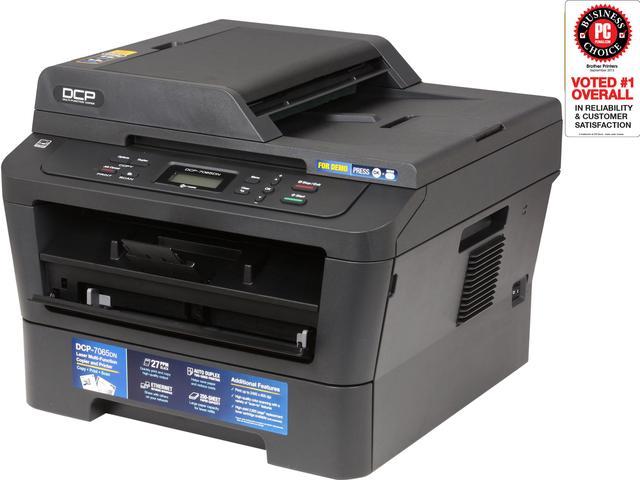
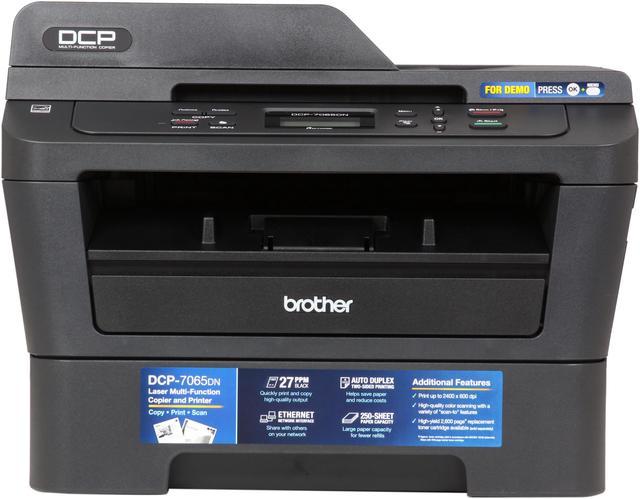
brother DCP-7065DN MFC / All-In-One Up to 27 ppm Monochrome Compact Laser Multi-Function Copier with Duplex Printing and Networking

  • DCP-7065DN
  • HQ1200 (2,400 x 600dpi), 600dpi, 300dpi
  • Duplex printing
  • Pin It
  • Email this page
ICON Loading...

The DCP-7065DN is an affordable multi-function copier that is great for making quick copies or printing text-based documents. It features automatic duplex printing for producing two-sided output, and a built-in Ethernet interface for sharing with others on your network. Its 35-page capacity auto document feeder allows for unattended, multi-page copying or color scanning. Plus, its advanced capabilities allow you to scan documents to a file, image, E-mail or OCR. To help lower your operating costs, a high-yield replacement toner cartridge* is available.

  • newegg Fast Printing and Copying Help improve your productivity with print and copy speeds of up to 27ppm and produce professional-looking output at up to 2400 x 600 dpi.
  • newegg Easily Produce Two-sided Output Print professional two-sided documents and booklets using the automatic duplex printing feature. Also, create two-sided output from one-sided originals when copying. This feature helps to reduce paper use and save money.
  • newegg Flexible Paper Handling Features an adjustable, 250-sheet capacity paper tray for letter or legal size paper. Plus, a single-sheet manual feed slot for envelopes and thicker media.
  • newegg Stand-alone Copying No PC required to make copies. Reduce/enlarge documents from 25-400% in 1% increments and help save paper with N-in-1 copying.
  • newegg Flexible Connectivity A built-in Ethernet network interface allows for sharing with multiple users on your network or connecting locally to a single computer via its USB interface.

Learn more about the Brother DCP-7065DN

General

Brand
brother
Model
DCP-7065DN
Recommended Use
MFC / All-In-One
Functions
3-in-1: Print, Copy & Scan
Display
16 characters x 2 lines white backlit LCD
Dimensions
15.95" x 15.69" x 12.44"
Weight
25.13 lbs.

Printing

Output Type
Monochrome
Laser Technology
Laser
Black Print Speed
Up to 27 ppm
Black Print Quality
HQ1200 (2,400 x 600dpi), 600dpi, 300dpi
Time To First Page (seconds)
Less than 8.5 seconds (from ready mode)
Emulations
GDI (host based)
Duplex printing
Yes
Max. Duty Cycle
250 to 2,000 pages

Copying

Copy Speed, Black
Up to 26 cpm
Copy Quality, Black
600 x 600 dpi
Max. Document Enlargement
400%
Max. Document Reduction
25%
Max. Number of Copies
99

Scanning

Scan Color Depth
48 bit internal, 24 bit external
Scan Resolution, Hardware
Up to 600 x 2,400dpi (from scanner glass) 600 x 600dpi (from ADF)
Scan Resolution, Enhanced
19200 x 19200 dpi

Media Handling

Input Capacity, std.
250 Sheet Standard Paper Tray - 60 - 105 g/m2 (16 - 28lb)
1 Sheet Manual Feed Slot - 60 - 163 g/m2 (16 - 43lb)
35 Sheet ADF (Automatic Document Feeder) 64 - 90 g/m2 (17 - 24 lb)
Output Capacity, std.
100 Sheets (Face Down)
1 Sheet (Face up) Straight Paper Path
Media Type
Standard Paper Tray - Plain Paper, Thin Paper & Recycled Paper
Manual Feed Slot - Plain Paper, Thin Paper, Thick Paper, Recycled Paper, Bond Paper, Labels & Envelopes
ADF (Automatic Document Feeder) - Plain Paper & Recycled Paper
Media sizes supported
Standard Paper Tray - A4, Letter, B5(ISO/JIS), A5, A5(Long Edge), B6(ISO), A6 & Executive
Manual Feed Slot - Width 76.2 to 216mm, Length 116 to 406.4mm

Ports

USB Ports
Hi-Speed USB 2.0
Network Ports
Ethernet 10/100BaseTX (RJ-45)

Hardware SPEC

Noise Level (Approx.)
Sound Pressure - Less than 53dBA when printing, less than 30dBA in ready
Sound Power - Less than 6.40B when printing, less than 4.22B in ready
Microprocessor Type
ARM9
Processor(MHz)
200
Memory, std.
32 MB
Cartridges Compatible
(1) Starter Toner (700 pages)
(1) DR420 (12,000 pages)
Power Consumption
445W copying
55W ready
0.9W deep sleep
TEC (Typical Electrical Consumption):1.337kWh / week

Compatibility

Windows Compatible
Windows 7 (32 & 64 bit editions), Windows Vista (32 & 64 bit editions)
Windows XP Home Edition, Windows XP Professional (32 & 64 bit editions)
Windows 2000 Professional
Windows Server 2003 (Network only / 32 & 64 bit editions)
Windows Server 2008 (Network only / 32 & 64 bit editions)
Windows Server 2008 R2 (Network only)
Macintosh Compatible
Mac OS X 10.4.11, 10.5.x, 10.6.x

Features

Features
Print
Technology: Electrophotographic monochrome laser printer
Laser Notice: Class 1 Laser Product (IEC 60825-1:2007)

Copy
First Copy Out Time: Less than 11 seconds (from ready mode)
N in 1 Copying: Allows the user to compress 2 or 4 pages on to a single A4 sheet

Scan
Grey Scale: 256 shades of grey are available for copying & scanning
Pull Scan Functions: Scan documents to E-mail, Image, OCR or File

Printer Driver Functions
N-up Printing: Save paper reducing 2, 4, 9, 16 or 25 A4 pages to 1 A4 page
Poster Printing: Enlarge 1 A4 page into a poster using 4, 9, 16 or 25 A4 pages for a bigger impact
Watermark Printing: Add predefined text or user-defined messages to your documents as a watermark
Booklet Printing: Print easy-to-read, professional documents in A5 booklet format using automatic duplex
Header & Footer: Print the time, date, user ID or customised message on your documents

Network
Web Based Management: Web browser print server management
Driver Deployment Wizard: A quick & easy way to deploy a Brother printer drivers on a networked Windows PC
BRAdmin Light: Print Server Management for Windows & Mac OS X 10.4.11, 10.5.x, 10.6.x
BRAdmin Professional: For LAN / WAN management
Protocols: TCP/IP (IPv4 & IPv6)
IPv4 Supported Protocols: ARP, RARP, BOOTP, DHCP, APIPA(Auto IP), WINS/NetBIOS name resolution, DNS Resolver, mDNS, LLMNR responder, LPR/LPD, Custom Raw Port/Port 9100, IPP, FTP Server, SNMPv1/v2c, HTTP Server, TFTP Client and Server, SMTP Client, ICMP, LLTD responder, Web Services (Print)
IPv6 Supported Protocols: NDP, RA, DNS Resolver, mDNS, LLMNR responder, LPR/LPD, Custom Raw Port/Port 9100, IPP, FTP Server, SNMPv1/v2c, HTTP Server, TFTP Client and Server, SMTP Client, ICMPv6, LLTD responder, Web Services (Print)

Ecology
Power Save: Consume less energy when not in use
Toner Save: Reduces toner usage

Quick Info

Warranty

  • Limited Warranty period (parts): 1 year
  • Limited Warranty period (labor): 1 year


Customer Reviews of the Brother DCP-7065DN

Do you own this product? Write a Review

Filter Results

Go
  • Alperion
  • 6/11/2013 5:50:27 AM
  • Tech Level: Somewhat High
  • Ownership: 1 week to 1 month
  • Verified Owner

5 out of 5 eggsNice monochrome laser printer

Pros: This printer prints up much faster than what I would have expected. First page comes out within 4-5 seconds. Scanner and copier works great with no problems.

Cons: A few aspects but not major. One would be that the copier lid is completely pastic and therefore very flimsy. The spring has a lot of resistance therefore when you close the lid, it will just slam down onto the glass if let down the lid too quickly. Second thing would be the scanner. When attempting to scan a stack of ducuments using the upside of the scanner, theres no problem in saving that whole stack of paper as 1 pdf file. However, when you use the glass top to scan, it can only be saved as 1 page per pdf file. More of a software issue i guess. My HP inject uses a glass top scanner but it gives you the option to add more scanned sheets before generating it into a pdf file. Strange but lets just hope the topside doesnt die.

Other Thoughts: Overall, its a great printer and got it at a great deal. Not a very intense printer user as i perfer everything digital unless when I need to read it. In my opinion, if you're a light user like me, the starter toner should last you a pretty long time. My last black starter toner lasted me over 1 year and the color starter ones are still working well after 4 years...

Did you find this review helpful? Yes No

  • N/A
  • 6/9/2013 3:00:27 AM
  • Tech Level: High
  • Ownership: 1 week to 1 month
  • Verified Owner

5 out of 5 eggsDirt cheap and awesome

Pros: got this for 87 dollars with a shellshocker. Printer is blazing fast. ZERO bugs.. zero jams easy to setup. Comes with flat driver install so you don't have to install a huge software suit. (but it does have a big software package if you want it) Easy to use. Network setup was a breeze... Best printer I've ever owned for less than 500 dollars. If this printer actually ends up being reliable for any decent period of time I'm going to feel like I robbed someone. I'm THAT impressed with it for the price. super cheap supplies also. new cartridge for like 25 bucks.

Cons: none

Other Thoughts: Awesome, it's been years since i've been THIS happy with a purchase.

Did you find this review helpful? Yes No

  • larhome
  • 5/27/2013 2:00:24 PM
  • Tech Level: Average
  • Ownership: 1 day to 1 week
  • Verified Owner

5 out of 5 eggsDCP-7065DN

Pros: So far the software for the DCP-7065DN has been installed and working fine on usb2.
The CD install disc was version C.
This is what was installed on my Win 7-64 ASRock FM2A85X Extreme6
Brother MFL-Pro Suite DCP-7065DN 1.66 MB 1.1.3.0
Microsoft Visual C++ 2005 Redistributable 300 KB 8.0.61001
Microsoft Visual C++ 2005 Redistributable (x64) 618 KB 8.0.61000
MSXML 4.0 SP3 Parser 1.47 MB 4.30.2100.0
MSXML 4.0 SP3 Parser (KB2758694) 1.54 MB 4.30.2117.0
Nuance PaperPort 12 201 MB 12.1.0000
Nuance PDF Viewer Plus 38.2 MB 5.30.3290
PaperPort Image Printer 64-bit 558 KB 1.00.0001

Cons: I used to have a Canon MP530 which was alot easier to configure

Other Thoughts: There is a learning curve to over come with this new software which you will soon discover.
This one will scan twice as fast as my old scanner . Hopefully this will last 8 years as well.

Did you find this review helpful? Yes No

  • Chris
  • 5/25/2013 2:36:50 PM
  • Tech Level: High
  • Ownership: 1 day to 1 week
  • Verified Owner

5 out of 5 eggsWhat a deal!

Pros: Inexpensive. It was the shell shocker for $90.
Decently fast

Cons: Just missing the unnecessary fax. Plastic is thin and flimsy.

Other Thoughts: Check out Rosewill RTCG-TN450V2 Replacement toner for this printer. Newegg had it for $10 after rebate.

Did you find this review helpful? Yes No

  • Wiley
  • 5/23/2013 7:31:19 PM
  • Tech Level: High
  • Ownership: 1 day to 1 week
  • Verified Owner

5 out of 5 eggsEasy setup in Linux (Ubuntu 12.10)

Pros: This multi-function printer was a slam-dunk setup in Ubuntu 12.10. I pulled down the Cups (debian) driver from Brother and all went very smoothly.

Duplex (notumble) works perfectly, and the stand-alone scanning and printing is great. I haven't hooked up to the network yet, but my previous experience with Brother network printers has been very uneventful. All in all, Ubuntu and Brother seem to be a very, VERY good match-up.

Note: Newegg's 3-day delivery via Ontrac was just fine. It arrived on time and in perfect condition. I was pleasantly surprised.

Cons: N/A

Did you find this review helpful? Yes No

  • dph-pdx
  • 5/21/2013 12:51:00 PM
  • Tech Level: Somewhat High
  • Ownership: more than 1 year
  • Verified Owner

5 out of 5 eggsGreat printer, easy double sided printing.

Pros: Fast printing, fast startup, clean prints. Duplex feature is awesome. Easy configuration and setup for PCs in my home LAN. Network scanning works.

Cons: None.

Other Thoughts: I haven't tried out a generic cartridge yet. The shell shocker price is attrive enough just to get the toner drum replacement part from it. It does come with a starter toner cartridge - buy another to have on hand as it doesn't last long.

Did you find this review helpful? Yes No

  • dantheman
  • 5/21/2013 12:49:45 AM
  • Tech Level: High
  • Ownership: 1 month to 1 year
  • Verified Owner

5 out of 5 eggsGreat Printer

Pros: This is a great laser printer. Never had any issues with it ever since I bought it on 6/2012. Very easy to use and set up on my network. Scans docs great and clear. Its a bit loud, but that is expected from a laser printer.

Cons: When printing on envelopes, you have to feed envelopes from the back of the printer. Which is inconvenient at times because this printer is on my desk against the wall.

Other Thoughts: The reviewer that is having troubles with the printer waking up or dropping off the network. It could be just hardware issues with that person's network. I had never had any issues with printing from a laptop in my living room (printer is in my room) and the printer coming off sleep mode to print. Nor does the printer drop off my network and is not recognized on my network.

Did you find this review helpful? Yes No

  • Not printing
  • 5/12/2013 3:42:15 PM
  • Tech Level: Somewhat High
  • Ownership: 1 week to 1 month
  • Verified Owner

1 out of 5 eggsDo not buy this headache

Pros: Frankly, I am concerned that the other reviewers are either fake or lying. This thing drops off your network in literally 1 minute and stays "asleep" or even "deep sleep" until you use Brother's invasive network repair tool to bring it back to life. Too bad it only does so until you let this 30lb paperweight sit 1 minute again. Back to no printing at that point.

I would rate this thing negative 5 stars if I could.

Cons: It doesn't stay online more than one minute. It goes to sleep and stays that way indefinitely. There is nothing you can do to print at that point. You can't wake it up on the printer itself. You can't wake it up from your PC. Your only recourse is to literally uninstall and reinstall the printer every single time you want to use it. Brother has some network repair tool to download to fix it. Too bad it does not. However, the existence of the tool at all shows that they are completely aware of the problem yet they keep making these things. It is even under their FAQ showing that this problem is very prolific.

Win7 does not see this as a scanner either. It only will after installing the bloatware - even if you installed the complete driver.

Win8 is the same way.

Why is it so difficult for companies to make stuff that works these days?

Consumers should be able to file lawsuits against companies like this for free or through the SEC. Brother clearly knows of this issue and does not care about you.

Other Thoughts: I will never buy another Brother product due to this absurd issue. A printer that falls offline in 1 minute and renders itself useless unless you reinstall it every single time.

Stupidity.

0 out of 9 people found this review helpful. Did you? Yes No

  • 993 Man
  • 5/11/2013 1:21:41 PM
  • Tech Level: Somewhat High
  • Ownership: 1 month to 1 year
  • Verified Owner

5 out of 5 eggsGreat Multi Purpose Home Office Machine

Pros: This multipurpose machine is relatively cheap, reliable, very fast, and silent when not in use. It is also pretty compact for an MFC with low overall printing costs.

Cons: Black and white only

Other Thoughts: I don't print or scan often in my home office but when I do, it is usually important and can be quite a bit of volume.

I had been using a relatively expensive color ink-jet printer that was a few years old when one of the plastic gears in paper feed cracked. It was big loud, took forever to warm-up and print the first page and shook my whole desk when it finally did start printing.

It would have cost at least $100 to repair so I decided to give up color printing and get the brother DCP-7065DN MFC for not too much more than the cost to repair my old printer.

I am much happier. Other than the ability to print in color, everything about this machine is much superior. It is silent when in sleep mode yet it wakes up and prints, copies, or scans in mere seconds when called upon. My overall toner costs are also much lower than ink-jet.

I've had a brother printer on my desktop at work for several years and never any problems. If you don't need color printing, I completely recommend this machine.

2 out of 2 people found this review helpful. Did you? Yes No

  • N/A
  • 5/6/2013 12:11:33 PM
  • Tech Level: Average
  • Ownership: 1 day to 1 week
  • Verified Owner

5 out of 5 eggsDCP-7065DN MFC

Pros: Easy installation. This unit replaces a Samsung color printer I had owned for 5 years. I seldom put it to use and it always seems to be slow and getting jammed every other pages. Hopefully this new printer will last longer.

Cons: None so far.

0 out of 1 people found this review helpful. Did you? Yes No

ICON Loading...

Protect Your Investment!

    • (more options) read warranty details
Are you an E-Blast Insider? Subscribe Newegg e-Blast

Buzz

Pretty good for the price

4 out of 5 eggs
Cheap, quiet, cheap toner, small, good print quality, duplexer.
— bthylafh 10/14/2011

Incredible printer!

5 out of 5 eggs
This is, by far, the best printer I have ever owned.

Scenario : I am a student doing my master's in history. ...
— Dugrok 3/14/2012


PayPal
Shop without retyping payment details. Secure shopping made faster.
Check out with PayPal.

Financing


Home
Home > 
Computer Hardware > 
Printers / Scanners & Supplies > 
Laser Printers > 
Brother > 
Item#: N82E16828113660
LOADING... LOADING...
Shop by Region: United States | Canada | China
VeriSign Click for the BBB Business Review of this Computers - Supplies & Parts in Whittier CAThis site protected by Trustwave's Trusted Commerce program Inc500
Policy & Agreement | Privacy Policy  © 2000-2013 Newegg Inc.  All rights reserved.
If the Adobe Reader does not appear when you click on a link for a PDF file, you can download Adobe Reader from the Adobe web site. nassau