Skip to: |

Newegg.com - A great place to buy computers, computer parts, electronics, software, accessories, and DVDs online. With great prices, fast shipping, and top-rated customer service - once you know, you Newegg.

If you are reading this message, Please click this link to reload this page.(Do not use your browser's "Refresh" button). Please email us if you're running the latest version of your browser and you still see this message.

Newegg.com - Computer Parts, Laptops, Electronics, HDTVs, Digital Cameras and More!

  • | Wish List
  • Help
Printers / Scanners & Supplies
Search

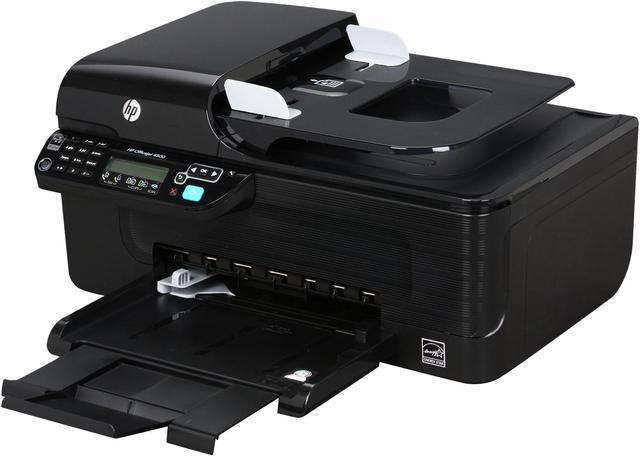
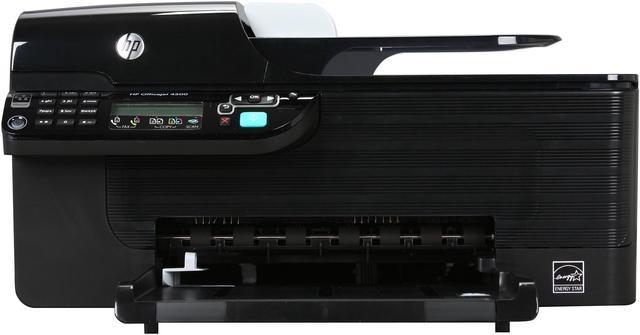
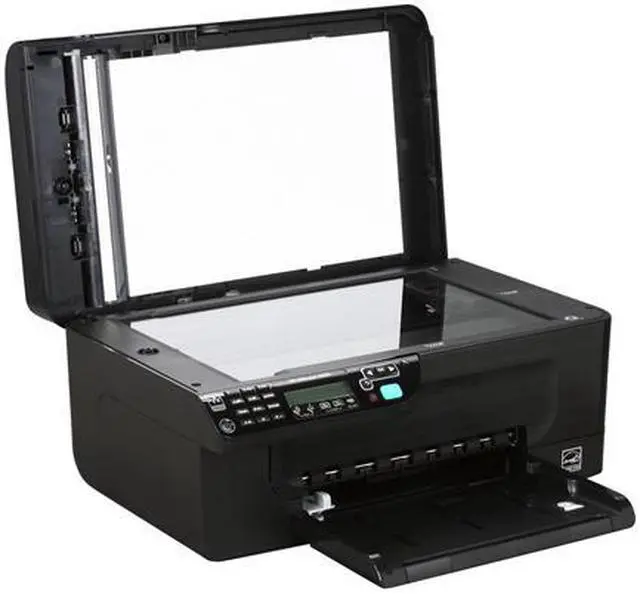
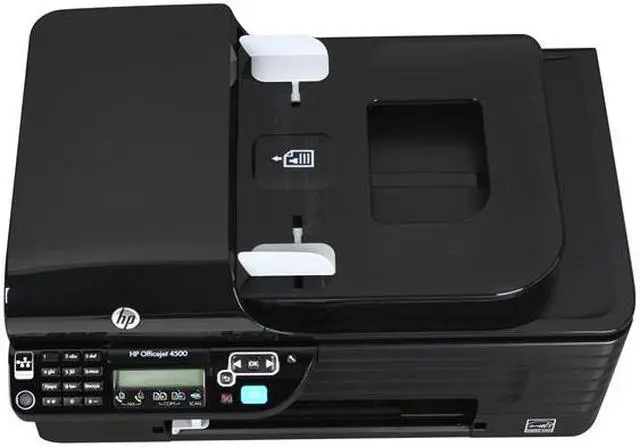
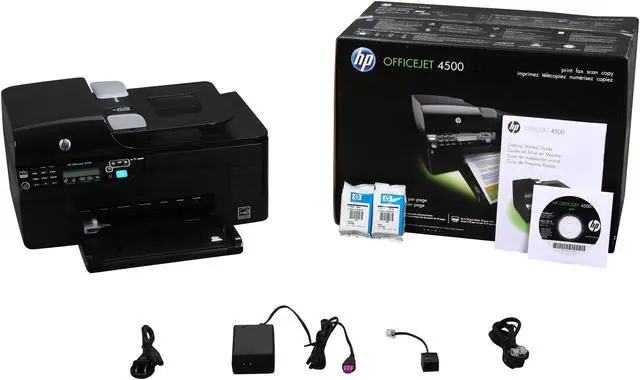
HP Officejet 4500 CB867A Up to 28 ppm Black Print Speed 4800 x 1200 dpi Color Print Quality Thermal Inkjet MFC / All-In-One Color Printer

  • Up to 28 ppm Black Print Speed
  • Up to 22 ppm Color Print Speed
  • Up to 1200 dpi Scan Resolution, Optical
  • Color Fax
ICON Loading...

This versatile machine does it all. It prints and copies up to 22ppm in color and up to 28ppm in black. The HP Officejet 4500 CB867A features an optical scan resolution of 1200dpi. It also offers a color fax. Need to copy a lengthy manuscript? It's not a problem with the 20-sheet automatic document feeder and 100-sheet input tray.

Why have multiple machines when you can have one that does it all at an affordable price? Bring the HP Officejet 4500 CB867A home or add it to your office today!

  • newegg All-in-one Capability The HP Officejet 4500 CB867A features B/W and Color printing, copying, scanning and faxing capabilities for great versatility.
  • newegg Great Performance The HP Officejet 4500 CB867A features a breakthrough 28 ppm black and 22 ppm color print speed for efficient printing.
  • newegg Excellent Print Quality With print resolutions of up to 4800x1200 optimized dpi for color prints and 600 x 600 dpi for black prints, the HP Officejet 4500 CB867A provides crisp, clean and lifelike images and laser-quality texts.
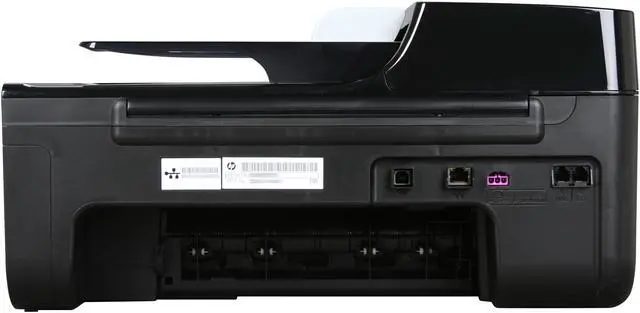
  • newegg Built-In Ethernet Network The HP Officejet 4500 CB867A features wired Ethernet connectivity for connecting to your home or office network, so you can share the printer function among multiple computers.

Learn more about the Hewlett-Packard CB867A

Model

Brand
HP
Series
Officejet 4500
Model
CB867A
Recommended Use
MFC / All-In-One

Printer SPEC

Print Technology
Thermal Inkjet
Output Type
Color
Black Print Speed
Up to 28 ppm
Color Print Speed
Up to 22 ppm
Black Print Quality
600 x 600 dpi
Color Print Quality
4800 x 1200 dpi
Print Languages, std.
HP PCL 3 GUI, HP PCL 3 enhanced
Max. Duty Cycle
Up to 3000 pages

Copier SPEC

Copy speed, Black
Up to 28 cpm
Copy speed, Color
Up to 22 cpm
Copy Quality, Black
600 x 1200 dpi
Copy Quality, Color
1200 x 1200 dpi
Max. Number of Copies
90

Scanner SPEC

Scan Resolution, Optical
Up to 1200 dpi
Scan Resolution, Enhanced
Up to 19200 dpi
Scan Technology
48bit

Fax SPEC

Color Fax
Yes
Fax Transmission Speed (seconds per page)
3 sec per page
Fax Memory
Up to 100 pages

Paper Handling / Media

Input Capacity, std.
100-sheet
Output Capacity, std.
20-sheet
Media Type
Paper (inkjet, photo, plain), envelopes, cards, transparencies, iron-on transfers, HP premium media
Media sizes supported
Letter, legal, executive, cards; Custom Media Sizes: 3 x 4 to 8.5 x 30 in
Borderless Photo Sizes
(up to 8.5 x 11 in, 215 x 610 mm)

Hardware SPEC

Noise Level (Approx.)
56 dB(A) (Draft printing)
Processor (MHz)
192
Memory, std.
64 MB
Memory, max.
64 MB
Modem Speed
33.6kbps
Cartridges Compatible
HP 901 Black Officejet Ink Cartridge (~200 pages), CC653A
HP 901 Tri-color Officejet Ink Cartridge (~360 pages), CC656A
HP 901XL Black Officejet Ink Cartridge (~700 pages), CC654A
Power Requirements
100 to 240 VAC (+/- 10%), 50/60 Hz (+/- 3 Hz)
Power Consumption
(Standby): 3.0 watts;
(powersave): 2.8 watts;
(Maximum): 17 watts maximum

Ports

USB Ports
Yes
Network Ports
Ethernet 10 / 100BaseTX (RJ45)

Compatibility

Windows Compatible
Microsoft Windows 7 x64, Windows 7, Windows Vista x64, Windows Vista, Windows XP Professional, Windows XP Home;
Windows Vista
Mac OS X v 10.4.x, Mac OS X v 10.5, Mac OS X v 10.6

Features

Features
Supported operating systems: Linux.

Physical SPEC

Dimensions
17.07" x 15.81" x 8.53"
Weight
13.03 lbs.

Quick Info


Customer Reviews of the Hewlett-Packard CB867A

Do you own this product? Write a Review

Filter Results

Go
  • ESB
  • 5/6/2013 11:48:38 AM
  • Tech Level: Average
  • Ownership: more than 1 year
  • Verified Owner

1 out of 5 eggsDiscontinued For a Reason

Pros: Fast on B&W printing

Cons: Does not connect to internet wirelessly like it says it does, ink cartridge issues, resource hog when in operation, can freeze up your OS if you like running Windows minimally (as few running applications as possible).

Other Thoughts: WAYYY too many issues with the ink cartridges. I had to blow cash on new cartridges all the time thinking it would solve the problem...nope. Meanwhile the HP execs are laughing all the way to the bank with MY money.

Did you find this review helpful? Yes No

  • N/A
  • 12/1/2012 12:26:07 PM
  • Tech Level: High
  • Ownership: 1 month to 1 year
  • Verified Owner

1 out of 5 eggsNever Purchase an HP Printer

Pros: NONE - HP is ripping Off consumers on purpose with the full knowledge of the HP executives!
NEVER EVER BUY an HP Home Printer, everyone I have had recently in the last 3 years or so have been this exact same way- I was stupid to give HP a try again

Cons: Networking does not work correectly 75% of Time,
on USB no work 50% of time, this Printer will connect to HP for Updates, as soon as the updates are done the printer will tell you the cartridges are empty or defective etc. regardless of how much ink ! Criminal Activity by HP to get you to buy more super expensive cartridges which print 150 pages or less(on default) Default ink settings are NOT on Economy, again to rip you off forcing you to buy6 more ink, if you change default to economy ink printing it will automatically revert to INK Drink settings Again to force you to buy more ink! So unless you change the settings to economy or draft EACH time you print you will run out of ink in like 150 pages! Cartridges are about 32 dollars each and you need 2 !

Other Thoughts: These problems were corrected by me when I uninstalled all the bloatware HP software, BUT only AFTER I uninstalled and used generic drivers AND BLOCKED the Printer from Communicating with HP ! after that my 45% full ink cartridges worked fine until they were dry! HP executives and the people who wrote the software designed to dupe and rip off consumers forcing them to buy expensive ink when they did not really need it should be put in Jail for the rest of their lives!

Did you find this review helpful? Yes No

  • N/A
  • 10/10/2012 12:04:53 PM
  • Tech Level: High
  • Ownership: 1 month to 1 year
  • Verified Owner

2 out of 5 eggsDose not work wit Win7

Pros: it's fast and has a good print quality

Cons: driver issues, will not work with Windows 7. There is a known issues with the scanner features not working with Win 7. Also has issues printing text after the drive issues came up.

Other Thoughts: It was a good printer when it was working now I can not get half the features to work under win 7

Did you find this review helpful? Yes No

  • Mr Promartin
  • 8/6/2012 1:24:35 PM
  • Tech Level: Somewhat High
  • Ownership: 1 month to 1 year
  • Verified Owner

2 out of 5 eggsMr Parkinson

Pros: Prints nice when it works

Cons: i only had this printer long enought to be out of waranty, teh printer fails to read ink levels, i only use hp ink, the paper jams every time i try to print,i called hp and they wish to send a teck out to service it how ever they want to charge me more than what i paied for the printer. i will buy a new printer and not a hp printer

Other Thoughts: dont wast your money, this is a poor qualty printer will work good for a short time than will cause you nothing but trouble

Did you find this review helpful? Yes No

  • BlackSunshine
  • 6/18/2012 8:47:04 AM
  • Tech Level: High
  • Ownership: 1 month to 1 year
  • Verified Owner

3 out of 5 eggsCheap, works

Pros: It works and most of the time works well. I got it for $49.99 and it's been up to the tasks I've thrown at it.

Cons: It's an ink hog. I am constantly replacing the cartridge even though I am not a person who is constantly printing stuff. Also, it's had a couple of paper jams that I've had to fix.

Other Thoughts: You get what you pay for. I got it for $50 and for a $50 printer it's adequate.

Did you find this review helpful? Yes No

  • lambition
  • 5/29/2012 6:20:23 AM
  • Tech Level: High
  • Ownership: 1 month to 1 year

1 out of 5 eggsWill not wake up from sleep mode

Pros: Many features. Wireless and ADF.

Cons: The printer will not wake up from sleep mode. Have to unplug and plug back in to wake it up.
There are many people with same problem, no help from HP at all.
Going into trash.

Did you find this review helpful? Yes No

  • N/A
  • 5/24/2012 7:15:24 AM
  • Tech Level: High
  • Ownership: 1 month to 1 year
  • Verified Owner

1 out of 5 eggsUtter Garbage

Pros: Scans well.

Cons: The printer can't pull paper into itself. I have to literally push the paper for the rollers to pull the paper in.

Did you find this review helpful? Yes No

  • N/A
  • 5/17/2012 9:57:17 PM
  • Tech Level: High
  • Ownership: more than 1 year
  • Verified Owner

1 out of 5 eggsterrible do not buy

Pros: printed sometimes

Cons: nothing but issues with this printer. had for about a year. during that time paper jammed constantly. also said cartridge jam every once in a while. finally tonight failed completely. smashed it with my fist and threw it away. felt great too. so if your looking to vent this is the printer for you. otherwise don't waste your money

Other Thoughts: there are cheaper items to smash on newegg

Did you find this review helpful? Yes No

  • DH950
  • 3/28/2012 7:05:27 AM
  • Tech Level: High
  • Ownership: more than 1 year
  • Verified Owner

4 out of 5 eggsPARTS $$$$$$ INK

Pros: Prints fast. Software bundle allows you to scan documents into PDF & other formats. The feeder on top will take about 20 pages at a time.

Cons: The worst thing is the EXPENSIVE ink, buy the 901XL if you are going to buy this.
It came with a cracked paper tray. I didn't want to pay the shipping & have a pretty much useless printer while waiting.
It snapped after 19 months. The tray is $15 & $12 shipping for something that weighs a few ounces. $27 parts & it was leaving lines on stuff scanned from the feeder tray. Ink is expensive.

Other Thoughts: I ordered a new one of these multifunction printers. The new one will have ink cartridges & I can use the old one for parts. The ink & tray would have cost almost 2/3 the price of a new one. I'll have a new warranty, plus I have some full cartridges for it.

1 out of 1 people found this review helpful. Did you? Yes No

  • Kevin
  • 3/26/2012 10:38:23 PM
  • Tech Level: High
  • Ownership: more than 1 year
  • Verified Owner

3 out of 5 eggsGood Printer / False Advertising

Pros: Great printer all around. Haven't had any trouble yet, and Cartridge World's prices for refilling the cartridges is excellent.

Cons: When I purchased this printer, newegg had it listed as wireless. I gave up trying to figure out how to setup the wireless networking on it until I realized this is a wired only printer! It seems that after a year, there's very little I can do but suck it up.

Other Thoughts: Ugh....

Did you find this review helpful? Yes No

ICON Loading...
Are you an E-Blast Insider? Subscribe Newegg e-Blast

Buzz

5 out of 5 eggs
Quiet printing, great professional looking device. Network capability, and Windows 7 ready.
— CJ 5/15/2010

You get what you pay for

3 out of 5 eggs
Cheap printer, $50 on a deal! All functions are attractive, scan quality is good. No need for fax, we have Email ...
— Crawsome 11/8/2010


PayPal
Shop without retyping payment details. Secure shopping made faster.
Check out with PayPal.

Financing


LOADING... LOADING...
Shop by Region: United States | Canada | China
Follow us:   RSS Feeds Youtube
VeriSign Reliability Seal1This site protected by Trustwave's Trusted Commerce program Inc500
Policy & Agreement | Privacy Policy  © 2000-2013 Newegg Inc.  All rights reserved.
If the Adobe Reader does not appear when you click on a link for a PDF file, you can download Adobe Reader from the Adobe web site. nassau