Skip to: |

Newegg.com - A great place to buy computers, computer parts, electronics, software, accessories, and DVDs online. With great prices, fast shipping, and top-rated customer service - once you know, you Newegg.

If you are reading this message, Please click this link to reload this page.(Do not use your browser's "Refresh" button). Please email us if you're running the latest version of your browser and you still see this message.

Newegg.com - Computer Parts, Laptops, Electronics, HDTVs, Digital Cameras and More!

  • | Wish List
  • Help
Home
Home > 
Computer Hardware > 
Networking > 
Wireless Networking > 
Wireless Routers > 
Netgear Inc. > 
Item#: N82E16833122487

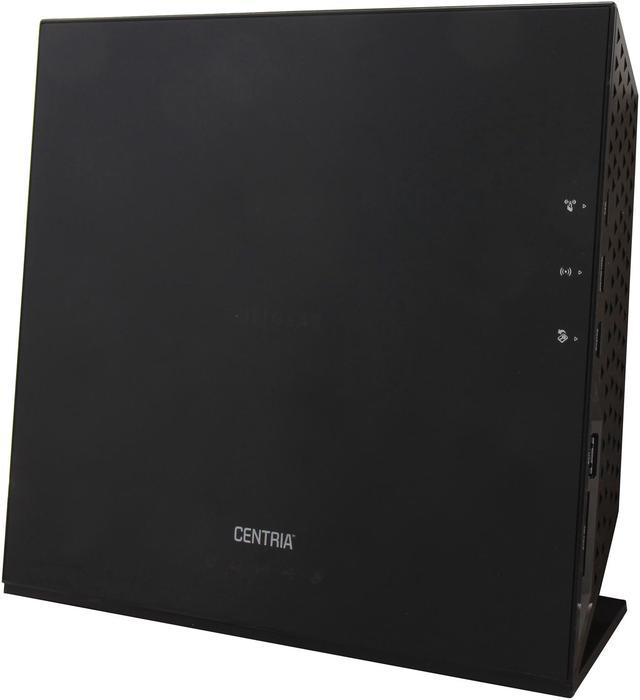
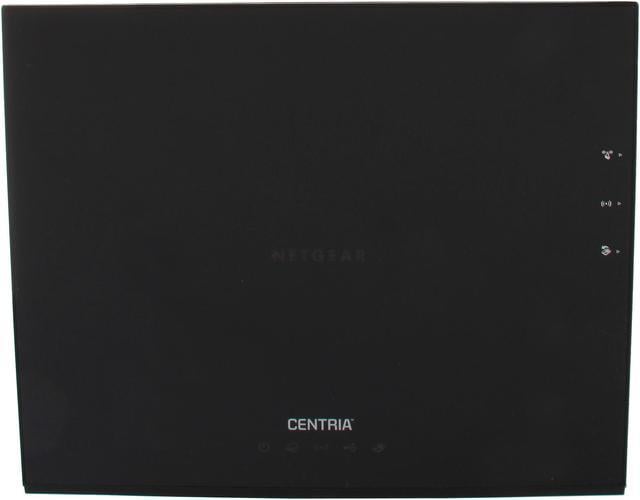
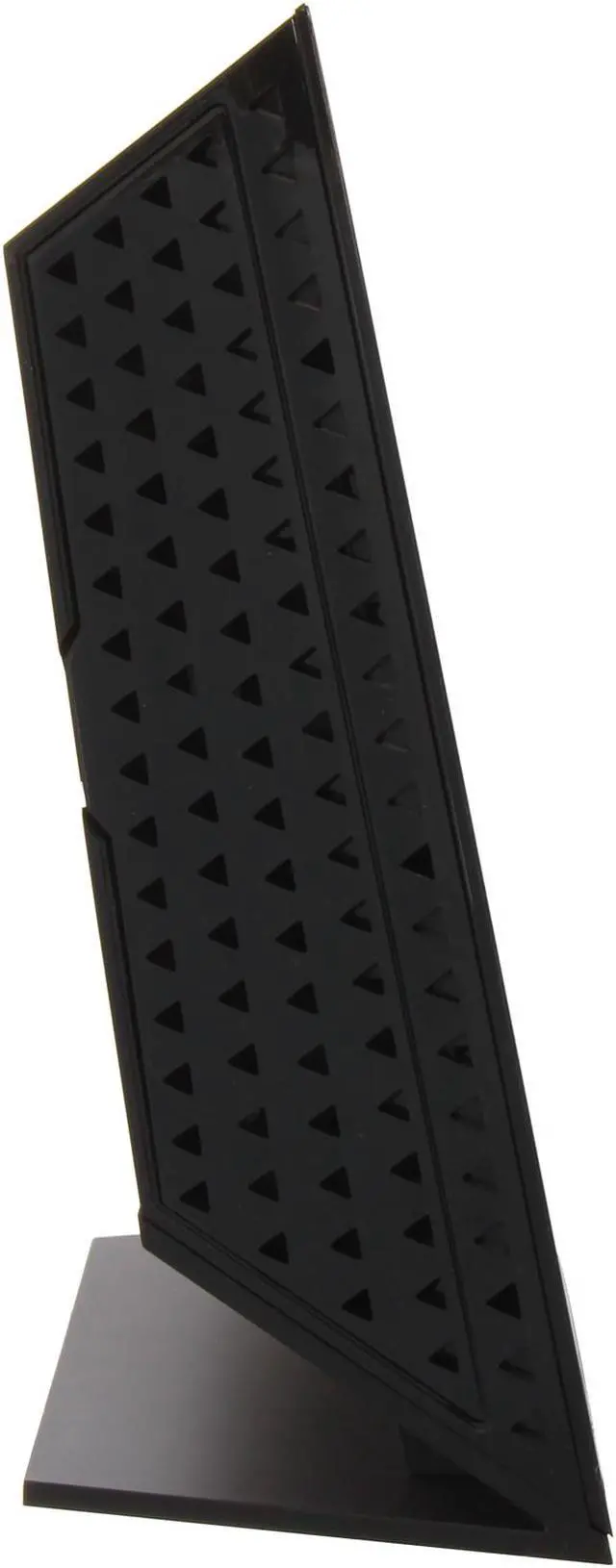
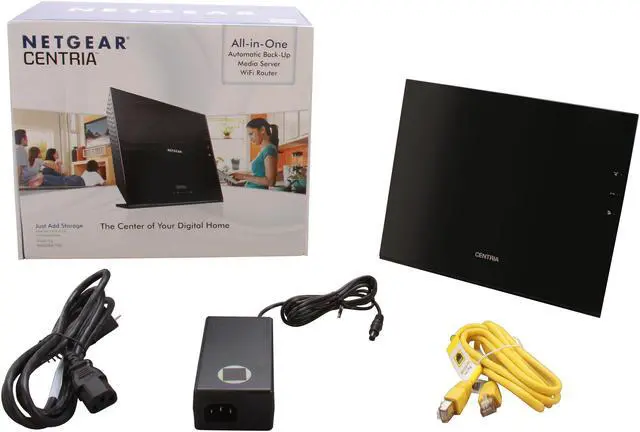
NETGEAR Centria WNDR4700-100NAS All-in-One Back-up, Media Server, N900 Dual Band Gigabit Wi-Fi Router; Diskless Version (WNDR4700)

  • N900 450+450Mbps
  • Automatic and continuous back-up for PC or MAC
  • DLNA Ready
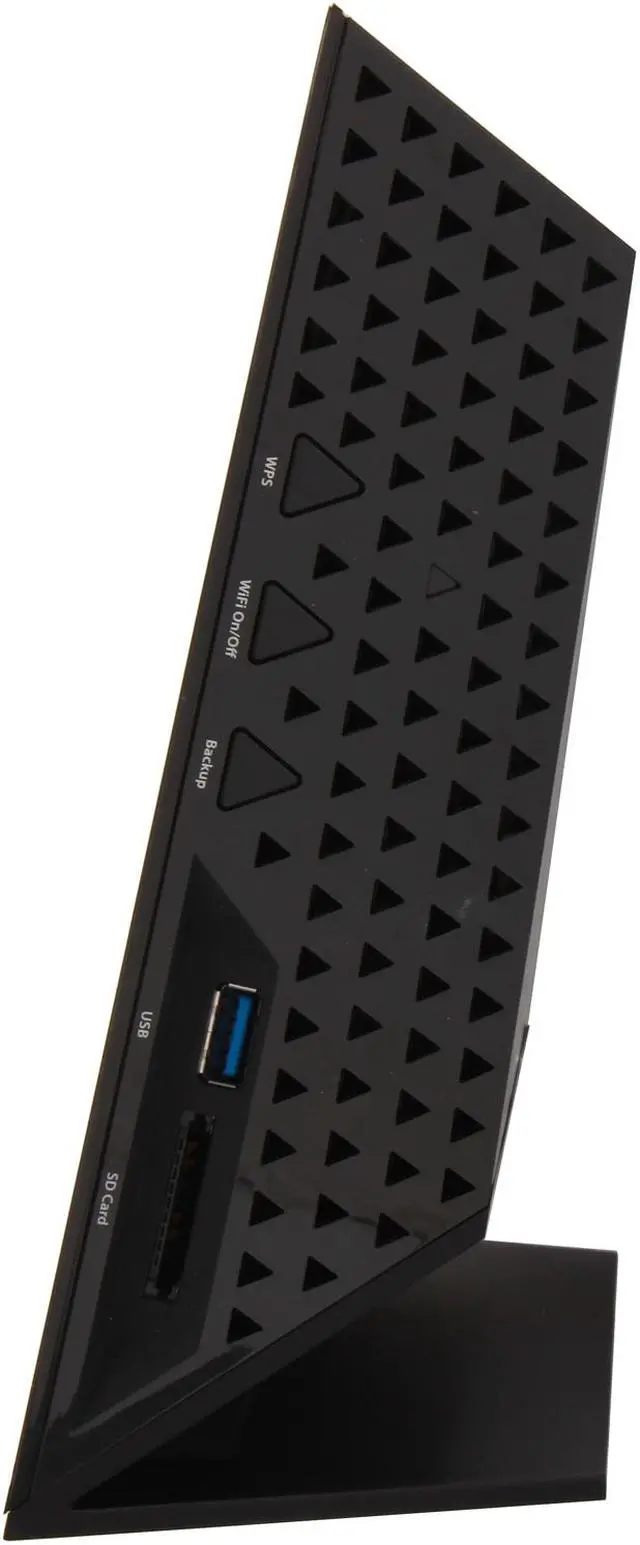
  • 2 x USB 3.0 ports
  • 1 x SD card slot
  • Open bay for 3.5" SATA HDD, Up to 2TB
  • Window 8 compatible
  • Pin It
  • Email this page
ICON Loading...


Learn more about the Netgear Inc. WNDR4700-100NAS

Model

Brand
NETGEAR
Model
WNDR4700-100NAS

Spec

Standards
IEEE 802.11a/b/g/n, IEEE 802.3/3u/3ab
Security
Wi-Fi Protected Access(WPA/WPA2-PSK)
Double firewall protection (SPI and NAT firewall)
Denial-of-service (DoS) attack prevention
WPS
WPA/WPA2
WPA2
Ports
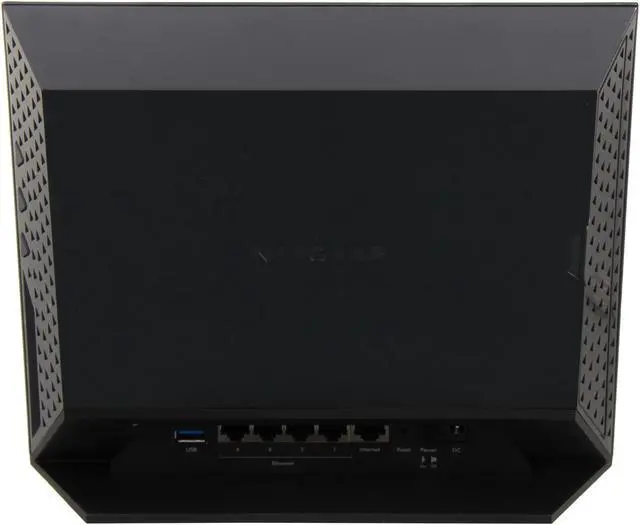
1 x 10/100/1000M WAN; 4 x 10/100/1000M LAN
Wireless Data Rates
Up to 450+450Mbps
Antenna
Internal Antenna
Interface
2 x USB 3.0, 1 x SD Card slot
Wireless Adapter included
No
System Requirements
Microsoft Windows 7, Vista, XP, 2000, Mac OS, UNIX, or Linux
Microsoft Internet Explorer 5.0, Firefox 2.0, Safari 1.4, or Google Chrome 11.0 browsers or higher
Use laptop with 3x3 450 Mbps adapter like Centrino 6300/5300 for maximum performance
Dimensions
256 x 206 x 85 mm
Weight
1.91 lbs.

Features

Features
Simultaneous Dual Band 450+450-Concurrent 802.11n dual band 2.4 and 5 GHz, 450 Mbps on each frequency, with combined speed up to 900 Mbps for streaming HD and 3DHD videos, simultaneous downloads, and online gaming

Ultimate Range - Improved for larger homes

ReadySHARE Vault - Automated continuous/scheduled backup for your PCs, Mac computers, iPads, tablets, and other devices on your home network

Time Machine compatible - Automatic backup for Mac computers

Integrated hard drive for storage - Customer upgradable internal high performance 2TB SATA hard drive

ReadySHARE Cloud - Access and share files on the integrated or attached USB hard drive anywhere you have an Internet Connection

Media server - Stream stored media files to DLNA media player like game consoles, TVs, and networked media players

ReadySHARE USB - Wirelessly access and share USB hard drives with your Mac computer or PC

ReadySHARE Printer - Wirelessly access and share a USB printer from your Mac computer or PC to a connected USB printer

Easy installation - Simple browser-based setup for iPads, PC, MAC computers, smart phones and tablets. No CD required

Business-class Wi-Fi security and firewall - High-level wireless security for the home: Stateful packet nspection (SPI), intrusion logging and reporting, denial-of-service (DoS) protection.

Live Parental Controls - Keeps your Internet experience safe using centralized, fliexible and customizable filter settings for your connected devices

Guest Network Access - Separate and secure access for guests using the Wi-Fi network

Push 'N' Connect - Secure push button Wi-Fi connections with Wi-Fi Protected Setup (WPS)

Wi-Fi and Power On/Off - Convenient power savings.

Window 8 compatible

Packaging

Package Contents
WNDR4700 (internal hard drive not included)
Ethernet cable
Power adapter (localized to country of sale)
Quick Install Guide

Quick Info

Warranty

  • Limited Warranty period (parts): Lifetime
  • Limited Warranty period (labor): Lifetime


Customer Reviews of the Netgear Inc. WNDR4700-100NAS

Do you own this product? Write a Review

Filter Results

Go
  • Sniper69
  • 4/10/2013 1:21:59 PM
  • Tech Level: Somewhat High
  • Ownership: 1 day to 1 week
  • Verified Owner

5 out of 5 eggsBest Router Ever

Pros: EASY TO SETUP a chimp could do it blindfolded.
HUGE Coverage would work for the largest homes.
The Wifi off/on button is nice.
Quick file transfer on the network.

Cons: I haven't had alot of time to tryout everything on this epic device due to work.

Other Thoughts: just overall best router I've owned yet

Did you find this review helpful? Yes No

  • N/A
  • 4/8/2013 5:34:22 AM
  • Tech Level: High
  • Ownership: 1 month to 1 year
  • Verified Owner

1 out of 5 eggsFails to deliver what is promised

Pros: It works as a good wireless router, but this is only small part of the promise and cannot justify the $200 cost .

Cons: ReadyShare cloud does not work. This is the sole reason I bought this router for. Netgear is planning to charge for ReadyShare cloud in the future. Netgear also charges the Readyshare android app. By the way app apparently does not work and has full of negative feedback.

Don't make the same mistake I did. Go get the Asus RTN66. AI Cloud is free and it apparently works. Asus one has a built-in ftp client and it is based on open source platform.

Other Thoughts: I tried to find support from Netgear for their not working solution. There is no support from Netgear. They advertise a service to give you support. Way to go!

1 out of 2 people found this review helpful. Did you? Yes No

  • Jonas4321
  • 2/2/2013 7:02:06 PM
  • Tech Level: Somewhat High
  • Ownership: 1 day to 1 week
  • Verified Owner

3 out of 5 eggsExcellent wireless router, decent shared network storage

Pros: Installing a hard drive is easy, though when I followed the recommendations online and formatted the 2T drive as NTFS before installing it, it showed up as a 289G drive with 117M available space. So, I used the “Format drive” option in the device’s management console, and it’s now fully available and I am backing up files from 3 different computers to it as I type (using Uranium Backup, not the software provided by Netgear). The format took about 5-10 minutes, and there was no option for “quick format”.
When you attach a USB drive, it becomes available automatically, which makes it easy.
It has an Access Point mode, which was great because I already have a DSL modem/router that I needed to attach it to. You lose much of the router configuration options when in Access Point mode, though. It also has a repeater capability, but can’t see it being used for that. Wireless setup is a breeze if you know what you are doing, and it had a default SSID with WPA to protect you if you don’t.
Throughput is more than adequate for my needs (backup and shared network storage, primarily).
Controlling access to folders on the unit is easy, but it MUST have at least one folder that is accessible to everyone on the network – you cannot restrict them all. The wireless has both 2.4GHz b/g/n and 5GHz a/n, so that’s a plus. The wireless and the router are really strong suits for this device. Shared storage, particularly on the Internet, is not. The Cloud feature requires an account and installing software to access it. Not a high value for me.
As for the printer sharing, you can connect a USB printer and allow access to it by any computer on the network, but you need to install software on each PC to use it. I guess if I really needed a printer on the network, I would use this, but getting a wireless printer is probably an easier option.

Cons: Con: You need to have one folder that everyone on your network can have access to without a password. I set this “must include” access up on an empty folder so that all other access requires credentials, but why it forces me to have one folder that everyone can access is beyond me. It does not make things easier for the novice, and it gets in the way of an experienced network admin. Other than that, the LAN access configuration is easy and well-featured.
When it comes to allowing access from the Internet, it let me down. Big time. I have not yet got the FTP working, because apparently it needs to have “/shares” on the end of the server to be accessible, and I don’t know of a client that allows that (both IE and FileZilla fail to connect). FTP services from the Internet is a bust at this point.
Next comes the HTTP access from the Internet. It does not allow for complete access control. Remember that “everyone has access” default required folder I mentioned? Guess what – that folder is accessible via the Internet if you turn that feature on. No username, no password. Just a URL and it’s wide open. Now, it’s read only, and I left this default folder empty, but so what? I should be able to control access to EVERYTHING if I want to.
Finally, an annoyance with no resolution – the admin login times out in about 5 minutes and I have not found a way to adjust it. When experimenting with the settings and remote access, it’s just plain a pain to have to re-enter the name and password so often.

Other Thoughts: It’s a solid value for a great router and shared storage that’s easy to configure. The Internet accessibility works for read-only but lacks features to make it a secure and flexible solution. It has several other features that come along for the ride. I like it for what I wanted it for (good wireless and shared storage for backups), but if NAS storage is your priority, getting something with RAID capability would be better.

Manufacturer Response:

Hi Jonas,

We apologize for the delayed response, but have some updates for you on some of the issues you mentioned.

First, we’re aware of the shared folder restriction as you mentioned. We plan to remove this restriction in the upcoming firmware release, so users will not need to grant everyone read access on at least one shared folder. However, please be aware that in order for the Centria’s media server to serve the media through DLNA, users still need to have at least one shared folder accessible to everyone.

Also, for the storage FTP access via Internet, we have tested and confirmed that IE, Chrome, and FileZilla do work correctly. We're concerned that you're still having problems, and would like for you to contact us directly at newegg@netgear.com so we can help further.

Regards,

NETGEAR Team

3 out of 3 people found this review helpful. Did you? Yes No

  • Network_fun
  • 12/18/2012 4:57:56 PM
  • Tech Level: High
  • Ownership: 1 day to 1 week

3 out of 5 eggsGood hardware, not so good management tools

Pros: I purchased this NetGear router to replace a 4-year old Linksys.

Initial thoughts:
1) Setup is generally easy, the menus are nice and self-explanatory
2) The guest network feature works well.
3) Have had no problems with throughput or wireless connectivity.

Cons: Cons:
1) The Netgear has a fan and it's not quiet. Generates more noise than my PC fan.

2) The box is an odd shape and the cables attach in the side, not the back, so they stick out and they're in the way.

3) The firewall features are limited. Defining rules is painful. Having more than a single rule is difficult, unless all the affected IP addresses in the rules are always the same. Firewall rules don't use MAC addresses, so you have to use DHCP reservation first, then create rules. Otherwise rules won't follow devices.

4) Whenever the device config is applied, Internet connectivity is lost, both wired and wireless. Time ranges from brief to multiple seconds, which is not helpful if you have an VOIP phone.

5) Logging function doesn't offer a means to sort log messages.

Other Thoughts: The Netgear offers nice specs and features. It needs some attention to the management aspects of the device.

And a quieter fan.

Manufacturer Response:

Hi Network_fun,

We responded to your post on another site, so we apologize if this is a duplicate response. We thank you for your honest feedback and encourage you to contact our support team to investigate the fan noise issue: support.netgear.com

Regards,

NETGEAR Team

2 out of 3 people found this review helpful. Did you? Yes No

  • Artonline
  • 11/26/2012 7:17:49 PM
  • Tech Level: Somewhat High
  • Ownership: 1 week to 1 month
  • Verified Owner

4 out of 5 eggsGood wifi, limited drive selection

Pros: Worked out of the box no set up problems. net genie software is decent. More reliable and better range than my old 54 WRT.

Cons: Internal hard drive is limited to 2tb. Good luck in finding external drives that it will recognize. The list of compatible external drives is tiny, no seagate drives only one 2tb Drive on the list. I had 10 external drives to try with it none are recognized.

Other Thoughts: It might be worth the price if it wasn't so limited in what you can plug into it

Did you find this review helpful? Yes No

  • Someone Helpful
  • 11/19/2012 10:46:17 PM
  • Tech Level: High
  • Ownership: 1 month to 1 year
  • Verified Owner

5 out of 5 eggsWell thought out and executed product

Pros: This product is literally the center of your Home Digital Hub. It sports the usual High-End router features: Gigabit Networking, 802.11N wireless, SPI Firewall, etc. etc. The DLNA, File and Print sharing support makes it indispensable. Why get a dedicated NAS and Server Streaming box that eats up more power and makes your room sound like the deck of an Aircraft Carrier? Is it the best in class for File and DLNA? No, but it's plenty fast enough for you.

* Easy to configure (Networking, File Sharing, Security, Wireless and DLNA)
* Push-Button wireless enable/disable
* Quiet operation
* Gigabit wired networking
* 2 X USB 3.0 External Support
* Does not suffer Internet Network Drops like the WNDR4500

Cons: Not entirely perfect.

* No support for MKV file format for Video Streaming. MKV is very common, and lacking this file format support is a bad oversight
* Storage Backup software to back up to the router is easy, but has one FATAL FLAW - it won't work if the share is WRITE PROTECTED in any way - even if you Map the network share. This is a stupid bug
* The Drive must be formatted using NTFS to see 3TB capacity. Format it using the NetGear Router utility, and the performance sucks
* The DLNA re-indexing should be configured to refresh at a certain interval - otherwise, files take FOREVER to show up or re-indexed
* No Radius 802.1X support for Wireless
* Buttons are not configurable / reprogrammable
* Security filtering by domain is limited to 30 entries only - even if you enter more than that, only 30 will be used

Other Thoughts: This product really blew me away. Streaming home videos over the network was Easy.

If you do this, you will want to do the following:
* Use the Gigabit Wired network
* Hard Code your MTU to match that of the Router's in your PS3
* MP4s are better to stream than MPGs

3 out of 5 people found this review helpful. Did you? Yes No

  • DougHo
  • 11/9/2012 8:46:03 AM
  • Tech Level: High
  • Ownership: 1 week to 1 month
  • Verified Owner

4 out of 5 eggsNice idea, storage not perfectly finished

Pros: I am longtime Netgear customer and like the idea of this router (purchased with promo). I don't use wireless much but signal seems stronger than earlier Netgears. Power use seems around 15 watts but that will depend on drive/activity. Storage performance reaches around 54MB/s read, 34MB/s write.

Cons: When formatted NTFS, I have encountered some "permission" errors which I've been able to workaround (if router's ext4 format is revised to create aligned, I'll probably re-format). The important internal storage feature could have improved design and testing. It takes finesse to fully insert and lock most drives I have tried (turning router temporarily on its side to take advantage of gravity seems to help insertion). Using the router's format feature seems to place partition on old non-aligned "cylinder" boundary instead of aligning for newer 4K "sector" performance. I have been unable to keep WD Red 3TB drive working regardless of formatting GPT in PC or MBR (smaller partition); the router briefly works sometimes showing Internal_Disk2 but later the router "hangs" (stops responding - both storage and networking).

Other Thoughts: I have ordered a WD Red 2TB which hopefully will work (after formatting in PC to achieve aligned performance).

Did you find this review helpful? Yes No

  • N/A
  • 11/2/2012 8:06:47 AM
  • Tech Level: Somewhat High
  • Ownership: 1 day to 1 week
  • Verified Owner

1 out of 5 eggsWorked for only 2 days

Pros: While it was working it was fine

Cons: Stopped working after 2 days

Other Thoughts: I should have listened to the previous comments about this thing crapping out. Now I have to go through the annoying process of getting an RMA and paying to ship something that only worked for 2 days. I guess I've learned my lesson. High price does not equal high quality.

Manufacturer Response:

Hi Anonymous,

We'd like to help -- your Centria shouldn't have lasted only two days, and we want to get things up and running for you as soon as possible. We do have some questions to start the troubleshooting:

1. Is the Centria completely inoperational? Or, does it work for a while, then fail? If it is the former, what's the LED behavior after the router powers on? Does the power LED keep blinking continuously? If the Centria does function for a while then fail, what exactly is happening? E.g., cannot keep a connection, cannot see SSID, and so on.

2. What is the serial number of your Centria?

You can get in touch with us to continue the process at newegg@netgear.com. We look forward to helping out!

Regards,

NETGEAR Team

0 out of 1 people found this review helpful. Did you? Yes No

  • Reviewer
  • 9/30/2012 4:39:12 PM
  • Tech Level: Average
  • Ownership: 1 day to 1 week
  • Verified Owner

5 out of 5 eggsGreat product

Pros: This thing is a beast! I think Netgear succeeded in their marketing by calling it "The center of your digital home". The backup capability, the DLNA, the internal hardrive making it a fast NAS. Read and write speeds are impressive; no comparison with external HDD speeds through USB port. The router UI is actually not bad and loaded with features. Simply impressive all-in-one piece of hardware. If you don't mind the cons below, go for it.

Cons: In terms of networking & routing capabilities, it actually performs a bit less than Netgear WNDR4500 or ASUS RT-N66U. Reviews do confirm that also. You can't have the best in everything (range, speed, all-in-one), but WNDR4700 is pretty close to that. But it's not something that will make a big difference to me. Most people in fact do not need to reach these ultra high speeds and ultra high ranges. Pros outweigh cons by far for me. Off course, this may vary person to person.

Other Thoughts: This review was done after 2-3 days of light usage; assuming and hoping no issues will be found later.

Did you find this review helpful? Yes No

Compare Offers from All Sellers

Seller Name & Rating Offer Details  
ICON Loading...
Are you an E-Blast Insider? Subscribe Newegg e-Blast

Buzz

Excellent wireless router, decent shared network storage

3 out of 5 eggs
Installing a hard drive is easy, though when I followed the recommendations online and formatted the 2T drive as NTFS before ...
— Jonas4321 2/2/2013

Good hardware, not so good management tools

3 out of 5 eggs
I purchased this NetGear router to replace a 4-year old Linksys.

Initial thoughts:
1) Setup is generally ...
— Network_fun 12/18/2012


PayPal
Shop without retyping payment details. Secure shopping made faster.
Check out with PayPal.

Financing


Home
Home > 
Computer Hardware > 
Networking > 
Wireless Networking > 
Wireless Routers > 
Netgear Inc. > 
Item#: N82E16833122487
LOADING... LOADING...
Shop by Region: United States | Canada | China
Follow us:   RSS Feeds Youtube
VeriSign Reliability Seal1This site protected by Trustwave's Trusted Commerce program Inc500
Policy & Agreement | Privacy Policy  © 2000-2013 Newegg Inc.  All rights reserved.
If the Adobe Reader does not appear when you click on a link for a PDF file, you can download Adobe Reader from the Adobe web site. nassau