* Free Shipping is not available to AK, HI and PR.
Special Offers
-
No interest for up to 12 months. Minimum purchase required.
Subject to credit approval. Details
-
No Payments for up to 6 months. Minimum purchase required.
Subject to credit approval. Details
-
Manufacturer Warranty
Beyond any applicable Newegg return policy, this item is warranted independently by the product's Manufacturer. Below is a summary provided for convenience only and may not be accurate or current.
Use this link for full details.
Manufacturer Contact Info
Return Policies
This item is covered by Newegg.com's Standard Return Policy.
- Return for refund within: 30 days
- Return for replacement within: 30 days
- Restocking Fee: Yes
|
-
- 5
-

- 80%
- 4
-

- 8%
- 3
-

- 4%
- 2
-

- 3%
- 1
-

- 5%
| Product Rating: |
   
|
| Total Reviews: |
490 |
So far, I love it
- Pros: The first thing I did was follow the quick setup guide and within 5 minutes I was up and running and have not had one hiccup since. There are an amazing amount of options to set and features to use. The router very fast. I have a CAT-6 cable from my PC to the router and from my iMac to the router and I transfer large files so much faster than I did with my older 10/100 router. Internet browsing seems to be snappier than it was with the older router. I develop Intranet apps and those interactions are much quicker now. I am very pleased.
- Cons: None that I have encountered.
- Other Thoughts: The Newegg delivery was fast and packaging was stellar. I was so impressed that I purchased again from here, just a few days ago.
- Pros: Worked right out of the box. My speeds increased dramatically. Settings are pretty easy to figure out.
- Cons: none
- Other Thoughts: I got this to replace a Linksys wired router I had for about 3 years. It was getting to the point I would have to reset it every week. The ping for the Linksys was 62 ms, The D-Link has a 46 ms ping (for my connection). My connection is very stable now, glad I bought this router. I didn't need to use the setup disk. I had to read through the manual to figure out how to log into the d-link router. Silly me, there is no set password. So you should put one in as soon as you get it set up.
- Pros: Old router was causing constant disconnects with ATT dsl. Very easy to set up and works perfectly with no disconnects.
- Cons: None
| Model |
| Brand |
D-Link |
| Model |
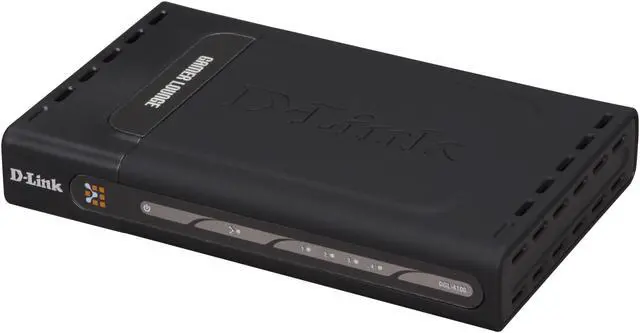
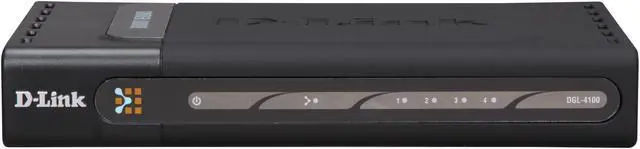
DGL-4100 |
| SPEC |
| Standards |
IEEE 802.3, IEEE 802.3u |
| Speed |
10/100/1000Mbps |
| WAN Ports |
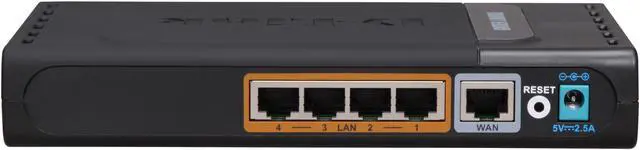
1 x 10/100Mbps |
| LAN Ports |
4 x 10/100/1000Mbps |
| LEDs |
Power, WAN, LAN |
| Dimensions |
7.5" x 4.6" x 1.4" |
| Features |
| Features |
Minimum System Requirements: Cable or DSL Modem with Ethernet Port
To Change Default Settings: PC with 1.2GHz Processor 256MB Memory CD-ROM Drive Ethernet Adapter with TCP/IP Protocol Installed Windows XP/2000/Me or Mac OS X v10.3/v10.2/v10.1 Internet Explorer v6 or Netscape Navigator v7
Software Features: GameFuel Priority – Technology Up to 256 Firewall Port Configurations Access Control Policies (Parental Controls) Internal and External System Logging Static/Dynamic Routing Oversized NAT table Email Alerts
Optimized Gaming Experience with GameFuel Technology 4 Gigabit Ethernet Ports Customizable Settings for Games and Applications |
| Packaging |
| Package Contents |
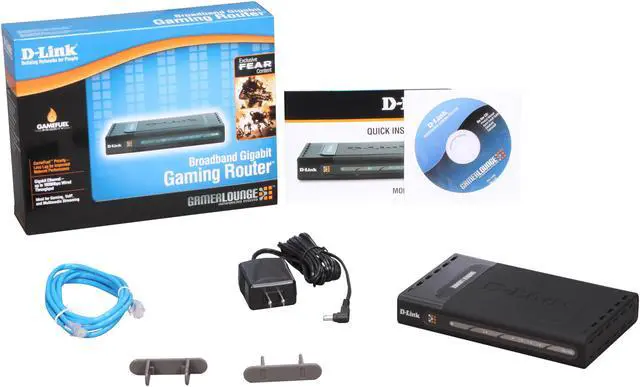
DGL-4100 Power Adapter RJ45 Cable Vertical Stand Resource Disk Quick Install Guide |
|
|