


Skip to: |

Newegg.com - A great place to buy computers, computer parts, electronics, software, accessories, and DVDs online. With great prices, fast shipping, and top-rated customer service - once you know, you Newegg.

If you are reading this message, Please click this link to reload this page.(Do not use your browser's "Refresh" button). Please email us if you're running the latest version of your browser and you still see this message.

Newegg.com - Computer Parts, Laptops, Electronics, HDTVs, Digital Cameras and More!

  • | Wish List
  • Help
Search all
Search
Home
Home > 
Computer Hardware > 
Networking > 
Wireless Networking > 
Wireless Routers > 
Western Digital > 
Item#: N82E16833146005

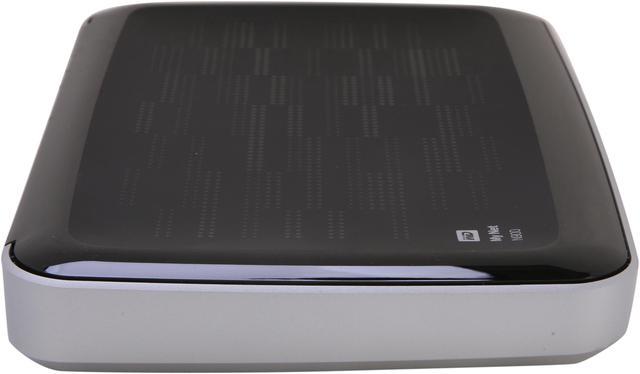
WD My Net N900 HD Dual-Band Router - 7x Ports, 450 + 450 Mbps, 2x USB Ports, Dual-Band, 2.4/5 GHz, FasTrack Plus WDBWVK0000NSL-HESN

  • Accelerated, seamless HD streaming with instant traffic prioritization
  • FasTrack Plus for best HD entertainment
  • Up to 450 + 450 Mbps Wi-Fi speed
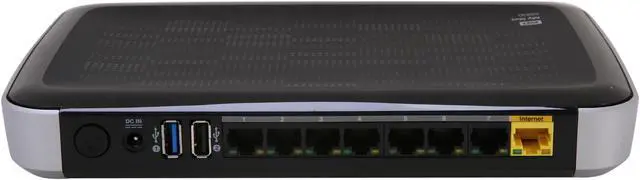
  • 7 Gigabit ports, 2 USB ports
  • Pin It
  • Email this page
ICON Loading...


Learn more about the Western Digital WDBWVK0000NSL-HESN

Model

Brand
WD
Model
WDBWVK0000NSL-HESN

Spec

Standards
IEEE 802.11a/b/g/n, IEEE 802.3/3u/3ab
WPA/WPA2
WPA2
Ports
1 x 10/100/1000M WAN; 7 x 10/100/1000M LAN
Wireless Data Rates
Up to 450+450Mbps
Frequency Band
2.4GHz/5GHz
Antenna
Internal Antenna
Interface
2 x USB 2.0
Wireless Adapter included
No
System Requirements
CD setup for PC: Windows 7, Windows Vista, Windows XP (SP3)

Web setup for Mac: Safari 2 or higher and type in //wdrouter or 192.168.1.1

Supported browsers for setup and advanced settings: Internet Explorer 7, Safari 2, Firefox 2, Google Chrome 7 or higher. Type in //wdrouter or 192.168.1.1
Dimensions
9.3" x 6.1" x 1.2"
Weight
1.05 lbs.
Temperature
5°C to 35°C (41°F to 95°F)

Features

Features
FasTrack Plus technology

Range-amplifying technology

7 Gigabit Ethernet ports

2 USB ports

My Net software includes parental controls, Internet security, guest access, and network diagnostics

Advanced QoS (WMM)

IPv6, WPS, DLNA, UPnP, Wi-Fi certified

Smooth, accelerated streaming of HD movies, shows, games and more

Instant recognition and auto-prioritization of all your HD entertainment

Streaming multiple HD streams all at the same time with HD-capable Wi-Fi

Upgrading to fast dual-band speeds and reducing interference

Multi-media households with multiple connected devices

Larger, multi-floor homes with superior range

Expanding your wired network at 10/100/1000 Gigabit speeds

Connecting to your home network in just a few quick steps

Setting parental controls and Internet security to keep your family and network safe

Providing guest access to your home Wi-Fi network

Connecting external storage, shared printers or scanners and other USB devices.

Packaging

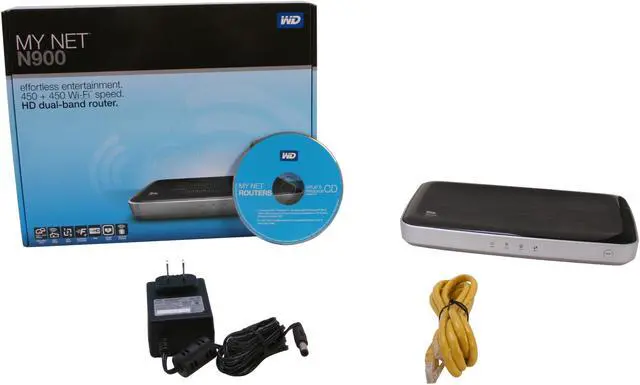
Package Contents
HD dual-band router
Setup and resource CD
Ethernet cable
AC Adapter
Quick Install Guide

Quick Info

Warranty

  • Limited Warranty period (parts): 1 year
  • Limited Warranty period (labor): 1 year


Customer Reviews of the Western Digital WDBWVK0000NSL-HESN

Do you own this product? Write a Review

Filter Results

Go
  • thewarm
  • 6/13/2013 4:34:00 AM
  • Tech Level: High
  • Ownership: 1 week to 1 month
  • Verified Owner

1 out of 5 eggsI should have kistened

Pros: Nice design... makes an attractive paperweight.

Cons: Drops wi-fi constantly. I tiied multiple firmware revisions, each one has it's own set of flaws. And of course it really started to act up after 31 days. So no refund...here goes the wasted postage RMA runaround...

Other Thoughts: Wanted it for the 7 gigabit ports.
Not reliable!

Did you find this review helpful? Yes No

  • Goolac
  • 6/11/2013 12:58:58 PM
  • Tech Level: High
  • Ownership: 1 week to 1 month
  • Verified Owner

3 out of 5 eggsGreat LIST of features...Poor performance

Pros: 7 port gigabit switch, usb3.0 and usb 2.0 ports...Active Cooling and fast throughput on usb.

Cons: poor performance on wifi...router must be reset nearly weekly to keep connection up.

Other Thoughts: I have RMA'd the unit and hope the next one works but after reading the other reviews, looks like this design is problematic at best.

Did you find this review helpful? Yes No

  • N/A
  • 5/26/2013 2:23:56 PM
  • Tech Level: High
  • Ownership: 1 month to 1 year

5 out of 5 eggsNo complain at all

Pros: I read a lot of review on this page about this router. they scared me. I finally decided to get it (sorry Newegg, not from Newegg). The reason why I'm writing this is I want to let everyone know that, this router is great. I used it for 3 weeks, haven't had to reboot it once. I have 2 TV and 1 Roku box that constantly streaming videos over a 25Mbps pipe. I turned on the QoS feature of WD (forgot the marketing name) but the wrouter has been super great.
I haven't seen a single sign of overheat yet, and I'm living in Vegas. I do admin I have 2 small block of brick to lift the router up to allow some air to flow through the bottom.

Cons: I wish WD made a stand of some sort so that the router can stand straight up.

Did you find this review helpful? Yes No

  • The Weatherman
  • 5/13/2013 4:05:40 PM
  • Tech Level: Somewhat High
  • Ownership: 1 month to 1 year
  • Verified Owner

2 out of 5 eggsThis router made me mad

Pros: At first, this router was awesome, now it is terrible. The fan died, and caused the router to overheat.

While I had the router working, it was great, I loved the 7 ports, also I loved the device's website for it's settings. It was an awesome router, until the fan went out on me.

Cons: Overheats quite a bit, built with a cheap fan. Fan will not last long. While working it was an excellent router, and had great signal strength.

Other Thoughts: Before the fan failed, this was one of the best routers I've had. I only gave two eggs, since it was a good router before, but then less than a year after owning it, the fan dies, thus causing the already hot router to crash. WD seems to have a pretty good grasp of how to make a router for the purposes you would use it for, but the hardware seems to be lacking. The wireless worked great, but the wired LANs and the internal fan, seem to have been built very cheaply. I would not suggest this generation of router to anyone to use, since it did not even make it one year. I've seen many reviews now, after 8 months of owning the router, saying that the fan died and caused the router to overheat. Please do not buy this shellshocker, untill WD gets a better fan to add to this router. When they do, i might look into getting another one. Untill then, I'm back to the much more old school technology of 54 Mbps Linksys router. Before the WD router, I had a Trendnet router for a short time, and it was terrible, then before that one I had a Microsoft router. This router was the best router that I've ever owned, for it's reliability. It may not have been as fast and have as many features as the WD router, but it would last year after year. It lasted me a total of 12 years. For $300 at that time, it was worth it. The speed was 54 Mbps, but it could last through any storm. Great router, great times.

Finishing up my review, the WD router was a good router while it was working, if you think you can get a router with a decent fan, or try a cooling mat underneath the router, then this router will work to your command, and have great speed. I enjoyed it. Now, I'm trying similar technology to my old and faithful Microsoft router, and hope it works for as long as it did. All and all, I could have gave 3 eggs, but I decided not to, since it did not even make it for one year.

Finally, you can see my initial review that I posted within one month after purchasing the router, under the same nickname for this review. I gave it 5 eggs at that time, but as you can see now, it has dropped in my approval for it.

Manufacturer Response:

We appreciate your feedback and apologize for any inconvenience you may have experienced with the My Net N900, as this is not the typical experience with the product.
We are sorry to hear that you encountered some difficulties with your My Net N900. Western Digital does stand behind its warranty for the duration of the provided warranty period, and regardless of the circumstances, we are here to support our devices. For warranty replacement assistance, please visit the following link or contact us.
How to get an RMA, (Return Merchandise Authorization) or replace a defective product under warranty
http://wdc.custhelp.com/app/answers/detail/a_id/8
We would appreciate the opportunity to further assist you, and resolve any further concerns you may have with the device and/or your experience directly, resulting in a positive resolution to your issue. You may contact us at 1 (855) 842-5370, or via our support website at http://support.wdc.com/contact/contact.asp?lang=en&ct=networking Please indicate within the online case creation or with the first support agent you speak with, that you are responding to a Newegg review, so we route you and your information to the correct team members.

Did you find this review helpful? Yes No

  • Strider
  • 5/13/2013 1:29:50 PM
  • Tech Level: High
  • Ownership: 1 month to 1 year

4 out of 5 eggs6 Month Followup Review - Still Happy

Pros: This is a quick update on my original review that was posted on 10/15/2012, titled "Western Digital My Net N900 - Good deal". My original performance assessment still stands and you can check out all the information in that earlier review.

The router has held up pretty well as the primary core of my very demanding and usage intensive home network for the past 6 months, with only one real issue that crept up, you can read about that in the cons section.

I notice many reviews saying the unit overheats. It does get warm, but mine has never got hot or overheated, even under the intense loads of my network. I have the router sitting on top of the DVR used for my home security system, which is metal, so the surface dissipates heat very well. Perhaps that helps. However I also keep it clean, the router does have a fan on the bottom so it can get dusty, so I clean it via compressed air once a month as I do for the PC's and other hardware in my home.

I have not had any wired or wireless connection drops, with wireless in operation 24/7 powering several devices.

The router have never hard locked or lost any of my settings.

In my original review I stated the 5GHz wireless strength was weaker than other options, however the 2.4GHz band seems on par with other units I have tested. I still stand behind this, but after considerable outdoor wireless usage on the 2.4GHz band, I must say it's range is very good. I live on the second floor of a small modern apartment building. My apartment being the furthest away from the parking lot. Yet I do not loose connection on my tablet until I am out of the lot and driving away. I get perfect connection everywhere on the property, even at reduced signal strength, as well as in the basement.

As far as the 5GHz band goes, other users around me have also said they have had range issues on 5GHz, and all use 2.4. So the fault may not be with the router.

The router is still performing well as a small file server via an attached Seagate Backup Plus 1TB USB 3.0 HDD as well as a connected printer.

Cons: The only real notable issue I have had with this router is that in the past 6 months I have had to power it down and reset the unit twice. The reason being that I seemed to loose performance. Not noticeable unless you were streaming HD media or gaming online, but easily noticeable running a speed test. My connection speed would drop from it's normal 60Mbps to 4-6Mbps. Running the current firmware.

I have had this happen on many other routers on my home network, as I have said many times, it's VERY demanding. Most of the time it was a routing table and memory management issue, and common among many routers. In a but shell, I don't think the units memory is being properly managed, as connections are closed, the memory used by those connections should be freed up, I don't think it is.

As far as I know, the only long-term fix would be to use DD-WRT, since the problem is there in the latest firmware.

This issue keeps the router at 4 eggs for me, even though it's a very easy fix and has only happened twice, just power down the router for a few minutes. However that's a workaround and there should be a fix in the firmware to properly manage the units memory without having to use a third-party firmware. Something I hope they look into in the near future.

Other Thoughts: When I say I have a more demanding home network than most, I mean it, so I routers have to be pretty robust and stable to handle the loads I put them under. As of this update review, my home network consists of the following devices, not including guest devices used from time to time.

4 wired PC's.

1 wired "server" PC.

1 wired home security system DVR.

7 wireless devices. (2 laptops, 2 tablets, Roku, a netbook, and a Wii U)

All of the wired devices are on almost 24/7, as well as at least 2 of the wireless devices at any given time.
Some of the loads this router are subjected too are long online gaming competitive sessions on one or two PC's in the latest games, while live streaming the entire time in HD to Twitch, and monitoring that stream via one of the laptops. Yet another PC also online gaming, and the other watching Netflix. All at the same time.

It also handles LAN gaming quite well, so far I have tested it with 8 systems running all at once, wired and wireless mixed, and it did not have a single issue.

Large file transfers and streaming over the network also do not slow it down.

It also works well when servers running behind it. I do run a couple private game servers for family and friend use, as well as a voice server, and a private file server. The unit has no problems keeping up with any of it.

So would I still recommend it after using it for 6 months? Yes, even with the two unit resets I had to do so far, this router has done really well considering the loads it's put under. I can honestly say I am pleased with it's overall performance, and as you can see, I don't exactly go easy on the unit.

Did you find this review helpful? Yes No

  • Gvegas_99
  • 5/5/2013 6:32:21 PM
  • Tech Level: Somewhat High
  • Ownership: 1 month to 1 year
  • Verified Owner

1 out of 5 eggsTERRIBLE BRICK!

Pros: Effortless to setup!

Cons: OVERHEATS! CONSTANTLY needs to reset!

Other Thoughts: constantly have to reset it. Have a laptop cooler plugged into one of the USB ports to keep it cool and it still shuts down. I've done 2 warranty claims on this brick. Working on my 3rd router. Definitely choose another router. I'm only giving it 1 star because it was so easy to set up.

Manufacturer Response:

We appreciate your feedback and apologize for any inconvenience you may have experienced with the WD My Net N900, as this is not the typical experience with the product. We always recommend ensuring that your router is up to date with the latest firmware, as this may easily resolve the issues you are experiencing. Assistance in how to update your router's firmware can be viewed on page 66 of the user manual provided by the following links.
http://www.wdc.com/wdproducts/library/?id=334&type=25 http://www.wdc.com/wdproducts/updates/?family=wdfmynetn900
If you have already done so and are still experiencing these issues, in the interest of troubleshooting, you may want to reset the device back to factory default, as this will remove any residual configurations that may be causing conflicts within your network from an update that did not fully reset upon reboot of the unit.
Please ensure the router is placed on a flat surface, not near or on top of other devices that may be emitting heat onto/into the unit, as this may cause undesired behavior and possible malfunctioning of the router.
We would appreciate the opportunity to further assist you, and resolve any further concerns you may have with the device and/or your experience directly, resulting in a positive resolution to your issue, as this is not the expected performance of your WD Router. You may contact us at 1 (855) 842-5370, or via our support website at http://support.wdc.com/contact/contact.asp?lang=en&ct=networking Please indicate within the online case creation or with the first support agent you speak with, that you are responding to a Newegg review, so we route you and your information to the correct team members.

3 out of 3 people found this review helpful. Did you? Yes No

  • NuLLx42
  • 4/14/2013 4:13:00 PM
  • Tech Level: Somewhat High
  • Ownership: 1 month to 1 year
  • Verified Owner

3 out of 5 eggsDO NOT UPGRADE FIRMWARE

Pros: It works on 1.05.12 firmware
It's got 7 ports
It works as a NAS

Cons: Do not upgrade to 1.6.28 or 1.6.18. I did mine and now some of the ports do not work and wont connect locally to other computers. internet cuts out and speeds are slow.

Other Thoughts: Can't downgrade to 1.05.12 (regardless of form posts that say otherwise) Tried a rollback and a full firmware install, both failed. Factory reset failed, 30/30/30 reset did nothing but clear my settings. Garbage

Manufacturer Response:

We appreciate your feedback and apologize for any inconvenience you may have experienced with the Western Digital My Net N900, as this is not the intended experience with the product.
Please ensure that the device is placed on a flat surface clear of obstruction, and not on top of other devices, so the unit receives proper cooling in the operating environment.
If you experience connectivity concerns, please reset the device back to factory defaults, as this may clear up any residual configuration issues related to a firmware update that did not properly reset.
Should the issue with the unit persist, we would appreciate to the opportunity to replace your device directly and investigate the root cause of these concerns, while providing a replacement at no cost to you, as the physical device, and not the firmware update, may actually be of concern.
Is there anything we can do to assist you at this time? You may contact us at 1 (855) 842-5370, or via our support website at: http://support.wdc.com/contact/contact.asp?lang=en&ct=networking
Please indicate within the online case creation or with the first support agent you speak with, that you are responding to a Newegg review, so we route you and your information to the correct team members.

1 out of 1 people found this review helpful. Did you? Yes No

  • Rob
  • 3/23/2013 1:18:56 PM
  • Tech Level: Somewhat High
  • Ownership: 1 month to 1 year
  • Verified Owner

1 out of 5 eggsUpdate

Pros: None

Cons: This router is a joke - does not work - overheats, buggy GUI, cannot access remotely, loses connections repeatedly, new firmware no help. I RMA'd mine to WD - DO NOT BUY

Other Thoughts: I messed with this router for months hoping WD would correct the issues with a new firmware release - this has not happened - spare yourself the pain. I bought an ASUS RT-N66U to replace it and it has been flawless from the get go.

Manufacturer Response:

We appreciate your feedback and apologize for any inconvenience you may have experienced with the My Net N900, as this is not the typical experience with the product.
We always recommend ensuring that your router is up to date with the latest firmware, as this may easily resolve the issues you are experiencing. Assistance in how to update your routers firmware can be viewed on page 66 of the user manual provided by the following link.
http://www.wdc.com/wdproducts/library/?id=334&type=25
If you have already done so and are still experiencing these issues, in the interest of troubleshooting, you may want to reset the device back to factory default, as this will remove any residual configurations that may be causing conflicts within your network from an update that did not fully reset upon reboot of the unit.
How to reset a My Net Router to Factory Default Settings
http://wdc.custhelp.com/app/answers/detail/a_id/9606
We would appreciate the opportunity to further assist you, and resolve any further concerns you may have with the device and/or your experience directly, resulting in a positive resolution to your issue.
You may contact us at 1 (855) 842-5370, or via our support website at http://support.wdc.com/contact/contact.asp?lang=en&ct=networking Please indicate within the online case creation or with the first support agent you speak with, that you are responding to a Newegg review, so we route you and your information to the correct team members.

1 out of 2 people found this review helpful. Did you? Yes No

  • gdubz22
  • 3/15/2013 9:09:13 PM
  • Tech Level: Somewhat High
  • Ownership: 1 month to 1 year

5 out of 5 eggsn900

Pros: 7 ports
fast
Nas compatiable with usb hdd or flashdrive
I use a extra 16gb flashdrive
easy to set up
far range its in my basement and i get good signal on second floor

Cons: Only problem I had was with my laptop connecting with wifi it would freeze up but turning off the firewall fixed that. Just software issues so updates should fix that.

2 out of 3 people found this review helpful. Did you? Yes No

  • N/A
  • 2/26/2013 9:20:47 AM
  • Tech Level: Somewhat High
  • Ownership: 1 week to 1 month
  • Verified Owner

4 out of 5 eggsExchanged unit better!

Pros: I have not had to restart the replacement unit since I installed it- has worked for 1 full week. Will have to see if things stay that way!

Cons: none at this time

2 out of 2 people found this review helpful. Did you? Yes No

ICON Loading...
Are you an E-Blast Insider? Subscribe Newegg e-Blast

Buzz

TERRIBLE BRICK!

1 out of 5 eggs
OVERHEATS! CONSTANTLY needs to reset!
— Gvegas_99 5/5/2013

Exchanged unit better!

4 out of 5 eggs
I have not had to restart the replacement unit since I installed it- has worked for 1 full week. Will have to see if things ...
— 2/26/2013


PayPal
Shop without retyping payment details. Secure shopping made faster.
Check out with PayPal.

Financing


Home
Home > 
Computer Hardware > 
Networking > 
Wireless Networking > 
Wireless Routers > 
Western Digital > 
Item#: N82E16833146005
LOADING... LOADING...
Shop by Region: United States | Canada | China
VeriSign Click for the BBB Business Review of this Computers - Supplies & Parts in Whittier CAThis site protected by Trustwave's Trusted Commerce program Inc500
Policy & Agreement | Privacy Policy  © 2000-2013 Newegg Inc.  All rights reserved.
If the Adobe Reader does not appear when you click on a link for a PDF file, you can download Adobe Reader from the Adobe web site. nassau