Skip to: |

Newegg.com - A great place to buy computers, computer parts, electronics, software, accessories, and DVDs online. With great prices, fast shipping, and top-rated customer service - once you know, you Newegg.

If you are reading this message, Please click this link to reload this page.(Do not use your browser's "Refresh" button). Please email us if you're running the latest version of your browser and you still see this message.

Newegg.com - Computer Parts, Laptops, Electronics, HDTVs, Digital Cameras and More!

  • | Wish List
  • Help
Home
Home > 
Computer Hardware > 
Networking > 
Wireless Networking > 
Wireless Routers > 
Western Digital > 
Item#: N82E16833146006

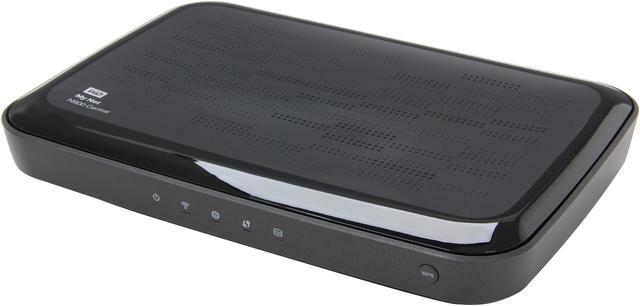
WD My Net N900 Central HD Dual-Band Router with 1TB Storage - 1TB Storage, 4x Gigabit Ethernet Ports, 450 + 450 Mbps, USB, Dual-Band, 2.4/5 GHz, FasTrack Plus WDBKSP0010BCH-HESN

  • FasTrack Plus technology accelerates your entertainment
  • Internal storage and wireless backup
  • View and share your files with WD 2go remote access
  • 4 Gigabit Ethernet ports; 1 USB port
  • Pin It
  • Email this page
ICON Loading...


Learn more about the Western Digital WDBKSP0010BCH-HESN

Model

Brand
WD
Model
WDBKSP0010BCH-HESN

Spec

Standards
IEEE 802.11a/b/g/n, IEEE 802.3/3u/3ab
Security
WPA/WPA2, SPI firewall, Parental controls, Internet security, Network diagnostic, antenna amplifiers, guest access
WPA/WPA2
WPA2
Ports
1 x 10/100/1000M WAN; 4 x 10/100/1000M LAN
Wireless Data Rates
Up to 450+450Mbps
Frequency Band
2.4GHz/5GHz
Antenna
Internal Antenna
Interface
1 x USB 2.0
Wireless Adapter included
No
System Requirements
CD setup for PC: Windows 7, Windows Vista, Windows XP (SP3)

Web setup for Mac: Safari 2 or higher and type in //wdrouter or 192.168.1.1

Supported browsers for setup and advanced settings: Internet Explorer 7, Safari 2, Firefox 2, Google Chrome 7 or higher. Type in //wdrouter or 192.168.1.1
Dimensions
9.3" x 6.1" x 1.2"
Weight
1.34 lbs.

Features

Features
Auto-prioritizes all entertainment services for accelerated HD streaming

*Built-in 1 TB WD hard drive for storage and wireless backup

Dual-band 2.4 and 5 GHz bands double your bandwidth and reduce interference

Superior multi-floor coverage with range-amplifying technology

WD 2go and WD Photos remote access

Smartphone and tablet friendly for viewing photos and files

Four each Gigabit Ethernet ports for instantly expanding your network

USB port for connecting shared printers or scanners

Parental controls, Internet security and guest access

Network diagnostics to help monitor your network status and repair it quickly as needed.

Ideal for:
Upgrading to smart HD dual-band speeds
Wirelessly backing up your personal files from any PC in your network
Smoothly streaming HD entertainment to smart TVs, tablets, smartphones, computers and other connected devices
Multimedia households with multiple connected devices
Viewing photos and files with your tablet or smartphone
Connecting to your home network in just a few quick steps
Quickly connecting new devices to your wireless network with the push of a button.
Setting up parental controls and Internet security to keep your family and network safe
Providing guest access to your home Wi-Fi network
Expanding your wired network at 10/100/1000 Gigabit speeds
Connecting external storage, shared printers or scanners and other USB devices.

Packaging

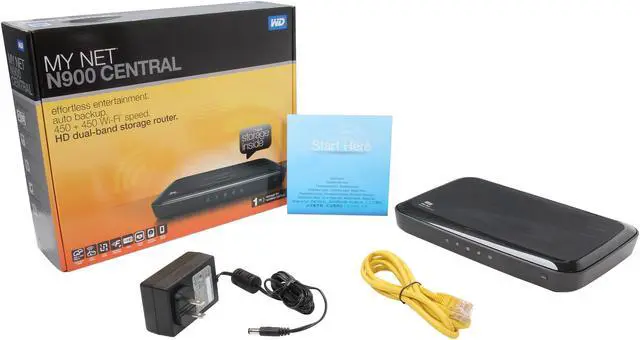
Package Contents
Dual-band storage router
Setup and resource CD
Ethernet cable
Power Adapter
Quick Install Guide

Quick Info

Warranty

  • Limited Warranty period (parts): 1 year
  • Limited Warranty period (labor): 1 year


Customer Reviews of the Western Digital WDBKSP0010BCH-HESN

Do you own this product? Write a Review

Filter Results

Go
  • Efros
  • 5/19/2013 9:38:42 AM
  • Tech Level: High
  • Ownership: 1 month to 1 year
  • Eggxpert Review

1 out of 5 eggsDeader than a very dead thing

Pros: Worked for 5 months

Cons: Worked for 5 months

Other Thoughts: Completely dead, not even a hard reset did anything. Upon performing a post mortem there appeared to be a very slight smell in the box. I'm wondering if the fan or something else burnt out. If you need to open the box be aware the screws are mounted under the feet and a fifth one under the label. I also needed to get into mine to get at the HD as I had some material on there I needed to get to.

Did you find this review helpful? Yes No

  • Efros
  • 5/12/2013 2:36:54 AM
  • Tech Level: High
  • Ownership: 1 month to 1 year
  • Eggxpert Review

2 out of 5 eggsReservations got bigger

Pros: When it was working properly it was a good piece of kit.

Cons: Over the last week I've been getting dropouts on my wireless, both 2.4 and 5 GHz. Very strange the wired side of it works ok it's just the wireless. A trawl around the web seems to suggest it is overheating, resiting the router doesn't seem to have improved the situation, I also rolled back the firmware to no avail. This morning, after repeated wireless dropouts last night necessitating 3 reboots in an hour, I get up to a dead network, not just wireless but the wired network as well. Hard reset on the router seems to have it operational but things are not looking up for this thing's life expectancy.

Other Thoughts: It has about a week before my patience will be exhausted and I will reluctantly put this thing to bed, I say reluctantly as I have been very satisfied with it's performance over the last 5 months. But 5 months really shouldn't be the life expectancy for such a costly item.

Did you find this review helpful? Yes No

4 out of 5 eggsWestern Digital Router with 1 TB Storage

Pros: Western Digital, the storage giant, now manufactures routers with hard drives built into them.The My Net N900 Central comes with 2 storage options; 1 TB and 2 TB. Remember, the N900 is a router first. It employs 2.4 & 5 GHz bands, with max speeds of 450mbps per band.The N900 also has all that you would expect from a router including: Push button WPS connection, Advanced QoS, IPv6 capability, SPI Firewall filters, gigabit Ethernet ports and WPA/2 wireless security.
With only 1 USB available for sharing devices on the network you may feel a little let down. Don’t forget that there is a 1000 GB drive built in to the router, therefore you may not need the second USB port if you normally use it for shared storage.
Installation was a breeze. I plugged in the router and directed my web browser to the default IP for the N900. The html install wizard started instantly and installation was very fast and simple. It walks you through securing your wireless signal and basic WAN setup.
I had a lot of trouble getting the WD 2go app to work on my network. I could get the app to work for about 5-10 mins but if I closed it and restarted the app I would lose the ability to connect again. After contacting WD support they recommended I reset the router back to default settings, unfortunately that didn’t help either. At the time I was flashed to version 1.05.12 and nothing I tried would solve the problem. NOTE: This issue was recently resolved for me after Western Digital released the most recent firmware update (version 1.06.28).
Firewall
The N900’s firewall is very basic. Most users will have no need for specific rules concerning blocking certain ports or setting up port forwarding. WD provides you with 32 customizable firewall rule entries. It’s important to note though, if you wanted to block ports from the wan side, you will need to do so using specific IP addresses or an exact IP range (on the WAN). That’s not really practical. I can understand if you wanted to block a port incoming from a certain IP on the network because there are only so many IPs and you can block the whole range. Blocking on the WAN side however, isn’t going to work that easily. It would be much better if an “Any” option was available for the IP range instead.
Wireless
Having a secure network is important and the N900 tries to fill that need. The N900 has your standard options like guest wireless access, WPA & WPA2 Personal encryption, WPS and MAC filtering. Guest Access is a simple one that allows your friends to use your wireless without giving them access to your N900 shared drive.It’s setup with a separate WPA/2 encryption password from the standard one you made.The Wi-Fi Protected Setup or WPS is a simple way of connecting new devices to your router by pressing only 2 buttons, 1 on the router and 1 on the device you connect. This worked flawlessly on the N900 with my USB N band wireless adaptor.MAC filtering option is typically used to either allow or block specific computers fro

Cons: accessing your wireless network. The N900 provides 24 MAC Address entries and a setting to “only allow” the listed devices or block this list. Unfortunately WD didn’t separate the wireless from the wired users so you will have to add wired MAC addresses if you choose to use this feature. That means that if want to use MAC filtering, you will be limited to 24 devices total. That includes all the phones, tablets, consoles, computers, laptops, webcams, and other wireless devices that can be connected to your router with filtering enabled. This isn’t good and I hope WD will find a way to remove the wired MAC addresses from the MAC filter.
Parental Controls
This is something more parents can and should take advantage of. Parental Controls on the N900 can control the time of day, specific sites that are viewable and the type of site viewable for all computers on the network. You can do all of this after you sign into the router and click the register link under the Parental Controls page. You can block or allow up to 60 sites per device.
WD did design the Parental Control software to separate out the rules for different devices. So you can have a global rule that blocks internet access for all devices after 10pm, but 24/7 internet access for you and your spouse’s iPhones for instance. I tested this feature by globally allowing a site by DNS name (google.com) and blocking another site (yahoo.com) on a specific device (my iPhone). The global Parental settings held fast, but the device was still allowed access to the blocked site. Clearly they haven’t worked out all of the bugs yet.
The “separate device” PC controls may not work, but the category filtering is quite an effective way of blocking content that minors shouldn’t be seeing.The Category filtering can be set to several settings, each stacking on the content of the last. Your options are: none, low, moderate, medium, high, maximum and All. Below is a list of each category and their defined parameters:
All-Blocks all web access regardless of category.
Maximum - Maximum level of parental control with block of High level block plus social network, video, etc. Includes all lower levels.
High-High level of parental control with block of all adult related contents. Includes all lower levels.
Medium-Moderate level of parental control plus block of all adult related contents, gambling, alcohol and tobacco. Includes all lower levels.
Moderate-Low level protection plus occult, illegal acts, etc. Includes all lower levels.
Low-Protects against prnography and hard core adult contents.
None-No blocking. Allows all.
Note: No system is infallible.WD’s PC system can be circumvented by going to a site that isn’t in WD’s Parental Control Database. The reason they are fallible is because no database can have all of the possible sites in the world and keep them up to date.
It’s easy to adjust these settings on the fly too. If you try to connect to a site that is already blocked, you will see a special

Other Thoughts: from WD informing you of this. You will then have the option to allow access to this URL/this category permanently or for a specified time limit. You can choose onetime, 1-2 hours, 1 day or add this site to the safe list (permanently allowed). They system isn’t perfect, but WD has created a tool that can help concerned parents mitigate some of the online risks to their children. Western Digital gets kudos for that.
Speed tests
I tested the download and upload speed of the My Net – N900 using my iPhone 4s and my Acer Aspire Laptop. For consistency I am using Speedtest.net’s App for the iPhone and Speedtest.net on the chrome browser with my Acer Laptop. I selected the same server (Optimum Online) for all speed tests. Each test was conducted within 10 feet (approximately 3 meters) of the router using the 2.4 GHz and the 5 GHz (N) Spectrum. N Band speed was tested with TP-Link’s TEW-684UB USB Wireless adaptor on the Acer Laptop. I have restricted the N Adaptor to the 5 GHz spectrum for these tests.
WAN Test Setup
iPhone 4s on iOS 6.0.1 with Speed Test App
Acer Aspire 3830T -Win7 64bit –Chrome version 25.0.1364.97 m
WD My Net N900 Wireless Router
My current bandwidth is rated 50down/8up

Internet Speed Results
I averaged the upload and download speed on 6 passes of each device connected to the My Net N900.
N900 via iPhone
Average Download/Upload
30.8Mbps/11.1Mbps
N900 via Laptop
Average Download/Upload
18.11Mbps/7.90Mbps
N900 via Laptop with N band adaptor
Average Download/Upload
59.02Mbps/7.35Mbps

Music Sharing Test
I wanted to test this device as a music sharing device. To test the LAN speeds I recorded the upload and download time required to transfer a 163.7 MB podcast file to and from the onboard 1 TB drive. This test was repeated 6 times and an average was taken. I use FileZilla on the laptop and the WD 2go App on the iPhone. It’s important to use the WD 2go app here because (a) it’s free to the user and (b) Western Digital has created this app to accompany their device.
LAN Test Setup
-All prior setup with the addition of:
FileZilla v3.6.0.2 –used the log files for time and speeds
iPhone 4s -WD 2go APP v2.1.1 –Time acquired via stop watch (no speeds available)
Music Sharing Results
N900 via iPhone WD 2go APP
Download Time (seconds)/ No Mbps available
55s
N900 via Laptop
Download Time (seconds) @Mbps
78s @2.1MB/s = 16.8Mbps
N900 via Laptop with N band adaptor
Download Time (seconds)/Mbps
18s @10.4MB/s = 83.2Mbps
Remember, there is no need to download the files to play them immediately on your iPhone.Music can be streamed to your device on the app and the download is saved once completed. That being the case, this device is perfect if you want to share the same music to multiple devices on your network.Using the app, you setup a rolling buffer of stored music so you don’t have to re-download the same files again.This buffer offers 1, 5, 10, 20 and 32 GB cache sizes.Depending on your iPhone’s free space, yo

Did you find this review helpful? Yes No

  • Bob M
  • 1/17/2013 10:34:51 AM
  • Tech Level: High
  • Ownership: 1 month to 1 year

5 out of 5 eggsUpdate

Pros: Western Digital Support is Unbelievable! Spent two and a half hours with Sal from Technical support today. They called me over the issue of downloads. New firmware and some adjustments to enable the router as an access point and now everything is running smooth!

Cons: None

Other Thoughts: If for nothing else, Western Digital's support team is worth the investment. I use Samsung SSD's and ONLY WD Hard drives. Support has always been stellar, and this situation reinforces, to me, that WD is the BEST! The router works as is should because WD took the pains to troubleshoot and fix any and all issues...

Did you find this review helpful? Yes No

  • Bob M
  • 12/27/2012 8:24:35 AM
  • Tech Level: High
  • Ownership: 1 month to 1 year
  • Eggxpert Review

2 out of 5 eggsFound Glitches

Pros: Router is fast and has strong signal.

Cons: A few:

1. Been working with Western Digital support. Seems that the router blocks ftp downloads. I have downloads from Epson (printer), HP (my laptop drivers) and a few others. No matter whether LAN or WAN, the sites get blocked. I hit the download button and a 40 mb download estimates to take 2 hours and never works.

2. If you have Windows 8, you are good to go. It recognizes the drive inside the router (once mapped) about 95% of the time. Windows 7 has glitches that when you get to Windows...it tells you that it cannot connect to the mapped drive. Then you have to double click on the drive and it goes from red to blue and it's contents are there. Pain to do every time.

Other Thoughts: In all honesty, for the money...find another router. This one has issues. WD tech support can't seem to figure out what the ftp issue is. I believe it to be part of the firmware of the router is faulty. If I remove the WD router and put my old D-Link DIR-655 router in it's place...I can download from Epson, HP and other ftp sites with NO issues. WD has work to do.

Manufacturer Response:

We appreciate your feedback and apologize for any inconvenience you may have experienced with the Western Digital N900C Router, as this is not the typical experience with the product. For your specific networking concerns related to DNS and/or FTP, it may be necessary to contact your ISP for a static configuration setup with port forwarding, of which the information would be provided directly by them. Our support team can of course provide you with assistance inputting the information and further troubleshooting your concerns to see if an adequate resolution can be achieved through the various configuration options Although a last resort when performing troubleshooting on any device which has data located on it; it may be a feasible step to restore the device to factory defaults (after creating a configuration backup file, as well as performing a factory reset on the internal drive). If no level of troubleshooting resolves the issue, it is possible that there is an internal device concern requiring replacement. For information on how to create a Return Merchandise Authorization (RMA) for your product, please view the following link.
http://bit.ly/Anlqmn
Although the mapping issue related to your Windows system appears to be somewhat frequent, ensure that if you are wirelessly connected, you attempt to hardwire your system directly to the router, as a loss of connection may cause this issue.
For the purpose of providing World Class Customer Service, we would appreciate the opportunity to replace your product for you directly, so that we may investigate the cause of the device failure for your product, to ensure that there is a positive resolution for you. You may contact us at 1 (855) 842-5370, or via our support website at: http://bit.ly/Te3EV2
Please indicate within the online case creation or with the first support agent you speak with, that you are responding to a Newegg review, so we route you and your information to the correct team members.

Did you find this review helpful? Yes No

  • Efros
  • 12/8/2012 10:00:25 AM
  • Tech Level: High
  • Ownership: 1 week to 1 month
  • Eggxpert Review

4 out of 5 eggsNice with reservations

Pros: 1 TB of networked storage is not to be sniffed at especially when bundled with a dual band wireless gigabit IPv6 router. Couple this with a built in media server and mobile access for Android and IOS devices, and also cloud access from a remote PC, then you have a pretty formidable package.

The initial setup was very straightforward, and to be honest the layout although different to most other routers, is familiar if you’ve used any networked WD devices before. There is a built in firewall with 32 customizable rules, a WPS setup feature and a MAC filter which works on wired and wireless computers. The MAC filter table is huge and I doubt in a domestic setting would ever be filled, the port forward table however is not, and offers only 30 configurable entries. The FasTrack QoS, (32 slots available), is an interesting and useful addition to this device's capabilities. It allows the bandwidth of the router to be juggled/limited/enhanced such that streaming and VOIP applications are given preference to other activities. Netflix in particular was noticeably better at streaming with much improved buffering times, (about 40% less time spent buffering), with this enabled. Enhanced WMM, (Wifi MultiMedia, 31 slots available), is also available for streaming wireless clients. FasTrack can cause some other issues, see other thoughts below.

Adding a mobile device is very easy and using the WD2GO app on Android accessing the 1 TB drive remotely is a breeze. Similarly accessing the drive from a remote PC is relatively straightforward and when setup through the WD online service your remote My Net drive is temporarily mapped as a drive on your PC, pretty neat. The throughput to both the mobile device and your remote PC is of course limited by your upload bandwidth from your home network, so don’t be looking to transfer large files quickly!

Cons: I really, really dislike the WD SmartWare, I think in trying to be user friendly they have achieved the exact opposite. If they had used an explorer type front end it would be easier. The FasTrack QoS is listed as a con largely because if you are torrenting anything then this will kill your torrent speeds. This may not be an issue for you, and may be a plus if you are trying to limit net hogging by kids etc., and in certain circumstances, streaming and VOIP, it can be viewed as a pro.

Slow file transfers: I observed 15MB/s writes and 25 MB/s reads. The file transfer rate is bottlenecked by the hardware in the router, gigabit networks will easily achieve 60-90 MB/s transfers on file copies from one machine to another. This rate is a bit disappointing but to a certain extent understandable given that the My Net does not contain a full blown PC.

The physical inaccessibility of the drive is also an issue, drives fail and the idea of it failing and then having to crack, (looking at the case it probably will crack!), open the case for replacement is not good. Also as a drive manufacturer WD are only offering a 1 year warranty on this, doesn't inspire confidence in what is touted as a backup device.

When I first installed and powered up the device I was informed there was a firmware upgrade. Knowing that WD has had some issues with its ‘My’ range I promptly activated the update. The dialog that sprung up informed me that the firmware upgrade would take 400 seconds! Now given that firmware upgrades can be quite fraught, this is quite a nerve wracking 400 seconds. It completed satisfactorily but given the possibility of bricking the device not something I’m going to be doing on a regular basis, unless absolutely necessary.

Other Thoughts: A 78 GB backup from a Windows 8 machine including system image took 2.5 hours, I don’t see me using this as a backup drive but I do see me using it as a remote disk, consequently files I need on the move will be stored there. Cooling is largely passive unless there is a lot of HD or network activity then the little fan will cut in, this seems to be more than adequate, although some care needs to be taken to not block vent holes on the top of the router. The lack of external antennae is somewhat disconcerting but the router certainly performs well enough to dispel any qualms about this, however, in a crowded wifi environment some more control on broadcast power or the flexibility of external antenna would be preferable.

The inclusion of wired devices on the MAC filter list somewhat confused me initially as my old router only applied this to the wireless clients, I'm also not sure what would happen if you enabled the MAC filter with no allowed clients and logged off, not something I'm about to try!

Considering the features this device has and the 1TB storage built in, this thing is a good buy. I’m not a fan of SmartWare, I don’t think it is… smart that is, but then you don’t have to use it. I've been operating the device now for over a week with no issues and it will remain in place until it goes to router heaven. Since installing it I have been moved to install dual band wireless cards in two of my laptops and this resulted in quadrupling the throughput on those machines, (up from 2.5 MB/s to about 11 MB/s), very rewarding! This required hacking the BIOS’s on both machines to kill the manufacturers’ wireless whitelist, they should not be allowed to do that! Overall despite the limitations of the disk in terms of accessibility, speed, 1 year warranty, and the horrible SmartWare (hence the 4 eggs), I like this piece of kit.

Did you find this review helpful? Yes No

  • Bob M
  • 11/27/2012 2:22:28 PM
  • Tech Level: High
  • Ownership: 1 day to 1 week
  • Eggxpert Review

4 out of 5 eggsOriginal review cut short

Pros: Above

Cons: Above

Other Thoughts: On Windows 7 (my laptop), when I boot up, I get a popup that the drive can’t be mapped. I just double click the drive and it re-initializes (bug with Windows 7). On my Windows 8 desktop, it is always there. Overall, Don got me going in less than 2 minutes. Don was so gracious that he stayed on the phone and walked me through all the firmware screens of the router. Compared to older routers, this one is beautiful to work with.

TESTING:

To test download/upload speeds of the router, I took 320 music files (all .wav) and copied to a folder. The overall size of the folder was 7.25 GB. That would give me how the router does transferring smaller files. Then I compressed the entire folder into a .zip file 5 GB in size. This would give me an idea of the router’s performance with large files. I tested the router in LAN, 2.4 GHZ, and 5 GHZ modes. U will stand for the uncompressed folder, and C will stand for the compressed file. Un-scientific as it was, I basically judged speed by recording the speed of the upload / download in 10% increments.

LAN Upload:

U-15.1 MB/s
C-23.1 MB/s

LAN Download

U-22.3 MB/s
C-24.1 MB/s

Now on to WAN speed:

5 GHZ tests @ 10 feet (connected at 300 mb/s)

Upload

U-6.65 mb/s
C-8.92 mb/s

Download:

U-8.83 mb/s
C-10.12 mb/s

5 GHZ tests @ 25 feet (connected at 240 mb/s)…some degradation of the signal…

Upload

U-5.1 mb/s
C-8.92 mb/s

Download

U-7.2 mb/s
D-9.64 mb/s

2.4 GHZ tests at 10 feet (connected at 150 mb/s)

Upload

U-6.49 mb/s
D-8.34 mb/s

Download

U-9.49 mb/s
C-9.87 mb/s

2.4 GHZ test at 25 feet (connected between 100-130 mb/s)…again distance degradation

Upload

U-7.15 mb/s
C-8.97 mb/s

Download

U-6.63 mb/s
C-7.42 mb/s

Overall performance shows that the 5 GHZ band is between 10-30% faster in certain conditions. Consider that a data transfer to my external USB 3.0 flash drive tops around 7mb/s, the speeds of this router are decent. The biggest advantage is the 5 GHZ band, where speeds are more consistent. The 2.4 GHZ band is slower and network speed varies more often. For further comparison, I went to Microsoft’s website and downloaded the Windows 7 Service Pak 1 file (1.9 GB for all languages). The file downloaded at an average transfer of 2.96 mb/s. I chose MS, because they have one of the faster servers I could find.

Overall, the router performs best in LAN and 5 GHZ modes. The 2.4 GHZ is about average, where the router begins to shine in the other two. If you have a computer that will connect via LAN or 5 GHZ this router is a decent choice to make. The 10-30% gain in speed makes the router scream.

Thoughts:

As a wireless N router, the MyNet N900 Central is slightly above average. At this price point, you might want to consider the new AC wireless routers…they are reported to have up to 3X the performance of N, and are cheaper (granted because none really have internal storage YET). The downside to AC, is t

Did you find this review helpful? Yes No

  • FuzzyLogician
  • 11/25/2012 7:58:59 PM
  • Tech Level: High
  • Ownership: 1 month to 1 year
  • Eggxpert Review

4 out of 5 eggsDecent home router with storage

Pros: Stylish design that isn’t too much of a finger print magnet but does much better than some of the more glossy encasements routers come in.
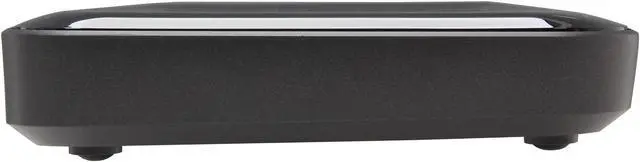
Interface is clean with basic iconic representation at a “guessable” state as to what it does. Though the router has a larger than average footprint, it is a tad thinner than most, while including the feet on back. This router, like many others, is wall mountable but can also serve as desktop or shelf-top equipment. Unit as a whole runs cool & the design included an approximately 1x1-inch fan enclosed in the housing with the vent located at the mid- center underside. Also located on the under carriage is the pin-hole reset button, which took me a few minutes to locate.
On-board 1Tb hard drive has lots of space to start out with - which is enough for about 117 standard definition DVD movies or over 5500 hours of CD quality music. Expansion for additional storage possibilities is provided via a single USB port on rear of router. Like other routers, it should be able to accommodate a small powered USB hub to provide additional ports. This unit has a really decent design layout of the ports with power connector & button located next to each other, so there is no guessing where the switch is nor an accidental power off when trying to join a device using WPS. Router sports all gigabit ports, which fits my minimum requirements for any file share device, though 5x 1Gbit LAN ports + 1x 1GB uplink/WAN is my ideal target for consumer / “small” SOHO use.
I am more than happy with the transfer rates wirelessly but I would recommend that any file shares be connected via hard line. However, this unit does provide useful QOS for data streams & prioritization.

Cons: Physical
There is no way to upgrade or replace internal drive without cracking the case open. I can only assume that the WD engineers were under the utopian impression that drives never fail. A product with as many features & the matching price tag as this, I would have expected to see more than a 1-year warranty & a way to easily service the investment – or at least, being able to replace its drive .

The lights on the front of the router are too dim. Given that the opposite is usually the complaint, I have to say that there might as well not be status lights on the front of the router, as they are useless; even at 5 feet away & at eye level, they are barely seen.

With only internal antennas, the router provides no way to extend or add external solutions (external antennas) or regulate output power up/down. An ability to tailor & integrate this router into existing AP coverage would be nice to avoid mowing over existing setups with mixed manufacturers or neighbors on all sides; then again, how big or small your place is does come into play here.

As with all “suggested or implied” backup devices, it’s best to use caution when keeping just one medium as the only basket to hold the important stuff. Also, take note that the internal drive is not physically accessible, so typical hard drive diagnostics or salvage operations aren’t an option without risking destroying your router to do so. **See “Other comments” for continuing note on backup.

FTP
I was disappointed that the FTP support didn’t have a more robust user interface for laying down permissions & user access. Though this isn’t DDWRT (an open source router OS), I see there is a good amount of room for features & improvement that could be done with the supporting OS part. Other than setting a single username & password, there really is no way to add a roster of users with different access to folders; furthermore, the FTP is limited to 10 concurrent users.
While setting up access & performing FTP, both at 54g & at 300n connections, the router performed very well but for some reason, it hit a disconnect a few times as well as a time out during an active transfer. The disconnections were experienced while using 54g (connected at 54 maximum @ approx 20 feet) transferring 600MB.

Another FTP oddity encountered & is repeatable was when using ftp> mget *.*
which rendered “200 TYPE is now 8-bit binary” instead of initiating multi file transfer from remote source. Binary command, “bi”, should have rendered this statement, therefore there is software compile error in the FTP portion. Supported FTP commands are listed by typing “help” at the FTP prompt, mget is present.

Power cord
The barrel plug & the power port appear to be a little touchy on making their connection. Looking at the router’s power plug design, I believe it could be improved by a longer barrel plug & connecting the interface with reinforced anchorage to the internal PC board.

Other Thoughts: Western Digital should take a class note from the leading corporate network industry leaders & unleash more potential to their end users. This nice router performs well & houses 1TB of storage, though unleashing the potential to off-load & even expand router coding OS to the storage medium, transforming it into a small Firewall/File share server. True, the router does save some data to the internal drive to some extent but potential is there to expand upon. Whether it be Western Digital or DDWRT that provides modification & expansion I believe it will be interesting to see what the My Net series routers develop into.

Backup
Some backup is better than no backup; however, I would recommend the router’s internal drive be used as an “operational” drive or as a supplemental backup option. With backups, failure is not an option, & the same applies here; thus, the USB port provides a redeeming factor, a means to attach an external storage medium, in addition to providing network print capability (having both concurrently will require the use of an external powered USB hub).

I haven't determined whether the internal cooling fan is a pro or con, however it has never been running during testing.

Basic wireless transfer times seen.
_
300n Get (Download) Start Connected @ 300n
100MB (102358334 bytes received in 11.26Sec 9088.02KB/sec.)
500MB (512753664 bytes received in 55.90Sec 9173.19KB/sec.)
600MB (665845760 bytes received in 74.33Sec 8957.37KB/sec.)
700MB (717225984 bytes received in 77.91Sec 9206.30KB/sec.)
800MB (819986432 bytes received in 88.30Sec 9286.69KB/sec.)
1-GB (1024458752 bytes received in 111.71Sec 9170.53KB/sec.)
300n Get End
_
300n Put (Upload) Start Connected @ 300n
100MB (102358334 bytes sent in 16.55Sec 6184.05KB/sec.)
500MB (512753664 bytes sent in 82.95Sec 6181.63KB/sec.)
600MB (665845760 bytes sent in 107.72Sec 6181.26KB/sec.)
700MB (717225984 bytes sent in 116.80Sec 6140.69KB/sec.)
800MB (819986432 bytes sent in 132.54Sec 6186.66KB/sec.)
1-GB (1024458752 bytes sent in 172.47Sec 5939.99KB/sec.)
300n Put End
_
54g Get (Download) Start Connected @ 54g
100MB (102358334 bytes received in 37.89Sec 2701.32KB/sec.)
500MB (512753664 bytes received in 189.06Sec 2712.11KB/sec.)
600MB (665845760 bytes received in 621.16Sec 1071.93KB/sec.)
700MB (717225984 bytes received in 863.48Sec 830.63KB/sec.)
800MB(819986432 bytes received in 914.85Sec 896.31KB/sec.)
1-GB (1024458752 bytes received in 1051.52Sec 974.26KB/sec.)
54g Get End
_
54g Put (Upload) Start Connected @ 54g
100MB (102358334 bytes sent in 48.17Sec 2124.81KB/sec.)
500MB (512753664 bytes sent in 195.89Sec 2617.52KB/sec.)
600MB (665845760 bytes sent in 403.19Sec 1651.46KB/sec.)
700MB (717225984 bytes sent in 346.37Sec 2070.67KB/sec.)
800MB (819986432 bytes sent in 506.08Sec 1620.26KB/sec.)
1-GB (1024458752 bytes sent in 465.00Sec 2203.15KB/sec.)
54g Put End

1 out of 1 people found this review helpful. Did you? Yes No

  • Bob M
  • 11/25/2012 9:07:14 AM
  • Tech Level: High
  • Ownership: 1 day to 1 week
  • Eggxpert Review

4 out of 5 eggsWestern Digital My Net N900 Central Review

Pros: Really easy setup. You can be up and running in 5-10 minutes, tops
Fastrack Plus-No longer do my videos stutter. Smooth multimedia playback over the internet
Dual band-2.4 GHZ, 5 GHZ and even GUEST mode for people who come to visit
1 TB of external storage (once you map the drive)
Excellent LAN performance. Good 5 GHZ performance.
Included Western Digital software good for Novices with no background in networking
At peak performance, the router gets warm, never hot.
Excellent WD Technical Support

Cons: Documentation doesn’t explain how to map the drive and make it work in the network. Installed WD software doesn’t do anything to make that happen, either.
Average 2.4 GHZ performance
To reset the router to factory you have to use a Kensington lock. Most routers have a reset button you can insert a paper clip.
Western Digital software is really not very useful. Smartware is nothing more than another file manager, that DOES NOT do entire system backup. If you want to back up your HDD, then you are going to have to use a program like Acronis True Image. Unfortunately, even the 2013 version of Acronis won’t recognize the network drive. All Smartware is good for is copying files from your HDD to the network drive. Not necessary…just copy and paste without it eating system resources. Also, I have wireless printing set up through Windows 8 / 7, so I didn’t need the included software to make it work. If you are a total novice, I can see where the software can be helpful. For that reason, I included on my Pro list.

Other Thoughts: The packaging was pretty simple. The Router, RJ-45 cable, Power supply and CD. The router is slightly larger than my old D-Link DIR-655.

The overall installation of the router was fast and Easy. Western Digital seems to really understand the end user and simplifies everything. Removed my old router, installed the My Net N900. Connected my Verizon FIOS to the Internet Input. Then my desktop to the LAN and my laptop to the WAN.

Inserted the Western Digital CD and proceeded to run the setup. On the CD, the software is as follows: WD Print Share; Quickview for status updates; Initial setup took LESS than 5 minutes. A screen pops up with settings for both the 2.4 GHZ and 5 GHZ bands. Before I could start my settings, I got a popup saying that there was a new firmware for the router, would I like to install it? Said yes and a few minutes later the router was running with the new firmware. Back to the setup…the 2.4 and 5 GHZ settings are both on the same screen. I My Netview for diagnosing network issues and WD Smartware, the software for moving files to the internal storage. I chose to change the name of both networks, so as not to confuse myself with which I was running (my laptop does have a dual band adapter built in). Put in my network passwords and away I go…

Immediately, my network icon on my laptop popped up and told me that there were new networks available. Both the 2.4 GHZ and 5.0 GHZ were present. Chose 5 GHZ, put in my password and connected. I can’t begin to even explain how simple getting this router going is. Additional info. My laptop used to connect via 2.4 GHZ only to my D-Link at a speed of 130 mbps. Now, at 2.4, my laptop connects at 150 mbps, but more impressive…with the 5 GHZ band, my laptop is connected at 300 mbps…FINALLY…I see the full benefit of N.

I immediately ran speed tests on the router, both wired and wireless. My Verizon FIOS speed is 30/25. In the past, only my desktop would report that rated speed. Now, both the desktop and laptop pass the test with full 30/25 speeds. Very impressed! My laptop with the Intel 6200N adapter built in never hit the full upload speed before, normally 16-18.

Now that the router is installed into my network and connected…I ran into a roadblock. I went into the firmware of the router and initialized the Internal storage. Even having done that, I could not see the hard drive of the router on any of my systems. Even with Smartware installed, no hard drive. Turned of my AV firewall, etc…still no hard drive. Now time to call Western Digital. On hold for about 8 minutes, when a tech named Don came to the phone. Explained what was going on. He immediately had me open the RUN on my desktop and type: \\mynetn900C and viola’ the hard drive appeared. Gave me the option of assigning a drive letter, so I gave it W for Western Digital. Did the same on my laptop and again the drive appears. Once caviat here. On Windows 7 (my laptop), when I boo

Did you find this review helpful? Yes No

  • Snakeman
  • 11/21/2012 11:23:19 AM
  • Tech Level: Somewhat High
  • Ownership: 1 day to 1 week
  • Eggxpert Review

4 out of 5 eggsPricey

Pros: The installation of this router was about the simplest that I have seen. The easy setup disc walked you through setting up the router and had me connected to the internet within minutes. It couldn’t have been easier. Upon completion of the setup you were placed in the dashboard where you had a list of messages waiting for you. In my situation one was advising that there was a newer firmware issue available. Applying the firmware was equally as simple as the installation. The router downloaded version 1.05.12 and applied the new firmware automatically without any additional help from me.

This router has a QOS feature called Fastrac Plus. The feature, when enabled, automatically detects different types of streams (video, VOIP phones, music, gaming, etc) and adjusts the priority accordingly. This feature would be great if you stream HD content a lot. If not, it is easily disabled.

The router has a power switch so you can turn the router on or off without plugging or unplugging the power connection. This is handy to have in the event that you need to power cycle the router.
The router has it’s own internal fan to keep it cool if needed. This router got warm to the touch, but not warm enough for the fan to activate. This certainly is a nice extra that most routers do not have.

Connecting up the external storage was pretty simple also. I plugged in an external USB drive and was immediately able to map a drive letter to the drive.

Cons: The IP address listed on page 19 in the user manual and the first page of the “start here” envelope is 192.168.1.1. Unfortunately, the address of the router is 192.168.6.1. Either the documents need to be updated or the address in the router needs to be changed.

The internal hard drive is not replaceable by the user so when it goes bad you are out of luck if your warranty has expired. Actual tests using the Lan Speed Test application gave me the same approximate results as a USB drive plugged into the router’s USB port so there isn’t any significant speed benefit of having the drive built into the router.

Other Thoughts: Overall, this router is easy to operate and should provide adequate service for a home owner. The Fastrac Plus feature is a plus for those individuals wanting to stream HD content or music to their homes entertainment centers.

I was disappointed to see that the N900 Central went back to 4 lan ports when the N900 has 7.

The 2.4 and 5 Ghz wireless signal range is better than some and worse than others, but it should be adequate for most reasonably sized homes.

Did you find this review helpful? Yes No

ICON Loading...
Are you an E-Blast Insider? Subscribe Newegg e-Blast

Buzz

Decent home router with storage

4 out of 5 eggs
Stylish design that isn’t too much of a finger print magnet but does much better than some of the more glossy encasements ...
— FuzzyLogician 11/25/2012

Deader than a very dead thing

1 out of 5 eggs
Worked for 5 months
— Efros 5/19/2013


PayPal
Shop without retyping payment details. Secure shopping made faster.
Check out with PayPal.

Financing


Home
Home > 
Computer Hardware > 
Networking > 
Wireless Networking > 
Wireless Routers > 
Western Digital > 
Item#: N82E16833146006
LOADING... LOADING...
Shop by Region: United States | Canada | China
Follow us:   RSS Feeds Youtube
VeriSign Reliability Seal1This site protected by Trustwave's Trusted Commerce program Inc500
Policy & Agreement | Privacy Policy  © 2000-2013 Newegg Inc.  All rights reserved.
If the Adobe Reader does not appear when you click on a link for a PDF file, you can download Adobe Reader from the Adobe web site. nassau