Skip to: |

Newegg.com - A great place to buy computers, computer parts, electronics, software, accessories, and DVDs online. With great prices, fast shipping, and top-rated customer service - once you know, you Newegg.

If you are reading this message, Please click this link to reload this page.(Do not use your browser's "Refresh" button). Please email us if you're running the latest version of your browser and you still see this message.

Newegg.com - Computer Parts, Laptops, Electronics, HDTVs, Digital Cameras and More!

  • | Wish List
  • Help

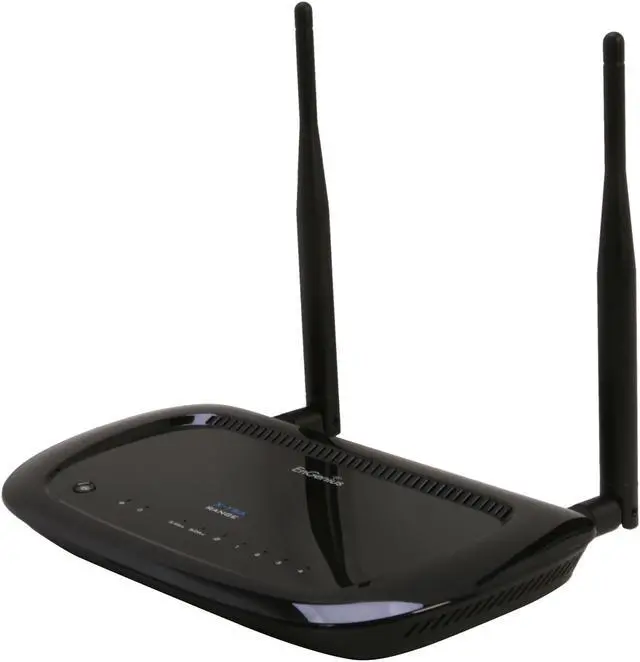
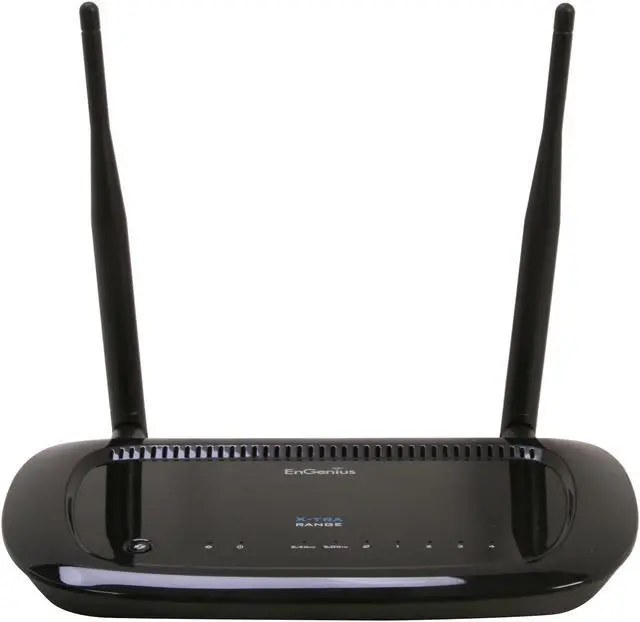
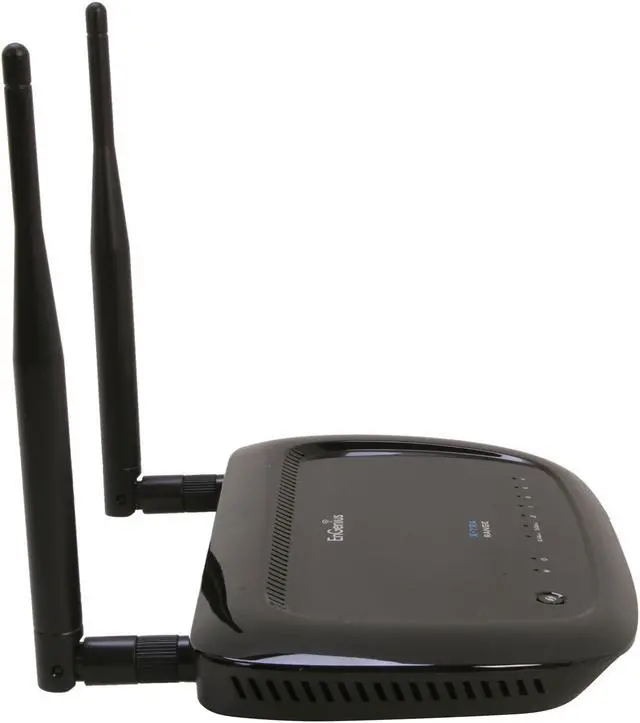
EnGenius ESR600H Long Range 300+300Mbps Dual-Band Wireless-N Router

  • 300Mbps + 300 Mbps
  • High Output Power + 5dBi High Gain Antenna
  • USB Adapter for storage and printer sharing
  • Pin It
  • Email this page
ICON Loading...

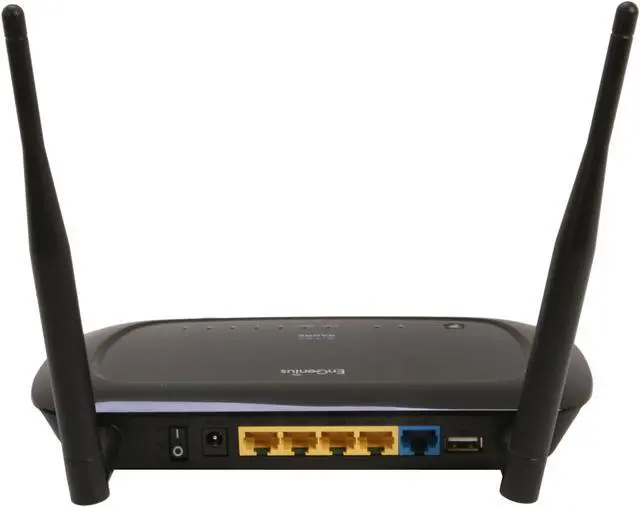
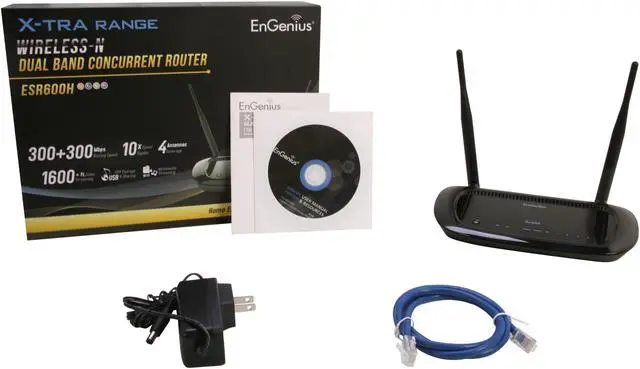
The Engenius XtraRange ESR600H is a Dual-Band Concurrent (300 + 300 Mbps) Wireless-N Router with a built-in 4-Port Gigabit switch and a Gigabit WAN port, and a built-in USB port to support a USB hard drive or USB printer. This high-powered Wireless-N router offers robust connectivity and performance for computers, smartphones, tablet PCs and home entertainment devices in a home or small office.

The ESR600H’s high transmit power capability, up to 100mW (20dBm) is designed to deliver extended range and expanded coverage so your family can connect more devices throughout and around your home and take advantage of all the free and subscription-based Internet services now available on Blu-ray players, game consoles, set top boxes, HDTVs and more. Users can also connect a USB hard drive to share its content throughout the home.

The ESR600H comes with the detachable 5dBi high gain external antennas and is embedded with internal high gain antennas to extend range and provide greater coverage for better overall wireless connectivity to remote devices.

The ESR600H also supports several security features and settings including industry standard wireless encryption, such as WEP, WPA/WPA2 to prevent unauthorized access to the network; an advanced SPI (Stateful Packet Inspection) firewall to block malicious software from the Internet from accessing networked devices; MAC Address filtering to grant only known computers and devices network access; and URL filtering to block access to unwanted or offensive websites.

This smart router also employs intelligent QoS (Quality of Service) to prioritize bandwidth-intensive applications like HD video and gaming or bandwidth sensitive applications like VoIP (Voice over IP) telephone calls for optimal connectivity.
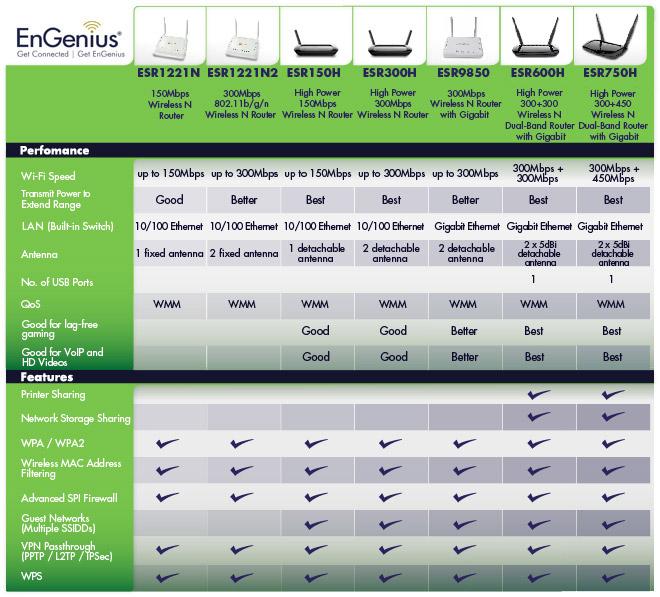
ESR1221NESR1221N2ESR150HESR300HESR9850ESR600HESR750H
  • newegg Wireless-N Speed The EnGenius ESR600H utilizes 802.11n standard speeds, up to 300 Mbps in both the 2.4 and 5GHz frequency bands, ideal for media streaming, online gaming, and large file transfers in and around the home.
  • newegg Gigabit Wired Speeds and USB Port The EnGenius ESR600H includes a 4-Port Gigabit Switch and Gigabit WAN port for 10x faster throughput than Fast Ethernet making large file transfers and HD Video streaming incredibly fast. One USB port allows you to attach and share a USB hard drive or to connect a USB-enabled printer; or for streaming music from an iTunes-enabled device.
  • newegg Detachable 5dBi High Gain Antennas and Embedded with Internal High Gain antennas The EnGenius ESR600H comes with high gain external and internal antennas extending wireless signal range and providing greater coverage and connectivity to remote devices. And the external antennas are detachable offering a chance to upgrade to higher gain antennas for even greater range and coverage.
  • newegg Prioritizes Applications and Maintains Quality of Experience Intelligent QoS (Quality of Service) prioritizes bandwidth intensive applications like HD video and gaming or bandwidth sensitive applications like VoIP telephone calls.
  • newegg Industry-Standard Security with L2TP and PPTP VPN support The EnGenius ESR600H provides advanced WPA and WPA2 wireless encryption, SPI firewall, Denial of Service (DoS) attack blocking, MAC filtering and URL filtering to secure high-speed network connections. It also supports L2TP and PPTP VPN tunnels to seamlessly secure your network, while enjoying high-speed surfing and sensitive data transmission from remote locations. The EnGenius ESR600H also offers more guest access options. Up to four separate and discrete SSIDs can be set to enable friends or visitors to access the Internet while protecting other networked computers or hard drives in the home that may contain private information.
  • newegg Advanced High Output Power Technology Up to 100mW transmit power extends wireless signal range and provides greater coverage.

Learn more about the EnGenius Technologies ESR600H

Model

Brand
EnGenius
Model
ESR600H

Spec

Standards
IEEE 802.11a/b/g/n, IEEE 802.3/3u/3ab
Security
WEP/WPA/WPA2
WPA/WPA2
WPA2
Ports
1 x 10/100/1000M WAN; 4 x 10/100/1000M LAN
Wireless Data Rates
Up to 300+300Mbps
Frequency Band
2.4GHz/5GHz
Antenna
External Antenna
Interface
USB 2.0
VPN support
PPTP, L2TP, IPSec
Wireless Adapter included
No
Dimensions
6.5" x 5" x 1"
Weight
0.5 lbs.

Features

Features
100mW high output power doubles wireless range with better coverage

Built-in 4-Port Gigabit Switch to connect Blu-ray players, Set Top Boxes, DVRs, Game Consoles and HDTVs

Gigabit WAN port for faster uploads and downloads to and from the Internet

Built-in USB port to share a USB hard drive or printer

Four Guest Access Login Options

WPA / WPA2 encryption to help secure the wireless network

QoS (WMM) optimizes bandwidth performance for streaming media

Detachable 5dBi high gain antennas for longer range and greater coverage. It also allows for end-user upgrade.

Quick Info


Customer Reviews of the EnGenius Technologies ESR600H

Do you own this product? Write a Review

Filter Results

Go
  • ToadeR
  • 5/7/2013 9:19:50 AM
  • Tech Level: Somewhat High
  • Ownership: 1 month to 1 year
  • Verified Owner

1 out of 5 eggsBad NAT (redirects tcp requests to the cloud)

Pros: Turns on

Cons: NAT is screwy. About 8 months ago, installed this in a dentist office that uses client/server software. We had replaced all the workstations and server, as well as a new gigabit switch, cabling etc. New software was always sluggish. I had chalked it up to the new software being buggy (which it is). Last week there was a bug fix release for their software, which improved the speeds somewhat, but some of the software clients wouldn't connect to the database on the server. Windows networking seemed fine (could see all the machines) all pings to the server and gateway (this router) would come back with almost 0 latency as one would expect from a gigabit network, but the software would not connect, and would give a tcp request error showing 2 or 3 different WAN IPs. After a go around with their (the dental software) tech support, we decided it was a routing issue, and, low and behold, if I disconnected the internet connection, the system worked perfectly. I flashed the router with the latest firmware, reset to factory settings and rebuilt the configuration a couple different ways. (DSL modem in bridge with router handling PPPoE session) (reset DSL modem to let it handle PPPoE session and set the router to receive a dynamic IP) No resolution no matter what I tried. So I removed the router and went to just letting the DSL modem act as the gateway and the system works perfectly. Better than ever in fact.

Other Thoughts: The only way around NAT is to set up static routing, which I have no intention of doing. Will probably use this as an access point only. Now I'm seriously concerned as to what's going on with this router because I use this as the gateway for my shop as well. It was puzzling too that only certain machines were affected, insofar as they actually wouldn't connect to the server, ALL the clients were sluggish before removing the router. I ran virus and malware scans on all the workstations and they came up clean. Hopefully DD-WRT has a firmware for this router as I no longer trust engenius with my networks.

Manufacturer Response:

Dear ToadeR,

We appreciate your time in posting your comments and feedback. We are sorry to hear about your experience.

We understand that you are having issues with the NAT on the ESR600H. It would be great if you could give our customer support team a call so we can check on the router. We look forward to getting this issue straightened out right away.

You may reach us through our number at 1-888-735-7888 or e-mail us at support@engeniustech.com. Our support team would be glad to be of service to you.

Thank you for your patience and we look forward to hearing from you.

Sincerely,

Mike
Engenius Customer Support Team

Did you find this review helpful? Yes No

  • POWER10
  • 5/6/2013 7:16:06 AM
  • Tech Level: High
  • Ownership: 1 month to 1 year
  • Verified Owner

5 out of 5 eggsSolid

Pros: Sleek, removable high-gain antennas, fast interface, LOTS of options in the interface. Has Basic and Admin sides to the config.

Firmware update is easy to find.

Performance is solid. Love this unit.
Technical support at EnGenius speaks english, located in California and is 100% on point. The guy I spoke with was actually a wireless network engineer and actually knew what beam-forming and SNR meant.

Had this unit running solid with heavy daily traffic for over 6 months straight without a single reboot.

dual band.

Cons: Can't think of any.

Did you find this review helpful? Yes No

  • maksim
  • 4/22/2013 2:05:27 PM
  • Tech Level: Somewhat High
  • Ownership: less than 1 day
  • Verified Owner

1 out of 5 eggs low range

Pros: Very fast when you are close to it.

Cons: Dosent cover my 3 bedroom appartment , very poor wifi signal , super short range , my old netgear rounder gets better range.

Manufacturer Response:

Dear maksim,

We appreciate your time in posting your comments and feedback. We are sorry to hear about your experience.

We understand that you are having wireless range issues with the ESR600H. There might be some possible settings you have not tried yet. We look forward to getting this issue straightened out right away.

You may reach us through our number at 1-888-735-7888 or e-mail us at support@engeniustech.com. Our support team would be glad to be of service to you.

Thank you for your patience and we look forward to hearing from you.

Sincerely,

Mike
Engenius Customer Support Team

Did you find this review helpful? Yes No

  • tommy2oclock
  • 4/13/2013 4:40:11 PM
  • Tech Level: Somewhat High
  • Ownership: 1 month to 1 year
  • Verified Owner

1 out of 5 eggsbad quality

Pros: none

Cons: didnt work right from day one. now that I have another router, this one was junk from the start.

Manufacturer Response:

Dear tommy2oclock,

We appreciate your time in posting your comments and feedback. We are sorry to hear about your experience.

We understand your decision but we still hope to earn your business in the future. We take your feedback seriously and continue to work to improve our products and customer support.

You may reach us through our number at 1-888-735-7888 or e-mail us at support@engeniustech.com. Our support team would be glad to be of service to you. Thank you for your patience and we look forward to hearing from you.

Sincerely,

Mike
Engenius Customer Support Team

1 out of 1 people found this review helpful. Did you? Yes No

  • N/A
  • 3/23/2013 9:39:29 PM
  • Tech Level: Somewhat High
  • Ownership: 1 month to 1 year
  • Verified Owner

1 out of 5 eggsDON'T BUY

Pros: I have yet to find one

Cons: This thing is terrible, the wireless network crashes a few times an hour and takes a few minutes to reboot. The range is average, I had to setup a repeater running dd-wrt to get full coverage of my house. This thing can't stream any video through one floor and across my house. The admin is not user friendly and support is almost non existent, 8am - 5pm M-F, so I can't resolve this issue because I work and would have to take time off to try and resolve this issue. I give up and I'm buying another router, one that will work.

Manufacturer Response:

Dear Valued Customer,

We appreciate your time in posting your comments and feedback. We are sorry to hear about your experience.

We understand that you are having problems with the ESR600H. The firmware might need to be upgraded to the latest version. We look forward to getting this issue straightened out right away.

Please allow us to do some troubleshooting with you. You may reach us through our number at 1-888-735-7888 or e-mail us at support@engeniustech.com. Our support team would be glad to be of service to you.

Thank you for your patience and we look forward to hearing from you.

Sincerely,

Mike
Engenius Customer Support Team

Did you find this review helpful? Yes No

  • Suave1
  • 3/23/2013 3:08:43 PM
  • Tech Level: Somewhat High
  • Ownership: 1 month to 1 year
  • Verified Owner

5 out of 5 eggsReliable Router

Pros: A above average router at an affordable price.

I installed this on Dec 1st 2012. I have not rebooted or shut it down. It works great and has not gotten hung like most over the counter routers. It is as reliable as a commercial brand router.

It has lots of advanced features. I mainly purchased it to stream video, watch internet TV, and to do backup transfers over the gigabit switch ports. The landline transfers between gigabit enabled computers is very fast. I set up QoS to manage my over the internet Nettalk phone communication and everything else. I have tested QoS on my phone while downloading large files and it maintains my quality of voice flawlessly.
I have had up to three family members streaming internet media simultaneously without a hitch. It works well at high wireless bandwidth streaming. This router can handle it well.

Cons: It is touted as long range. I do not think the range is any better than most of the standard wireless routers. I do not see a range boost from my two previous routers running at 2.4Ghz. My old D-Link DI-624 and Netgear Mr814 feature wise are not even close comparison wise but the range I get are about the same. So if you're looking to boost your range this router may not be the right one. The range is about normal with the Tx Power Range set to 100%.

Other Thoughts: All of my wireless devices get a consistent 54Mbps connection rate. I have tweaked one of my newer laptops to get above 100Mbps connection at the 5Ghz band. Getting higher connections is a ticky thing and it all has to do with the adapter capabilities and settings. This router is great that it can broadcast both bands simultaneously. It is like running two separate routers.

Did you find this review helpful? Yes No

  • Reddog
  • 3/14/2013 3:14:15 PM
  • Tech Level: High
  • Ownership: 1 month to 1 year
  • Verified Owner

4 out of 5 eggsNice Router with Extras

Pros: Old router was causing my internet to be slow so purchased this one, mainly for the external USB port. It was a little different setting it up but once I got used to the gui, making changes is easy. USB Hard Drive feature is nice. Can access it from any PC connected to the router. You access it like network share which you can then do a mapped drive. Set it to auto map once you connected to your wifi.

Cons: A little difficult setting it up. You have to install their software on a PC to get the USB hard drive working. I thought it would just be plug-n-play but apparently not. Speeds are good, service has pretty good range, and plenty of ports on the back.

Did you find this review helpful? Yes No

  • random
  • 3/8/2013 10:05:16 AM
  • Tech Level: Average
  • Ownership: 1 week to 1 month
  • Verified Owner

5 out of 5 eggsEnGenius

Pros: Great Range
Great Speed

Cons: none so far

Other Thoughts: Great router especially for the price. Have not installed the usb sharing feature yet, but other than that everything is fantastic with this

Did you find this review helpful? Yes No

  • scottncc
  • 2/22/2013 12:55:55 PM
  • Tech Level: Average
  • Ownership: 1 month to 1 year
  • Verified Owner

4 out of 5 eggs

Pros: Good range, better than my previous Buffalo router. I get excellent signal everywhere in a 2000 sq.ft house. This is my first N router but internet streaming (Netflix, ect) seems improved. This router has been solid so far, after one reboot for initial configuration I've had 42 days of uptime with no hiccups.

Cons: The setup UI is slow to respond at times, sometimes a refresh will bring it up and sometimes not. Options are limited compared to DD-wrt but I can do most everything I need to do. The included documentation is not very helpful for anything but basic setup.

Other Thoughts: Previous reviewer mentioned this router doesn't support a guest network, this is not true. You can make a separate ssid in Wireless/basic, then set the parameters in Wireless/policy.

Did you find this review helpful? Yes No

  • ND
  • 2/16/2013 12:52:14 PM
  • Tech Level: Average
  • Ownership: 1 month to 1 year
  • Verified Owner

1 out of 5 eggs

Pros: it showed a faster connection than my old "n" router, dual band, worked well with wired computers

Cons: It dropped connections and could not connect to some computers. The shown speed would slow to a crawl whenever i tried to use the internet. I updated the firmware, but it did not help. I am going to try to send it back. Also, the blue flashing lights are really bright and cannot be dimmed or turned off.

Other Thoughts: it had the same range as my old "n" router

Manufacturer Response:

Dear ND,

We are sorry for any inconvenience this might have caused you. If you are willing to do some troubleshooting please contact us at 888-735-7888 or e-mail us at support@engeniustech.com. Our support team would be glad to be of service to you.

Sincerely,

Mike
Engenius Customer Support Team

1 out of 1 people found this review helpful. Did you? Yes No

Compare Offers from All Sellers

Seller Name & Rating Offer Details  
ICON Loading...
Are you an E-Blast Insider? Subscribe Newegg e-Blast

Buzz

Solid Router

5 out of 5 eggs
Decent Range, Great Price Point, Solid GUI, Gigabit, Mounts to a Wall,
— Make 12/11/2012

Nice

5 out of 5 eggs
Great price, attractive, nice GUI, easy setup, gigabit, 300 Mbps, 20dB (100mW)-good range, Internal & external ...
— wingbike 12/26/2012


PayPal
Shop without retyping payment details. Secure shopping made faster.
Check out with PayPal.

Financing


LOADING... LOADING...
Shop by Region: United States | Canada | China
Follow us:   RSS Feeds Youtube
VeriSign Reliability Seal1This site protected by Trustwave's Trusted Commerce program Inc500
Policy & Agreement | Privacy Policy  © 2000-2013 Newegg Inc.  All rights reserved.
If the Adobe Reader does not appear when you click on a link for a PDF file, you can download Adobe Reader from the Adobe web site. nassau