Skip to: |

Newegg.com - A great place to buy computers, computer parts, electronics, software, accessories, and DVDs online. With great prices, fast shipping, and top-rated customer service - once you know, you Newegg.

If you are reading this message, Please click this link to reload this page.(Do not use your browser's "Refresh" button). Please email us if you're running the latest version of your browser and you still see this message.

Newegg.com - Computer Parts, Laptops, Electronics, HDTVs, Digital Cameras and More!

  • | Wish List
  • Help
Search all
Search
Home
Home > 
Computer Hardware > 
Networking > 
Wireless Networking > 
Wireless Adapters > 
TP-LINK > 
Item#: N82E16833704045

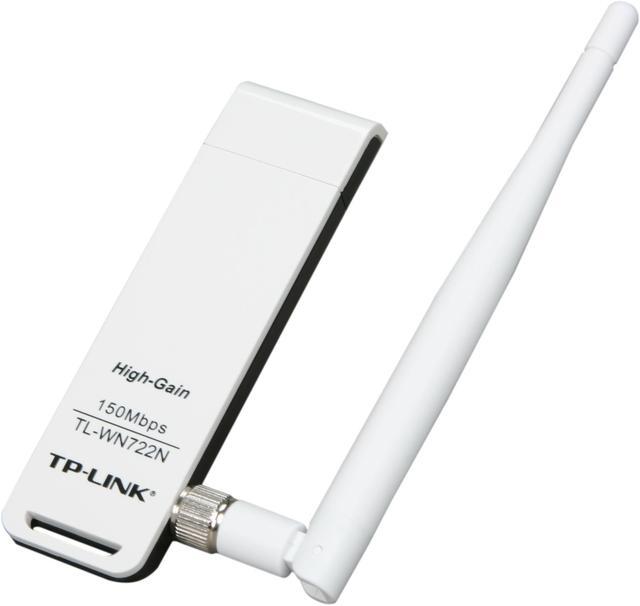
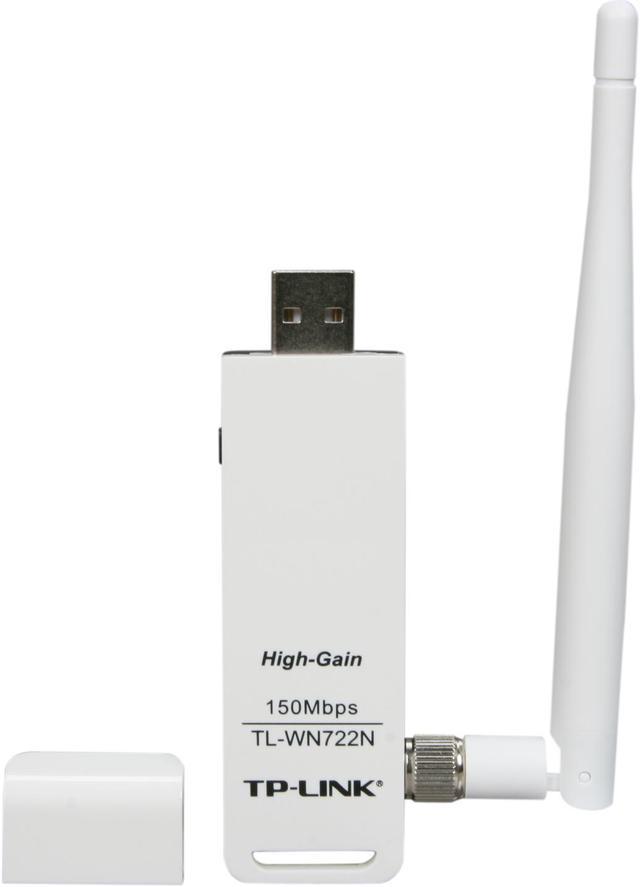
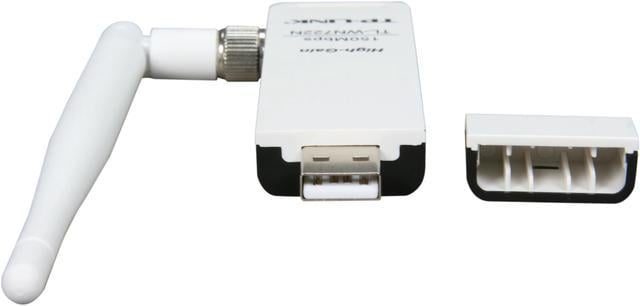
TP-LINK TL-WN722N Wireless N150 High Gain USB Adapter, 150Mbps, w/4 dBi High Gain Detachable Antenna, IEEE 802.11b/g/n, WEP, WPA/WPA2

  • Ideal for home use
  • Great signal w/4 dBi High Gain Antenna
  • Up to 150Mbps Wireless Data Rates
  • Supports Sony PSP X-Link
  • Easy encryption w/ WPS button
  • Advanced Security-WPA / WPA2
  • Pin It
  • Email this page
ICON Loading...


Learn more about the TP-LINK TL-WN722N

Model

Brand
TP-LINK
Model
TL-WN722N

Spec

Standards
IEEE 802.11b/g/n
Wireless Data Rates
Up to 150Mbps
Security
64/128 bit WEP, WPA-PSK/WPA2-PSK
WPA/WPA2
WPA2
Interface
USB 2.0
Frequency Band
2.4GHz - 2.4835GHz
Modulation
DBPSK, DQPSK, CCK, OFDM, 16-QAM, 64-QAM
Antenna
4dBi Detachable Omni-directional Antenna (RP-SMA)
System Requirements
OS: Windows 7(32/64bits), Windows Vista(32/64bits), Windows XP(32/64bits), Windows 2000
Dimensions
3.7" x 1.0" x 0.4"
Temperature
0°C - 40°C (32°F - 104°F)
Humidity
10% - 90% (Non-Condensing)

Feature

Features
Wireless Modes: Ad-Hoc / Infrastructure mode

Advanced Functions: WMM, PSP X-LINK(For Windows XP), Roaming

Wireless N speed up to 150Mbps makes it ideal for video streaming, online gaming and VoIP

High gain external antenna brings better performance than conventional internal antenna

Easy wireless security encryption at a push of the QSS button

Packaging

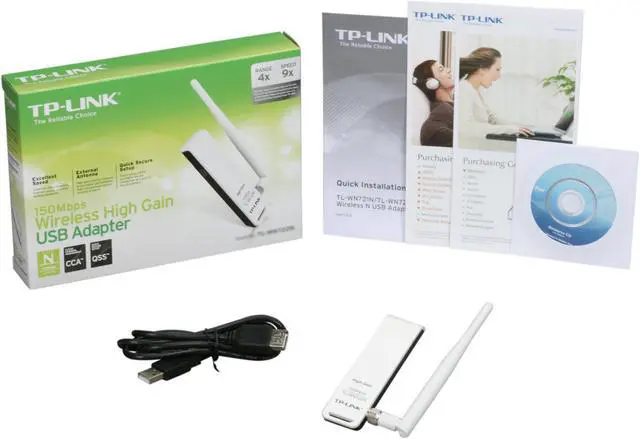
Package Contents
Wireless Adapter
4dBi detachable Omni directional antenna
Resource CD
Quick Installation Guide

Manufacturer Warranty

Parts
2 years limited
Labor
2 years limited

Quick Info

Warranty

  • Limited Warranty period (parts): 2 years
  • Limited Warranty period (labor): 2 years


Customer Reviews of the TP-LINK TL-WN722N

Do you own this product? Write a Review

Filter Results

Go
  • AmNowtheHulk
  • 6/15/2013 1:01:48 PM
  • Tech Level: Average
  • Ownership: less than 1 day
  • Verified Owner

1 out of 5 eggsPiece of junk

Pros: Worked for 5 minutes.

Cons: See pros

Other Thoughts: Stopped receiving power from the USB port. Tried every port on my computer, nothing. I've been without internet on my main machine for almost two weeks now, and this made me angry. Don't buy, you will regret it.

Did you find this review helpful? Yes No

  • TenpennyTower
  • 6/5/2013 11:25:37 AM
  • Tech Level: Somewhat High
  • Ownership: 1 month to 1 year
  • Verified Owner

5 out of 5 eggs

Pros: Easy and quick setup.

Cons: None

0 out of 1 people found this review helpful. Did you? Yes No

  • JeffTY
  • 6/5/2013 8:29:40 AM
  • Tech Level: High
  • Ownership: 1 month to 1 year
  • Verified Owner

5 out of 5 eggsGreat Product

Pros: Purchased to boost wireless range for my wife's old laptop. No need to upgrade your entire system to get better signal strength!

Cons: The end cap doesn't have a string to ensure it stays with the antenna.

Did you find this review helpful? Yes No

  • TylerH
  • 6/3/2013 6:47:59 PM
  • Tech Level: Somewhat High
  • Ownership: more than 1 year
  • Verified Owner

4 out of 5 eggs2 Year Evaluation

Pros: Cheep plug and play WiFi dongle.
Nice little extra boost antenna. (Great for sneaking WiFi across the street and few houses down.)
USB extender.
Sweet cap in which I only used once when moving houses.
Works fine in XP, Win7, and even Linux.

Cons: That Windows 8 Driver. Although given it is still beta, it's the only thing holding me back from a full on Windows 8 desktop (Keeping it on tri-boot with Wn7 and Ubuntu Linux to use the drivers from respective).
Little bulky, but nothing the USB extender included couldn't solve.

Other Thoughts: I haven't had a major problem (IE. Heating or serious disconnection problems), maybe I got lucky on this one or maybe it just hasn't happened yet. Overall, great cheep USB WiFi dongle.

Did you find this review helpful? Yes No

  • Mike
  • 5/29/2013 9:05:52 PM
  • Tech Level: Somewhat High
  • Ownership: 1 month to 1 year
  • Verified Owner

2 out of 5 eggsoverheated? and died

Pros: -Worked well out of the box

Cons: -Utility software was horrible (-1 egg)
-Quit working one day, when I went to remove the cable extender it was so hot it almost burned me! I expected it to last slightly longer than a year.

Manufacturer Response:

Hi Mike,
We're happy to hear the adapter works and apologize for the inconvenience caused.
For the utility issue, it's up to your choice. You could just install the driver and let the Windows built-in utility control the adapter.

For the temperature issue, I hope it didn't burn you. We provide 2-year warranty on this adapter and would like to replace you a new one upon your request. In that way we could get back the adapter and test its temperature.

If you need further info, please feel free to let me know.
My email is: howard.he@tp-link.com

Best Regards!

TP-LINK Support Team
support@tp-link.com
(866) 225-8139
http://www.tp-link.com/us/support
http://www.facebook.com/TPLINK

1 out of 1 people found this review helpful. Did you? Yes No

  • N/A
  • 5/29/2013 3:38:16 PM
  • Tech Level: Average
  • Ownership: less than 1 day
  • Verified Owner

5 out of 5 eggsIt worked

Pros: The drivers on the disc are the newest (2011). Came with a USB extension cord in the box, although it isn't a dock like the one that also comes with the adapter.

Cons: Couldn't really get it to connect into my backpanel USB ports for some reason, had to use the dock. Also, it would face upside down had I not used the dock which isn't actually a big deal.

Other Thoughts: Missing W8 drivers, can be found on both their .com and .us sites.

0 out of 1 people found this review helpful. Did you? Yes No

  • k
  • 5/29/2013 9:16:58 AM
  • Tech Level: Somewhat High
  • Ownership: 1 month to 1 year
  • Verified Owner

4 out of 5 eggsVery very good, but

Pros: It works.
It was CHEAP
It works.

Cons: Every time my computer goes to sleep, I have to remove the dongle and plug it back in. This has happened without the computer going to sleep maybe 3 times in 6 months as well.

Other Thoughts: For the $15 I can't complain. It's a lot better and a lot faster than the last $15 dongle i bought.

1 out of 1 people found this review helpful. Did you? Yes No

  • denny
  • 5/27/2013 12:15:27 PM
  • Tech Level: High
  • Ownership: 1 week to 1 month
  • Verified Owner

1 out of 5 eggsWont work steady.

Pros: Installed in win7 and works somewhat.

Cons: Watching Netflix constantly changes back from full screen.
Scrolling web pages changes constantly to top of screen.
You are always left clicking mouse to keep scrolling.

Other Thoughts: In all fairness after 2 TP-Link Wireless modems and 2 TP-Link wireless adapters this is the first trouble I've had!

Manufacturer Response:

Hi Denny,
We apologize for the inconvenience caused by the adapter.
The adapter should not affect the mouse and keyboard.
May I provide you some suggestions?
1. Uninstall the driver and utility; Install the driver only and let Windows built-in utility control your adapter;
2. Change to use another USB port with the USB extention cable.

If you need further info, please feel free to drop me an email @ howard.he@tp-link.com

Best Regards!

TP-LINK Support Team
support@tp-link.com
(866) 225-8139
http://www.tp-link.com/us/support
http://www.facebook.com/TPLINK

Did you find this review helpful? Yes No

  • N/A
  • 5/23/2013 10:43:08 AM
  • Tech Level: Average
  • Ownership: more than 1 year

1 out of 5 eggsWindows 8

Pros: Worked fine on Windows XP

Cons: Upgraded to Windows 8 and the Beta Windows 8 drivers are really bad. You can't play any online games because your latency will jump all over the place.

Other Thoughts: Seems fine when you are just surfing the web, but avoid at all costs when gaming on Windows 8.

Manufacturer Response:

Dear customer,
We apologize for the inconvenience caused by the WN722N on your Windows 8 gaming PC.

In order to resolve this issue, could you please contact me and share with me your bad experience on gaming?
My email is: howard.he@tp-link.com

And we appreciate that if you could tell me the following info:
1. Model# of the motherborad;
2. Windows 8 version;
3. What game it is;
4. The result of speedtest;

Thank you in advance.
Best Regards!

TP-LINK Support Team
support@tp-link.com
(866) 225-8139
http://www.tp-link.com/us/support
http://www.facebook.com/TPLINK

Did you find this review helpful? Yes No

  • stanno
  • 5/22/2013 11:36:46 PM
  • Tech Level: Average
  • Ownership: 1 day to 1 week
  • Verified Owner

1 out of 5 eggstoo light to be a paper weight

Pros: absolutely nothing.

Cons: shoddy construction.. terrible physical connection to USB. DOES NOT WORK. I bought it because of good reviews and it was cheap.. I might as well have wiped myself with it.. this is JUNK. stay away.. btw, I use windows 7 64 bit.

Other Thoughts: save your money and buy something else.. this is total junk. I couldn't get it to work AT ALL after HOURS of trying. A complete waste of money.. I love newegg and have used it for years, but this is the worst purchase I have ever made..

Manufacturer Response:

Dear customer,
We apologize for the inconvenience caused by the adapter.
Usually you just plug in the adapter and install the driver, the adapter will work immediately.
May I know what issue you experienced? Any error message or issue description would be great help for troubleshooting.

I personally like this adapter very much and also hope it can provide excellent wireless connection to any customers who need it.
So if you don't mind, I wish you could share with me more info.
My email is: howard.he@tp-link.com

Best Regards!

TP-LINK Support Team
support@tp-link.com
(866) 225-8139
http://www.tp-link.com/us/support
http://www.facebook.com/TPLINK

Did you find this review helpful? Yes No

Compare Offers from All Sellers

Seller Name & Rating Offer Details  
ICON Loading...
Are you an E-Blast Insider? Subscribe Newegg e-Blast

Buzz

Windows 8 Drivers

5 out of 5 eggs
This device only has beta drivers for windows 8, which did not work properly. I tried turning driver signing off in the boot ...
— dplunn 11/6/2012

5 out of 5 eggs
It's worked great.
— Domenic 1/21/2012


PayPal
Shop without retyping payment details. Secure shopping made faster.
Check out with PayPal.

Financing


Home
Home > 
Computer Hardware > 
Networking > 
Wireless Networking > 
Wireless Adapters > 
TP-LINK > 
Item#: N82E16833704045
LOADING... LOADING...
Shop by Region: United States | Canada | China
VeriSign Click for the BBB Business Review of this Computers - Supplies & Parts in Whittier CAThis site protected by Trustwave's Trusted Commerce program Inc500
Policy & Agreement | Privacy Policy  © 2000-2013 Newegg Inc.  All rights reserved.
If the Adobe Reader does not appear when you click on a link for a PDF file, you can download Adobe Reader from the Adobe web site. nassau