Skip to: |

Newegg.com - A great place to buy computers, computer parts, electronics, software, accessories, and DVDs online. With great prices, fast shipping, and top-rated customer service - once you know, you Newegg.

If you are reading this message, Please click this link to reload this page.(Do not use your browser's "Refresh" button). Please email us if you're running the latest version of your browser and you still see this message.

Newegg.com - Computer Parts, Laptops, Electronics, HDTVs, Digital Cameras and More!

  • | Wish List
  • Help
Home
Home > 
Computer Hardware > 
Networking > 
Wireless Networking > 
Wireless Accessories > 
TP-LINK > 
Item#: N82E16833997226

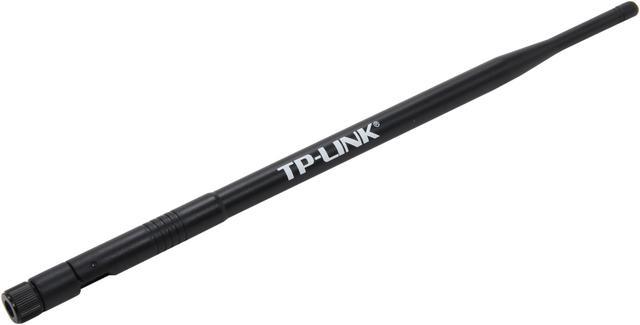
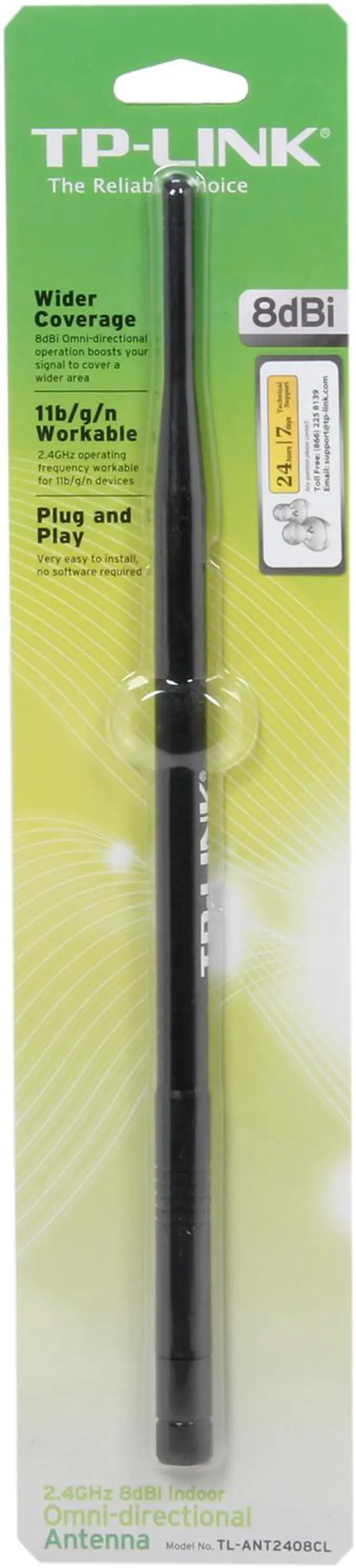
TP-LINK TL-ANT2408CL 2.4GHz 8dBi Indoor Omni-directional Antenna

  • Frequency: 2.4GHz
  • Impedance: 50 Ohms
  • Gain: 8 dBi
  • Radiation: Omni-directional
  • VSWR(MAX.): 1.92:1
  • HPBW/H( °): 360°
  • HPBW/V( °): 15°
  • Polarization: Linear, Vertical
  • Mounting: Desktop / Fixed on met
  • Pin It
  • Email this page
ICON Loading...

The TL-ANT2408CL 8dBi indoor omni-directional antenna is ideal for upgrading the wireless performance of your wireless access points/routers. It is very easy to use, no configuration or software installation required.

Compliant with 802.11n/b/g (2.4GHz), the TL-ANT2408CL will significantly increase the range and strength of your Wi-Fi signal. This quality built omni-directional antenna is a direct replacement for the antenna that comes standard with your router, access point. Because it is omni-directional, no aiming is required - it can send and receive Wi-Fi in all directions.

  • newegg Compliant with 802.11n/b/g (2.4GHz) Compliant with 802.11n/b/g, the TL-ANT2408CL 8dBi antenna operates in the 2.4-2.5 GHz band and provides 8dBi omni-directional operation, which largely extends the wireless range and delivers much better wireless performance.
  • newegg Wide compatibility The antenna offers the RP-SMA Male (Plug) connector guaranteeing wider compatibility with most of the wireless equipments.
  • newegg Easy To Use Installation is very easy - just detach your device's factory antenna and attach our booster antenna and you'll experience an instant increase in signal coverage and stability. (Please note that the increase in signal strength depends mostly on your router or adapter; upgrading the antennas helps but the signal cannot transmit or receive at a level that your modem or adapter does not have.)

Learn more about the TP-LINK TL-ANT2408CL

Model

Brand
TP-LINK
Model
TL-ANT2408CL

Spec

Type
Antenna
Specifications
Frequency: 2.4GHz

Impedance: 50 Ohms

Gain: 8 dBi

Radiation: Omni-directional

VSWR(MAX.): 1.92:1

HPBW/H( °): 360°

HPBW/V( °): 15°

Polarization: Linear, Vertical

Mounting: Desktop / Fixed on metal surface

Application: Indoor

Compliant with 802.11n/b/g (2.4GHz)

RP-SMA Male connector

Features

Features
Very easy to install, no software required

8dBi Omni-directional operation boosts your signal to a higher range

RP-SMA Male connector, works with device with RP-SMA Female connector

Quick Info


Customer Reviews of the TP-LINK TL-ANT2408CL

Do you own this product? Write a Review

Filter Results

Go
  • Wade
  • 4/20/2013 4:28:17 PM
  • Tech Level: High
  • Ownership: 1 day to 1 week
  • Verified Owner

3 out of 5 eggsHelps the 2.4 GHz, does not support 5 GHz

Pros: It does improve the range over stock antennas on the 2.4 GHz band. Not a lot, but noticeable.

Cons: The antennas clearly say they are for 2.4 GHz and they really are. If you use 5 GHz, look somewhere else. Strangely, these antennas work better for devices above it. I get a better signal upstairs 50 feet away than downstairs where the router is 50 feet away even though the signal has to go through more walls upstairs.

Other Thoughts: These are more suited for WiFi adapters on your computer and not for routers and access points.

Manufacturer Response:

Hi Wade,
We're happy to hear the antenna boostes your 2.4GHz wireless network.

Yes, the antenna is 2.4GHz only.
It's also suitable for routers and APs with only 2.4GHz radio.

We really appreciate you taking the time to check out our TP-Link products and we hope that you will be able to check out more in the future.

Best Regards!

TP-LINK Support Team
support@tp-link.com
(866) 225-8139
http://www.tp-link.com/us/support
http://www.facebook.com/TPLINK

Did you find this review helpful? Yes No

  • shawn_k
  • 4/4/2013 6:13:25 PM
  • Tech Level: Somewhat High
  • Ownership: 1 month to 1 year
  • Verified Owner

4 out of 5 eggsTP-LINK ANT2408CL (review)

Pros: easily movable. screws onto the back where original ones were

Cons: not that much different in performance from stock ones

Other Thoughts: there huge

Did you find this review helpful? Yes No

  • N/A
  • 2/24/2013 7:48:05 AM
  • Tech Level: Somewhat High
  • Ownership: 1 month to 1 year
  • Verified Owner

5 out of 5 eggs

Pros: They work.

Cons: ...

Other Thoughts: After I bought these I moved my router and had no need of them. They are laughably large though!

Did you find this review helpful? Yes No

  • rob
  • 2/15/2013 1:26:06 PM
  • Tech Level: Somewhat High
  • Ownership: 1 day to 1 week
  • Verified Owner

5 out of 5 eggsWorked better than expected.

Pros: I live in a condo where I see almost 20 networks. There is a tremendous amount of interference at 2.4GHz . I've tried all possible channels on my router/adapters and have had limited success. My ISP advertises 75 Megabits per second down and 35 Megabits per second up. I get 75/35 when hardwired. With wireless, my rates used to top out at 40/25. I swapped antennas (two of them) and now get 70/34 consistently, reliably. My connections go through one wall, range from 15-30 feet, with lots of other 2.4GHz devices around.

Cons: I did not notice the height of the these antennas as being advertised.

Other Thoughts: I bought a pair of antennas for my red-banded premium FiOS router. They are about 11 inches/28 centimeters tall for those of you with space concerns.

1 out of 1 people found this review helpful. Did you? Yes No

  • moe07728
  • 2/3/2013 8:51:45 AM
  • Tech Level: Somewhat High
  • Ownership: 1 day to 1 week
  • Verified Owner

5 out of 5 eggsNoticeable signal gain

Pros: Noticeable improvement in signal strength and definitely a good value. On average I saw ~10% stronger signal over the stock 5dbi antenna on my amped sr10000 repeater. I'm pretty far away from the router as well!

Cons: none at the moment

Did you find this review helpful? Yes No

  • Just Checking
  • 1/27/2013 8:34:55 PM
  • Tech Level: Average
  • Ownership: 1 week to 1 month
  • Verified Owner

5 out of 5 eggsGreat Value High Gain Antenna

Pros: * Sturdy Construction. No Rattles or falling over.
* Increases Signal Strength for both 2.4 GHz and 5 GHz Bands.
* NewEgg reduces the price when you Bundle it in with a Router Purchase.
* Significantly extends the range and speed of the WiFi transmission in my Home.

Cons: * All Routers with External Antenna should already have these as a standard feature.
* Not the cheapest Antenna offered ;-)

Other Thoughts: I did a direct comparison against a pair of G-Skill antenna I bought here for US$5 each and, the standard antenna that came with the D-Link DIR-825 Dual Band WiFi Router I also just purchased. The TP-Link Antennas increased signal strength and extended the signal range for both the 2.4 GHz and 5 GHz bands. I was able to get max signal on the 2.4 GHz band at 20 meters and through 5 walls with metal pipes, romex, and cableing. The 5 GHz band was also improved though the original signal, and hence the amplified signal were also weaker than the 2.4 GHz band.

I do not have a signal meter that can give a quantitative measure of signal strength in my home. I measured it using a HP Elitebook Laptop which I brought to different locations and connected to the WiFi and streamed Video signal while monitoring the # of bars of signal strength for each band that the HP laptop reported.

The TP-Link antenna gave the best increase in signal strength of the three antenna types I tested. Surprizingly enough, the G-Skill antenna which are the longest and largest antenna (with a reported 9db signal gain) had the worst signal strength. The stock antenna on the D-link DIR-825 router were the shortest/smallest antenna but gave more signal strenght than the G-Skill antenna but not as good as the TP-Link antenna.

I would recommend the TP-Link antenna if you need more signal strength from your router. Stay away from the G-Skill high gain antenna. Those may be half the price but, if they don't increase the signal, they are not worth buying.

Did you find this review helpful? Yes No

  • WolfmanKiknAzz
  • 1/27/2013 4:00:33 PM
  • Tech Level: High
  • Ownership: 1 week to 1 month
  • Verified Owner

5 out of 5 eggsAWSUM!!!

Pros: Gained additional 2 BARS for near full signal constantly!!! Put 2x on my WiFi Router and 1x on my PC!!!! Used on a N300 Dual Router and N300 PCI-e Adapter!!

Cons: besides it's a foot tall, but I know that going into purchase, and for reasoning of getting better signal!!

Other Thoughts: I had to move my puter upstairs....about 40-50ft thru 4walls and of coarse a floor!!! This increased the signal so I wouldn't get dropped all the time!!!! Before I was only one room away (1 wall), so signal was great!!!

Did you find this review helpful? Yes No

  • Karmuppa
  • 1/5/2013 8:00:30 AM
  • Tech Level: Average
  • Ownership: 1 month to 1 year
  • Verified Owner

5 out of 5 eggsWorked for me

Pros: I bought this to complement my Engenius 2.4ghz wifi adapter. The sorry receiver built into my laptop is useless.
Adapter is excellent and comes with a 2dbi antenna. Not quite enough of a boost if I move around and get too far from the router. I needed more dbi for more bars. This TP-LINK 8dBi andtenna has done the trick. Improved signal greatly. I get five bars all the time.

Cons: I really don't see any for my situation.

Other Thoughts: Yeah, it's big. Not likely to walk out of the building with it.
I have my adapter hooked to my computer via a 10' usb cable so I can search out the sweet spots if necessary.So, the cable plus the huge antenna are sort of odd looking but they were inexpensive solutions that work and all problems solved.

Did you find this review helpful? Yes No

  • GarryB
  • 11/29/2012 1:29:35 PM
  • Tech Level: Somewhat High
  • Ownership: less than 1 day
  • Verified Owner

5 out of 5 eggsFemale Connector on Antenna

Pros: Very long / large antenna! Looks well made.

Cons: Very long / large antenna! (If that is a con for you.)

Other Thoughts: The connector is FEMALE! Not sure why the specs say "male". It fits the Encore ENHWI-3GN3 wireless router / repeater I bought it for.

I have not yet used either. I wanted to post concerning the connector since I had so much trouble trying to verify the connectors on both units.

1 out of 1 people found this review helpful. Did you? Yes No

  • CB
  • 11/8/2012 2:10:51 PM
  • Tech Level: Somewhat High
  • Ownership: 1 day to 1 week
  • Verified Owner

5 out of 5 eggsIf you own FiOS Actiontec MI424WR Buy It!

Pros: Made poor weak signal to good signal. before terrible 75 -80dBi to now 65 - 70 dBi a few rooms away. Still need to select channels for best signal.

Cons: Will not change router to top of the line 5 Ghz band or 802.11AC - tongue in cheek

Other Thoughts: If this didn't work, it was going to force me to speed up my acquisition of a new top of the line router with 5 GHz channels. On a good day with low interference I am getting over well 50 Mbps down without stuttering signal loss. Even bad days with interference often 30 Mbps down. Now I can take my time on deciding if an when I will upgrade. It was narrowed down to 5 dBi and this 8dBi one. Glad I got the stronger one. Hope this helps someone with the same issue.

Did you find this review helpful? Yes No

Compare Offers from All Sellers

Seller Name & Rating Offer Details  
ICON Loading...
Are you an E-Blast Insider? Subscribe Newegg e-Blast

Buzz

Works well, SMA connectors

5 out of 5 eggs
Installing two of these on my Asus PCE-N13 PCIe WLAN NIC vastly improved my connection speed and quality. I went from dropped ...
— 5/22/2012

Worked better than expected.

5 out of 5 eggs
I live in a condo where I see almost 20 networks. There is a tremendous amount of interference at 2.4GHz . I've tried ...
— rob 2/15/2013


PayPal
Shop without retyping payment details. Secure shopping made faster.
Check out with PayPal.

Financing


Home
Home > 
Computer Hardware > 
Networking > 
Wireless Networking > 
Wireless Accessories > 
TP-LINK > 
Item#: N82E16833997226
LOADING... LOADING...
Shop by Region: United States | Canada | China
Follow us:   RSS Feeds Youtube
VeriSign Reliability Seal1This site protected by Trustwave's Trusted Commerce program Inc500
Policy & Agreement | Privacy Policy  © 2000-2013 Newegg Inc.  All rights reserved.
If the Adobe Reader does not appear when you click on a link for a PDF file, you can download Adobe Reader from the Adobe web site. nassau