If you are visually impaired and are having difficulty navigating this site, please call our Customer Support line via our toll free number (800) 390-1119.

Newegg.com - A great place to buy computers, computer parts, electronics, software, accessories, and DVDs online. With great prices, fast shipping, and top-rated customer service - once you know, you Newegg.

If you are reading this message, Please click this link to reload this page.(Do not use your browser's "Refresh" button). Please email us if you're running the latest version of your browser and you still see this message.

Newegg.com - Computers, Computer Parts and Electronics

My Account

MyNeweggReviewsHelp & Info  
topNavRowBottom  
Cooler Master  Cooler Master News Room

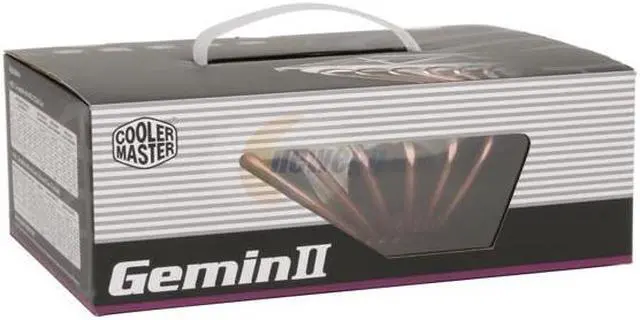
COOLER MASTER GeminII RR-CCH-ANU2-GP CPU+ Board Cooler - Retail

newegg
COOLER MASTER GeminII RR-CCH-ANU2-GP CPU+ Board Cooler - Retail
Image Viewer

COOLER MASTER GeminII RR-CCH-ANU2-GP CPU+ Board Cooler - Retail COOLER MASTER GeminII RR-CCH-ANU2-GP CPU+ Board Cooler - Retail COOLER MASTER GeminII RR-CCH-ANU2-GP CPU+ Board Cooler - Retail COOLER MASTER GeminII RR-CCH-ANU2-GP CPU+ Board Cooler - Retail COOLER MASTER GeminII RR-CCH-ANU2-GP CPU+ Board Cooler - Retail
Currently Unavailable What's this?
Print This Page
Manufacturer InfoReturn Policies

Return Policies

This item is covered by Newegg.com's Standard Return Policy.

  • Return for refund within: 30 days
  • Return for replacement within: 30 days
  • Restocking Fee: Yes
OverviewCustomer ReviewSpecificationsProduct Tour
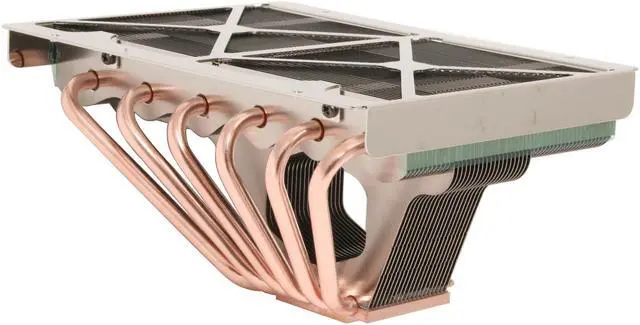
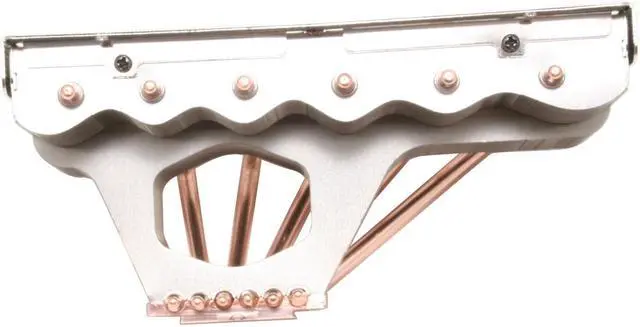
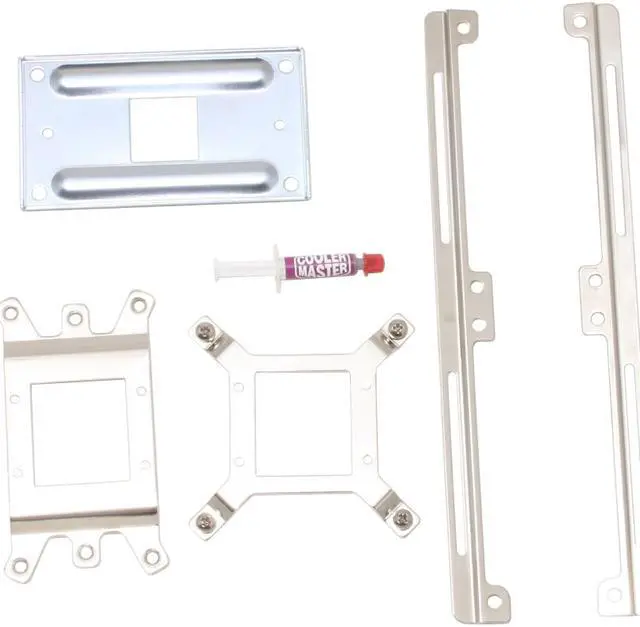
Cooler Master says that its RR-CCH-ANU2-GP "Gemini" is more than a CPU cooler, it's a "complete system cooler." A large beast by any measure, it features 6 copper heatpipes, more fins than a fish market and enough room to mount a pair of 120mm cooling fans. A selection of mounting components allow the user to obtain the optimal installation of the cooler's copper base against the AMD or Intel processor.

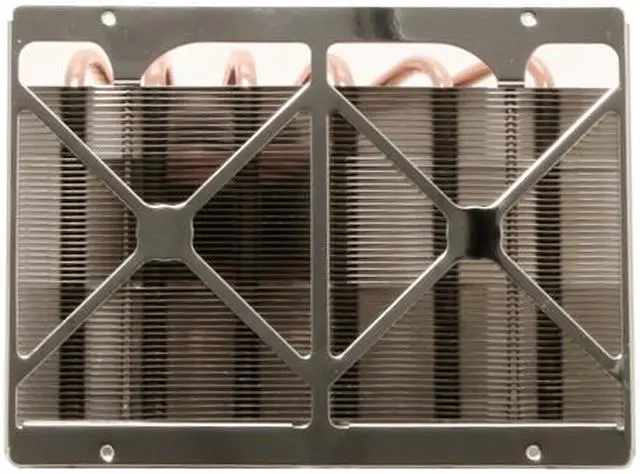
While Cooler Master stresses that fans are optional, nearly any thickness of 120mm fan can be added for additional cooling. This allows further customization according to the user's and system’s needs. Use a pair of ultra-quiet fans for silent operations, or high output fans can be used to get faster, stable performance out of an overclocked CPU. Or, position a silent fan can be placed over the memory, while a high output fan cools the processor. The choice is up to you!

Review Summary (read more reviews)

5
newegg
70%
4
newegg
21%
3
newegg
6%
2
newegg
1%
1
newegg
2%
Product Rating:
Total Reviews: 286

Big Air Cooling

white Reviewed By: daweezyone on 8/2/2007
Rating + 4
Tech Level Tech Level: high - Ownership: 1 month to 1 year
This user purchased this item from Newegg
Pros: Huge volume to dissipate heat. Cools other PC componet's as well though its main functions is as a CPU cooler.It can work passively as well as with cooling fans. Can use Dual 120 mm fans or in passive mode(Both tested and worked great)
**FYI im a 20+ year hardware technician.
Cons: Installation is not for faint at heart, might be a bit daunting to those without a fair amount of PC knowledge and or know how.
Very big area that blocks access to most Ram slots and header pins / jumper's. Make sure your case can handle this before purchase, Cooler master site has a diagram of sizes for you to check with your setup(a plus not a con)
Other Thoughts: Instructions are not great and come on a tiny fold out sheet, not bad instructions but could be better imho. Parts seem to be good quality and nothing is gonna break on you due to poor workmanship. I have installed 1000's of CPU coolers and while this is rather large and not made for small form factor cases it does do a very good job at cooling the pc and north and south bridge chipsets.

If you have never used such a setup and or cooler get a experienced hardwaretech to install.

Using on a AMD 5600 overclocked @ 3.1ghz and the CPU still idles at 29 deg with only one 120mm fan running.. As reported by Sisoft and Everest sensor programs.
True heat was measured via hand held sensor and reports no more than .03 deg off reported temps(very good)
Good product works better than expected, i am very pleased with this cooler and now have 3 of them on my home and gamer based systems.
Manufacturer Response:The installation requires some meticulous laboring, but the result will make it worthwhile.
If you have further questions or need further help, please feel free to visit the Cooler Master forum at http://forum.coolermaster.com/ where you can post questions to numerous experts.

15 out of 16 people found this review helpful. Did you? Yes No

white Reviewed By: mrclarke on 7/26/2007
Rating + 4
Tech Level Tech Level: high - Ownership: 1 day to 1 week
Pros: This should dump the heat generated by any CPU known to man.
I put it on an AMD X2 6000 SOCKET AM2.
Running just fine and i will order the 120 mm fans as soon as i get around to it,
Now for the MEAT OF THIS REPORT!!

this is for users of mother boards that have AMD CPU's on them.

All others LIKEWISE,
TAKE HEED!
it will take above average mechanical knowledge to remove the mother board from the mother board tray and remove the cpu and the the bracket that is the OEM bracket for the heat sink retainer,
if you are not careful and you follow the instructions written by a non-English speaking TECHNICAL WRITER,
you will damage the mother board by applying torque to the final assembly nuts on the back of the mother board,
it will bend the board and it may cause damage to internal power and ground traces that are buried inside the inner layers of a printed circuit board.

[one thousand character limit reached ?]
SOME TEXT REMOVED SO I CAN CONTINUE BELOW>>>
Cons: so,
remove all the old mounting hardware and set it aside.

when you have finally figured out that the four custom screws ARE LEFT HAND SCREWS,
then you can actually get going.

on the AMD BOARD, you need to put the cushion gaskets on the screws first and do not leave the other hard spacers in the box,
put them on right behind the soft spacers that have a sticky back,
They go on the TOP SIDE OF THE BOARD,,,
RIGHT AGAINST THE BOARD.

otherwise the heat sink tends to want to float and not stay in one place.

if you leave them, [ THE HARD SPACERS ] , out of the assembly you will never get a tight fit against the motherboard.

GOOD LUCK with your installation.
Manufacturer Response:Thank you for your purchase. We will work on more reader-friendly instructions for future products. Your review will help out other users and we appreaciate that.
If you have further questions or need further help, please feel free to visit the Cooler Master forum at http://forum.coolermaster.com/ where you can post questions to numerous experts.

8 out of 8 people found this review helpful. Did you? Yes No

Quick Specs (view all30)

ModelRR-CCH-ANU2-GP
TypeHeatsinks only
CompatibilitySocket 754 / 939 / 940 / AM2 / LGA 775
Heatsink MaterialAluminum & Copper
WeightMore than 450g

Review Summary (read all 286 Reviews)

5
newegg
70%
4
newegg
21%
3
newegg
6%
2
newegg
1%
1
newegg
2%
Product Rating:
Total Reviews: 286

white Reviewed By: cretonic1 on 9/1/2008
Rating + 3
Tech Level Tech Level: somewhat high - Ownership: 1 month to 1 year
This user purchased this item from Newegg
Pros: can mount 2 120mm fans, cools memory as well as cpu, probably worth a mint at the recycling center lol ;)
Cons: BIG, HEAVY, CPU cooling is moderate and will work for small OC on a 9950.(I spiked at 67ºC running 3.0ghz at 1.4v 182W), Worked well with my Raidmax Smiladon case as the motherboard side hinged out (this one is a dream for working with btw) Had I not had this style case I would be forced to remove the cooler to swap out memory chips. Also if you have Ballistix tracers you won't be able to see the led's nearly as well as the HS and Fans mask them.
Other Thoughts: For the size and price one could do better and for the hotter cpu's you won't be able to push them to their limit.

For Asthetical value 2 120mm Blue led fans circulating 97cfm each Hightlighted by the blue leds on my post screen, Case, and sound card really looks cool.

Final thoughts works well enough and install isn't so bad if you have experience assembling PC's but I would choose different next time.
Did you find this review helpful? Yes No

not bad

white Reviewed By: Bureaucrat on 9/1/2008
Rating + 4
Tech Level Tech Level: somewhat high - Ownership: 1 week to 1 month
This user purchased this item from Newegg
Pros: The cooler works well. When I had it installed my cpu temp never went above 50 even under a massive load.
Cons: Its huge. it hung well over my ram, which was nice for the extra cooling which is why it was designed that way, but I lost about 5 layers of skin on my knuckles trying to install the ram. I had to eventually upgrade to a motherboard that worked and sadly the cpu on the gigabyte m750sli motherboard is a bit closer to the ram than my asus m3a so I could not install the ram due to the heat pipe being in the way.
Other Thoughts: All in all a good cooler, I didn't want to give it a 5 because it was almost more trouble than it was worth when it was all said and done.
If you have a stable set up and wont have to add or take out ram or plug anything around it in, it will work wonders for your system. If you have a habit of upgrading or bad luck with parts and plugs, look for something that wont drive you insane.
1 out of 1 people found this review helpful. Did you? Yes No

Cools OK without Fans

white Reviewed By: Blender on 8/28/2008
Rating + 4
Tech Level Tech Level: average - Ownership: 1 week to 1 month
This user purchased this item from Newegg
Pros: Despite what some others have said, this heat sink will cool OK without fans if there's decent air movement through the case. I built my system about a month ago with a Core 2 Duo and the stock cooler. I logged my CPU temperatures for several days (doing everything from idling to intense games) had had an average temp of 33 C and a max of 53 C. I switched to this cooler just because I'd already bought it and wanted to see how it did. I have since been averaging 31 C although the max shot up to 59 C while gaming. So it's just a little worse off than stock, but it can hold its own even without the fan. I'm sure it'll be much better as soon as I do add some fans.
Cons: This thing is truly a monster to install. It requires complete removal of the motherboard, and then when reconnecting everything it makes screws and power cables very hard to reach. I'm pretty mechanically inclined and it took me over an hour to do it all. It's not as physically big as I was expecting from other reviews (no problem at all to fit in the case), but it does tend to get in the way of the connections that must be made to the motherboard near the CPU.
Other Thoughts: My case is a CoolerMaster 690. I'm running only the 3 stock fans that came with the case, and none of the fans are positioned to blow directly on this heat sink. I'm not overclocking at the moment, except my factory-overclocked video card.
Did you find this review helpful? Yes No
Model
Brand COOLER MASTER
Series GeminII
Model RR-CCH-ANU2-GP
Spec
Type Heatsinks only
Compatibility Socket AM2 / 754 / 939 / 940 / LGA775
Color 2-Tone
Heatsink Material Copper Base / 6 Heatpipes / Aluminum Fin
Physical Spec
Heatsink Dimensions 175.0 x 124.6 x 81.5mm
Weight 847g
Features
Features CPU+Board Cooler Design cools CPU and its surrounding components
Compatible with AMD X2 Dual Core, Intel Core 2 Duo and Core 2 Extreme.
Complete cooling solution cools CPU and its surrounding components (motherboard, memory, VRM, chipset and VGA cards)
Fan bracket design for mounting two 120 mm fan cools mainboard.
Flexible bracket design provides interference-free installation
Copper base with 6 heat pipes design creates superior cooling performance
Huge aluminum fin design for excellent heat dissipation.

Introduction

Cooler Master says that its RR-CCH-ANU2-GP "Gemini" is more than a CPU cooler, it's a "complete system cooler." A large beast by any measure, it features 6 copper heatpipes, more fins than a fish market and enough room to mount a pair of 120mm cooling fans. A selection of mounting components allow the user to obtain the optimal installation of the cooler's copper base against the AMD or Intel processor.

While Cooler Master stresses that fans are optional, nearly any thickness of 120mm fan can be added for additional cooling. This allows further customization according to the user's and system’s needs. Use a pair of ultra-quiet fans for silent operations, or high output fans can be used to get faster, stable performance out of an overclocked CPU. Or, position a silent fan can be placed over the memory, while a high output fan cools the processor. The choice is up to you!

Highlights

newegg Superior Heat Dissipation
The extra-large copper base and 6 copper heatpipes, coupled with high-density aluminum fins, maximize heat dissipation for the CPU and its surrounding components. The unit also provides an option to add two additional 120mm fan for the best possible cooling performance!
newegg Universal Socket Compatibility
The Cooler Master GeminII features broad compatibility with AMD socket 754, 939, 940, and AM2 platforms, as well as the Intel LGA 775 platform.


Photo Gallery

COOLER MASTER GeminII RR-CCH-ANU2-GP CPU+ Board Cooler - Retail
COOLER MASTER GeminII RR-CCH-ANU2-GP CPU+ Board Cooler - Retail COOLER MASTER GeminII RR-CCH-ANU2-GP CPU+ Board Cooler - Retail COOLER MASTER GeminII RR-CCH-ANU2-GP CPU+ Board Cooler - Retail

Quick Specs

CompatibilitySocket 754 / 939 / 940 / AM2 / LGA 775
Heatsink MaterialAluminum & Copper
TypeHeatsinks only
WeightMore than 450g
NeweggBusiness
For Business Needs
EggXpert.com
Newegg Community
|NeweggMall.com
Shop Multiple Retailers
Shop by Region: United States | Canada | China
VeriSignReseller RatingsReliability Seal1This site protected by Trustwave's Trusted Commerce programInc500
Policy & Agreement | Privacy Policy | NeweggBusiness | Newegg Canada  © 2000-2010 Newegg Inc.  All rights reserved.
If the Adobe Reader does not appear when you click on a link for a PDF file, you can download Adobe Reader from the Adobe web site. nassau