If you are visually impaired and are having difficulty navigating this site, please call our Customer Support line via our toll free number (800) 390-1119.
Newegg.com - A great place to buy computers, computer parts, electronics, software, accessories, and DVDs online. With great prices, fast shipping, and top-rated customer service - once you know, you Newegg.
If you are reading this message, Please click this link to reload this page.(Do not use your browser's "Refresh" button). Please email us if you're running the latest version of your browser and you still see this message.
Beyond any applicable Newegg return policy, this item is warranted independently by the product's Manufacturer. Below is a summary provided for convenience only and may not be accurate or current.
Use this link for full details.
Manufacturer Limited Warranty period (parts): 1 year
Manufacturer Limited Warranty period (labor): 1 year
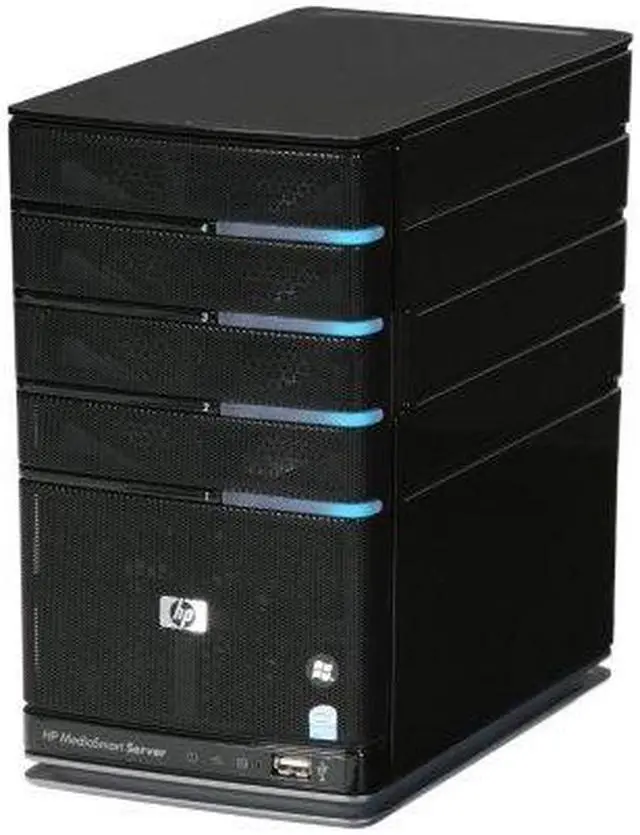
HP takes aim at the top of the home server market and hits it spot on with the MediaSmart series. This compact box is more than just a drive controller and some connectors. It's powered by an extremely energy efficient Intel Celeron 2.0GHz 64-bit processor with 2GB of DDR2 memory. Windows Home Server operating system helps you easily store, access, share and protecting your digital files.
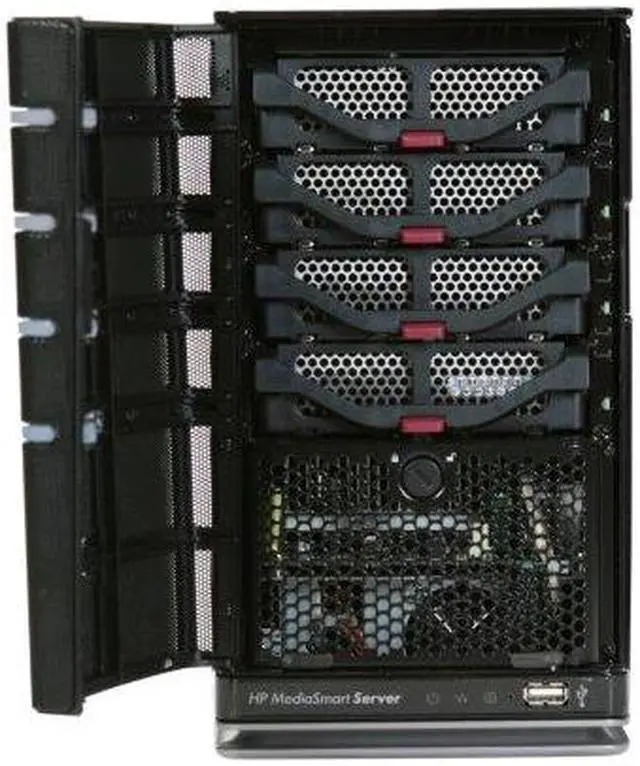
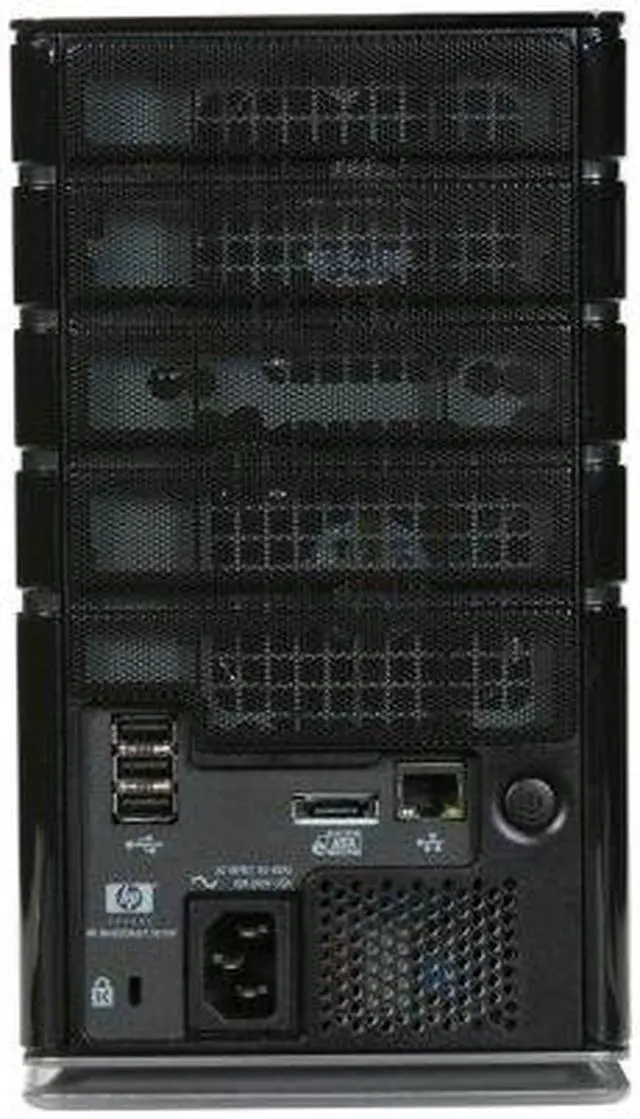
The EX485 features 4 hard drive bays for easy expandability. It already includes a large 750GB SATA drive for great storage, and you can add additional hard drives without tools. If that isn't enough, there are 4 external USB 2.0 ports for external storage devices, printers and wireless networking. Or, if you want to go wired, there's a Gigabit Ethernet port. An e-SATA port is provided for high-speed external drives. This gives you redundancy or the ability to attach networked devices.
Automatically manage files, back up multiple computers and deliver security protection. You can even set up a personal web address to be used for remote access and by visitors. Enjoy the functionality home server system with HP MediaSmart EX485!
Pros: Works. Provides great support for a home network or business network. I ordered my first HP WHS before release. I guess I am an early adopter. I have had one running since release and its still running. I loaded it with 4 .5TB drives and filled it up. Then went to 4 external USB .5TB drives and filled it up. So I went to 1TB drives and am keeping an eye on it as I fill it up. Currently that first WHS has the .5TB drive with the OS running that it was delivered with and 3 internal 1TB drives plus 4 external 1TB drives. All are WD Green. I maintain my ITUNES library there, 6000+ tunes, 400 TV shows, 900+ movies streaming via a Win XP home host to 4 Apple TVs. Got so much data there that I bought a second HP WHS a year ago, and grew it to back up the ITUNES library + MPEG4 copies of movies. That got full so I built my own WHS on a refurburished Dell Inspiron and use that to back up critical data and as scratch storage. LOVE THEM
Cons: the first gen HP WHS are relatively slow. They do the job and are as reliable as a boat anchor but it can take 5-10 seconds to bring up a streaming movie. Because they are so convenient and easy to use, you can easily get tons of data on them. Then if you have for example 900 movies in a folder, you have to back that up. Cloning on the same server is ok but you get nervous about the hundreds of hours you have into that irriplacable data. So you get a second WHS to back it up. Then you have to learn that each of your 12 home computers will only associate with ONE of the servers. So if you want ot manage the WHS you have to learn how to reassociate a computer with one of the WHS boxes. No instructions. No support. But I figured it out. :-) Have rebuilt 3 computers from their backup files on WHS successfully. Only challenge is you have to have the drivers for network cards for a box on a USB drive so you can get the computer to talk with the WHS. Pre planning is good.
Other Thoughts: The HP WHS has unique code that does a great job of supporting ITUNES. I would buy it just for that in my particular case. Having a home built WHS backing up the two HP WHS has worked out great too. I use a piece of code free from Microsoft that makes a copy of a folder on the HP WHS to the Dell WHS, let it run once a week and I sleep well at night. The connector software does not allow renaming the WHS server so they all look the same. Keeping track is tricky. I generally use shortcuts and have renamed all my WHS uniquely so I can keep them straight. When you look at the two HP boxes, they look the same LOL. I LOVE mine and do not know how I would stay sane without them. The one challenge I have not solved is getting them to connect through my Comcast cable modem. No real tech support from anyone. I need to swap out the Comcast hardware some day . . .
4 out of 4 people found this review helpful.
Did you?
Thanks for the valuable feedback you provided!
Worth The Investment!
Reviewed By: EnvisionMore on 10/14/2009
Tech Level: somewhat high - Ownership: 1 week to 1 month
This user purchased this item from Newegg
Pros: Shell shocker great buy!! (EX485 +WD750GB + WD 750GB = 408 shipped), easy setup, sleek and stylish, reliable
Cons: dual ethernet, advanced features require a learning curve, **WARNING** - WILL FORMAT DRIVES PLUGGED INTO IT)
Other Thoughts: I'm brand new to WHS. At first seemed a bit limited until I dug a little deeper. Remote connect to the mediasmart using RDP (Start Menu + Search:Remote Desktop Connection). Computer name can be found using [windows key] + [pause key]. For username use (YOURSERVERNAME\Administrator). For password use the same password that you set up your mediasmart. Logging in with RDP allows you to connect as if it is your desktop. I installed utorrent and set it up to run in the background so it doesn't tax my main computers cpu. I also found a program that I can run on the server called SCRU.. It automatically unrars archives in a folder structure. It is really nice to have all these tasks run in the backround of the server and has made my main PC considerably faster. For most tasks it seems pretty fast but make sure your network is running at gigabit speeds. Upgrade your cable to cat6 and make sure your router and nic supports 10/100/1000. Once I upgraded, network transfer speed jumped 5X.
3 out of 3 people found this review helpful.
Did you?
Tech Level: somewhat high - Ownership: 1 month to 1 year
This user purchased this item from Newegg
Pros: Does back-ups which did work the one time I needed it to. Although you need to read cons below on that. Easy to Share Files and media with computers on network.
Cons: Twonky Media is not a streaming solution. Very clunky and tends to just sit there and do nothing when it does work. I have rebuilt database several times. No real controls. If you have copies of music or pictures there is no way to factor out the copies. If you play an album and it sees the song three times in the database you hear the song three times before it goes to the next song on album. I have had to do multiple factory resets and wipe out the everything on the server and reinstall software. Disk become unhealthy a lot and have to be repaired. Last night after repairing disk it had to reindex and repair my backups. After it finished and I looked this morning I now have one backup for each computer. It wiped out about a month and a half of backups for both my computers. That one I have not figured out yet. I have talked to Tech Support quite a few times. They answer fast. Unfortunately the answers you get from them is do a factory reset or a workaround. Not user friendly.
Other Thoughts: This server is a great concept. When I bought this I thought this would be a great piece of equipment. Unfortunately it is like a bad beta version. There needs to be of work done just make it stable and do the things it is advertised to do.
Did you find this review helpful?
Thanks for the valuable feedback you provided!
Incrdible Machine.
Reviewed By: on 12/2/2009
Tech Level: high - Ownership: 1 month to 1 year
This user purchased this item from Newegg
Pros: Awesome box. Ive upgraded mine to 6.75 tbs and the thing still kicks just as fast as the day i got it. Have it running MyMovies 3 and it rips my dvds all day without a hiccup. Also the remote access feature is great.
Cons: none. gets pricey once you start upgrading the storage.
Did you find this review helpful?
Thanks for the valuable feedback you provided!
hp media server not mac friendly
Reviewed By: eireog68 on 11/2/2009
Tech Level: somewhat high - Ownership: 1 month to 1 year
This user purchased this item from Newegg
Pros: unit is nice and small, you can call it plug and play and extra drive instalition is easy it works great with all pc's
Cons: does not work with mac's running leopard,or snow leopard not sure about other mac os's hp states this will be fixed with next upgrade which was to be this month, after wating several months so far but i still do not have a server that works with my mac with 15000 photos and counting. they are running out of time before i send it back.
Other Thoughts: i purchased this server because it was recomended for mac and pc I have one mac and 2 pc and 2 laptops that i need to bakup at the time of purchase i also got 4 1tb drives for the server setting up the server was a snap untill it came to the mac, mine is an 24" imac running leopard the software installed fine but that was it it just does not work I spent hours then days on the phone with hp tech support support with no results. it has been a few months now and it still does not work with my mac and hp's answer is it will be resolved with the next upgrade.
1 out of 1 people found this review helpful.
Did you?
Thanks for the valuable feedback you provided!
Main
Brand
HP
Series
MediaSmart
Model
EX485
Type
Tower
Processor
CPU Type
Intel Celeron 2.0 Ghz
Memory
Installed Memory Size
2GB
Memory Type
DDR2
Storage
Hard Drive (Installed)
750GB
HDD Interface
SATA
Networking
LAN Ports
1x Ports
Physical Spec
Dimensions
5.5" x 9.8" x 9.2"
Features
Features
Powered by Microsoft Windows Home Server software Network-based backup of Macs using Appleās Time Machine Photo and video sharing with friends and family Remote access to digital media and files on a variety of devices Media streaming to PCs, the entertainment center and remote devices Automatic digital content organization across all PCs
Manufacturer Warranty
Parts
1 year limited
Labor
1 year limited
Introduction
HP takes aim at the top of the home server market and hits it spot on with the MediaSmart series. This compact box is more than just a drive controller and some connectors. It's powered by an extremely energy efficient Intel Celeron 2.0GHz 64-bit processor with 2GB of DDR2 memory. Windows Home Server operating system helps you easily store, access, share and protecting your digital files.
The EX485 features 4 hard drive bays for easy expandability. It already includes a large 750GB SATA drive for great storage, and you can add additional hard drives without tools. If that isn't enough, there are 4 external USB 2.0 ports for external storage devices, printers and wireless networking. Or, if you want to go wired, there's a Gigabit Ethernet port. An e-SATA port is provided for high-speed external drives. This gives you redundancy or the ability to attach networked devices.
Automatically manage files, back up multiple computers and deliver security protection. You can even set up a personal web address to be used for remote access and by visitors. Enjoy the functionality home server system with HP MediaSmart EX485!
Highlights
High-performance Home Server/NAS Platform The HP MediaSmart EX485 provides a versatile platform for building a home server and Network Attached Storage (NAS) with the combination of a powerful Celeron 2.0GHz 64-bit processor, 2GB of DDR2 memory and wide OS support for Windows Home Server, Windows 2000/XP/2003/Vista, Linux and Mac OS X.
SATA Hard Drive Support The HP MediaSmart EX485 features a large 750GB hard drive, and supports installation of up to 4 HDDs for storage expansion.
eSATA and USB 2.0 Connectivity The HP MediaSmart EX485 features an eSATA port and four USB 2.0 ports so you can add external hard drives, USB drives, printers and wireless adapters for storage and functionality expansion.
Gigabit Network Connection The HP MediaSmart EX485 features a Gigabit Ethernet port for up to 10X the speed of most 100M network connections and excellent usability for home networks.