
Your Browsing History


Jeremy H.
Joined on 07/30/07
0
0
product reviews
- 9
Runs League of Legends
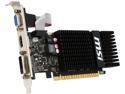
MSI GeForce GT 720 1GB DDR3 PCI Express 2.0 x16 Low Profile Graphics Card N720-1GD3HLP
Pros: Pros are runs League of Legends nicely with graphics set to Medium-High, Character Inking On, Anti-aliasing Off. Twisted Treeline map (3v3) framerate averaged 60fps and seemed even higher on Summoner's Rift (5v5). Card can do 4K resolution 4096x2160. No need to upgrade power supply only 300 watt required which is what machines have. Card draws a modest 19-23 watts.
Cons: No fan means card could heat up, but heatsink is designed well, extending past card to allow heat to rise off. Idle card is 35 C (95 F). When done playing LOL card was at 45 C (115 F).
Overall Review: GeForce GT 720 Passmarks at 753, quite an upgrade from my Radeon HD 5450 scoring 232). For comparison a GeForce GT 730 gets 931 marks, might be worth spending that extra few bucks. Says it can screen capture video games, nice. Came with *two* low profile brackets, one with HDMI only, as well as cool red plugs to cover the graphics ports not in use.
12/16/2015See more detail
Good Enough for Bioshock Infinite

EVGA GeForce GT 730 1GB GDDR5 PCI Express 2.0 Low Profile Ready Graphics Card 01G-P3-3731-KR
Pros: Cool, quiet, decent power, great for my work machine (HP EliteDesk 800 G1 SFF) and easy to install. The fan is great, don't even hear it but on the other hand there is a little background office noise in the room. Now for the good part. Banchmark, Bioshock Infinite at *VeryHigh* settings, 1680x1050 16:10 format: Average fps 31.56 (minimum 11.73). For comparison my Radeon R7 250 also a 1GB GDDR5: Average fps 35.24 (min 16.70). So a little slower than my home card but both over 30 fps. In 3D Mark - Fire Strike / Sky Diver / Cloud Gate / Ice Storm: Intel HD Graphics 4600 - 738, 3535, 7290, 62903 GeForce GT730 (this card) - 1516, 5379, 10294, 87001 Radeon R7 250 1GB GDDR5 - 1924, 6325, 8583, 91659 Overall a good budget card.
Cons: Fps can drop in high-demand scenarios. But on average over 30 fps in Bioshock Infinite tests.
Overall Review: Can't believe how cool Bioshock Infinite is and that this budget card can run it with High effects. Get this card and game if you like artsy stuff. Good story.
9/10/2014See more detail
495 MB/s Read Speed in CrystalDiskMark
SAMSUNG 840 EVO MZ-7TE250BW 2.5" 250GB SATA 6Gb/s 1x nm Samsung Toggle DDR 2.0 3-Bit MLC NAND Flash Memory (400Mbps) Internal Solid State Drive (SSD)
Pros: 494.8 MB/s read speed in CrystalDiskMark 3.0.3 x64, 5 tests at 1000MB test size. CDM write speed was 478.1 MB/s. O M G This thing is faster than Superman.
Cons: No moving parts
7/25/2014See more detail
Update: Power Supply lasted 5 years

SIGMA La Vie LSWSP Leather Silver SECC Steel ATX Mid Tower Computer Case 500W Power Supply
Pros: [Follow up to my 9/2009 review] Power supply finally died after five years of heavy use. The last few years it was running 24/7 powering my media center pc in the basement storage room. Not bad imho.
Cons: No cons that I can think of.
6/18/2014See more detail
Kickin' Budget Card
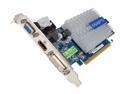
GIGABYTE Radeon HD 6450 1GB DDR3 PCI Express 2.1 x16 Low Profile Graphics Card GV-R645SL-1GI
Pros: Good sub-$40 card. Installation on Win 7 64-bit was a breeze. Rig is AMD Phenom II X4 965 3.40 GHz 8GB DDR3 667 MHz. * WEI Windows Experience Index increased to 4.6/6.1 Graphics/GamingGraphics on this Radeon HD 6450 from 3.7/5.7 on my Radeon HD 5450 * StarCraft II playable at 1280x1024 Medium quality with High textures. First level "Liberation Day" was 25-35 fps, opening Jim Raynor cinematic 42-45 fps
Cons: * 6450s use about 27 watts, PC hotter now than with 5450. * Temp 98 F in Windows and 105 F in StarCraft II. * StarCraft II "Liberation Day" final in-game cinematic started at 45 fps but went as low as 15fps when the civilian runs away in the fog using settings listed above.
Overall Review: Heat sink nice and low profile. Came with nice plastic covers on each port VGA/DVI/HDMI which I left on the two I wasn't using to keep dust out. Go Gigabyte.
7/7/2012See more detail
StarCraft II 1920x1080 High Detail
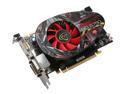
XFX Radeon HD 5750 1GB DDR5 PCI Express 2.0 x16 CrossFireX Support Graphics Card HD-575X-ZNFC
Pros: Great upgrade card. WEI (Windows Experience Index) score in Windows 7 32-bit is 7.3 Graphics, and 7.3 Gaming gbraphics on a Phenom X4 9750 with 4GB (3GB effective) of DDR2 system memory. Able to play StarCraft II: Wings of Liberty at full 24" Samsung monitor resolution of 1920x1080 on "High" graphic settings.
Cons: StarCraft 2 "Ultra" settings (1920x1080) worked on cut-scenes with only occasional tearing and dropped frames, but in gameplay framerate struggled even more and any serious battle was unplayable. On "High" settings there are occasional lower framerates in battle but in my opinion the game looks great and is fully playable. I am keeping my settings on "High" at 1920x1080.
Overall Review: Nice, quiet, silent card! XFX rocks. I have a custom Sigma case with only the large power supply fan running (500 watt ps) and I cannot hear the card over it. If I put my ear down towards the case when I boot to Windows 7 I can hear it temporarily spike in super fast mode in some sort of fan test, and then it levels out. Again, sitting up in my chair I never hear the card. Oh, don't forget to plug the 6-pin power cord into the card when installing - I forgot and kept wondering why my video wouldn't come up.
8/20/2010See more detail