
Your Browsing History


Michael W.
Joined on 11/20/03
0
0
product reviews
- 30
Works great so far - 5 months running strong
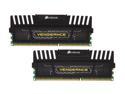
CORSAIR Vengeance 8GB (2 x 4GB) 240-Pin PC RAM DDR3 1600 (PC3 12800) Desktop Memory Model CMZ8GX3M2A1600C9
Pros: Nice looking memory, it's cheap right now (I paid $58 back in september of 2011). Runs fast and stable. Works with ASRock Z68 EXTREME4 GEN3 LGA 1155 Intel Z68 Motherboards.
Cons: While it DOES make me a sammich, it always forgets to use dijon.
Overall Review: 2500k over clocked to 4GHz, GTX 570 and this memory = modern, stable gaming.
3/7/2012See more detail
DOA - doesn't spin.
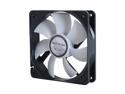
GELID Solutions FN-PX12-15 Case cooler
Pros: The white/black theme was perfect for my build. I liked the rubber mounts and it was nice and snug when I secured it to my chassis.
Cons: This was to replace another case fan on an existing build. After installing it and plugging it in the chassis fan header on my motherboard I powered on my rig only to find that the Gelid fan doesn't spin at all. I powered off and tested the fan on another fan header. Didn't spin. Tested another fan I had laying around in the same motherboard connector and the test fan worked perfectly. This is my first time buying a Gelid product and it's defective = I'll likely never buy this brand again. Bummer.
8/12/2017See more detail
Loose,/wobbly when installed. Doesn't form a tight connection with the CPU.
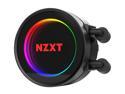
NZXT Kraken X62 RL-KRX62-01 280mm All-In-One Water / Liquid CPU Cooling with Software Controlled RGB Lighting
Pros: Looks super cool, lots of options to modify lighting scheme.
Cons: I've tried remounting this thing 3 times with my ASRock Z270 Gaming motherboard (intel 6700K). Yes, the backplate mounting screws are in as far as they will go, and the water block mounting screws are secured snugly as well. With just the backplate secured to the motherboard, there's a LOT Of back/forward and in/out play, which I researched as normal, but even with the block secured with the thumbscrews and everything snug, I can grasp the water block and wiggle the thing around with a lot of play.I tested it out anyway but my CPU temps were way too high for this type of setup (gaming in Wildlands reached high nearly 90 celcius on all four cores - CPU is not overclocked). The back plate appears to be slightly warped, indicating poor manufacturing QA.. Also the CAM software to control this thing is super buggy, as other reviewers have mentioned. I'm not eligible for a refund apparently, so I guess it's off to try and deal with NZXT's notoriously bad customer service to see if I can get a refund on this paperweight. Was willing to try and purchase another one but newegg is out of stock, so I guess it's back to Corsair I go. Majorly disappointed.
3/25/2017See more detail
The Good Stuff
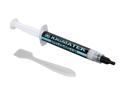
XIGMATEK PTI-G4512 thermal grease with gold grade thermal matrix filler particles
Pros: Low price for the performance. Not the cheapest but not the most expensive by a long shot. My idle temps on my 2500k cooled by a Corsair H80 went from 28C to 21C, but I also did a thorough cleaning of my fans and radiator while I was stripping my system to reapply the thermal paste.
Cons: Doing this is always a pain in the @ss, but that's not the paste's fault.
Overall Review: As mentioned, my idle temps dropped 7 C, which is fairly significant. But I also thoroughly cleaned my Corsair H80 (fully cleaned both fans and ran water through the radiator fins until it looked brand new). When I removed the H80 unit it looked like the stock paste didn't have the greatest application coverage so if I had to guess the new paste contributed to most of the temperature drop, and the cleaning maybe 1-2 celcius (it was pretty dusty). So if you have a corsair H80 and it's time for the "annual tear the case apart and clean the hell out of everything", give this paste a shot, seems to be a good upgrade.
1/7/2014See more detail
Best card I've ever owned...so far.
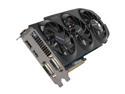
GIGABYTE GeForce GTX 670 2GB GDDR5 PCI Express 3.0 x16 SLI Support Graphics Card GV-N670OC-2GD
Pros: By far the best pro in my opinion is how cool and quite this card runs. I've mostly used EVGA cards in the past, which are great, but those single centrifugal fans are LOUD even at moderate settings, and their cards always seem to run a little warm - or at least the 3 that I've owned have. Granted, I set my fan profile very aggressively as I don't like my card heating up to the 80-90 C range. It's not even a problem with this gigabyte card. The most recent game I've played was Far Cry 3 - and for many hours at a time - and the card never reached 60C. (more on how this card handles FC3 below). All in all the card stays cool with the 3 fans and the fans are very quiet, I can never hear them over the fans of my CPU cooler which are by far the loudest items in my case right now. I use MSI afterburner to set fan profiles and monitor temps.
Cons: I can't think of one other than the obligatory "it doesn't rub my feet after a hard night of gaming" joke. I see there are some people who have had defective cards and what not, so that sucks, but mine has worked fine in the 3 months I've had it. I'm also using the latest Nvidia beta driver (310.70) and have played BF3, WoW, FC3 and Dishonored just fine on this driver without any issues.
Overall Review: I've seen a lot of reviewers bragging about huge frame rates on FC 3 with everything maxed out at 1080p which is a reminder to always take user submitted reviews with a grain of salt. This card CAN run FC3 on ultra settings at 1080p and DX11 but not with great frame rates. I personally am running the game with everything on High settings, 2xAA and SSAO and stay in around 45-60 fps (DX11 enabled). I had a couple settings on Ultra but the frame rate would get a little dodgy with lots happening at once (two factions fighting, animals, attacking dudes, fire everywhere, etc). I just keep them all on High now - I personally can't see any difference in fidelity between the two, at least not at 1080p. Keep in mind FC3 is one of the most graphically demanding games out right now so it's good to see how the old 670 stacks up. For those wondering my CPU is a 2500k @ 4GHz. But don't take my word for it - spend a few minutes searching and you'll find legit benchmarks proving what I just said. Also, get this card. It rocks.
12/19/2012See more detail
Warranty replacement = refurb

RAZER DeathAdder RZ01-00151400-R3U1 Black Wired Optical Precision Gaming Mouse - 3.5G Infrared Sensor
Pros: I like this mouse when it actually works.
Cons: Problem is after not even a year of usage the left mouse button started malfunctioning which was causing me to die a lot in online games like Battlefield 3 and made general computer work a pain. I contacted customer service and after going through all the usual hoops (some of the troubleshooting steps they wanted me to do were quite silly and totally a waste of MY time for a simple warranty claim on a well documented issue with this particular mouse) and getting passed around to numerous departments (customer service, technical specialist, exchange/return specialist, etc - ridiculous) they finally told me to mail my mouse in to receive another one under warranty. This is about two weeks after making my original claim! Good thing I had a spare mouse. Just got my replacement unit today and the invoice clearly states that its refurbished. Sure enough I see some minor scratches and signs of wear on the mouse. Awesome! Maybe that's standard practice for computer accessories these days, but if I had known all the hoops I would have to jump through (not to mention the cost of shipping my broken mouse to razer) just to receive another used mouse, I probably would not have even bothered.
Overall Review: Also the software for this mouse, Synapse, is uh...well I'm not a fan. It bogs down windows 7 for a few moments every time I log in because it has to connect to Razer online every time (seriously) and it requires updates on a semi regular basis, all of which seem to require a restart. It's a mouse, not a video card driver! Why even update the software at all? It works fine.
11/12/2012See more detail