
Your Browsing History


Valentin S.
Joined on 09/11/05
0
0
product reviews
- 17
Joy to look at and work with
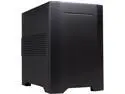
Rosewill Legacy W1-B - Black Aluminum & Steel Mini-ITX Tower Computer Case - Dual Fans
Pros: Small(ish) on the outside, ginormous on the inside. Great proportions between height, width and depth. Gorgeous strong, simple-looking. Extremely rationally designed and well made. Everything fits together precisely with no gaps and no rattle. No sharp edges inside, pleasure to work with. Lots of room with easy access to absolutely everything (but see other thoughts). Efficient, quiet ventilation. Can take a large video card, large CPU cooler and large power supply, all at the same time. Still one of the now rare mini-ITX cases that support an optical drive (although only a slim one).
Cons: The slots in the HDD cage (to where the disks slide) are too short: the screws with the rubber vibration dampeners must use the rear and the middle mounting holes only, the front hole cannot be used. This may make mounting some HDDs that don't have the middle mounting holes impossible. The SSDs mounted at the bottom of the case are too close to the floor. As a result, only the power connectors at the end of the power cable can be used; the connectors in the middle of the power cable would need to have the cable bent too sharply. The black painting inside the case is just a little bit too smooth, so it shows dust easily. If it was a bit more rough, it would be perfect. The thread on the screws that fix the red HDD holders do not match the thread in the holes in the cage. I was able to force the screws but ended up with quite a bit of metal dust. Not nice. The front panel USB connectors (on the right side of the case) are too flimsy, when a plug is inserted, they can move from side to side, which doesn't create confidence. The connectors also are not positioned deep enough to accept the entire length of the USB connector metal part. This is typical these days (nobody much cares), but a well designed case should pay attention to such details. The LED light on the front panel escapes the Power and reset buttons, the red and blue color get mixed together in the buttons and the light also escapes through USB and audio connectors. More attention to details needed. Can't take an egg for all of it though - the case is too nice. These are just some things to be aware of.
Overall Review: Perhaps the best case I've ever worked with. Moving from Lian-Li PC-Q11 (self inflicted desire to make a small machine), I appreciated the ease of access to everything and a beauty of rational, efficient design. Something to pay attention to: - There is very little room between the motherboard and the drive cage. If you board has connectors on this side, make sure you do them before you fit the board into the case. This especially concerns the fiddly front-panel connector and I'd imagine the main power connector (my board has it elsewhere). - If you plan to use a slot loading optical drive, make sure you have a "slim SATA to SATA adapter" (and not "mini-SATA to SATA", that's for 1.8" drives). The standard SATA connectors do not fit into the slim drive.
6/17/2014See more detail
A couple of large flies in a good soup
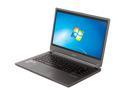
Acer TimelineU M5-481TG-6814 14" Ultrabook
Pros: Thin and light, yet very sturdy. DVD drive included. The screen can be opened far back. Hinges are solid and well-balanced. Aluminum body looks great and is not much prone to fingerprints. Multi-touch touch pad operation is descent. Backlit keyboard. One of the best laptop keyboard layouts: separate page navigation buttons, arrow keys are decently sized, not cramped together like on some blindly copied knock-offs. Fast, quiet and cool most of the time. On my unit, CPU/GPU temperatures do not exceed 75C under 100% load. The fan exhaust is hot, but it is not too loud. Everything seems quite balanced in this respect, considering the thin design.
Cons: The screen is worse than junk: extremely low contrast, with poor, gray-looking blacks and not enough brightness. Extremely narrow vertical viewing angles. Everything looks washed out (bad gamma) even at the optimum viewing angle. The narrow bezel around the screen is not the actual LCD panel boundary, there is yet another black frame around the panel itself. It looks as if the frame was designed for a 16:10, 15" screen, but at the last moment it was replaced with a 16:9 14" one. Definitely not "edge-to-edge". The included 20GB SSD cannot be used with Intel Smart Response Technology (for SSD caching), because the BIOS doesn't even have the RAID mode setting for the disk controller, which I believe is necessary to enable it. This makes the installed 20GB SSD (a $50 retail value) essentially a battery sucking useless appendix of the storage system. The touch pad has an annoying gap between its surface and the button switches underneath it; it feels like a photo camera two-stage click: the first part is very light and does nothing, for the second, you need to press very hard (luckily, tap to click works). It is an ELAN touch pad and the driver does not support cursor inertia, a useful feature found on Synaptics touch pads. 90 degree power connector makes the power cable to either block USB3.0 ports or go very close to the hot air exhaust at the back. The keyboard is very shallow. Several tons of crapware, some repeating the features found in the OS itself (backup). Acer Games cannot be uninstalled when advanced security features are turned on (NX set to "alwayson" and UAC set to maximum).
Overall Review: Dear Acer, did some LCD panel manufacturer paid *you* to install this panel?! This is definitely the worst panel I've ever seen in a laptop, and badly calibrated on top of that. The screen is OK for using the computer in a bedroom. In any other location: kitchen, dining, living room, study, the dim and extremely glossy screen is a source of pain. It's a pity because it looks like Acer actually has tried to produce a good design. It is especially annoying because Acer missed very obvious and known to everybody things (the LCD panel) and also didn't bother to check how advanced features would work, before stuffing the laptop with a now useless SSD. Attention to detail. Attention to *every* detail. That's what makes some other companies have a runaway success with their hardware. Dear Intel, why do you count this as a "design win" for an Utrabook program when it has an atrocious screen and a piece of hardware that cannot be used with your smart response technology? Do you guys just look at the BOM only (HM77 + SSD) and never check actual operation before granting the "Ultrabook" badge? I am torn as to how many eggs to give. It's a good design, but with the flaws I mentioned, it is not worth the price, it's a bad compromise of a laptop. 5.5 eggs for the design effort, -2.5 eggs for major drawbacks.
12/15/2012See more detail
Have several, never failed
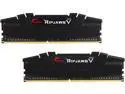
G.SKILL Ripjaws V Series 64GB (2 x 32GB) 288-Pin PC RAM DDR4 3200 (PC4 25600) Desktop Memory Model F4-3200C16D-64GVK
Overall Review: This particular SKU never failed for me, and I built a few computers with it in the last 2-3 years for both Intel and AMD CPUs.
9/17/2022See more detail
Super-rigid backplate
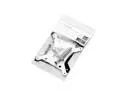
EK-AIO LGA1700 Upgrade Kit
Overall Review: Super-rigid backplate for LGA 1700. As usual, EK mounting system is the best.
9/17/2022See more detail
An excellent AIO, but it has no water temp sensor
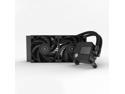
EK 240mm AIO Basic, All-in-One Liquid CPU Cooler with EK-Vardar High-Performance PMW Fans, 120mm Fan, Intel 115X/1200/2066, AMD AM4, (240mm AIO) LGA 1700 Compatible(Requires purchase of LGA 1700 Kit)
Pros: - Looks minimalistic and elegant - Very well built - The best mounting system among many AIOs, excellent LGA 1700 backplate. - Quiet water pump - Vardar fans are powerful and move a lot of air without much noise. - No software is required
Cons: - There is no water temperature sensor and thus there is no way to control fan speed based on water temperature, even if the motherboard has a temperature sensor connector.
Overall Review: Unlike coolers based on Asetec design, this one has no temperature sensor. You simply connect the pump to the "water pump" connector and the fans to the "CPU" fan connector and that's it. As a result, your pump will run at constant speed (that's OK, it's quiet), but the fans will ramp up and down with the CPU temperatures. This misses one of the great advantages of the liquid cooling - that the water in the loop serves as a heat buffer and results in lower fan speeds if the CPU work is not constantly 100%. There is no software (which is a plus), but then there is no way to control the *water* temperature in any way. This lack of temp sensor is the same for all EK AIOs, even more expensive with lots of bells and whistles (LEDs). @EK, it would be so much better if at least some of the AIOs had a temp sensor. It's a few bucks only, and, perhaps, it could be added to the pump assembly or elsewhere in the loop.
9/17/2022See more detail
Fast basic Intel processor
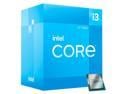
Intel Core i3-12100 - Core i3 12th Gen Alder Lake Quad-Core 3.3 GHz LGA 1700 Processor 60W Intel UHD Graphics 730 Desktop Processor - BX8071512100
Pros: - Low power consumption (65-89W) - Four 12-th gen performance cores with hyperthreading - DDR4 and DDR5 support (depending on the motherboard) - Has an integrated GPU that can help troubleshoot BIOS settings if the main GPU doesn't work - More comparisons here: https://ark.intel.com/content/www/us/en/ark/compare.html?productIds=96149,134589,134594,134584
Cons: - Look for a more expensive CPU if you need more threads or higher clocks.
Overall Review: A basic CPU that pairs well with cheap motherboards, as it doesn't need a lot of power. It's speedy enough for office work.
9/17/2022See more detail