
Your Browsing History
 Holiday Shipping Details & Extended Holiday Returns Holiday Shipping Details & Extended Holiday Returns

Joined on 01/24/14
I crushed Dominus!
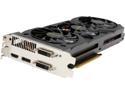
Pros: 1) I got a good price on it (rebate + promo code), 2) Fast and solid 3) Quiet (I hate noise in computers) 4) Great frame rate
Cons: 1) It wasn't cheaper! ;^) 2) LONG. Be sure to check your case to see if it has enough room Neither is a problem, just sayin'
Overall Review: I recently started playing Path of Exile. I'm not usually a big gamer, but don't want it to suck when I *do* play. My old Athlon was struggling with POE (mostly due to having only 2GB of RAM). I bumped the RAM up to 6GB and it was a lot better, but Dominus was still kicking my tookus. The windows install went wonky on me, so rather than reinstall, I built a new Windows machine. I'll install Linux on the Athlon and retire my current Athlon box and make it my new backup server. Anyway, with the new build, I got a solid framerate (50-120 fps, depending on what's going on). The Dominus battle in POE is pretty demanding, but this card delivered and kept the action smooth, so I spanked Dominus and sent him to bed without dinner. I generally don't buy items until their price-performance hits the "knee". But it was Christmas season, so I gifted myself honkin fast video card.
Slightly less unbearable!
Pros: 1) Performance wise, it's fine. 2) UI is slightly less unbearable than 8.0.
Cons: 1) Ridiculous tablet UI for desktop machine 2) Annoying tie-ins to "microsoft store" 3) Too many useless widgets 4) Too much window dressing, not enough space for *the*apps*I*want*to*run*.
Overall Review: I realize that since I'm technically oriented that I'm not in the target market for 8.1, so I'm willing to put up with *some* ridiculosity. Now that 8.1 is out, it's actually usable without installing third-party "fixits". Though I'll probably install Start8 and company on it ASAP. Why Microsoft decided that the desktop is dead is beyond me. For a tablet or phone it looks like it might be a nice UI. For a desktop, however, it's frustrating. Thankfully, I don't have to use it except when I want to run games. I could've bought Win 7 (which rocks, by the way) but I figured I'd better get the latest, so I could avoid the next upgrade as long as possible. Start8 lets me avoid most of the "modern" interface, and I'll whip up a little C++ to fix some other annoyances. I'm hoping that I don't regret not getting Windows 7 for too long.
Boring Power Supply Review
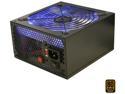
Pros: 1) Feels solid and well-built 2) Installed easily (i.e., everything lines up as it should) 3) Supports a honkin' big video card 4) Blue LED fan turns off with a button on the back (though I like to leave it on--it brings out a nice tone with the orange LED fans on the front.) 5) Modular, so you don't have to route a bunch of unused wires
Cons: 1) I'm not a fan of the in-line connectors. I think having a connector block on the case would be better 2) Wires are pretty stiff, so routing can be a little difficult
Overall Review: I like the power supply, and would recommend it. But it could be improved: A connector block on the case, rather than in-line connectors would be great.
Nice motherboard, works as advertised
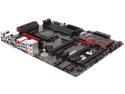
Pros: 1) Supports plenty of RAM, and handles DDR3-bazillion. (I got some DDR3-2400 for it) 2) Plenty of card slots 3) On-board COM port 4) BIOS is pretty simple to navigate, though it is a bit mouse-happy
Cons: 1) No cable for COM port. Since few people use COM ports any longer, won't dock it for that. (I'll just fab a cable to go to front panel for microcontroller work.)
Overall Review: I've bought MSI stuff before and have been happy with it. Since my case has a window, I thought the dragon heatsink would be a nice touch. (It's really well done) Since the computer simply worked when I assembled it, I'm pretty happy with everything. I'm not an overclocker, so that aspect was meaningless to me. But I like to buy OC-ready parts, if only to imagine that they may be engineered to higher standards.
Nice case, fun color
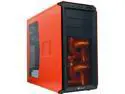
Pros: I recently built a nice gaming machine for my son, but wanted to game with him. So I had to build one for me, too. I thought it would be fun to go with a "Hot gaming machine" theme, so I elected to go with the orange/red case with orange LED fans in the front. 1) Has cable management area 2) USB 3 on the front! 3) Fans & power button LEDs are not overly bright 4) ACRES of room for video card (I used an 11.8" card, there was at least 2" of room left afterwards--probably more) HD cages are under and over the PCI card area, but not in line with it, so it gives plenty of room to spare. 5) Front-panel wires are all black, making them easy to route attractively and unobtrusively 6) Almost no tools required!
Cons: 1) Thumbscrews were tight from the factory. I had to use a screwdriver to remove them. This was the only reason I had to use a tool. (One case panel, and both PCI slot covers needed the screwdriver to remove.) 2) Cable management area is a *little* tight, so be sure to test-fit case lid before securing cable ties, or you may wind up doing it again! 3) USB 3 cable is thick and stiff (to main high-speed integrity) so routing it attractively may be tricky. Luckily there are no windows on the routing side of the case, so you'll be the only one to know! 4) Dangling cables from front-mounted USB ports may interfere with optical drive open/close. Would prefer top-mounted controls.
Overall Review: I'd definitely recommend this case. I've been building computers since *WAY* back, and this is one of the nicest cases I've worked in. If you don't mind front-mounted ports over the drive mounts, and like the color, you won't go wrong choosing it.