
Your Browsing History


Daniel H.
Joined on 05/20/04
0
0
product reviews
- 5
I love my lappy!
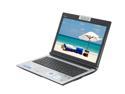
ASUS F8 Series 14.0" Intel Core 2 Duo T5750 3GB Memory DDR2 667 Windows Vista Home Premium F8Sp-X1
Pros: All around good laptop. This machine is capable of playing games at decent resolutions and frame rates. I use it at LAN parties where we typically play UT2004, Rise of Nations and Dawn of War. I have also played Elder Scrolls: Oblivion, Portal, HL2 etc... all with good playability. I typically use 1280x800 resolution and have noticed only occasional stutter in Oblivion. Wireless works good. Bluetooth works good. Burns CDs with no problems (haven't tried DVDs). I am a linux user and Ubuntu 8.04 installed with no issues. The 250GB drive comes as two partitions approximately equal in size. The second partition is labeled as "Data". I installed Ubuntu here and everything works as described.
Cons: These issues are minor but worth pointing out. The hot air from the processor vents out the right side near the hinge and could blow onto your mouse hand. The network port is upside down (contacts belong on top to keep dust off) and as others have pointed out, pressing the release tab on a patch cable is very hard to do. The keyboard is a little loud on the left hand side. The Tab key especially makes a louder noise when pressed. It almost feels like that side of the keyboard isn't attached completely. None of the letter or number keys have this problem. I am otherwise satisfied with the keyboard. The fglrx driver seems to have issues when coming out of sleep/hibernation in Ubuntu. It still works, but sometimes the title bars are replaced by random noise or something. This doesn't happen in Vista, but FYI for Ubuntu users. Here's to hoping for an updated driver :)
Overall Review: I kept Vista due to reports of not being able to find XP drivers, although I see newegg is now including an XP driver disk (also available separately for purchase for the low low cost of $TOO_MUCH_MONEY). I use Vista for gaming and Ubuntu for everything else and this laptop works well under both OSs. Battery life is adequate for my needs. I get an estimated 2 hours of use while surfing (wireless) with the LCD brightness turned down. I haven't tried gaming on the battery and I don't intend to. The laptop stays warm most of the time but is fairly quiet. You can hear the fan run in a silent room but you have to try. It does get louder (but not obnoxiously so) during gaming. I have no complaints about noise. I recommend this buy for someone looking for a decent all around laptop where playing games is a requirement.
7/22/2008See more detail
A respectable case with one major issue
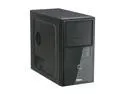
ENERMAX VOSTOK ECA2020-B Black 0.6mm SECC Steel Micro ATX Mid Tower Computer Case 350W Power Supply
Pros: Decently constructed case with a decent power supply. My system with this PS draws 85 watts, while the same system with an Antec 80+ certified PS draws 79 watts = ~74% efficient. PS handles mobo + CPU + 4x SATA drives no problems (Max observed draw is ~150 watts). PS has a 120mm fan on the bottom instead of an 80mm fan on the back. Case has 120mm fan in back (with 3-wire mobo connector). Has a duct for CPU fan that is adjustable (longer/shorter) to fit different CPU HSF heights. Two (out of three) 5.25 bays have covers with integrated button and fold down flap for a hidden CD/DVD drive (I haven't used these, see below).
Cons: The third (bottom) 5.25 bay will probably be useless for a standard length CD/DVD drive. The motherboard will interfere with this slot unless the motherboard has no caps or other object over ~3/8" tall. I had to desolder a small cap and attach short wires to bend it over to get a 3 bay 5 drive SATA back plane to fit. The SATA enclosure is shorter than a standard CD/DVD drive. This is the only reason for 3/5 stars.
Overall Review: I'm using this case to make a smallish 4 drive RAID NAS box. I used an Icy Dock 3 in 5 SATA backplane for drive storage. The cpu/motherboard is an AMD Athlon 64 LE-1600 sitting in an ECS AMD690GM-M2 w/ 1GB RAM. The power supply spins up all 4 drive simultaneously with no issues
4/2/2008See more detail
Works OK, poor video
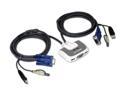
IOGEAR GCS632U 2-Port KVM Switch with built-in KVM Cables and Audio Support (US packaging version)
Pros: USB mouse/keyboard switching works well. Video switching does work.
Cons: Video signal is significantly degraded. It is still usable but became very fuzzy. Looking closely at the image reveals pixels jittering back and forth.
Overall Review: This is over a VGA connection to a 19" 4:3 LCD @ 1280x1024. Video was very crisp before using this KVM switch. I am using a Microsoft Natural 4000 keyboard and a Microsoft Trackball Explorer connected to Windows XP and Ubuntu 7.04. I haven't tried sound.
7/22/2008See more detail
Heat issues
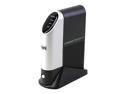
LINKSYS NSLU2 Diskless System Network Storage Link for USB2.0 Disk Drives
Pros: -small -low power -2 USB ports I can use for peripherals -CPU has MM so it'll run std linux (no uClinux required)
Cons: Appears to have heat issues. I had trouble getting the network connection to work reliably for this reason.
Overall Review: I put SlogOS on this so I could write my own applications. I used a USB flash drive as main storage so it would use very little power. The initial firmware update worked fine and I was able to use it for a day or two. Then I noticed the network light had turned of and I could no longer ssh into the slug. I rebooted but this didn't fix it. I pulled the USB drive and looked at the system log. It appeared to lose the network connection at decreasing intervals over the two days it was running until it was constantly trying to obtain an address via DHCP. I unpluged it and let it sit for a day and then turned it back on and the network interface was working again. I ended up laying the nslu2 on its side and drilled a couple of holes in the top to increase air flow. These two measures seemed to fix it.
10/13/2007See more detail
Works for my purposes
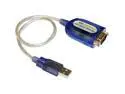
CP TECHNOLOGIES Model CP-US-03 USB to Serial Adapter
Pros: Linux drivers available for the nslu2 via ipkg. Works with my application
Cons: DB9 shell is a little larger than a standard serial cord. This was OK for me, but check your application to make sure you have room.
Overall Review: I'm using this to interface a circuit I built with the Linksys nslu2. I'm using only RX/TX, no flow control @ 2400 baud. I ran it continuously for about a week with no problems. I installed the pl2303 driver to get it to work.
10/13/2007See more detail