
Your Browsing History


Geoffrey B.
Joined on 03/12/07
0
0
product reviews
- 33
Small board, but feature packed
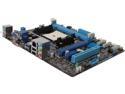
ASUS A85XM-A FM2 AMD A85X (Hudson D4) USB 3.0 HDMI Micro ATX AMD Motherboard
Pros: Suprisingly small board, used two less screws than the previous Micro ATX board it replaced used, looking at the specs it is an inch narrower than most other Micro ATX boards. I have not utilized all the available connections, I have a card reader and a USB 3.0 HUB coming that will help complete my build. Otherwise there was plenty of options with 6x SATA, 2x 2.0 USB, 1x 3.0 USB on board, HDMI works great, really wish it had 2 more USB ports instead of the standard PS2 mouse and keyboard connections, but whatever 2x 2.0 USB and 2x 3.0 USB on the back is fine, as I will be adding 2 more 3.0 and 1 more 2.0 USB ports with the card reader and HUB. This is being used in an HTPC setup for our living room and is definitely more up to date than the previous build. Hoping this one outlasts the ASUS board that it is replacing, which died at just over 3 years of use.
Cons: None that I could find while putting everything together. I didn't go for the next model up, as I didn't see the need for 2 extra RAM slots or an extra PCI-E slot for Crossfire, as of now I have been satisfied with the performance of the APU for what we need it to display and I am sure there are plenty of graphics cards that could upgrade its performance, but it is not necessary for what I need it to do.
Overall Review: Little things, the front panel connectors were off just a little from the case connectors, the PWR LED is a 3 Pin from the Case and only has 2 Pin on the board, but whatever, the lights are annoying for our build, so nothing lost, nothing gained. I just switched the PWR and the HDD connectors, whatever.
6/11/2013See more detail
Terrible Support
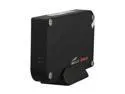
Eagle Tech 320GB USB 2.0 3.5" External Hard Drive ET-CS320NSU2-BK Black
Pros: Good price for a 320 gig hard drive external hard drive
Cons: Don't misplace your setup CD, because they have absolutely no tech support what so ever: This should not be the problem of drivers as it should be compatible with Windows XP or higher OS. As the product is not being recognized by your system, please check the followings to help us identify the problem: 1. USB cable 2. USB ports 3. Power supply 4. The product works on other computers? 5. Hard drive spinning/noises ? Now I have built my fair share of computers and know my way around things, but my XP system doesn't get the drive to spin after the first beep of recognizing and the second beep of shutting off is 2-3 seconds later. My Vista system recognizes the hardware, searches for drivers and after a few minutes lets me know no drivers were found, so don't tell me that it shouldn't be the problem and send me the drivers. Download link on their website brings you back to the main page, circular reference, so obviously they have not QA. I just don't understand it.
Overall Review: I pulled the HDD out of the external enclosure and plan on using it as an internal drive once my sata cables come in the mail, not worth scrapping all and all, 320 gigs will work, but doesn't help me use it between my 4 systems like the interal would have
1/6/2010See more detail
Solid case, type-c integrated, plenty of room
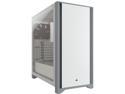
Corsair 4000D CC-9011199-WW White Steel / Plastic / Tempered Glass ATX Mid Tower Computer Case
Pros: Room for plenty of fans or multiple options for AIO if you prefer. Can handle 2x 140mm or 3x 120mm fans on the front or 2x either on the top. I have mine setup with a push pull fan setup and a 240mm AIO cooler up front with 2x 120mm exhaust fans up top. Standard cable management that it comes with and plenty of screws and zip ties included.
Cons: I am used to most cases having the pressure pegs for the front cover and busted one of the mounts that secure the front to the case. That said Corsair is awesome and they are sending me a new cover.
Overall Review: So if you are doing anything to the front panel make sure you remove the steel insert and then there are 2 screws at the bottom of the front panel to remove it completely. That said you really don't need to remove it completely, once the metal insert is removed you can do anything you need to with the front fans.
3/8/2022See more detail
Should get the job done, but...
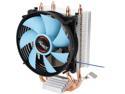
Rosewill ROCC-16002 High Performance Long Life Sleeve Bearing CPU Cooler with Silent 92mm PWM Fan and 2 Direct Contact Heatpipes, Supports Intel & AMD CPU
Pros: Super low price, works for the FM2 CPUs.
Cons: Pretty hard to leverage down onto the stock brackets, such that the housing/shroud around the fan on mine broke. It won't effect function, but pretty disappointing to have an issue like that while installing.
Overall Review: It will still get the job done and is still one of the lowest price options I found.
2/12/2022See more detail
Great combination of value and performance.
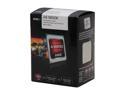
AMD A8-5600K - A-Series APU Trinity Quad-Core 3.6GHz (3.9GHz Turbo) Socket FM2 100W AMD Radeon HD 7560D Desktop APU (CPU + GPU) with DirectX 11 Graphic - AD560KWOHJBOX
Pros: So my just over 3 year old ASUS Mobo failed recently and after looking at alternatives to use my old components I decided that going new components + APU made more sense. I am replacing a AMD 740 Heka 3.0GHz processor, was a triple core, but unlocked to quad core. Was a fine processor for what I needed it for. This is truly overkill, it is being used to run a HTPC that is used for NetFlix and some HD video playback, but it was nice to be able to salvage my CPU, Graphics Cards(GT 240) and RAM to cover some of the upgrade cost. Performance so far has been great. I have not watched any shows/movies with it yet, but had NetFlix streaming with no issues. I know that Intel still has an edge on AMD in overall performance, multitasking, gaming, etc, but AMD sure nailed it for people that don't need all that and are looking for an affordable yet very capable set up. This offers a solution for that at a much lower cost and I can't see that there is anything that I am missing for what I need it to do.
Cons: None at this time.
Overall Review: I almost decided to save a few bucks and go with the 5400 or the 6400, both dual core offerings at 65w rather than 100w, but the 6400 doesn't have the GPU information listed, even on the AMD website and I figured for the few extra dollars it was worth going quad core. Newegg had a special promo that made it a pretty sweet deal and with how affordable these FM2 processors are I am fighting the urge to upgrade a few more of my rigs. We have a FM1 setup in our bedroom that has been great for what we need it to do, but better GPU and fast CPU is tempting.
6/11/2013See more detail
Clean look, quality product, low energy.
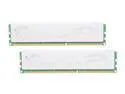
G.SKILL ECO Series 4GB (2 x 2GB) DDR3L 1333 (PC3L 10600) Desktop Memory Model F3-10666CL7D-4GBECO
Pros: Time will tell, but these went into my new rig with no issues. Very asthetically appealing heat sink, just a clean but sharp design. I don't have clearance issues at the moment, but may end up installing an aftermarket cooler, which would need to be low profile, which means it would probably infringe on the RAM space. I like the lower voltage and the tight timings. Reality is that they will probably overclock with some tweaking, but I am all for lower power consumption and don't need blazing speed for this application. Lower voltage = lower heat. I am going from 2GB of DDR2, so it is a huge upgrade overall and all that it needs to handle is Netflix for my boys and a few shows/movies for my wife and I.
Cons: None at this time.
Overall Review: I think this is a safe bet for any build. The RAM I have in my current PC is looser timings at a higher frequency, but 1.65v. I would rather pay a few dollars more for the lower timings and knowing that there is still room to increase frequency if I really wanted to.
6/11/2013See more detail