
Your Browsing History


Gabriel A.
Joined on 02/11/08
0
0
product reviews
- 9
It Works
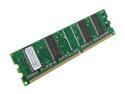
PQI POWER Series 512MB DDR 266 (PC 2100) Desktop Memory Model MD6412UOE
Pros: Put it inside an older Dell machine that only had 256 MB. Booted up, was recognized, and greatly improved application response time.
Cons: None
6/11/2008See more detail
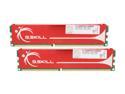
G.SKILL 2GB (2 x 1GB) DDR 400 (PC 3200) Dual Channel Kit Desktop Memory Model F1-3200PHU2-2GBNS
Pros: They work! I popped these in on an Asus K8S-LA motherboard (Socket 754, AMD Athlon 64 3200+ @ 2.2 GHz) and they run just fine. I already had two 1GB sticks running at 3 CAS instead of 2.5 so the increase in performance wasn't that noticeable, if at all. I ran Memtest on them with no errors. At this point the system is about 8 years old but with a discrete AMD HD 3650 AGP graphics card and 2 x 1 TB SATA hard drives, the system runs 32-bit Windows 7 and 64-bit Ubuntu 13.04 like a hot knife through butter. Some of the reviews here caution that you shouldn't buy these sticks if you have an HP, Dell, etc. because you may not be able to change voltage settings in the BIOS to accomodate the increase in power the sticks require. It may be true that you cannot change the BIOS settings because the manufacturers locked down the settings to make only the basics adjustable. That is true of my motherboard, actually. I bought it as a Compaq but have since upgraded everything but the motherboard and optical drive. These sticks of RAM work anyway in spite of me not even being able to see voltage settings in the BIOS. So if you're on the fence and are holding back because you think you can't change voltage settings either, I think it's worth the shot. Your motherboard may increase the voltage on its own, like mine apparently does in spite of being a former Compaq. I think the worst that can happen if the sticks don't work is an unstable system that will crash (if you even make it past POST) on you when the sticks try to pull more power but can't access it (some reviews here indicate that). They're not going to fry your motherboard if they can't draw 2.75V.
Cons: None
Overall Review: Ordered on a Friday morning, arrived on a Saturday(!) morning. Those of us in southern California are so lucky Newegg is nearby.
10/13/2013See more detail
Decent Case for the Price
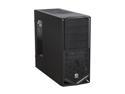
Thermaltake V4 Black Edition Gaming Chassis Mid Tower Steel Computer Case Fully Black Powdered Interior VM30001W2Z
Pros: Inexpensive, all-black finish is aesthetically pleasing, tool-less drive installation, plenty of places to put fans, PSU mounts at the bottom, dust-filter included for the bottom fan mount(s), front USB ports are spaced apart I swapped in a Micro-ATX motherboard, 2 x 1TB HDDs, 1 optical drive, a wireless PCI card and an ATI HD 3650 graphics card and have plenty of room for expansion and air flow. My PSU isn't modular but with decent cable arrangement (with thin velcro straps) I can definitely mount a bottom intake fan and have it draw in air that will have an effect--I know some reviewers said they couldn't. I can also mount exhaust fans in both spots at the top of the case without issue. However, one fan would sit awfully close to my sticks of RAM. I imagine that if I had heatsinks on the RAM, the rear-most top fan might not be mountable. I think aside from the aesthetics which you can readily see for yourself and the positives I already listed above, there isn't much else to say as far as pros go.
Cons: Thin-ish metal, HDD activity light relatively dim compared to the power light, stock exhaust fan relatively weak Other reviewers are right in saying that the case metal is on the thinner side of things. The only real weak points because of this, however, are the windowed-door and the fan grills at the top. I can see those things getting bent/dented if you're not careful. For the price, this doesn't really bother me. I think the weaknesses really combine to knock off just one star.
Overall Review: Do yourself a favor if you don't already have 120 mm fans and buy at least one to replace the stock exhaust fan. This fan is WEAK. It's rated for 1200 RPM and even plugging it into a molex connector with an adapter (to get full, constant speed) instead of the motherboard does not make it push out significantly more air. I can barely feel any air when it's plugged into the motherboard. I'm personally not a fan of LED-lit fans anyway. I bought another 1200 RPM fan here and have it plugged into the same molex adapter to do air intake. Despite having a dust filter on that fan, it still moves significantly more air--so the stock fan is definitely the problem. It's not really a problem because it's basically self-explanatory, but the included instructions are useless. They consist of just telling you to swap things in and screw them in. That much is obvious, but needing to use stand-offs to mount the motherboard (at least a Micro-ATX board) is not and yet the instructions never make menton of them. You also need to unscrew a small piece of metal mounted at the bottom of the case to install the PSU, otherwise it won't seat. Again, the instructions don't make mention of that.
6/29/2013See more detail
A Worthy Upgrade for Older Systems
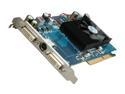
SAPPHIRE Radeon HD 3650 512MB DDR2 AGP 4X/8X Graphics Card 100258L
Pros: It seems like a good card so far. The drivers from Sapphire's site installed fine on XP SP3 and CCC works fine for me. I've owned the card for about a week and thought to test it on games falling in the range of old, moderate, and newer games. ---Old: Halo CE (All Max'd @ 1280x1024) 30 FPS (Halo itself is actually capped at 30 FPS so it definitely could have gone higher)--- ---Moderate: Battlefield 2 Demo (All Max'd @ 1280x1024 with 4x Anti-Aliasing) 45-50 FPS--- ---Newer: Call of Duty 4 Demo (All Max'd @ 1280x1024 with 4x Anti-Aliasing) 18-38 FPS--- CoD 4 is playable in the opening and closing scenes of the demo but not smooth at ~18 FPS. There is a lot of stuff going on (lots of explosions and gun battles) that's why my FPS range was so large. Once you're inside the building or at the point where you pick up the javelin to take out tanks, the FPS goes up. Tuning the settings down, disabling Anti-Aliasing, and lowering the resolution will NOT increase my FPS. I don't know why.
Cons: The card's fan should have been aimed to the rear of the case instead of shooting hot air back toward the front.
Overall Review: System: Asus K8S-LA motherboard, AMD Athlon 64 3200+ @ 2.2 GHz, 1.5 GB DDR-400 RAM. The card sits at idle in the 40s, it reaches the 50s on moderate load, and 60C at full load when I tested the CoD4 Demo. Overall I'm pleasantly satisfied. I'm a very infrequent gamer and this was really intended to put integrated graphics behind me on this spare computer. Keep your expectations reasonable; this is a mid-range card for systems where the CPU will likely be the bottleneck for games. That's probably why my FPS won't improve in games like CoD 4. An AMD Athlon 64 3200+ meets the minimum "playable" requirements for the game but a Core Duo CPU is recommended. A PSU in the 300-400W range is fine. I have an Antec Earthwatts 380 which is why this card was rather perfect. The HD 3800 series requires 400W+.
6/17/2009See more detail
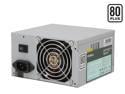
Antec earthwatts EA380 380W Continuous Power ATX12V v2.0 80 PLUS Certified Active PFC Power Supply
Pros: - 80+ Efficiency - Low-to-no noise (I can't hear it at all. My CPU and case fans are louder.) - More cable connectors than I know what to do with (Which is good. The last thing you want is to be lacking cables. - Good cable length and malleability (bendability) - Antec quality - Inexpensive upgrade (I needed it for a GFX card.)
Cons: None
Overall Review: I wish that they were modular cables, and that ALL of them were sleeved and not just the 20+4 pin motherboard cable. It's alright for the price though, and it's far from being a deal-breaker for me. This EA-380 is probably the cheapest PSU you'll find at this wattage and efficiency rating. According to the manual that comes in the box: Over-current protection is ONLY available on the 430 & 500W models. While over-power protection is ONLY available on the 380W (this) model. All the other electrical protections apply to all of the models. My voltage readings on the 3.3, 5, and 12V rails: 3.3V: 3.28V 5V: 5.00-5.03V 12V: 12.3-12.38V (Those are acceptable voltage fluctuations.)
7/23/2008See more detail
Best of the Bunch
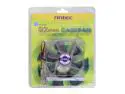
Antec 75002 92mm 2 Ball Bearing Case Cooling Fan
Pros: It's not that loud and can move plenty of air. Antec has other fans available in this size: Tri Cool and Smart Cool. These fans are the Pro Series and move more air than the others. The others use a thermal sensor to automatically adjust their speeds, these Pro Series don't but you can do that with the SpeedFan program anyway (Google it.) There's plenty of cable length as well.
Cons: None
Overall Review: My computer stabilizes the fan down to ~1450 RPM in Windows. I can't do anything about it in my system's BIOS so I use SpeedFan to increase RPM and move more air. (It's designed to spin at 2600 RPM, anyway.) The fan comes with an adapter to connect it to a 4-pin drive connector from the PSU. You can take it off and just connect it to the 3-pins on your motherboard. Also, the plastic holes for the screws aren't pre-threaded. I was worrying because the screws weren't turning smoothly so I thought, "@#$%, I just crossed the threads." Well, no; you create the threads in the holes as you first install the fan. I bought this elsewhere because the price + tax + S&H didn't make it a good deal. Sorry, Newegg. :)
7/16/2008See more detail