
Your Browsing History
 Holiday Shipping Details & Extended Holiday Returns Holiday Shipping Details & Extended Holiday Returns

Joined on 08/13/06

Pros: Love this deal. I have 4GB of this ram and works smoothly with my computer. The heatsink is a nice added bonus to help cool off the ram.
Cons: Not that I can think of.
Horrible BIOS!
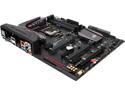
Pros: The board, when it boots, runs smoothly. The BIOS is nice to work with with many options. Also, the memory test and the added codes is nice to see, but that is about all that is good.
Cons: The BIOS software is awful with auto overclocking. I had turned it on and set it to be for water cooling and the specs were right except the voltage and ram settings were way off. The computer was not stable. I had to do all the settings manually. Also, the first board I got was DOA! Code 55 Memory Not Installed. I tried to re-seat the cpu, loosing the pegs for the water cooling, each stick 1 at a time in each slot. Nothing. The second board I got after RMA boots, but the A1 DIMM slot will cause it to not boot. I either get stuck on code 55 or code 41. I can swap out any of the RAM sticks in any order and boots, but only with 3 of the 4 sticks. I might have to RMA again. Another issue with this board is that the software will not separate read and front audio ports. When enable, it shows it is, but only the rear plays on both speaker and headphones at the same time. I tried all the versions of the audio drivers for the Realtek and this board, but nothing will fix it.
Overall Review: If you plan to use only 2 or 3 DIMM slots, then this might be an OK board for you. But, I recommend going with another company other than ASUS since after weeks of researching and reading through forums, it seems to be only ASUS has problems on the Z710 chipset.
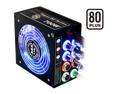
Pros: The power supply is very stable and is quiet. Doesn't vibrate and the cables are easy to hook up.
Cons: One of the PCI-Express cable wire broke and so my second graphic card is now unusable. If do not mind not having any way of getting extra cables or cables to replace them, then go ahead. IMHO I would get a power supply that uses cables that you can get from a store near you to replace them.
Overall Review: Their customer support is awful. I have called Tagan to get a replacement cable 3 times and 2 of the reps told me to just e-mail. The 3rd call was when I didn't get a response through the e-mail after 4 days. On the last call, the service guy told me that I had to wait for a call from a tech support to see what they can do. They have poor service.
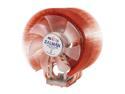
Pros: I love these heat sinks. They help the CPU stay very cool. In my family, we have 5 computers with these heat sinks. Sometimes I wonder if the fan is not on since it runs so quiet.
Cons: none
Overall Review: Be careful with these heat sinks when moving the computer. They can crack the motherboard or even move the cpu around. I also found it to be a pain to put these on for the AMD, but that is because I hate putting a lot of force on the motherboard.
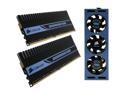
Pros: The ram works great and is fast. I find it funny that the fan is a bit of an overkill, but it was a better deal to get this instead of the package without the fan.
Cons: The first set I bought had a bad module and so I had to pay extra money to get it sent back for a replacement when I only had the thing for about 16hours.
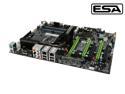
Pros: I bought a second one of these to built a computer for my brother. The tech support from this team seems to know their stuff and the board works great out of the box.
Cons: The only problem I had with this is that the cpu sometimes doesn't sit right in the socket for the core 2 duo. Also there is no built in wireless card. So I have to get a wireless card to take up the last slot when having SLI enable.
Overall Review: If you are having problems with getting the computer to boot and it is stuck on FF, make sure that the jumper for the CMOS is not in the reset mode. I also found that bumping up the speed of the PCI-express to 105 made my SLI more stable.