
Your Browsing History


Jeff J.
Joined on 08/17/06
0
0
product reviews
- 5
Roxio VHS to DVD Plus 3
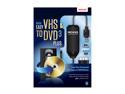
Roxio Easy VHS to DVD 3.0 Plus
Pros: Software was easy to install and getting the driver software to recognize the device on the computer was simple. I transferred two old work out tapes to dvd and it was simple once I figured out some technical things that the help section doesn't cover. Tapes copied great, no artifacts (transparent squares) and from what I can tell the picture doesn't jump or lag when the conversion is done. There are two very great features that comes in the software: the noise reduction, which really works, and the stabilization feature which reduces the video being jumpy by the camera man. The exercise videos I have did jump up and down when I transferred it but the stabilization took care about 90-95 percent of it. There are settings where you can tweak the noise reduction and stabilization so that is a major plus.
Cons: Don't use the software it comes with to burn your dvd is takes way to long. That's because it burns a elevator music sound track to the title page of the dvd and I can't find a way to exclude it. Also there isn't much customization settings with the software to make it how you want it, it's very bare bones. Also the dvd menus look good in the software but on a TV or computer monitor it sometimes does or doesn't. Finally, there is only text for the dvd menu so you can't have a button that has a picture or video from your home movie to click on, like I said very bare bones. Knocked off an egg for the bare bones software and insufficient instructions.
Overall Review: Huge tip to people using this software to burn anything or digitally transfer to the computer: when you go to advance settings to transfer to dvd or computer don't use MPEG2 as a file type, it takes forever, like in it will take a week for your dvd to finish burning or transferring. Use the WMV (Windows Media Video) instead and it won't take so long. Reason is MPEG2 is a bigger file format and if you put your video setting to best quality it will never be done in a day. Video looks good on best quality using WMV in my opinion. I recommend using Windows DVD Maker (which comes with any Windows 7 version), Nero, or any other software to burn your dvds. DVD Plus 3 is compatible with Mac so Mac users use what you have or get burning software for Mac. Roxio does have advanced dvd burning software by itself but I think I wouldn't buy a $99 software from a company that gave me bare bones software to begin with, so it's up to you.
3/27/2012See more detail
Really bad tower!
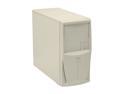
POWMAX MM3800 Beige SGCC Steel Micro ATX Mini Tower Computer Case
Pros: good case structure.
Cons: the power led wires inside the case were bad and didn't boot my motherboard.
Overall Review: Think twice before buying this case.
5/8/2007See more detail
Corsair Vengeance
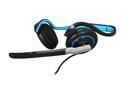
Corsair Vengeance 1100 3.5mm/ USB Connector Supra-aural Communication Headset
Pros: Great sound when using the usb adapter. I have a good sound card so it also has sound good when I plug them into the 3.5mm jack. Sadly the usb adapter does beat my on-board sound card. Also has good bass with the usb plugged in. Doesn't come with any software so when you plug in the usb adapter it will install the drivers, so that it a big plus. The foam pads are very comfortable and the mic has a 180 degree turn to it.
Cons: hurts my ears after awhile playing a computer game or watching a video. Sometimes the pain goes away and then it comes back. Reason it hurt is because the headphones have some weight to it. Also I have some problems with the volume control where the sound doesn't seem equal to the right or left side. Sometimes I have to adjust it by moving the wheel back and forth a little. Not a big con, but that and the weight of the headphones I will deduct one egg.
Overall Review: haven't tried the mic yet, read it was good so I'll have to field test it later.
3/27/2012See more detail
Great case!

Otter Box Black Commuter TL Case for Nokia E72 (NOK4-E72XX-20-C5OTR)
Pros: I really like how this case has two parts to it: a silicone sleeve on the inside and then hard plastic on the outside. Very sturdy material; it doesn't feel cheap at all. Bonus screen protector makes buying the case worth it.
Cons: The only problem I have with the case so far is that it makes my phone have a muffled vibration when the person on the other line is talking. The muffled vibration comes and goes, so it's a small con.
Overall Review: Really good case to protect the E72 from dropping it or having it in the pocket and bumping into something really hard. The headphone jack cover does set off the headphone detection on the E72 when I turn it on, but if I leave the phone on I don't have the problem at all. Every now and then I make sure the cover is on good.
3/30/2011See more detail
Works, but...
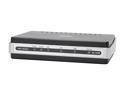
D-Link DSL-2320B ADSL2/2+ Ethernet/USB Modem 24Mbps Downstream, 3.5Mbps Upstream ADSL Port (RJ-11) 10/100 Ethernet Port (RJ-45) USB 1.1 Port ADSL Standards: Multi-mode Full-rate ANSI T1.413 Issue 2 ITU-T G.992.1 (G.dmt) Annex A/C/I ITU-T
Pros: Half the size of my old modem. Connected to the internet right away with the setup wizard.
Cons: The modem is sluggish when connecting to web pages. Some pages wouldn't load, tried my best to find the MTU setting the other reviewers walked about. It does get hot when it's on for awhile, could cook an egg on it or use it on cold nights to keep me warm. The power and internet light is very dim and hard to see if it's on. The instruction book could use some more explaining, there are some vague parts when trying to read step by step.
Overall Review: If you are someone who knows the ins and outs of modems you could possibly figure out how to get this thing going. For people who don't know modems very well, I would look somewhere else and find something that is easier to work with and that has a good manual.
8/11/2008See more detail