
Your Browsing History


Lonnie V.
Joined on 07/25/06
0
0
product reviews
- 7
No nonsense, serious firewall
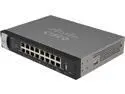
Cisco Small Business RV325-K9-NA Dual Gigabit WAN VPN Routers
Pros: The GUI is understandable and if you mess it up, the reset to default is straightforward. If you have a working understanding of Networking and router setup, even though it is a CISCO, you can handle this device. The Firewall and attendant Port functioning is a more in-depth than the usual consumer models, but the defaults are sufficient if you leave it alone. VPN capability is likewise there, but I'd suggest the average user do some reading up before configuring it. This firewall is suitable both for a small business or a Home with a small network of devices (Multiple PC's/Laptops, Networked Devices, Printers, TV's, etc). And attaching a WiFi Access Point or router is easy-peasy. Lastly, it's a small point, but it has a power rocker switch at the back. I always prefer a switch to 'Pulling the Plug'.
Cons: The device is meant really to sit on a shelf or to rack mounted, but there are two holes in the base place for Wall mounting. But CISCO only packs in screws for the Rackmounts. You have to get the wall screws for wall mounting on your own. Warning, the mounting holes are NOT the standard size...they're tiny! The heads must be smaller than 5mm ! And that means a trip to the hardware store.
Overall Review: At my office I installed Sonicwalls, but their way out of my price range for my home. But I looked at my old Netgear FVS318 Firewall and realized it was over 20 years old and non up-date-able. And I never trusted the Minimal firewall patches in the ISP provided router/modems. And in an age where more and more home devices are networked (TVs, Thermostats, etc) a router with ample ports is a necessity. The CISCO has all the ports I need without having to add another switch and finding a plug for it. If your a home user and have never dealt with CISCO before, or you have a Different brand and want to change/upgrade, remember to go into your current firewall and Document all the settings. Then log into the CISCO BEFORE you install it to see how it deals with everything. Everything is there...but each manufacturer gives different names & terms, or they place functions in different submenus.
10/25/2015See more detail
HDMI vid would sometimes go dark
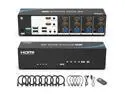
Real Seamless Switching USB 3.0 HDMI KVM Switch Dual Monitors 4 Computers 4K@30Hz, 4 Port Extended Display, 3.5mm Audio, EDID Emulators, Button, Hotkey, Remote Control, Mouse, RS232 Code Switching
Cons: I have 4 PC's with an ATEN DVI CS1764 KVM with an ASUS VE278 Monitor Every once in a while, I'd switch to a different PC and the Monitor would stay dark. Move the Mouse: Nothing. Click Mouse buttons: Nothing. Bang the Keyboard: Nothing. Then maybe... MAYBE...the video connection would wake up if i went Alt-Ctrl-Del. Second-- when a PC blanked the screen after a period of inactivity-- the screen was still lite with a kind of dim background haze. A third and final issue that nagged at me was a vague blur. It wouldn't go away even when did the 'Adjust Cleartype Text'. I think it has something to do with the way the device interfaces with Windows: With the ATEN KVM, Windows Still sees and identifies my Mouse (Mad Catz 8+), my Keyboard (Das Keyboard) and my Monitor (ASUS VE278) But with the ELK KVM, Windows no longer sees or names Monitor, Mouse or Keyboard-- Windows only sees a single device whose name I can't remember now... Finally when one PC refused to lite the screen up when I switched to it today, I took the EKL KVM out and put the ATEN and the DVI cables back in. Switches between PC's Back. Screen Lights up. Screen Goes BLACK after inactivity. And the BLUR is gone. Sorry EKL, Not Good enough...
Overall Review: It promises to be a HDMI for Dual Monitor KVM users--but it had too many operational negatives even with just Single HDMI Monitor. And I could not accept the vague blur that would not go away.
8/21/2024See more detail
Very Useful...but beware!
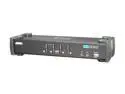
ATEN CS1764A 4-Port USB DVI / Audio KVMP Switch
Pros: for Managing different PCs for professionals from one keyboard/mouse/screen...there's no substitute.
Cons: This KVM, like most USB 4 port KVMs, have a really strange quirk-- They really don't like Static Electricity. If you hear a snap when you touch the MOUSE-- the charge will hit the KVM... And then it will STOP WORKING. The Mouse will be fine. The PC will be fine...but the KVM is now a piece of junk. If you use a KVM switch-- you need to be aware of how much static is in your workspace environment: your clothing, the rug, the fabric of the chair, etc.
Overall Review: Very good.
4/1/2020See more detail
Be careful with this one
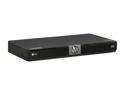
LG Blu-ray Player BD370
Pros: You can get Netflix. That's the main reason I got this one. I managed to get the thing set up and connected and could see my Instant Queue. I actually own NO Blue-ray Discs. I'm happy with plain DVD. And this thing plays them. Good enough.
Cons: The Networking Capability now being encluded with Consumer Electronics can be dicey. If you happen to have the basic setup that they designed for, then you're okay. But if you have an extended, complex Home Network, they will not be able to help you. YOU must be willing to troubleshoot the connection like a true Network Administrator. Routers and Firewalls are NOT made alike. A Netgear box may behave differently than a D-Link box or a LinkSYS. And then there are default level Firewall Settings to consider. Open up your Router or Firewall Settings and take notes BEFORE you start plugging in this device.
Overall Review: I say READ the Bad Reviews on this one even if you decide to buy this. The CON's listed are valid points that may make or break your reason for this purchase. I read them and decided to take the risk because I reasoned that I knew my network setup well enough to tackle it. And on this point they are all correct: DO NOT DO THE SOFTWARE UPGRADE IF YOUR PLAYER WORKS. This upgrade is more properly defined as a FIRMWARE UPDATE such as what you do for a Motherboard. And the rule for FIRMWARE is Hard and Simple: If It WORKS-- DON'T UPGRADE. FIRMWARE updates are NOT REVERSIBLE.
8/7/2009See more detail
Easy Set-up & install
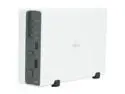
Synology DS107 1-bay SATA NAS Server
Pros: Easy setup--the shell opens easily for drive installation. The software CD is needed to find the unit on the network and then you are able to login and set the IP address. What's good about the software is that after you do the initial setup-- the software disappears-- no bloatware/crapware installed on the PC. I appreciate that. The rest administrative of the setup is standard for network storage unit-- Setup Groups and Users and Folders and you're off. The DS107+ has more memory-- but for a small home network-- this is sufficient. The size also makes it amenable to placement in an unobtrusive place in your system. Last-- the plethora of Functions-- Download, Broadcast, USB printer, iTunes, etc far outstrips the first generation Home NAS's (ie: my old Buffalo LinkStation)
Cons: I did not give it 5 stars because there is no Drive Maintenance function such as Repair or some kind of DriveScan. And I would have liked the ability to create partitions if I were to put in a terabyte drive.
Overall Review: The Administrative interface is best viewed in Internet Explorer-- so Firefox users need to use IE Tab for full functionality and less frustration.
12/2/2008See more detail
Handy KVM
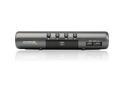
IOGEAR GCS1734 4-port MiniView Extreme Multimedia KVMP Switch Kit w/Cables
Pros: Can switch between older PS2 boxes and newer USB boxes. Can also switch Audio and limited USB devices. The Keyboard hot-switching almost makes the manual switches superfluous.
Cons: USB is still 1.1. So don't use a USB harddrive with this, nor a high end scanner. The Audio may act weird depending on your device.
Overall Review: If your power supplies in any of the boxes are high-end (ie: Antec)-- do NOT use the included power supply. The juice coming through the USB alone will power the KVM. Plugging in the brick will lock the KVM up.
9/29/2007See more detail
seller reviews
- 1
Prompt response
They alerted me in a timely manner that the original ordered case was not available in Black, but would substitute a white if I agreed. I did so and got the case in about the same time. All good.
On-time
Delivery
Product
Accuracy
Customer Service
Satisfactory
8/29/2023See more detail