
Your Browsing History
 Holiday Shipping Details & Extended Holiday Returns Holiday Shipping Details & Extended Holiday Returns

Joined on 12/10/05
Really nice afordable alterative to the expensive ITX options.
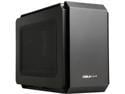
Pros: Really glad I went for the Cougar QBX. Not as smaller and more premium feeling aluminum ITX cases, for the price I'm more than happy. I like to build high end high performance PC and not usually value PCs, but am not made of money so spending it on the core components and not just looks is how I operate. This case a priced very attractively to the Dans cases, Ncase, Streacom and Ghost S1.Might not be as premium looking and feeling but I like it look a good bit. It a bigger than those other cases, but that has it's advantages. I was able to mod the side panel to mount a 280mm AIO (the EVGA CLC 280) and with a good 9900K chip, I'm running 5GHz at 1.25V and temps are in the 80s, similar to my open loop cooled 9900k running at 1.3V. Really happy with this case and am likely to use it to build a second ITX PC towards the end of the year (Ryzen 3000 maybe?). My GTX 1080 runs about 10 degrees cooler then is did in my original mid tower case, but still it usually maxes out at about 75C. Recommendations: Go with an SFX PSU - If using a full length card spend a little more and go with an SFX PSU. a 140mm long non-modular (modular is more likely to interfere with full length PSUs. I was advised this and tried to make an ATX PSU work, but ended up just getting the SFX PSU and it well worth the extra cost. Choose your GPU wisely - My Asus STRIX GTX 1080 fits but the power connectors just barely allow the case to close after shushing them as much as I could. That car is 5.28" wide so anything longer will likely not work. My other GPU is a MSI GTX 1080 Ti Gaming X Trio that 5.51" wide and I didn't eve bother trying. I'm planning on upgrading t a 2080 Ti and am being careful finding one. - Affordable (more money to spend on other components) - Mod friendly - fits high end powerful components - I like the Looks - I have 6 case fans running plus the 2 radiator fans
Cons: - Have to choose PSU carefully (just get a Corsair SFX PSU) - Have to choose your GPU carefully (nothing wider than 5.28"). 2.5 slots cards might work with bottom installed. 2.7 slot cards might work, but likely not with bottom fans installed (might have to get creative to keep bottom fans).
Overall Review: I think this is an underrated case especially as, like me, you can get a 280 AIO installed to build a real small powerhouse. -someone cas complaining about PSU co,compatibility, but Cougar site spells out the requirements. 140mm length Max, non-modular and power plug configuration. -Someone complained about the DVD/Blu-Ray not being accessible, but the top slides back to give access.
Fast and top notch CPU if your OK playing the premium for the best consumer mainstream processor.
Pros: - Fast great for both tp notch production and gaming in a mainstream PC. I have two of these CPUs: one in a December 2018 build in a Lian Li PC-O11 Air under an EK open loop. can get all core 5.0GHz at 1.3V with temps in the mid to high 80 depending on my ambient temps I'm in a hot environment and a hot upstairs room). The second just is a more impressive chip in a February 2019 ITX build in a Cougar QBX, that i managed to install a 280mm AIO (EVGA CLC 280) in. It does 5.0GHz at 1.25V with similar temps as my water cooled BIG PC. More impressively it also benches a bit better than my open loop cooler 9900K desktop.
Cons: - Run hot when pushing overclocks. You need good cooling if you want to overclock. I'd recommend a top air cooler (Noctua NH-D15 or the new Deepcool Assassin III) or a 280 AIO minimum. But running 5GHz on a 8 core 16 thread CPU isn't a big surprise. - Price is a bit high relative to the competition.
Overall Review: Quite happy with the performance, especially on with my ITX build.
This review for ASRock review rebate program
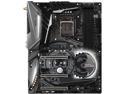
Pros: This review for ASRock review rebate program: ASRock has been making some good boards in recent years and usually has a rich feature set for the price. What lead me to choose this board: - ASRock wisely did away with USB 2.0 ports in the rear in favor of more USB 3.0 ports (only ones I've seen make this move thus far) - Good feature set - Good VRM solution - Unique looking board - ASRock reputation in recent years give me confidence - Didn't go crazy with RGB - Option to have up to three NVMe SSDs. - 8 SATA ports vs the usual 6 (populating the M.2 slots will disable some of the ports).
Cons: Wish the VRM solution was a bit better like the Gigabyte Z390 line. It's still good just Gigabyte seems to really up the anti with their VRM for the Z390. The back of the VRM can get warmer than some other boards, So I'll probably add some thermal pads to the back to help dissipate heat.
Overall Review: Other ASRock baords that are very similar to the TAichi Ultimate are: -Taichi -minus the 10gig NIC (standard dual 1gig NIC), BT 4.2 vs 5.0, less advanced WiFi solution -Phantom Gaming 9 - has 2.5gig NIC vs 10 GIG nic Only real difference I can see
Beautiful aesthetics, four fans included for excellent air flow with a couple of gripes.
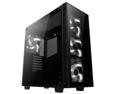
Pros: - Look really good. Everyone that's seen it reacts the same way, "Wow, that look really good". - Four fans included, Three front intakes and one rear exhaust. This was great because I didn't have to spend any extra cash on fans. If I had to buy additional fans I'd probably have to buy four so they all matched as the case is all glass. Most of the other cases I was considering only came with two or maybe three fans. - Mostly easy to work in. -came with three SSD brackets, the other cases I was looking at only came with two. -Glass panels on three sides make for a striking looking case, there is a flip side listed in the cons. - Did I mention it looks FANTASTIC. - The plastic shroud serves a double purpose. A. it helps cover you cables for a nice clean look and B. it has built in support for ling graphics cards. It hold my Asus GTX 1080 STRIX very nicely and prevents GPU sag. I wish more cases offered this.
Cons: - Weight, because it was three glass panels it's going to be heavier than most cases. not a problem if you just going to set it on your desk. If you plan to move you computer around often, you may want to consider something lighter. - If you motherboard as connections at the bottom that point down the PSU basement will be in the way requiring you to mod the case or get another motherboard. My Asus Z170 Deluxe had no issues, but some boards might, for example the EVGA X99 Classified. Check compatibility first. - The rear bracket used to lock the rear expansion slot into place made installing my Asus GTX 1080 STRIX a bit difficult. I was able to get it to work though. Would be easier if the back plate of the bracket was a bit shorter, it I didn't get it to work I was going to cut it down a little. - The back side of the case doesn't offer a lot of room for cable management. Just a little more space would of been nice. I got it to work with my EVGA 750 G2 PSU cables, but it took some extra effort and some force so I could close the back glass panel. A power supply with flat cables is recommended.
Overall Review: - The included fan hub is a nice option, but I didn't use them as my mother board can control the fans based in CPU temps. -Once the PSU is installed there is not a lot a room between the PSU and Hard drive cage area for cables. Connect all the necessary cables to you PSU prior to installing it into the case. - I'm glad I got this case. It looks really good. Build: Case - Anidees Crystal CPU - i& 6700K CPU Cooler: Noctua NH-D15 MotherBoard: Asus Z170 Deluxe RAM: G.Skills Ripjaw V series DDR4-3200 GPU: Asus GTX 1080 STRIX PSU: EVGA G2 750w OS: Windows 10 Pro Storage: Samsung 840 Evo 512GB boot SSD, 840 Evo 1TB SSD & WD 2TB green HDD
Good upgrade to Lenovo Yoga 2 Pro
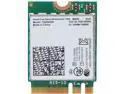
Pros: - 802.11AC speeds - Integrated Bluetooth 4.0 - Easy install (Yoga 2 Pro)
Cons: Just the fact that Lenovo didn't offer an AC card ad default or as an option.
Overall Review: Works fine with my Linksys E3000 though that's an older N Widi router. I tested it with a D-Link DIR-510L travel router (AC750 router) and I did get improved throughput and signal strength. I look forward to the arrival of my new Netgear R7000 Nighthawk WiFi router. This is a relatively easy upgrade for most modern laptops. My Lenovo Yoga two Pro was very easy. On the other hand My Asus G750JH was upgraded at purchase by a custom builder, as doing it myself would of required a lot of major disassembly. Make sure you get the correct version for you device, this is the new M.2 (NGFF) form factor WiFi card. Check which card your device requires. I did see a bump in mt internet throughput with the AC750 travel router but the real benefit will be with you Local Network speeds especially for those streaming from their computers.
Nice enclosure for the price
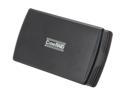
Pros: - Works well and give a nice speed bump in RAID 0. - Relatively inexpensive - The only Dual 2.5 in drive I could find. There are some 4 bay 2.5" drive enclosures by Drobo and Pegasus but they cost between $300 - $400 (but they do offer greater capacity and possibly redundancy/protection). - Small enough to take with you on the go.
Cons: - The cheap plastic latch that locks the enclosure closed broke with in a month of ownership. Still it manages to stay closed, I will eventually add some duck tape to make sure it doesn't open during transport. - Documentation is not the best, but get the job done. - I'm confused as to the exact specs. The documentation and what's listed on newegg differ a bit. Not Sure if it's SATS II (3GB/s) or SATA III (6GB/s). Documentation says up to 6TB of total Storage (3TB x 2) online description says 2TB (1TB x 2). Probably because there aren't any 3TB 2.5" laptop HDD available.
Overall Review: So far happy with the CinaRAID CR-H212. I'm planing to get another down the road. Would be nice to pait this enclosure with two Samsung 840 EVO 1TB SSDs, But that would be an expensive proposition at the moment at nearly 1K for the SSDs. CyrstalDiskMark showed that in raid 0 it is more than twice as fast as my fingle drive 1TB USB 3.0 drive from WD. I can't complain as it make transfering files much much faster. Running raid 0 I have no protection so I back up this drive with my WD single 1TB USB 3.0 drive for added protection.