
Your Browsing History


JAMES L.
Joined on 02/23/10
0
0
product reviews
- 14
So far Great
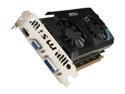
MSI Radeon HD 6670 1GB GDDR5 PCI Express 2.1 x16 Graphics Card R6670-MD1GD5
Pros: Beast of a card so far. Playing MW3 on all "extra" high settings, not a single slow down or stutter yet. Easy to install, does take up two slots in rear, so i had to take out one additional cover, but its a pci-e slot so thats typical or expected with some cards, no actual pci slots next to the pci-e slot anyway. Have no packaging complaints, came with usual cd and manual and anti static plastic. Upgraded from a radeon HD 5550, my WEI rating went from overall 5.5 to 5.9, graphics rating went from 6.5 to 7.1 (thing keeping it low is the HDD.) *Will update review as time goes along if anything changes.* All in all, secksi card for the price havent been able to slow it down in extra/ultra high settings.
Cons: The drivers from the msi website do work, the software/utility to overclock it and monitor the graphics card sucks, there is no utility from msi like the amd catalyst software to change settings like resolution, or if you have multiple monitors, yes you can use windows resolution options to change those settings, but I find that the amd catalyst software and drivers work just fine as well and I am use to the amd catalyst utility to change my multiple monitor settings and overclocking abilities. so i in the end deleted the msi drivers and software and installed the amd software as it is a radeon card after all.
Overall Review: My custom build so you know what I have to allow the super extra high settings: phenom II x 4 980 3.7ghz 8gb ddr3 ram 1600mhz ASrock970 extreme3 mobo corsair h60 liquid cooling coolmaster case (has total of 5 fans default installed, plus 1 I personally added) 450w power supply **This is not dual graphics card for crossfire**
7/24/2012See more detail
Looks cool . But that is the only Cool aspect of this cooler
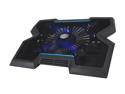
Cooler Master NotePal X3 - Gaming Laptop Cooling Pad with 200 mm Blue LED Fan
Pros: Looks cool, nice lights.
Cons: Does not cool anything. I put a piece of paper (straw wrapper for like a fountain drink) on the cooler. Could not even blow it away. Tried with plastic that the usb power cord came in.... couldnt blow that away either. So it looks cools and has nice angle, but thats it. returned.
8/24/2016See more detail
When it worked, great.
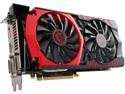
MSI Radeon R9 380 4GB GDDR5 PCI Express 3.0 x16 CrossFireX Support ATX Graphics Card R9 380 GAMING 4G
Pros: This gpu can handle any game thrown at it. I don't do 4k or anything, but I am a big gamer, and a married one.
Cons: Failed 1 month after the 1 year warranty. Of course it did.
Overall Review: This is most likely a fluke as all my previous gpu for the last 8 years have been msi. However, the clear obvious quality of all computer components (not just MSI) have degraded rapidly over the last 5 years leaves suspicious on the fact that of course it failed 1 month after the 1 year warranty. Go figure. My build: Fx8350 4.4ghz 16gb ram Asrock 970 extreme 3 HAF 932 full tower case with 8 fans in it Liquid cooling So I know it's not build.
10/20/2016See more detail
Great PC for the price.
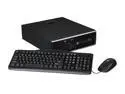
HP 8200 Elite SFF Desktop PC - Core i5-2500 3.3GHZ, 8GB RAM 500GB HDD, Windows 7 Professional
Pros: -the price -the specs -the os.
Cons: -driver issue with windows 10 (not serious as the driver is with some equipment not used for anything important.) Only one driver could not be used for a serial port. The hardware in question is used only for remote access viewing for like a big business who may monitor their employees live via remote access. This does effect the basic remote access programs such as windows remote access or team viewer. It's more for a business that runs a separate video line to each piece and hooks up to the hardware plug in question. The drivers you can find online. But you cannot install them in windows 10 as Microsoft will not let you because it's not approved Microsoft software. I've tried many workarounds to bypass Microsoft's block on the driver install exe but no luck. I just left it so that hardware is disabled due to lack of drivers. Not a vital piece. (Note: with the windows 7 pro that was already installed when I got the pc did not have this problem, the driver was already installed. This lack of driver issue only occurred on windows 10.)
Overall Review: So my overall review.... this cpu is more on the high end of cpu spectrum. The ram that came with it was indeed 8gb but only 1333mhz. Still it booted up fast. I'm the family tech guy and I ordered this for my sister as she needed a good school computer. This would natural be a great gaming machine with the proper case, motherboard, and gpu. But this case is a thin one and I doubt the motherboard could handle a high end gpu let alone wouldn't fit in the case. It comes with an ATI HD 6350 if I recall correctly, but I have never seen that type of connector. It's not vga, hdmi, nor dvi. But the pc came with the necessary adapter which actually split into two vga plugs for two monitors. Plus the on board Intel for a 3rd monitor should you need 3. I do not believe the Intel built in gpu was active on windows 7, but that's a simple install of drivers if you want 3 monitors. It does come with both a wired optical mouse and keyboard, and the hdd was indeed a 500gb in which about 10gb, was partition separately for recovery purposes. The site states it comes with recovery cds. This was not true in my case, but an email settled that and they replied with a simple shipping it out asap, sorry for the trouble. The case had a few scratches but no dents. The vent area of the case had some dust, but not enough to my standard to warrant a cleaning and i clean my own custom built pc every 6 months. The inside of the case was impressively clean, didn't see a single spec of dust/dirt. If I wanted to upgrade this to a gaming pc, I would buy a standard gaming case, a new motherboard, a new gpu, and maybe upgrade the ram to a 1600mhz speed. The cpu alone is worth the $200 for this pc (almost). I didn't notice any sluggishness like you do with most work/corporate pcs as you can quickly tell that's what this was used for. The pc came clean. As soon as you turn it on, you have to go through the setup process. Sure comes with some bloatware like Norton and a bunch of other stuff you will need to uninstall. But your not dealing with anyone else's mess. Everything as expected was compacted in the case as it is a small case, made me feel cramped just by looking at it. So I am not sure if anything is upgradeable. I mean, you can swap out hard drives for an ssd in sure, swap out ram, but adding more ram? I didn't check as its intended use is not mine so I didn't bother checking. The build is perfect for my sister and then some. The gpu I saw could be upgraded to a better gpu if someone wanted to install a better one for gaming, but you will not be able to go to the top of the line gpu. It will be required to use a micro/small gpu. But I know they make small ones built for gaming, may not be able to play far cry on high settings, but medium sure with the right micro gpu upgrade. After buying this one, I have already recommended these to a few clients asking for a simple but powerful pc. This is definitely it. I also took advantage of the free windows 10 upgrade. Only had the one driver problem mentioned above which in 99% of cases won't matter anyway as not many business use that type of software/hardware for remote access anyway. I will buy another one of these to use as a server for my family as that's what we use instead of cable tv. Who pays for tv anymore? I will just upgrade the hard drive.
2/16/2016See more detail
Great Deal
MSI Radeon R9 380 4GB GDDR5 PCI Express 3.0 x16 CrossFireX Support ATX Graphics Card R9 380 GAMING 4G
Pros: I upgraded from a hd6670. So this is of course a huge upgrade. Ive played watchdogs on ultra (had to turn down due my old phenom cpu bottlenecking.) So i play it on high settings as my cpu allows that with few bottlenecking. Also far cry 4 on ultra plays like a champ. So I do not think I will need to buy a new card for a number of years, just a new cpu.
Cons: I have an haf 932 full tower with 7 fans and liquid cooling for the cpu, so I am very disappointed in the concept that the graphics card idles at 60 degrees c. I bought a pci dual fan (also from newegg) and that brought idle temps down to 45 which is more reasonable. Granted at full load it hit only 66 with an avg of 64 with multiple hours of gaming. But This is due to the fact at idle the fans on the card do not run. And if you override the fans to run, which you can via msi or amd drivers and say put it at 35% it will idle temp down to normal 40 without a problem. But if you forget to turn up the fan speed when gaming or turn off so its auto, you risk ruining the card from overheating. So this concept i do not like. But again the pci dual fan I bought took care of that risk, I leave fan control on auto. Just disappointing as i said, I have 7fans built into the darn tower and there are no wires or cords bundled up to prevent air flow, so I figured as I never have heat problems the idle temp would be lower than 60 (well now 45 with the pci fan). My cpu when gaming never got above 52 degrees c. so obviously the airflow and liquid cooling is functioning normal and this is a graphics card issue only. Does this want me to return the card? heck no. the pci fan solved my concern which without it was minimal as again under load it only hit 66 degrees c with or without the pci fan.
Overall Review: I am not a gamer that cares about 1080p or 4k yet so I cant comment on that, based on other reviews this card can easily handle it though. I run a two monitor system, 1 hdmi, 1 dvi-d. I also run it on the amd drivers instead of the msi drivers. Nice price and big bang. I was considering the gtx 970, 980, and r9 380x 390, and 390x and I chose this one based on reviews and am glad I saved the hundred dollars to get the others i was considering as this thing handles anything i throw at it.
8/29/2015See more detail
Great Fan, just loud
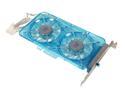
Vantec Spectrum Fan Card with Dual 70mm Adjustable UV LED Fans - Model SP-FC70-BL
Pros: OK, so I just upgraded to the r9 380 4gb graphics card and figured mind as well get something to help keep it cool. before this fan idle was at 60 degrees celsius. After installing this fan, idle went down to 45. When under heavy load the highest it gets is 66, avg is 64. I tested this on watchdogs on highest settings (as my old cpu of phenom ii x 4 980 BE cant handle ultra despite the graphics card being able too.)
Cons: none
Overall Review: not a con, but a thought. It is not annoying to me as i wear headsets, but the fan on max (changed by a slider on the back of the pc) is loud indeed, so if you keep your pc away from your desk, this should not be a problem or like me if you wear headsets. It does light up blue, but I do not care about that. So I am happy with this purchase. Note: I did install it 3 slots down from my graphics card for best temp results. And it does come with a p4 connector that connects both sides so it also acts like an extension of p4. So I have this and another fan plugged into this p4 connector as i said it is more of an extension.
8/29/2015See more detail