
Your Browsing History


Kyle H.
Joined on 10/12/11
0
0
product reviews
- 6
Great Speakers
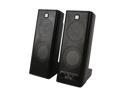
Logitech X-140 5 watts 2.0 Speakers
Pros: Great Sound Quality Seperately adjustable "Base" frequency volume Audio in and Headphone ports
Cons: Volume and Tone knobs are somewhat weird (See Other Thoughts)
Overall Review: -General Review- These speakers look and more importantly sound great. They have a sturdy construction and balanced so they are not easily knocked over. like any computer speaker ever, they are prone to interference (random blips, crackling, and buzzing) if you leave your phone right next to them, which is easily cured by putting your phone further away from them. But generally this does not happen as they are fairly well shielded. It has only happened once to me. The integrated line-in port is useful if you want to use them as speakers for an mp3 player without having to unplug the main connector from your computer them from your computer, however it overrides the input from the main connector. The headphone port is useful if your computer case does not have a front panel headphone port. It is simply a pass-through so it is the same 2 channel signal that the speakers are getting. However it overrides the speakers, so you cant just plug another set of speakers into them and have 4 speakers over 2 channels. There is a detent in the volume knob that also clicks to ensure the speakers are off or on. The Tone control knob is useful for fine tuning the amount of bass without using software. I personally find it useful for videos where people are talking but you can't understand what they are saying because there is too much low tone. Just turn it all the way down and their voice will become much clearer. -Oddities- The volume knob works perfectly fine, but there are no groves to help you grip it. So if you have greasy or sweaty fingers you might have some trouble controlling the volume, especially if you are trying to turn them on or off. At about the 70% mark the knob is slightly more resistant to turning, but not to the point of becoming a problem and. The only real complaint about the knob is that the indicator for the position of the knob is just a small dimple that you can see in good light, but you cant physically feel it. So if you are in a darker room, combined with your eyes adjusting to the bright screen in front of your face, you can not see what it is set to. This isn't much of a problem since you can just stop turning the knob once it is at a comfortable level. But you can put a dab of white/glow-in-the-dark paint on it if it really bothers you. The Tone control knob has the same problems as the volume knob listed above, but when it hits the spot with more resistance there is much, much more. Of course it is not that big of a deal since you will almost never use the Tone knob.
10/18/2013See more detail
Best Cooler for the Money
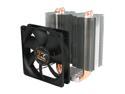
XIGMATEK Gaia SD1283 120mm Long Life Bearing CPU Cooler LGA1150 Haswell Compatible
Pros: Works Great Quiet Not too expensive
Cons: Setup instructions are not very clear
Overall Review: -General Review- This is a great cooler! I installed it on my i5-3570K using only the included fan. Over clocked to 3.8GHz base clock and running at maximum load for an hour, the temperature never went above 40°C. -Tips- When I first installed it, which took a good 20 minutes due to poor instructions, I made the mistake of installing it (in the case) before plugging in any connections to motherboard headers. If you want to have an easy build process, I suggest you install it AFTER you plug in any and all connectors to your other components. Otherwise it gets in the way and gives you less room to work with, especially with a Micro-ATX motherboard. The included thermal compound comes in a non-resealable package, so what is not used is either wasted or stored awkwardly with a Chip-Clip on it. The fins bend very easily so be careful.
10/18/2013See more detail
Works Great
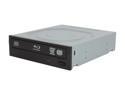
LITE-ON Black 12X BD-ROM 16X DVD-ROM 48X CD-ROM SATA Internal Internal 12X Blu-ray Combo Model ihes112-04
Pros: High read rate Works Perfectly
Cons: None
Overall Review: The Color and sheen blends very well with most cases. Company Logo is NOT printed on the front of the tray, which is a huge aesthetic plus for custom builders like me. Unlike most OEM optical drives which report themselves to Windows as a non-specific optical drive under the display name of their model number, this one reports itself as a Blu-Ray Drive under the display name a "BD-ROM Drive". So Windows knows exactly what it is.
10/18/2013See more detail
Quiet and Effective
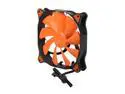
COUGAR CF-V14S Vortex Hyper-Spin 150,000 Hours 14CM Silent Cooling Fan
Pros: Quiet
Cons: Tool-less attachment is way to difficult to use and is not compatible with some types of attachment points on cases.
Overall Review: They look really cool.
10/18/2013See more detail
Great First Time Builders
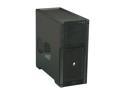
Corsair Carbide Series 300R Black Steel / Plastic ATX Mid Tower Computer Case ATX (not included) Power Supply
Pros: Great Cooling Potential Easy access air filters Completely Tool-less Installation (except Motherboard of course) Lots of space Kensington Lock Slot Case Lock Slot
Cons: Case Lock plate not included Case Speaker not included
Overall Review: -General Review- Great case overall. The tool-less design, and carefully planned ventilation are the basis of a great case. The open space between the HDD cage and 5.25" drive bays ensures airflow directly from the top front fan into the center of the case, while the bottom front fan blows over the HDDs to keep them cool. The top will support up to a 280mm radiator. The bottom intake for the Power Supply is elongated for Large,High Wattage Power Supplies, and has an easy access filter. The feet are tall enough that you can put it on most carpets and airflow to the Power Supply will be relatively unaffected. The side vents are positioned perfectly to provide cool air to any GPUs. The tool-less design makes it easy to add or swap out components. -Small Issues- (These are extremely small nuances that I personally find as something that could be better. THESE DO NOT AFFECT THE QUALITY OR FUNCTIONALITY OF THE CASE IN ANY WAY!) The Power button is not very intuitive. It has a detent that makes an audible and tactile Click when you press the button far enough. Naturally I would assume that at this point the computer would turn on, but you actually have to press it a little bit harder. This scared me when my computer would not turn on when I first tried to power it up, since I was only pressing it to the detent. Not that anyone actually uses the reset button (usualy just hold down the power button to accomplish a power-off during a hard lock-up), but the reset button on the case is too small. Since it is flush with the surface of the panel it is extremely difficult to depress it far enough using only your finger. Combined with the same problem the Power Button has, it is quite useless unless you have something small like a pen to press it with. The connectors for the power and HDD indicator lights are not clearly marked as positive and negative. I had to use the guess and check method to set it up properly.
10/18/2013See more detail
Great Card
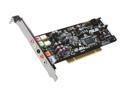
ASUS Xonar DS 7.1 Channels 24-bit 192KHz PCI Interface Audio Card
Pros: Works Great Compatible with EAX Low profile Capable 7.1 Analogue and Digital Suround
Cons: Front Pannel Mic Problem (See Other Thoughts) Automatic switching between Front and Rear panel output does not work as intended. (See Other Thoughts)
Overall Review: -General Review- This card works fantastically! I have it installed in the slot next to my GTX 660 and it is small enough that it is completely out of the way of the intake fan on the Graphics Card. The adapter to use an optical TOSLINK cable is included, which is very helpful. I tested the optical capabilities on my home theater setup and it works perfectly. -FP Mic Problem Info- There is a problem with the front panel mic port. When monitoring is enabled you can hear yourself and Windows sound settings also displays the green audio level bars. But when using an application such as Skype or games with VoiP they do not register any input. However, The Mic port on the card works just fine. This leads me to believe it's a problem with drivers and Windows 8. This is particularly annoying because If I want to use my headset and mic I have to get behind my computer and switch out the plugs with my speakers. -Automatic Switching Problem Info When you plug headphones into the front panel connector it will automatically switch to front panel headphone mode. When you unplug them it will automatically switch back to the on-board port, but it will remain in headphone mode instead of switching back to the speaker mode. You have to manually change the setting back to speakers. This is most noticeable if you have a 5.1 or 7.1 setup since you will be getting audio out of only 2 speakers if you don't change it back.
10/18/2013See more detail
seller reviews
- 1
Scam. Shipped to wrong address.
They shipped my order to some random address half way across the country. Response was that they would handle my claim after their national holiday, it’s 3 days past the end of the holiday and still no more response.
On-time
Delivery
Product
Accuracy
Customer Service
Satisfactory
10/13/2020See more detail