
Your Browsing History


Rick I.
Joined on 02/13/05
0
0
product reviews
- 6
Great case, mazing' airflow
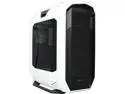
Corsair Graphite Series 780T (CC-9011059-WW) Black / White Steel ATX Full Tower 780T Full Tower PC Case ATX (not included) Power Supply
Pros: + GREAT airflow + lots of room for cable management + easy to clean dust filters + Fits a thick 140 Rad up top, with room to spare + Looks amazing, LED lighting is really classy. + Light enough to carry with one person, well balanced
Cons: + huge (but I like that)
Overall Review: First time going with a Corsair case (previous was CM Cosmos, and thermaltake before that.. and then some others before that.). Awesome case. Lots of quiet, quality fans. Tons of room to hide wires. Easy to access and clean dust filters. Super high quality case. Fit the dual 140mm fan and crazy thick radiator in the top with no problems whatsoever. Fan speed setting is a nice touch, and overall very pleasing visually with the included LED's. SSD clip holder is a bit tricky, but once you get it, no problems.
6/3/2015See more detail
Great mobo when it worked - now on 3 RMA's with ASUS customer service.
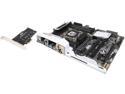
ASUS X99-PRO LGA 2011-v3 Intel X99 USB 3.0 ATX Intel Motherboard
Pros: Running this with a i7 5930 and Corsair dominator 2800 ddr4. Overclocking was a breeze. I first tried the 'auto' (5 way optimization) to see how it has improved, and it has in leaps in bounds. But I still got a little better clock by going in and manually tweaking settings. If you are new to the game, it does a great job, but a little research and you will be able to squeeze out a bit more on it. (bclk / strap 125, cores set to 36, voltage at 1.28 gives me a 4.5ghz OC and 3000 ddr.) Auto gave me bclk 100, core to 44, volts at 1.299 which is a 4.4ghz OC and 2400 DDR.
Cons: No screws included in the package to attach the motherboard to the case, so make sure you have some. Last stick of DDR (Closest to the ports on the back of the board) is super close to the plastic housing over a heat spreader. Be nice to have a 1/4 of an inch or so gap there but they are almost touching. No heat problems detected though.
Overall Review: Great board, have always gone with ASUS. Check out the reviews of this board, it's the best when it comes to overclocking your ram (even to just get it running at it's labeled speed.) This is the goto board for a lot of reviews, because of it's ease in overclocking both the CPU and the RAM. Upgraded from an OC'd i7 920 (3.82 GHZ) and in render tests (I work in Maya) the new build is coming out about 2.5 to 3 times faster. CRAZY! *UPDATE* 4/24/17 This Board worked up until about 4 months ago flawlessly. Since then I'm on my THIRD RMA with ASUS in trying to correct the problem. Code 95 (PCIE not initializing). I have been building with ASUS motherboards for 20+ years and have NEVER had this disappointing of a run-in with them in customer service. Have called multiple time, usually, each call lasts 1.5 to 2 hours. Every call the tech says the PCI express is faulty. They authorize an RMA and then send me the board back two weeks later with a flashed BIOS. This last RMA they said they will replace the board. I send it in. An ASUS rep calls me and says the 'remanufactured' board is ordered and will be sent soon. A week later a board arrives. It's my same motherboard (the one that had already been RMA'd 3 times) with a flashed bios. Called and talked to a level 3 tech. Said he would find out what was going on and call me back within 24 hours. That was 4/20 and today is 4/24 - still haven't heard back. Asus tech support has really gone downhill... not sure if they have just grown too big or what not. This will be my LAST Asus purchase. Troubleshooting steps - Tried posting with one stick of Ram (all four separately at a time in the same slot, restart, get the same result.) code 95. Replaced the power supply (*no problem with corsair sending me a brand new PSU to swap out with and take the old one back) - code 95. Tried 3 different working GPU's - code 95. Tried the board in and out of the case with nothing plugged in except power, 1 ram stick and the CPU - code 95. Without the GPU code 96 (No GPU). No matter what PCI-E port I use it's the same code. I think (and the multiple techs I've talked with agree with me) that the PCI bus is shot. But for some odd reason, ASUS feels that a BIOS reflash is the ticket to fix it. *sigh* I'm a patient person... but going on 4 months now without a working computer and getting the run around from ASUS is wearing on me. Avoid a headache, buy a different brand.
4/24/2017See more detail
New Favorite TIMP
GELID Solutions GC-Extreme Thermal Compound
Pros: + dropped my CPU 3C. + Mind blown.
Cons: + needs to be warmed up before using. Not really a con, unless you don't warm it up first. I put it in two ziplock baggies and then dropped it in hot water for about 5 minutes. Easy peasy.
Overall Review: I used the thermal paste that came with my Swifttech h240-x, and was getting about 75c, switched to the GELID GC-extreme, and it has never hit over 72, and usually hovers around 70. Really good stuff... blew my mind that it was 3c cooler just by changing the paste. (Make sure you heat it up first before using, as it's pretty solid stuff..)
6/3/2015See more detail
X.M.P 3000 Nice and stable
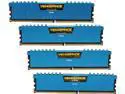
CORSAIR Vengeance LPX 16GB (4 x 4GB) DDR4 2800 (PC4 22400) Desktop Memory Model CMK16GX4M4A2800C16B
Pros: XMP settings for both 2800 and 3000 speeds. Set and forget, worked just fine, and super stable.
Cons: None.
Overall Review: Running this on a Asus X99-Pro board with a 5930k processor. When you set the XMP it will bump your Bclk to 125. No problem, just set my cores to 36 and I was off and running with a really nice overclock. Timings are a bit high, but this is new tech, they'll come down with updates. Solid Ram!
6/3/2015See more detail
Custom PCB - No liquid cooling option
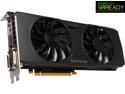
EVGA GeForce GTX 980 04G-P4-2986-KR 4GB FTW GAMING w/ACX 2.0, 26% Cooler and 36% Quieter Cooling Graphics Card
Pros: + Stupid fast card. + Decently cool on air (72 - 75C under load), but would be much cooler on liquid (and more overclockable). + Haswell Chip, very power efficient. + NewEgg is all sorts of Awesome + Ran at factory overclock (since it was so high, watercooling would be the next step before pushing it more.. oh wait.. can't watercool.. I forgot! Bah.)
Cons: +knocked off three stars because this is a Custom PCB (you wouldn't know that unless you tried to watercool it.. there is no readily available info unless you dig. EVGA should label this!) + There is no watercooling option except a total hack job, which would be a shame on such a great card. +EVGA told me to go pound sand when I asked for options. +980 TI (which is water cool.. able.) came out, and I was over the 90 day 'step up' option by 3 days and they would not budge. +EVGA used to have amazing customer service, either I got someone on a bad day, or they have gone down the tubes. + Next card won't be an EVGA.
Overall Review: The card is great. If you don't want to watercool, go for it. With the TI out, this is still a great, cheaper option. Be wary of EVGA's customer service, as I feel that they have gotten to high and mighty. Unless you want to feel like a number that is, then go right ahead. I prefer companies that treat you like a human, like NewEgg for instance.
6/3/2015See more detail
Great case
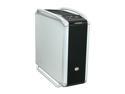
Cooler Master COSMOS 1000 RC-1000-KSN1-GP Black/ Silver Steel ATX Full Tower Computer Case
Pros: Nice roomy case.. good airflow if you do the following: Replace all three fans with Scythe S-FLEX SFF21E 120mm fans. If you are doing overclocking, but don't know a ton about water cooling, then pickup the new Eco from coolit. Install the fan on it to pull air into the case instead of it's default 'pull out' Your top fans will vent out the hot air. Before I did this I was running 40 C on Idle, and pushing 72C on full load. Now it's running under 30C Idle, won't go over 62C under a full Load. (Overclock to 3.82Ghz... ram is oc'd to 1603 Mhz.) I've got a GTX 285 and it runs nice and cool as well. (All purchased at newegg.) Before I did those mods (And I built this about 18 months ago..) I thought the case was decent but wouldn't buy another or recommend it.
Cons: Airflow out of the box box is great if you are not overclocking, and playing solitaire with a built in Graphics chip *grin*
Overall Review: If you do want to overclock, then it can be a great case, with a few cheap modifications. The case is beautiful, and runs nice and quiet. MB : Asus P6T Deluxe v2 Intel X58 CPU: Intel i7-920 OC'd to 3.8Ghz (200x19 @ 1.28V) GPU: EVGA GTX 285 OC'd to 702 / 1584 / 2646 RAM: Corsair Dominator 12GB DDR3-1600+ Cl8 (8 8 8 24, 1.66V) HDD: 1Tb Samsung Spinpoint SataII 32Mb Buffer PSU: Rosewill RX850 Xtreme (850w) ECO CoolIT (CPU cooling) Coolermaster Cosmos 1000 Case Samsung 2433BW 24" Lcd Samsung 204B 20.1" Lcd Windows Vista Ultimate 64-bit
3/14/2011See more detail