
Your Browsing History


Dean H.
Joined on 11/26/02
0
0
product reviews
- 23
Incredibly easy set-up; USB cable included, works with Windows 8.1: very affordable laser printing
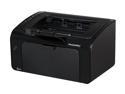
HP LaserJet Pro P1102w (CE658A) Duplex Up to 1200 dpi USB / Wireless Monochrome Laser Printer
Pros: -USB cable included -USB and wireless -works in a WAN (via router) or peer-to-peer -works with Windows 8.1 -CD-free install under Windows
Cons: none
Overall Review: When faced with a need to simplify a user environment (from a networked/wireless to a local printing environment), the two main features I searched for was affordability and a direct USB connection. This printer hit both of those marks, and as it came out of the box offered multiple additional pleasant surprises from a printer that is this affordable. Among them: -an included USB cable (maybe this is new since my last printer purchase, but this is the first printer I ever bought that included a USB cable in the box. Nice! -CD-free installation. I simply plugged this printer's USB cable into an available port, turned on the printer, and was walked through a no-hassle "HP Smart Install" routine that took only five minutes to complete. -Windows 8.1 compatibility. I've had past experiences with other perfectly good HP printers deciding they would not play well the most current Windows OS. My Windows 8.1 install is five days old, and neither this printer nor the 8.1 machine blinked during this install. Because the printing needs this printer will support are basic ones, I passed on the printer's prompt to download and install HP's XPS (XML paper specification driver). Because I specifically wanted a wired connection for this printer, I tested the wireless features only briefly, and successfully installed it wirelessly (both via a router-enabled connection to a non-wireless capable desktop AND via a peer-to-peer wireless connection that required no assistance from a router). All in all, this printer offers a tremendous amount of features at a very affordable price. Select with confidence.
10/31/2013See more detail
If you already have Office 2010, don't bother
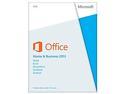
Microsoft Office Home and Business 2013 Product Key Card - 1 PC
Pros: -Slightly streamlined interface...
Cons: -But "the ribbon" remains... -The price. Ouch!
Overall Review: Office 2013 does not offer enough improvements to take on the hassle of moving to the new version (which I deliberately did not call "upgrading"). If you are already using the Office 2010 suite, deliberate carefully about both the expense and the subsequent tweaking it will take to get you back to the customization you like. At installation, I was promoted to first remove my existing Office 2010 suite. After doing so, installation of Office 2013 took approximately 10 minutes. Although cosmetic changes appear in the user interface (mostly in a "flattening" of controls on the toolbars), the overall presentation will be familiar to users of Office 2010. Hint: if you have many commands placed in your Office 2010 applications Quick Access Toobars, export them before you uninstall. You can later import them into the 2013 programs. Why this couldn't be scripted into the 2013 install process (along with removal of the earlier version) is another question. Microsoft claims an array of new features in Office 2013. The biggest one that is readily apparent is that Microsoft would love for you to join them on the cloud via its online SkyDrive and Office 365 subscription services. Oh please. I already bought the productivity suite, and could have done without the additional marketing. Plus: every single time you look at the Office Ribbon, the big "Sign In" button will be visible on the right side. Bad idea, Office team: please don't add clutter to an already complicated user interface. Newly installed programs installed in a recently refreshed operating system should work flawlessly. The user experience while working with various Office suite data files (primarily Excel, Word, PowerPoint and Access for me) is basically the same as with 2013. Immediately after installation, every time I closed an application, Office offered a "...(application name) has stopped working" and the usual MS prompt to check for solutions or close the program. Of course it stopped: I just closed it. Online searches, including at Microsoft, have presented nearly a dozen options, most specifically focused on add-ins. I accepted the "search online for solutions" option during a Word shutdown. Apparently Office found one, and the remedy took place across all applications. However, this error was *NOT* part of the user experience in the Office 2010 suite that I uninstalled 10 minutes before the switch to 2013...and users shouldn't expect the latest version to contain more annoyances (which is what this is) than its predecessor. Very unsatisfactory. Office 2013 claims increased ease of handling graphics and editing .pdf documents. I've experimented with both, and in my opinion, the jury is still out. I am extremely lucky in being able to obtain this product under an academic license via my employer for fraction of what "civilian" users must play. For the deep discount I enjoyed, this behavior is an annoyance. If I had paid full price for this, "annoyed" would be far too mild
6/27/2013See more detail
Outstanding performance for the price
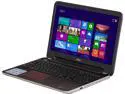
DELL Inspiron 15.6" AMD A8-5545M 8GB Memory Windows 8.1 64-Bit M531R
Pros: -Power: -- quad-core processor --12GB of RAM --1TB HDD -Connectivity: -ethernet -integrated 802.11 -Bluetooth -HDMI -USB [2x 3.0] -USB [2x 2]
Cons: No touchscreen, no 5 GHZ wifi
Overall Review: Compares favorably with models costing twice as much... ...because the quad-core processor, 12GB of RAM and 1TB HDD are not currently the performance specs for similarly priced computers, but for those costing twice as much. Maybe this model is reaching the end of Dell's production life, or perhaps the absence of a touch screen and 5GHZ wireless option has moved it into the "bargain priced" laptop domain, but one thing is for sure: if the absence of a touch screen is something you can live with (and I certainly can): you're not likely to find a more capable machine in this price range. Good connectivity options (ethernet, integrated 802.11, Bluetooth, HDMI output and USB [2x 3.0 and 2x USB 2]).l After loading an Office Professional suite, an anti-virus program and the normal set of PC utility programs I use (inclduing a screen capture tool and audio editor, boot time from power off is an astonishing 24 seconds (12 seconds to my user splash screen, and 12 more for the desktop to be ready to use). Shutdown time to full power of is less than 20 seconds. I don't yet have a consistent sense of battery life, which is going to variable depending on power management settings (including an "ultra long life" setting that will maximize available charge time). For a mass market laptop, this computer arrived surprisingly free of bloatware/trialware. Super responsive to productivity tasks, and so far has handled light video processing just fine. Long term durability is TBD, but for most users, this is going to outpunch others in its weight class.
2/15/2015See more detail
Inexpensive SSD solution (for small data volume needs)
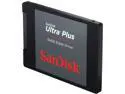
SanDisk Ultra Plus SDSSDHP-064G-G25 2.5" 64GB SATA III MLC Internal Solid State Drive (SSD)
Pros: -inexpensive SSD -
Cons: -if you don't need SATA, consider SD instead
Overall Review: ..for those without massive data storage needs. -Good for Linux users, as a an OS boot drive in a multi-drive system, or for backup/portability for users that aren't overflowing with data files. -Instantly recognized by two separate Windows 7 machines. In my desktop, USB 3 transfer speeds to/from an external enclosure were around 80 MB/sec. -Fairly pricey (you can get the same capacity in an SD card for about half the price).
7/4/2014See more detail
nce you've selected your printer hardware...what else can you do?
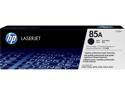
HP 85A LaserJet Toner Cartridge - Black
Pros: OEM for HP 1102w 1800 pages estimated
Cons: none
Overall Review: Once you've settled on your printer hardware, your only other choice is whether to go with the manufacturer's cartridges or an aftermarket "equivalent". I go with the OEM, and have had nothing but satisfactory result from HP cartridges. Watch for sales and select with confidence for your HP printer.
10/31/2013See more detail
Works fine in Windows 7 machines
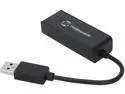
Tek Republic TUN-300 USB 3.0 to Gigabit Ethernet Network Adapter
Pros: USB 3 Link/activity LEDs
Cons: None
Overall Review: The TUN-300 adapter worked immediately in my tests on both a desktop and a laptop computer (each running Windows 7 Professional). The device was recognized immediately and the driver self-installed upon connecting to a USB port. The TUN-300 appeared in the Windows device manager listing of network adapters under its ASIX chipset name. Both the green link LED and yellow activity LED light as indicated (and blinked to show activity for the yellow LED). Although the tekrepublic website contains separate driver downloads, this adapter provided wired connectivity as soon as data input was provided via an ethernet input without additional installations. In a market crowded with commodity items: this one works. Note: This product was provided for review purposes.
9/23/2013See more detail