
Your Browsing History


Rob H.
Joined on 03/11/03
0
0
100%
100%
product reviews
- 109
GB for GB, it is hard to find a better Backup Drive value
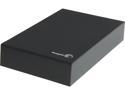
Seagate Expansion 5TB USB 3.0 Desktop Desktop External Hard Drive STBV5000100
Pros: Simple design, satin/flat surface will not show smudges, reasonably fast, subdued blue LED on top, drive is super-quiet
Cons: Minor con: Requires stand-alone power adapter, which is typical with the power requirements this size of drive. Also, the price indicated that it would be no-frills as far as software goes and I was correct. It comes with an app to help you register it and that is about it. That wasn’t a con for me, more of something I wanted to mention here.
Overall Review: I have used a wide variety of external hard drives in both the 2.5” & 3.5” offerings, including a 4-drive RAID tower connected through a port replicator for backup of my Media Server. Each has its pluses and minuses and this Seagate 5TB HDD is no different. Speed wise, it competes pretty well with some of my fastest external drives. As is typical when I test HDDs, I filled up the drive with video files in one big transfer to see how it does under load. This one did great and, actually, stood strong while my Western Digital 3x2TB Black Drive RAID array had a temporary failure, which is fixed only by powering down the system completely and re-booting. Once full, I ran CrystalDiskMark with the USB 3.0 interface and it scored 134-96-41-88 (SeqRead=134MB/s, SeqWrite=96MB/s, RandomRead 512KB=41MB/s, RandomWrite 512KB=88MB/s). In read speed, it is the fastest external drive I have. It loses a bit on write speed, but that is to be somewhat expected, considering its most likely use: backup. I wouldn’t expect to see day-in, day-out performance on level with the aforementioned 3x2TB RAID array used in my media server. Overall, it is really convenient to be able to transfer all of the contents of the media server onto a single drive and have it all to go in a reasonably convenient size. I have been using two 2TB 2.5” USB 3.0 external HDDs for this purpose, but it is kind of a pain to split the data. Also, they have more spotty performance with speeds in the area of 88-86-36-51. I mention this because, for external drives, I care more about speed & performance than software frills and that is what my egg rating is based on here. Regarding Seagate, I have 10+ aging Seagate drives running in various machines around the house, including the four 1.5TB in a RAID 0 Backup setting mentioned in the beginning of the review. For a while there, I had stopped purchasing Seagate drives due to mediocre reviews and better offerings in other brands. With successful usage of a Seagate 3TB USB 3.0 backup drive and some solid internal 1TB drives, I have begun to purchase them more for certain types of builds/settings. 5 eggs for being a good value and being everything I needed it to be and nothing I didn’t.
12/18/2014See more detail
Easy setup, abysmal performance

TP-LINK TL-WA854RE V1.2 300Mbps Universal Wi-Fi Range Extender, Repeater, Wall Plug design, One-button Setup, Smart Signal Indicator
Pros: -Straightforward setup using typical browser-based access to the configuration -Device found my local wireless network without issue and you can specify by MAC address which AP you want it to connect to -Retains profiles for different locations/wireless networks and allows you to select -I like the low profile, especially compared to a similar NETIS device I have that sticks out perpendicular to the wall
Cons: -Throughput speeds are rarely better than the speeds seen when connected to device being extended -Minor Con: Although I understand why TP-Link uses ‘extender’ in the naming of this device, it is really just a wireless repeater. In my experience, an extender is a device that is connected to the wired network and then acts as an access point for the wireless network, extending it that way. -Minor Con: They made this device low profile, but didn’t include a plug that folds in for travel.
Overall Review: I have had good history with TP Link’s devices (routers & adapters) and this device has surprised me a bit, but not in a good way. As mentioned in the Pros, I had no difficulty configuring this device to the local network. As I typically do with all of my network connections, I test the actual throughput speeds using the excellent third-party utility LAN Speed Test (LST) v3.5 with LST Server running on a home server across a robust Gigabit-802.11ac network. As a point of reference, I average 800Mbps Write/Upload & 800Mbps Read/Download (hereafter, 800/800) on my network testing from PCs that have Gigabit wired adapters and (90/145) testing over Wireless AC speeds on the 5GHz band. With an N300 adapter on this network, I can easily get 50/90, so that is our actual top end. I connected to the TL-WA854RE (latest 140827 firmware) configured it to my local network and then tested using a Windows 8 Tablet and also a Windows 10 Ultrabook, both with an N300-rated adapter. Sadly, I could not get better averages than 12/10. I tried different plug-in points around the room (utilizing the Smart Signal functionality), some at typical wall height, some at desk height and, finally, one that is a foot below the ceiling and is about 4 feet away from the wireless device that the extender is extending the signal for. The result was the same – sluggish response and throughput speeds. That concluded home testing. I also brought it along on a weekend vacation and did the same type of testing using my CradlePoint router connected via wired connection to an Ultrabook with LST Server running. Having tested other devices, I knew that this aging, yet functional, router could easy throughput 40+ down & up. Using the same devices and processes as at home, I was seeing the same throughput of 12/10. I then tested a N150 NETIS repeater device for comparison and it was showing a comparable throughput of 9/9. I really wanted to like this device and it does make a great nightlight. However, If you need to extend your wireless network but also have access to the wired network somewhere along the way, I recommend the TRENDnet TPL-410APK (which uses the AC power wiring as an “alternative” network). For comparison, in the same setting where I was getting 12/10 with this device, the TPL-410APK was getting 35/35. I believe it is worth the extra money. Overall, this device gets 5 eggs on form and then loses 2 eggs on function. I will sometimes rate a device higher than normal if I can find a niche or specific purpose for it, but I simply could not find a niche for this device. If I do, look for a follow-up review...
9/15/2015See more detail
Rarely buy any other brand of RAM, especially for AM4 builds
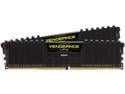
CORSAIR Vengeance LPX 32GB (2 x 16GB) 288-Pin PC RAM DDR4 3200 (PC4 25600) Desktop Memory Model CMK32GX4M2E3200C16
Pros: - Absolutely stable, especially with AM4 builds - Reliable: I am pretty sure I haven't had a faulty stick of Corsair RAM since I started buying them over 20 years ago.
Overall Review: I have been building / fixing / modding computers for over 25 years and have been buying Corsair RAM for most (possibly all) of that time, usually alternating between Corsair and G.Skill. However, when I first moved to AM4 hardware in 2019, I had a lot of issues with my first build: A malfunctioning Ryzen 5 1600 in a malfunctioning motherboard, forcing me to buy more hardware to troubleshoot. The other challenge at that time was RAM compatibility and Corsair finally saved me on that issue. Since then, I have done about 10 AM4 builds and all but one have Corsair RAM, typically Corsair Vengeance LPX. It is my go-to RAM.
1/20/2025See more detail
Not worth the trouble and extra cost
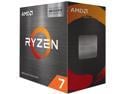
AMD Ryzen 7 5700X3D - Ryzen 7 5000 Series 8-Core 3.0 GHz Socket AM4 105W None Integrated Graphics Desktop CPU Processor - 100-100001503WOF
Pros: - When it works, it does bring some extra gaming performance
Cons: - Unstable at random times, but never when it was under load
Overall Review: I purchased AM4-based hardware for 1 new build and 1 upgrade: An MSI MPG B550 GAMING PLUS and a GIGABYTE A520M K V2 (REV. 1.0) both with CORSAIR Vengeance LPX 32GB (2 x 16GB) and a Ryzen 7 5700X3D and a Ryzen 7 5700G. I first started with the 5700X3D in the A520M K V2 (REV. 1.0) and, as I always do with a new build, verified the RAM using the 4-part MemTest86+ testing that takes several hours. I then cloned a Windows 11 Pro environment from another AM4-based system. Note that this system has a Corsair H60 liquid cooler with dual, synced fans and a $160 eVGA 650W Power Supply. I first ran 3DMark from Steam and was impressed with a 150-point bump vs the exact same hardware/GPU (RTX 2060) with the Ryzen 7 5700X. I also ran Prime95 to "burn-in" the heatsink compound and was a bit concerned that the temps sometimes approached 90°, but it didn't crash, even after running it for several intervals of 30-40 minutes. At this point, it seemed like it was going to be a stable system. But, in regular usage doing nothing processor intensive e.g. browsing or even sitting idle, it would hard crash randomly causing the motherboard to do super weird things that required cutting the power then using the reset button. Having seen M.2 SSD compatibility with previous AM4 builds, I switched from a WD Black SN770 system drive to a Samsung 990 EVO Plus, but the problem persisted. Because the A520M K V2 is a mid-range gaming rig, I swapped a known-stable Ryzen 7 5700X from my main rig (MSI B550-A Pro) that I primarily use for Video Editing and encoding. It has a Corsair H100i, which can easily address any cooling concerns. The 5700X3D has been stable in this device, but I'm not sure I will get much benefit from the extra features, as I don't really do any gaming. I guess I preferred swapping it over returning the CPU. In between, I also tried the 5700X3D in the MSI MPG B550 GAMING PLUS, which is the replacement hardware for a media server that also has a Corsair H100i cooler. I was seeing a similar outcome to the A520M, but the odd issue in the MPG B550 board was that the system would power off without warning as soon as Windows turned the screen off, no matter what time was set under Windows Power settings. Switching to the Ryzen 7 5700G in that board immediately fixed the issue and it has been very stable since then. Final points: - In all scenarios, I was using either Corsair or eVGA 650W quality power supplies and Corsair Dual-fan Liquid cooling, as referenced above. - Corsair RAM FTW: I first moved to AM4 hardware in 2019 and, in my first build, had the very painful scenario of a malfunctioning Ryzen 5 1600 in a malfunctioning motherboard, forcing me to buy more hardware to troubleshoot. The other challenge in the early AM4 days was RAM compatibility. Since then, I have done about 10 AM4 builds and all but one have Corsair RAM, typically Corsair Vengeance LPX 2x8GB or 2x16GB. Bulletproof!
1/20/2025See more detail
Still the only brand of modular power supply I trust
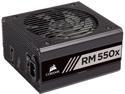
CORSAIR RMx Series RM550x CP-9020177-NA 550 W ATX12V / EPS12V 80 PLUS GOLD Certified Full Modular Power Supply
Pros: -CORSAIR QUALITY = The “little things” that make the experience richer & more enjoyable: -Tapered edges to give it that not-so-boxy look -PSU arrives in velvety case and cables have their own nylon bag -Fan only needs to run under load and not much at that -The modular cables just work – all of them, all of the time -Fantastic experience with Corsair’s products, in general, as well as their support (in the rare times when it is needed) -Silent to near-silent operation -All of the amperage on one 12v rail
Cons: Absolutely none
Overall Review: I have a PC in my home that hosts two websites that is also our media server. I upgraded it with this power supply a few months ago so that I could use the existing RM650X for a dedicated video editing/encoding machine and it has performed flawlessly. I am a longtime fan of Corsair power supplies and still have a few that are running and fully functional that are 8+ years old, including a TX750W. A few months ago, I retired a TX850W that was fully functional only because I was doing other hardware upgrades and had a newer Corsair HX750 power supply readily available. It had been running continuously for 9 years, so Corsair power supplies are #1 in my book. All in all, I have probably used 20+ Corsair power supplies for various builds and only had one lower-wattage supply fail and, even then, it was well past the warranty period. I have tried many brands of power supply over the years and, although I believe that eVGA’s power supplies are good competition for Corsair, my first choice is always Corsair. Here’s why… They totally understand hardware geeks like myself. Some people would say that some of the items listed in my Pros list are overkill or wasteful. However, there is a certain thrill about unwrapping a quality power supply – The heft of it, the smell of the components, all of it. When I first removed this RM550X from its velvety bag, I marveled at the sleek design. I doubt that the tapered edges provide any functional benefit and, sadly, you don’t even see them once it is installed. Nonetheless, they are there as part of the builder experience, so thanks for that Corsair! In addition to trying other brands over the years, I have occasionally tried modular power supplies with mixed success. I suppose some of it was just the fact that the concept was new and their manufacturing wasn’t as polished, but I came to dislike modular PSUs. Silverstone were making modular in the early phases of the concept and were highly rated, at the time. On two occasions, I had Silverstone SATA cables that were just plain faulty. I ended up using the ATX 12v power cable and adapting them for SATA power and, because of this, I didn’t buy a modular PSU for many years. When Corsair started making modular affordable enough, I decided to give it another go and have had 100% success with Corsair modular power supplies, hence the title of this review. This is one of those reviews where I didn’t even have to give any thought to how many eggs their rating would have. Final thoughts: Having been a hobbyist/enthusiast/part-time paid system builder for almost 20 years, I came to realize many years ago that the key to a good, stable system is a quality power supply. Even if you are building a budget system, DON’T SKIMP ON THE POWER SUPPLY, especially when Corsair makes one that costs under thirty dollars.
1/14/2019See more detail
Where have you been all my life!
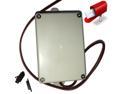
Mailbox Alert, External. Get an email and a text message when mail is delivered.
Pros: -Well-made product that simply works -Reasonably easy implementation
Cons: -Although using a browser for configuration works fine, I wouldn't mind seeing a MySpool app -Would love to see an option to have it send notifications to more than one SMS number
Overall Review: I recently transitioned to an extra large mailbox and, in the process of converting my PVC mailbox post to accommodate the larger box, I built-in an option to have my MAILBOX Alert hang just inside the post. Between that and accommodating for the wire to go between the mailbox and the wood bracket it sits on, I was able to make my MAILBOX Alert invisible except for the 3" of wire that comes up inside for the magnetic sensor. We are online shoppers, which has made our family a bunch of mailbox watchers. Currently, I have the MAILBOX Alert send an SMS message to my phone then I use the SMS Forwarder app to forward the message to the rest of the household members. I am looking into a way to have the message go to another number that would then forward to all of us, that way the message can be tagged as a different contact for everyone, not just me. However, that is a minor nitpick for the best smart device I have purchased since the Nexx Garage.
10/15/2018See more detail