
Your Browsing History
 Holiday Shipping Details & Extended Holiday Returns Holiday Shipping Details & Extended Holiday Returns

Joined on 02/07/03
The Cooler Makes All The Difference
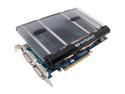
Pros: This is a reference car with the Arctic Cooling Accelero S1 Rev. 2 cooler. Temps are about 10-12°C above case ambient at idle, and 20-22°C above at the peak in 3DMark06 benchmark. Not using the included fans raises the idle 4°C and the load 8°C. Using a 45cfm 120mm fan drops that to 6-8°C idle and 10-12°C under load. With an OC Q6600 B3 dumping heat to an ambient 30°C, that is 42°C max on air! For under $200! The memory appears to be high quality, taking a high OC without a hickup
Cons: The processor seems less prone to liking an OC, 720 even at the cool temps. But that must be just the luck of the draw. The good processors become GTS cards, or some of the upcoming high end 9800s. It is tall, and barely clears my 140x20mm case fan. Takes 2-4 slots. It doesn't ship with the second slot grill. The clips that support the large fin array are a PITA. The stock fans are limited in mounting because of those clips, and there exposed blades can hit cables.
Overall Review: This may be the best value in a 8800GT. The cooler is really a must, stock cooling is either weak, noisy, or both noisy and weak. This is great and quiet. If the CPU was on water and not heating the case, I imagine the temps would be very close to water cooling. The cooler was a great decision by ECS and makes this card the preferred choice IMHO. Vista x64 seems to have some issues with the current Nvidia drivers. Hopefully resolved after SP1
Pretty Good
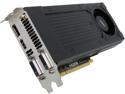
Pros: Small, Quiet, Fairly fast, Attractively priced, scales images to high res very well
Cons: Not as fast as more expensive models, next generation Maxwell GPU models due with in a few months, 2GB can be challenged in some gaming apps, probably not enough power for high resolution gaming
Overall Review: Replaced a 5 year old MSI GTX 260. Did it to support the 4K Seiki TV used as a monitor. I was only expecting a modest speed improvement if any in my mostly editing and browsing applications. I was wrong. It is a lot faster and seems to make the whole system run better. When it connected via HDMI to the Seiki monitor, the monitor recognized it and ran 4k automatically. I've tried playing some HBO movies online and it scaled them to 4k seamlessly. The housing is plastic, not as impressive as the GTX 260s longer metal housing. But it is lighter and queiter.
Pretty Good
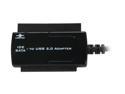
Pros: It works. Connected with out issue, and have used it on a about 5 PATA drives so far. It maintains a 25-33MB/s transfer rate, which isn't bad. Directory access on my rather quick (2600k Sandy Bridge, 16GB DD3-1600) system is fast.
Cons: It is an adapter not a docking station, so the disk is bare on the desk.
Overall Review: Now that the new Sandy Bridge system has over 5TB of storage, I needed to recover documents, photos, and videos a draw full of old (2005 an earlier) disk drives. This is doing the job. This did the job rather inexpensively. The adapter is probably also capable of accessing older floppy disk drives.
Great Machine
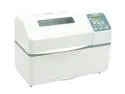
Pros: Makes excellent bread. Minimal effort.
Cons: Large machine, 2pound loaf is very tall, too tall for toaster! Bread can be very high calorie.
Overall Review: Two recommendations: 1) ensure the blades point to each other at the start of the process, this ensures they move the dough between them; and 2) check the water temperature with digitial thermometer, 100-110°F for active yeast, 120-130°F for rapid rise yeast.
Works Pretty Good
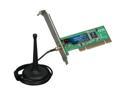
Pros: Installed in Vista 32 letting Vista find a driver on the Internet...no problems at all. Ran two back to back tests. In one, it down loaded a file from Nvidia at 1.33 MB/sec, the direct (20ft) cable did 1.43MB/sec). The second, a speed test, it clocked 12,900kb/sec, the direct wire only did 12,200kb/sec. It will be several days until I can test it at a distance.
Cons: None so far.
Overall Review: Comparison was with EVGA 780i onboard LAN port connected to Linksys router and cable modem. Cable modem Internet speed was the benchmark as the intent is to move the computer remotely in the house. Board quality and the antenna quality looks very good to me. Very satisfied so far.
Xigmatek makes good stuff
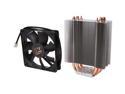
Pros: I have the 1283...and it works well. This one should work better. On two poster's comments: mounting the fan and mounting to the motherboard. First, the fan. The rubber clips that come with it have a slit in the arm that stretches from the cylinder to the base. That slips over the fin. I strongly recommend putting the fan on before you put the motherboard in the case. It will be very hard (but not impossible) to put the lower pins in the cooler if it is in most cases. Second, the optional mounting kit, or the similar kit from Thermalright, is a must. The cooler is simply to big for the stock Intel plastic pins. Those kits are $8 or so. Because of their nature, you will need to mount the cooler with the motherboard out of the case to hold the backing plate while threading the screws. I simply removed the plastic screws and replaced them with the spring loaded metal ones.
Cons: The main negative is that the mounting kit is optional. Given the low price of the cooler and the mounting kit, not a real problem. It also isn't as 'pretty' as some coolers. More a farm girl then a débutante. However, aren't we more interested in performance than looks?
Overall Review: If you want to run dual fans, they are easily mounted with tie wraps. You could put two just down the middle. I recommend Panflo 120x38mm fans (I wouldn't go past the 38dbA model) for performance and Noctua 12P fans for silence. You may have a problem clearing some of the MOSFET coolers used today. If this isn't the best air cooler, it is within a whisker of the best, at a fraction of the price. P.S. Now I generally watercool and use my Xigmatek for test bench use. Quick and effective. The main processors I have used it on are overclocked quadcores, primarily Q6600 B3 and Q6700 G0. It seems fine up to about 190-200 watts.