
Your Browsing History


Albert G.
Joined on 11/09/05
0
0
product reviews
- 8
Darn That Bay
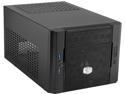
Cooler Master Elite 130 - Mini-ITX Computer Case with Mesh Front Panel and Water Cooling Support
Pros: Supports full-sized PSU's and GPU's. The only actual mini-itx component required for use with this case is the mobo. Plenty of air and ventilation for some decent air cooling. Front panel is removable. Front mesh filter is removable and can be rinsed.
Cons: The 5.25" bay is not removable. This a big issue if your GPU's power connectors are at the very end. I mean, it's possible to connect two connectors, but that bay gets right in the way of them. Connect power cables to your GPU first and then try to maneuver it around. Delicate USB 2.0 header cable. I can't even use the USB 2.0 port on the front panel anymore since one of the wires became dislocated from the connector. No good hiding spots for motherboard and CPU power cables. Not a big deal, but they can be an eye sore.
Overall Review: It's a pretty good small case if you want to build something small, inconspicuous, but powerful. Regarding CPU coolers clearing the PSU, I find that a stock Haswell cooler clears the space just fine. There's not a lot of space, I know. So, get yourself a tape measure before investing in an aftermarket CPU cooler. Something to keep in mind, though, is about the lid. The bottom part of the lid does not slide or ride on the rail of the case as if on a track. It just snaps on. Keep that in mind if you find yourself straining to close it correctly.
8/28/2015See more detail
Decent
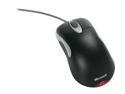
Microsoft IntelliMouse Optical Mouse
Pros: 7 Buttons: left click, right click, scroll wheel up, scroll wheel down, middle click, left-side, right-side It works.
Cons: Like all other intellimice before it, it eventually suffers from the infamous single double-click problem (clicking left click once registers as double-click). It's the mouse, not the drivers or software. The scroll wheel is unstable. You may think you've finished scrolling, but not quite.
9/14/2011See more detail
Watch Out for the Main Connector
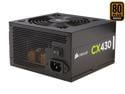
CORSAIR CX Series CX430 430W 80 PLUS BRONZE Active PFC ATX12V & EPS12V Power Supply
Pros: Great efficiency for the price. It provided enough power for my mITX PC's initial incarnation (with mid-end GPU).
Cons: Delicious power cable spaghetti! It provided more cables than I needed at a little too long a length. Not that big a con, I suppose. Difficult to get the 24-pin main connector to lock in and snap. Make sure you push down on that sucker hard. Some carelessness in this matter gave me some serious panic at one point.
Overall Review: In all, a decent PSU for the price. Just, watch out for that main connector. If you search for "corsair cx 24-pin," you'll see many others have had similar issues. This might be a design flaw.
8/6/2015See more detail
Decent for the Price
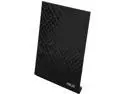
ASUS RT-AC52U Great-Value Dual-Band AC750 Wireless Router
Pros: Versatile USB Port. See the manual for more details. Great wireless strength in a two-story house with regular ol' drywall walls. DO NOT use auto channel.
Cons: Construction-wise, it feels a bit flimsy. The auto wifi channel feature for the 2.4 GHz band is faulty. DO NOT use the auto setting under "control channel" for the 2.4GHz band. Set the channel manually and the strength should be great. Not exactly getting true 802.11n transfer speeds between wireless devices on the LAN. Looks like this is where the price comes in. The firmware should have more info and features. Wireless signal strength info, opened upnp port info, manual duplex settings for the ethernet ports, and ssh support come to mind.
Overall Review: As the title says: it's decent for the price: the signal remains stable (as long as you don't use auto channel) and you get a usb port for file transfers, media streaming, and, of course, printer sharing. No PC's or devices in this house have gigabit ethernet ports nor do we have gigabit internet service, so lack of gigabit ports isn't a big issue. It's also a great idea to keep the firmware up to date. You can get it at this device's page on the ASUS site.
9/6/2014See more detail
Better than my old sound card
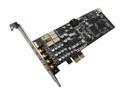
ASUS Xonar DX 7.1 Channels 24-bit 192KHz PCI Express x1 Interface Sound Card
Pros: System wide equalizer! Drivers that have been developed during this current decade. Louder and clearer audio than my old sound card
Cons: A longer berg connector/mini molex/floppy disk power cable should be used to keep the power connector from moving. Newegg does not sell extensions for these cables. Aforementioned cable does not snap on to the card. The molex adapter provided does not snap onto other molex connectors either. No hardware-based eq effects.
Overall Review: I bought this card to replace the M-Audio Revolution 5.1 (discontinued) that had been serving me well for five years. It was an awesome no frills card until MS vista was released. After that, the company had already shifted their focus away from consumer sound cards. As a result, their vista drivers were rushed and very buggy. Either way, it was time for a new card and the Xonar DX is clearly an upgrade (considering the technical specs).
8/17/2012See more detail
good enough for me
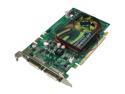
EVGA GeForce 9400 GT 512MB DDR2 PCI Express 2.0 x16 SLI Support Graphics Card 512-P3-N944-LR
Pros: it's an improvement (albeit not a BIG improvement) over the 6800 I bought two years ago it also runs a lot cooler than the 6800 (which would reach 68C when idle) runs pretty good with "last gen" games
Cons: games don't run too well at my monitor's native resolution (1280x1024); no biggie though
1/31/2009See more detail