
Your Browsing History


Eric W.
Joined on 05/19/05
0
0
product reviews
- 26
Definatly not a bad drive
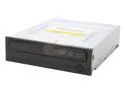
SAMSUNG Black 16X DVD+R 8X DVD+RW 8X DVD+R DL 16X DVD-R 6X DVD-RW 16X DVD-ROM 48X CD-R 32X CD-RW 48X CD-ROM 2M Cache E-IDE/ATAPI DVD Burner
Comments: The manufacture date on the drive said september 05, and there is a Firmware update. The drive is QUIET (not QUITE like some people spell on newegg) around 30-35DB max it really is a good buy I tried using some 4 month old Memorex 40x CD-Rs and it would only write at 16X. So get yourself some fresh media Tests done using a maxell 48x CD-R READ TEST (Nero CD-DVD Speed) Transfer Rate Start 17.65x End 41.47x Average 31.27x Type CAV Seek Times Random 92 ms 1/3 98 ms Full 169 ms CPU Usage 1X 9 % 2X 7 % 4X 5 % 8X 7 % Interface Burst Rate 21268 KB/sec Spin Up/Down Times Spin Up Time 2.38 sec Spin Down Time 3.11 sec Load/Eject Times Load Time 1.20 sec Eject Time 1.94 sec Recognition Time 9.73 sec WRITE TEST Transfer Rate Start 21.42x End 39.51x Average 34.95x Type P-CAV
11/25/2005See more detail
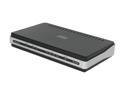
D-Link DSL-2540B ADSL2/2+ Modem with 4-Port Ethernet Router TR067/069 ADSL Standards
Multi-mode
Full-rate ANSI T1.413 Issue 2
ITU-T G.992.1 (G.dmt) Annex A/C/I
ITU-T G.992.2 (G.lite) Annex A/C
ITU-T G.994.1 (G.hs)
ADSL2 Standards
ITU-T G.99
Pros: Log isn't too bad, has some decent features not on old supplied modem Runs (old) BusyBox v1.00 (2005.04.12-18:11+0000) linux kernel.
Cons: I've had Verizon dsl for a year now and have the best possible home conditions I can have. In other words, I have an outdoor splitter and CAT5 to the modem and NID. That being said I am 2 wire miles from the CO which gives me a 42dB Attenuation Down. Now on the old Verzion modem this was fine and would transmit at the full 19dBm power level resulting in a Down SNR of about 20dB. On this one it's a mere 8dBm causing it to lose sync a few times a week when the margins fluctuate. No way to manually change the power level and for me, would not automatically connect. Also they haven't had a single firmware update for this in over a year!
Overall Review: Bottom line is if you are more than 2 miles from your central office, or remote terminal (40+dB), you may want to stick with what you have if you want reliability. And Verizon DHCP guys, you need to leave your old modem off for as much as 2 hours to let the DHCP lease time expire before setting up this new one. And if yours won't auto connect like mine use these settings. VPI:0 VCI:35 MAC Encapsulation Routing (MER)
9/26/2009See more detail
Loud
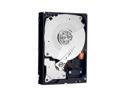
Western Digital Black WD7501AALS 750GB 7200 RPM 32MB Cache SATA 3.0Gb/s 3.5" Hard Drive Bare Drive
Pros: 6 month check in.
Cons: Seeks are loud and obvious.
Overall Review: Purchased based on longer warranty, hoped for a quiet drive at the same time. Bad gamble. Been a SG user till now, and got too used to how quiet they were. The BLUE series is much better at noise levels. Must be because they have 'IntelliSeek' while the Black line does not. Been a PC user since 96 and I swear this is about as noisy as the drives back then. So be aware. Otherwise it works, and that's the only other part I care about.
7/1/2010See more detail
3 year failure
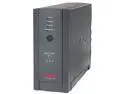
APC BR800BLK 800 VA 540 Watts 7 Outlets UPS
Pros: Had solid capacitors as far back as 06
Cons: Voltage sensor(s) went bad, relays were clicking on and off so fast it sounded like a stun gun. All Chinese parts inside, what is there no Taiwan or even better, Japanese part manufactures out there??
Overall Review: This unit was for occasional outages, not power problems so it has had an easy life for only powering a 200W personal PC. Batteries only lasted 2 years. Expected more from APC, so I changed to a different brand, insides on new don't look like it will last that long even, sadly it seems APC is the only good brand in this price range. Not happy I have to spend $300+ on anything that only looks like it might last 5+ yrs.
2/5/2010See more detail
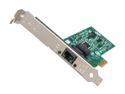
Intel EXPI9301CTBLK Network Adapter 10/100/1000Mbps PCI-Express 1 x RJ45
Pros: PCIE
Cons: I couldn't get this NIC to be stable. Anytime I would have mutliple connections, be it torrent, download manager, or lots of Youtube windows it will timeout from the LAN. I know it was the card because I couldn't even access my DSL modem page, so I figured it was just the so-so modem Verizon gave me and bought a Dlnk, same story on BOTH modems. Only way to "fix" it was to go into Network connections and disable, and restart it. But that only works till the next time using the above. 8 months and I couldn't figure it out.
Overall Review: Maybe it's some software conflict on my XP machine, maybe it's a defective card, who knows. All I know is that the onboard Realtek NIC works and Intel support never replied back.
9/26/2009See more detail
not bad
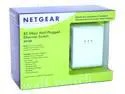
NETGEAR XE104 85 Mbps Wall-Plugged Ethernet 4-port Switch Up to 85Mbps
Pros: 38-56Mbps from circuit to circuit in about 60Ft of 12 gage wire. 4 ports!! Better than another wall wart for a switch for 2 devices I also use X10 equipment in the house and seems to work fine with it. 40Mbps seems to be the average Good price to Mbps ratio.
Cons: Price! I found a 2 pack of these for a bill online. Still thought that was a bit much. Speeds go all over the place day to day. Outlets these are on are not under more than a few hundred watts so I'm not sure how they work under more load. LEDs are TOO BRIGHT to be in plain view and flash rate is high! I'm going to tape over them. Also seems kind of dumb that there are 3 lights, one for power, blue for connectivity, and last for transmit. A power led seems kind of ridiculous? And just like a standard ethernet port, they all have conct/trans leds. So if you have all 4 ports in use, it's going to be a disco ball.
Overall Review: Hope they have a long service life. I have a dvr planned in the future and won't be happy if these don't last long.
1/17/2009See more detail