
Your Browsing History
 Holiday Shipping Details & Extended Holiday Returns Holiday Shipping Details & Extended Holiday Returns

Joined on 05/07/09
Flawless for everyday tasks, but an odd duck.

Pros: As of this writing, the 4370 is the highest performance i3 available. This chip performs absolutely flawlessly and instantaneously for everyday tasks, oftentimes with better response times than some i5 chips. As someone who browses the web, watches HD video and listens to music, the i3-4370 is more than powerful for my needs. The fourth thread is often idling at 0%, meaning there's plenty of power left over if I needed it. I can't imagine noticing an improvement in these tasks with an i5 or i7. The stock CPU cooler is excellent. Initially I was wary of a stock cooler on a 3.8GHz chip. Depending on conditions outside the case, it idles anywhere from 79-90 degrees Fahrenheit. Even when benchmarking, I don't think I've seen it exceed 145 degrees Fahrenheit, and only momentarily.
Cons: None that I can think of, other than the peculiar placement of the i3 among Intel's product line. For "just" thirty dollars more, you could buy an i5 with four cores. It'd be a more powerful chip, but probably not as zippy. Also, it's a shame Intel doesn't sell a "K" variant of this chip, with an unlocked multiplier. Based on what I've seen from the stock CPU cooler, this chip could easily maintain a high overclock with little modifications. That'd be fun.
Overall Review: 1) I'm not so sure why the i3 line exists. Most people who buy a CPU like this for a strict HTPC or for "grandma" or "the parents" could get by spending roughly half as much for a Pentium, with likely no noticeable difference in performance of basic tasks. People who need more performance would go quad-core anyway, placing them in the market for a pricier i5 or i7. Don't get me wrong--the i3-4370 is an excellent, fast-as-hell chip for everyday tasks, but man, is it a middle child. 2) Someone here suggested disabling cores or whatever to maximize energy efficiency. I can't imagine that being based on good science. This is a maximum 54W TDP chip at nearly $160. If you want to save power, buy a "T" variant of the i3-4130/4330, or a Celeron or something. Those run at 35W tops, cost a fraction of the price of this chip, and you get to keep the performance benefits of both cores. Lobotomizing this chip will just make the other core work harder, increasing power consumption anyway. 3) While single-threaded performance is comparable to even the high-end i7 chips, this is no replacement for someone who truly needs more than two cores and four threads. In general Windows environments, web browsing, and stuff like that, even this chip is total overkill. For intense gaming, video compression, basically anything serious, look at the i5/i7 lines. 4) If you're a casual computer user looking for a boost in performance, don't buy a new CPU unless you already own an SSD as the boot volume. It's incredible how SSDs impact performance. An i3 with an SSD will be faster for general Windows tasks than an i7 with a disk drive.
Fantastic 1920x1200 display for those on a budget, but beware manufacturing issues.
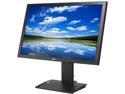
Pros: Awesome resolution for the money. Picture quality is very good in general, and the display brightness will make you giggle. I have it set to "0%" all the time and it's still more than bright enough. Comes with a USB hub (not actively powered, though) and the ability to tilt, swivel, pivot, height adjust, etc. The pencil tray on the base is a nice touch.
Cons: I do have some gripes, some insignificant, others SERIOUS. I hate the blue LED on the front. Amazed this design fad hasn't died already, but whatever. Some electric tape did the job. When I type, the display tends to wobble a bit, which drives the perfectionist in me nuts. This is caused by the VESA mount being a bit looser than most, I believe. Not worth losing a star over, but still agitating enough for those who type hard or enjoy mechanical keyboards. Contrast, if I'm using that term correctly, is a bit off. The darks are too dark, and when I try to up the contrast, it just becomes washed out. There's little wiggle room there. I consider myself to be as technically proficient as anyone, but can't figure out how to get darker colors to not blend as they currently do, which makes photos and other objects (like black computer cases on Newegg) look odd. The issue isn't in the usability of the adjustment software/firmware, it's just a hardware issue of some kind. Maybe not even an issue, I don't know. Point is, blacks are too black, and not in an impressive, high-contrast way. This is not an issue with display brightness, this is an issue with either contrast or gamma, neither of which fixes the issue upon adjustment. One star lost. Finally, there was clearly some sort of terrible issue during the manufacturing process of my particular monitor, because the base does not properly mount to the display. As another reviewer described, you basically have to be a PhD to put this thing together, and that's without mentioning my manufacturing issue, which prevents the single screw lock at the base from tightening... something happened to the threading, because the screw won't go in at all, preventing the base from fully locking into the display. THIS IS A PROBLEM. Because this screw/pin is on the underside of the base, and because the screw/pin is incapable of properly seating due to poor threading, I can't leave my display on a flat surface-- the pin sticks out below the base, elevating the back off the table! I used an absorbent foam to prevent the dɑmn thing from falling over, which was still less of a pain in the ɑss than RMA'ing this thing. I hope nobody else has to experience this extremely frustrating issue, which cost me about an hour of installation time before I figured out what exactly what the problem was. Second star lost.
Overall Review: Acer has done well where others have failed or given up. For some dumb reason, display manufacturers have colluded to phase out all display types that aren't the terrible "Full HD" 1080p 16:9 crɑp. Who wants to look at a 1920x1980 24-27" monitor? I can't even imagine how bad the pixel density is on those. Seriously, display resolutions haven't improved in ten years. I remember being able to pick up virtually any cheapo 15-21" CRT and run it at 1600x1200 at 75Hz without issue, giving an eye-poppingly good picture no problem. Now you're lucky to get 1600x900 or 1920x1080 on displays well over 20", which is an outrage to people who need higher resolution displays (1080P is NOT high resolution).
Ideal for compact builds
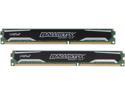
Pros: Sits flush with the RAM clips on the motherboard, allowing for plenty of custom CPU cooler configurations. This RAM is clearly designed for compact systems, both in terms of physical dimensions and low voltage and other power consumption. It looks great, too. Nothing flashy or obnoxious. Absolutely minimalist.
Cons: None that I can think of.
Overall Review: This is a niche product designed for compact systems with very specific requirements. Don't waste the $20 premium on this memory over other DDR3 1600 if you don't care about low voltage or height of the sticks.
Near perfect for ITX systems
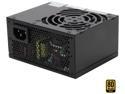
Pros: This is the ideal PSU for my Fractal Node 304. The fan is inaudible. I'm not sure if the fan speed is variable on temperature or load, but I certainly never hear it. The SHORT cables are great for ITX systems. I don't have to worry about excess clutter or length I'll have to bunch up somewhere with zipties. This is what you want for an ITX system to maximize airflow and reduce clutter. The included SFX to ATX bracket is convenient and allows me more room to tuck and hide non-PSU cables and wires than if I had gone with a traditional and utterly pointless ATX power supply. Seriously--this things is dramatically smaller than ATX supplies, in nearly every dimension. 450W is more than enough for my system, and probably more than enough for most single GPU systems. The matte black paint finish is handsome too.
Cons: As others have mentioned, these cables are exceptionally stiff and too snug to completely plug into the PSU itself. They're in enough to function, but there is a pronounced gap between the socket on the PSU and the cable. Taking off a star not for the stiffness, but for the dysfunctionally-tight connections.
Overall Review: Lots of people here are complaining about the cables being too short, which I believe is unfair to blame Silverstone for. This is an SFX PSU, designed for compact systems where short cables are ideal, if not wholly necessary. If you have an ITX system (or something like it) but need longer cables, well, I'd probably be quicker to blame the engineers who designed the case for their oversight. I don't own Silverstone's set of flat cables PP05-E but I would recommend them for almost any application, considering how stiff and tight the standard cables and sockets are. I am unsure if the PP05-E are any shorter or longer than the standard included set. I'd hope they're not any longer.
A powerful board with the future in mind
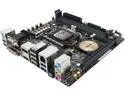
Pros: ASUS' fan control UEFI configuration is brilliant. This really allows my system to stay cool and quiet. The board is handsome, and the quantity of USB ports is great. More configuration options than most people would know what to do with. There's not really anything left locked or untouchable, which is perhaps dangerous for those who don't know what they're doing. Hell, some of these options require you to be an electrician for proper configuration. I love the M.2 port, which I use for my SSD boot volume. This saves on cable clutter and power consumption. Based on my positive experiences with the interface itself, I can imagine this is the future of SSD storage. I'm glad ASUS thought to include it--it was the deciding factor in choosing this board over others.
Cons: The M.2 port I mentioned previously is a huge plus, but, unfortunately, its placement on the rear of the board means that I have to remove absolutely everything from my ITX enclosure just to get to the M.2 SSD. Also, the screw thing that would hold the M.2 SSD in place is so tightly attached to the board that upon attempting to unscrew it, the top of the screw instantly wore smooth and shredded. Now I can't get it out to move into the proper place for my SSD, which means my SSD is not properly installed, sitting on top of the screw mount rather than securely in it. Thankfully, the backplate of my case keeps the M.2 SSD in place. I'd love to hear back from ASUS on a solution for this. Very frustrating, and a star lost. Is a bit slow to load the UEFI... I don't remember it being that way on the first few initializations. I set everything back to factory spec at one point, but that didn't fix the issue. It's not a huge deal, but expect to stare at a completely blank screen for five or more seconds after hitting F2 or DEL. If you're not loading to UEFI but instead booting the OS, you won't have this issue. For a board over a hundred dollars, a colored/black backplate would've been nice. This is the same CRAРРY ugly one from ASUS' $50 line of AMD boards. Not worth losing a star over, of course.
Overall Review: As mentioned in the "pros," this board is tremendously configurable. I can't imagine what the Z97 variant has that this doesn't. If my chip were unlockable, I could overclock it despite this being an H97.
Super bright, but didn't include sound-response feature...
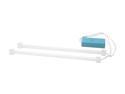
Pros: Super bright, almost beyond purple and into the white. Against a surface, color is solidly purple, but away from immediately reflective surface, is more white. Comes with two of 'em, so you've some options if you wanna get creative. The PCI expansion slot switch is a neat idea.
Cons: I had no intent of using it, but I figured the box would come with the equipment to use the sound-response feature, which would, in theory, blink or pulse the lights in accordance with sound. Oh well.
Overall Review: These tubes are always a blast. I can't get enough of them.