here!
here!
I’m your shopping assistant for PC builds, upgrades, and everything tech.
Got questions? Ask away!
Start a conversation
here!
I’m your shopping assistant for PC builds, upgrades, and everything tech.
Got questions? Ask away!
Start a conversation















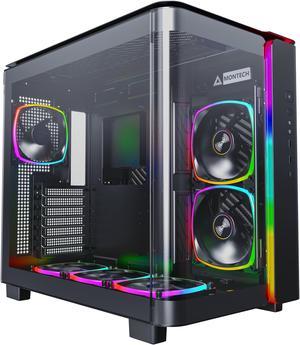
Step into the future with Montech's KING Series – the epitome of premium materials and cutting-edge design. KING is the result of our relentless pursuit of quality and innovation, seamlessly blending top-tier materials with distinctive aesthetics. Whether you're a trend-setting gamer or a visionary creator striving for excellence, KING Series is designed to meet and exceed your every tech component desire.
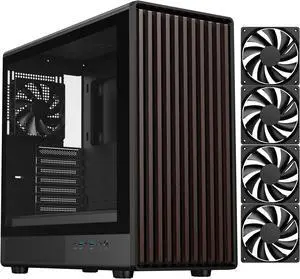
+ $5 off w/ promo code BNWFF42, limited offer
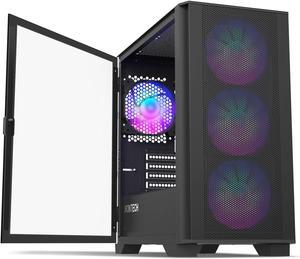
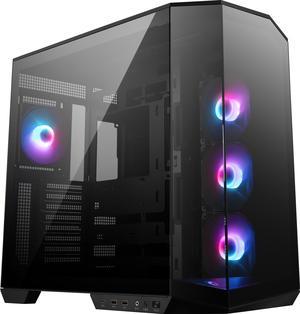
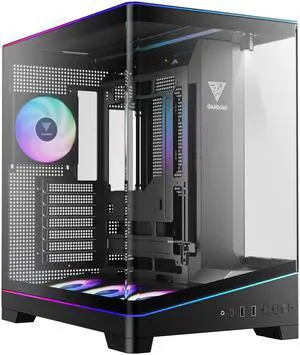
PC cases featuring tempered glass panels, RGB lighting, and support for ATX and microATX motherboards provide versatile cooling and styling options for gaming or professional setups. Check out our Black November deals and Black Friday deals to upgrade your setup with the best computer chassis from Newegg.
Selecting the right computer case is crucial for building a reliable and visually striking rig. Here are the top features and technologies to consider:
For gaming or workstation builds, thermal management is the single most impactful factor. The case must support strategic airflow designs that keep high-performance CPUs and GPUs cool under load:
For developers, content creators, and IT professionals, selecting a professional-grade case means prioritizing durability, modularity, and expandability. Consider workstation cases designed to handle intensive workloads with features like hot-swappable drive bays, extensive internal I/O options, and sturdy steel chassis for long-term stability. To explore options tailored for these needs, check out this collection of Workstation Case solutions. Additionally, the Montech KING Series Cases deliver advanced airflow and modularity essential for high-end custom configurations and professional liquid cooling loops.
Newegg shopping tip: When choosing a computer case, compare the size compatibility with your motherboard and cooling setup to ensure everything fits comfortably. Also, consider airflow design and available ports, especially during Black November deals and Black Friday deals, to get the best value for your build.
Show off your build with tempered glass panels that offer clear visibility while providing durable protection and excellent airflow for high-performance rigs.
Get everything you need with computer case combos bundling cases, cooling, and cables designed for seamless assembly and optimal airflow.
Light up your setup with cases pre-installed with high-static pressure RGB fans, built for both stunning looks and efficient cooling.
Choosing your first computer case can be an overwhelming step, but it’s crucial since your case sets the foundation for your entire build. Look for cases that match your motherboard size, such as ATX, microATX, or mini-ITX, to ensure everything fits perfectly. Features like Tempered Glass Cases are popular starter choices, letting you display your components with style and ease of access. During this Black November deals season, exploring options with straightforward installation and pre-packaged cooling solutions is a smart way to build confidence while saving time. You can also find Computer Case Combos designed for beginners to simplify the setup process.
For gamers, case choice goes beyond aesthetics—excellent cooling and expansive internal space are essential to keep high-performance GPUs and CPUs running smoothly. Explore Gaming Cases that support multiple radiators and offer superior airflow options with customizable fan mounts. Many models feature integrated RGB Fan Cases to add vibrant lighting effects that complement your gaming rig’s vibe. Take advantage of Black Friday deals on these cases to build a system that dazzles both in performance and appearance.
Building a workstation calls for a case that supports robust hardware configurations and extended uptime reliability. Workstation cases prioritize build quality, cooling versatility, and expandability with features like hot-swap drive bays and enhanced I/O options. Whether you’re rendering, animating, or running complex simulations, these cases help keep your components cool and accessible. For serious workstations, consider options detailed in the Workstation Case category. Take advantage of Black November deals to equip your professional rig without compromising on quality or features.
Research more: When choosing a computer case, consider factors like airflow, compatibility with your components, and future upgrade options to suit your build’s needs. For a deeper dive into selecting the perfect case, check out Newegg Insider’s detailed buying guides before taking advantage of Black November deals or Black Friday deals.
Last Updated: November 2026 | Newegg Computer Case Buying Guide
Mid-tower cases are smaller and usually fit most builds comfortably, while full-tower cases offer more space for larger components and better airflow options but take up more room on your desk or floor.
Budget cases can be perfectly fine for basic setups, but premium brands often provide better build quality, improved cooling features, and easier cable management, which can make a noticeable difference in long-term use.
Most mid-tower cases support ATX, Micro-ATX, and Mini-ITX motherboards, but it’s always good to check the case specifications to be sure your board will fit properly.
Not all cases are designed for water cooling, so make sure to pick one with the right mounting points for radiators and enough clearance for tubes and pumps before you buy.
Start by checking your motherboard size (ATX, Micro-ATX, Mini-ITX) and GPU length, then pick a case that supports those dimensions with some extra room for airflow and future upgrades.
If you want better cooling options, quieter operation, or build it once and leave it, a high-quality case can be worth the investment; otherwise, budget cases still do the job for basic builds.
Look for comments about sturdy materials like steel or aluminum and check if users mention any warping or broken panels after a few months. Consistent praise or complaints about build quality can give you a good idea of reliability.
Pay attention to mentions of poor airflow, noisy fans, or tight spaces that make cable management and hardware installation difficult. These issues often show up in reviews and can impact your build experience.
Check the case specifications for supported motherboard sizes, like ATX, Micro-ATX, or Mini-ITX, and compare that with your motherboard’s form factor to make sure they match.
Route your cables carefully behind the motherboard tray to improve airflow and use any included fans or install extra ones if needed to maintain good ventilation inside the case.
“ This PC case is an awesome buy, even full priced valid BUT especially on sale my goodness buy it. ”
Antec Performance Series P20C, Massive Metal Mesh Front Panel, 3 x 120mm PWM Fans, Type-C 3.2 Gen2 Ready, 2 x 360 mm Radiator Simultaneously, GPU Bracket, Mid-Tower E-ATX PC Case“ this pc case has a lot of space with the psu also having a lot of space for cable management and it also is really cheap and comes with 4 fans. ”
Phanteks XT Pro Ultra, Mid-Tower Gaming Chassis, 4x M25-140 Fans Included, High Airflow Performance Mesh, Tempered Glass Window, USB-C 3.2 Gen2, Black“ Name me a better looking PC case. ”
DIYPC ARGB-N3-W White USB3.0/ Type C Tempered Glass E-ATX /ATX Dual Chamber Gaming Computer Case w/ 3 x Tempered Glass Panel and 4 x ARGB PWM Fans (Pre-Installed).“ Great budget PC case that offers a lot of features found in more expensive cases. ”
Montech AIR 100 ARGB MICRO-ATX Tower with Four ARGB Fans Pre Installed, Ultra-Minimalist Design, Fine Mesh Front Panel, High Airflow, Unique Side Swivel Tempered Glass, Dust Protection, Black“ It's all here, pretty good PC case, only flaw is how bulky it is ”
Phanteks NV5 MK2, Showcase Mid-Tower Chassis, Rear-Connect MB Support, Integrated D/A-RGB Lighting, Seamless Tempered Glass Design, 8x Fan Positions, Black“ The aesthetic PC case you could find ”
LIAN LI O11 Vision Black Aluminum / Steel / Tempered Glass ATX Mid Tower Computer Case ----- O11VX“ Overall, the SAMA SV02 ATX Computer Gaming PC Case Mid Tower is a fantastic choice for gamers looking for a stylish and functional case with excellent cooling capabilities and cable management features. ”
SAMA SV02 ATX Computer Gaming PC Case Mid Tower Black with 3 ARGB Fans Pre-Installed, Tempered Glass Transparent Side Panel,BTF Back Plug Motherboard Design“ This is one of the best PC cases you can buy. ”
Phanteks XT Pro, Mid-Tower Gaming Chassis, High Airflow Performance Mesh, Tempered Glass Window, 1x M25-120 Black fan included, Black