- Home
- Computer Systems
- Laptop / Notebook
- Custom Laptop
Custom Laptop
- Brands
- Price
- Processor Name
- Screen Size
- GPU/VPU
- Memory
- SSD
- Show More
- Graphic Type
- WiFi Generation
- Color
- Operating System
- USB
- HDMI
- Useful Links

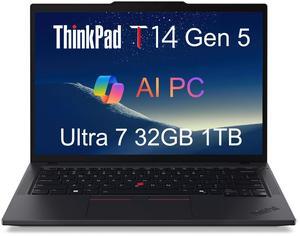
- Brand: Lenovo
- Series: ThinkPad T
- Color: Black
- Operating System: Windows 11 Pro
- Model #: ThinkPad T14 Gen 5 32GB 1TB SSD
- $1,649.99 –
- Free Shipping

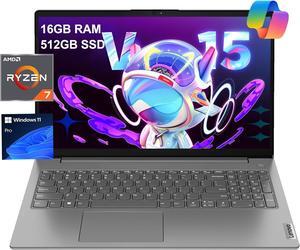
- Brand: Lenovo
- Series: V15
- Color: Grey
- Operating System: Windows 11 Pro
- Model #: Lenovo V15 16GB 512GB SSD
- $749.99 –
- More options from $749.99 - $799.99
- Free Shipping

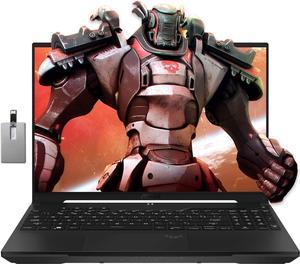
- Brand: ASUS
- Series: TUF Gaming
- Operating System: Windows 11 Pro
- Number of Cores: 8-core Processor
- Model #: B0CG6KKXLN
- $1,939.00 –

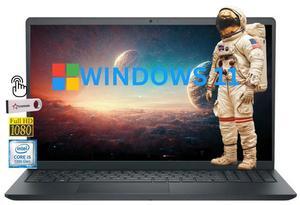
- Brand: DELL
- Color: Black
- Operating System: Windows 11 Pro
- Touchscreen: Touch Screen
- Model #: DELL3530I5C182
- $1,399.79 –
- Free Shipping

- Brand: DELL
- Color: Black
- Operating System: Windows 11 Pro
- Touchscreen: Touch Screen
- Model #: DELL3530I5C181
- $1,196.79 –
- Free Shipping

- Brand: DELL
- Color: Black
- Operating System: Windows 11 Home
- Touchscreen: Touch Screen
- Model #: DELL3530I5C197
- $829.79 –
- Free Shipping

- Brand: DELL
- Color: Black
- Operating System: Windows 11 Home
- Touchscreen: Touch Screen
- Model #: DELL3530I5C139
- $769.79 –
- Free Shipping

- Brand: DELL
- Color: Black
- Operating System: Windows 11 Pro
- Touchscreen: Touch Screen
- Model #: DELL3530I5C223
- $829.79 –
- Free Shipping

- Brand: DELL
- Color: Black
- Operating System: Windows 11 Pro
- Touchscreen: Touch Screen
- Model #: DELL3530I5C211
- $719.79 –
- Free Shipping

- Brand: DELL
- Color: Black
- Operating System: Windows 11 Home
- Touchscreen: Touch Screen
- Model #: DELL3530I5C191
- $729.79 –
- Free Shipping

- Brand: DELL
- Color: Black
- Operating System: Windows 11 Pro
- Touchscreen: Touch Screen
- Model #: DELL3530I5C178
- $999.79 –
- Free Shipping

- Brand: DELL
- Color: Black
- Operating System: Windows 11 Home
- Touchscreen: Touch Screen
- Model #: DELL3530I5C201
- $1,199.79 –
- Free Shipping

- Brand: DELL
- Color: Black
- Operating System: Windows 11 Pro
- Touchscreen: Touch Screen
- Model #: DELL3530I5C227
- $1,399.79 –
- Free Shipping

- Brand: DELL
- Color: Black
- Operating System: Windows 11 Home
- Touchscreen: Touch Screen
- Model #: DELL3530I5C145
- $829.79 –
- Free Shipping

- Brand: DELL
- Color: Black
- Operating System: Windows 11 Home
- Touchscreen: Touch Screen
- Model #: DELL3530I5C133
- $699.79 –
- Free Shipping

- Brand: DELL
- Color: Black
- Operating System: Windows 11 Pro
- Touchscreen: Touch Screen
- Model #: DELL3530I5C159
- $699.79 –
- Free Shipping

- Brand: DELL
- Color: Black
- Operating System: Windows 11 Pro
- Touchscreen: Touch Screen
- Model #: DELL3530I5C168
- $839.79 –
- Free Shipping

- Brand: DELL
- Color: Black
- Operating System: Windows 11 Pro
- Touchscreen: Touch Screen
- Model #: DELL3530I5C217
- $769.79 –
- Free Shipping

- Brand: DELL
- Color: Black
- Operating System: Windows 11 Pro
- Touchscreen: Touch Screen
- Model #: DELL3530I5C214
- $829.79 –
- Free Shipping

- Brand: DELL
- Color: Black
- Operating System: Windows 11 Pro
- Touchscreen: Touch Screen
- Model #: DELL3530I5C167
- $849.79 –
- Free Shipping

- Brand: DELL
- Color: Black
- Operating System: Windows 11 Home
- Touchscreen: Touch Screen
- Model #: DELL3530I5C142
- $849.79 –
- Free Shipping

- Brand: DELL
- Color: Black
- Operating System: Windows 11 Home
- Touchscreen: Touch Screen
- Model #: DELL3530I5C200
- $929.79 –
- Free Shipping

- Brand: DELL
- Color: Black
- Operating System: Windows 11 Home
- Touchscreen: Touch Screen
- Model #: DELL3530I5C149
- $996.79 –
- Free Shipping

- Brand: DELL
- Color: Black
- Operating System: Windows 11 Home
- Touchscreen: Touch Screen
- Model #: DELL3530I5C204
- $1,099.79 –
- Free Shipping

- Brand: DELL
- Color: Black
- Operating System: Windows 11 Pro
- Touchscreen: Touch Screen
- Model #: DELL3530I5C175
- $1,196.79 –
- Free Shipping

- Brand: DELL
- Color: Black
- Operating System: Windows 11 Home
- Touchscreen: Touch Screen
- Model #: DELL3530I5C155
- $1,396.79 –
- Free Shipping

- Brand: DELL
- Color: Black
- Operating System: Windows 11 Home
- Touchscreen: Touch Screen
- Model #: DELL3530I5C208
- $1,399.79 –
- Free Shipping

- Brand: DELL
- Color: Black
- Operating System: Windows 11 Pro
- Touchscreen: Touch Screen
- Model #: DELL3530I5C220
- $849.79 –
- Free Shipping

- Brand: DELL
- Color: Black
- Operating System: Windows 11 Pro
- Touchscreen: Touch Screen
- Model #: DELL3530I5C165
- $769.79 –
- Free Shipping

- Brand: DELL
- Color: Black
- Operating System: Windows 11 Pro
- Touchscreen: Touch Screen
- Model #: DELL3530I5C161
- $789.79 –
- Free Shipping

- Brand: DELL
- Color: Black
- Operating System: Windows 11 Pro
- Touchscreen: Touch Screen
- Model #: DELL3530I5C162
- $749.79 –
- Free Shipping

- Brand: DELL
- Color: Black
- Operating System: Windows 11 Home
- Touchscreen: Touch Screen
- Model #: DELL3530I5C188
- $829.79 –
- Free Shipping

- Brand: DELL
- Color: Black
- Operating System: Windows 11 Home
- Touchscreen: Touch Screen
- Model #: DELL3530I5C148
- $889.79 –
- Free Shipping

- Brand: DELL
- Color: Black
- Operating System: Windows 11 Pro
- Touchscreen: Touch Screen
- Model #: DELL3530I5C174
- $889.79 –
- Free Shipping

- Brand: DELL
- Color: Black
- Operating System: Windows 11 Pro
- Touchscreen: Touch Screen
- Model #: DELL3530I5C230
- $1,099.79 –
- Free Shipping

- Brand: DELL
- Color: Black
- Operating System: Windows 11 Home
- Touchscreen: Touch Screen
- Model #: DELL3530I5C207
- $1,296.79 –
- Free Shipping
Related searches
Build Your Custom Laptop with Tailored Specs for Work and Play
For tech enthusiasts and professionals looking to create a personalized laptop, this page offers full customization options. Choose your CPU, GPU, RAM, and storage to optimize performance for gaming, productivity, or creative projects.
How to Choose Custom Laptop
Key Features to Consider When Choosing a Custom Laptop
- Processor (CPU): Pick between Intel 13th-gen or AMD Ryzen 7000 series depending on your multitasking and performance demands.
- Graphics Card (GPU): Essential for gamers and creatives, choose a laptop with dedicated GPUs to handle intense workloads smoothly.
- Memory (RAM): More RAM means better performance during heavy multitasking and demanding applications. Aim for at least 16GB for most users.
- Storage Options: SSDs drastically improve boot times and file access speeds. Custom laptops often let you select PCIe 4.0 or PCIe 5.0 SSDs for cutting-edge performance.
- Display Quality: Consider screen size, refresh rate, and resolution — especially important for gaming and creative work.
- Battery Life: Balance between power and portability if you plan to use your laptop unplugged frequently.
- Customization Flexibility: Look for options to upgrade or tailor internal components to suit your needs now and in the future.
Diving Deep: Why the CPU Choice Dominates Custom Laptop Decisions
The processor is the beating heart of your custom laptop and arguably the most critical component to get right. Intel’s 13th-gen CPUs and AMD’s Ryzen 7000 series bring exceptional speed, efficiency, and multi-core prowess to the table. Whether you’re gaming, editing videos, or crunching data, the CPU determines the overall responsiveness and longevity of your rig. Prioritize a higher-tier CPU if your workflows stress heavy computations or demand seamless multitasking. Additionally, newer generations deliver advances in power savings and support for faster RAM and connectivity standards, ensuring your laptop won’t feel outdated anytime soon.
Advanced and Professional Use: Maximizing Your Custom Laptop for Development and Design
For professionals such as developers, 3D artists, or video editors, a custom laptop offers the flexibility to tailor performance to specific workload requirements. Consider configurations with maximum RAM capacity and the fastest available GPUs for rendering and real-time previews. You’ll also want blazing-fast NVMe storage for large project files and frequent read/write cycles. Utilizing features in the Laptop / Notebook category lets you narrow down machines equipped with powerful processors and expandability to future-proof your investment. This ensures your custom laptop handles demanding IDEs, virtualization, or GPU-accelerated tasks without compromise.
Performance and Setup Tips
- Update your operating system and drivers immediately after setup to ensure stability and newest performance improvements.
- Adjust power settings to balance between battery life and maximum CPU/GPU output depending on your priority.
- Install reliable benchmark tools to monitor your laptop’s performance and temperatures under load.
- Optimize storage by enabling SSD features like TRIM, and consider dedicated drives for system versus project data.
- Keep your cooling system clean and unobstructed to prevent thermal throttling during intense sessions.
- Customize keyboard shortcuts and software profiles to streamline your everyday workflows.
- Regularly backup data to the cloud or external drives to protect your creative or professional work.
Newegg shopping tip: When customizing a laptop, start by balancing your CPU and GPU choices based on what you plan to do most—gaming, content creation, or everyday tasks—as this combo defines overall performance. Also, consider RAM and storage upgrades carefully to avoid bottlenecks or running out of space down the line.
Explore Custom Laptop & Related Categories
Explore laptops with Intel 13th-gen CPUs or AMD Ryzen 7000 series, offering tailored power and portability for gaming or professional workflows.
Discover custom computer systems built with the latest RTX 40-series GPUs and PCIe 5.0 SSDs, optimized for seamless multitasking and high-end rendering.
Refine your search with filters for display types, GPU models, and RAM speeds to find the perfect laptop built for your unique performance needs.
New to Custom Laptops? Start Here
Building your own laptop might sound complex, but it’s a fantastic way to get exactly what you want—no compromises. If you’re new to customizing laptops, begin by exploring the components that matter most: processor, memory, storage, and graphics. For a balanced mix of performance and portability, consider options like the latest Intel 13th-gen CPUs or AMD Ryzen 7000 series. These chips power everything from daily tasks to more demanding applications without dragging down battery life. Getting familiar with these basics will help you feel confident in choosing a setup that fits your lifestyle and budget. For a smooth start, you can always browse our Laptop / Notebook category to see what’s available and learn the vocabulary of laptop components.
Gamers: Customize Your Ultimate Gaming Laptop
When it comes to gaming, performance is king, and a custom laptop lets you hone in on every detail. From choosing powerful RTX 40-series GPUs to pairing them with fast PCIe 5.0 SSDs, a tailored gaming rig ensures you get top-tier visuals, rapid load times, and smooth frame rates. Don’t forget to balance your cooling options and display specs, focusing on high refresh rates for the smoothest gameplay. Memory upgrades are equally important—more RAM means your laptop can juggle games and background apps effortlessly. If you want to push your gaming experience even further, check out our Computer Systems for inspiration on how custom hardware can elevate your entire setup.
Creative Professionals: Tailor Your Laptop for Productivity
Whether you’re a video editor, graphic designer, or 3D artist, a custom laptop lets you prioritize components that boost productivity. Opt for CPUs and GPUs that accelerate content creation workflows, such as multi-core processors from the latest Intel or AMD lines and GPUs optimized for rendering tasks. Storage speed and capacity are critical—fast NVMe SSDs help you handle large files without lag, while ample RAM keeps your software running smoothly even with heavy multitasking. Display quality also matters: choose laptops with high-resolution screens and color accuracy to ensure your work looks its best. To fine-tune your ideal setup, start with our Power Search tool and narrow down options by your specific creative requirements.
Before You Buy
- Confirm the processor generation—is it Intel 13th-gen or AMD Ryzen 7000 series for the latest performance?
- Decide on the GPU based on your primary use case: gaming laptops typically use NVIDIA RTX 40-series, while professionals may need workstation-class GPUs.
- Check RAM size and speed—16GB is generally the sweet spot, but more may be required for demanding creative work or gaming.
- Consider storage type and capacity: SSDs ensure quick boot and load times; larger drives are essential for media-heavy tasks.
- Evaluate display specs such as resolution, refresh rate, and color accuracy according to your specific needs.
- Verify connectivity options including ports, Wi-Fi standards, and battery life for your mobility requirements.
- Look into warranty, upgrade possibilities, and customer support services offered by the manufacturer or seller.
Need Expert Guidance Choosing Your Perfect Custom Laptop? We're Here to Help
- While the video "How to Pick the Right College Laptop for Your Major" from Newegg Studios covers this topic, you can watch it below:
Research more: When building a custom laptop, balancing components like CPU, GPU, and RAM is key to meeting your specific needs without overspending. For deeper insights on what to prioritize depending on gaming, work, or creative use, check out the Newegg Insider buying guides.
Last Updated: October 2026 | Newegg Custom Laptop Buying Guide
Custom Laptop FAQs:
How do custom laptops compare to pre-built models when it comes to performance?
Custom laptops let you pick parts tailored to your needs, so they often outperform pre-built ones in the same price range by focusing on what matters most to you, like CPU speed or graphics power.
Is it better to customize a laptop with a higher-end GPU or more RAM for gaming?
For gaming, boosting your GPU usually gives a bigger performance jump than extra RAM, since most games rely heavily on graphics power; however, enough RAM is essential to avoid slowdowns, so balance matters.
What makes a custom laptop different from a regular pre-built one?
Custom laptops let you pick and choose components like the processor, RAM, and storage to fit your needs, which means you get exactly the performance and features you want instead of settling for a standard setup.
Can I upgrade parts on a custom laptop after buying it?
It depends on the model, but many custom laptops are designed to make upgrades easier, allowing you to swap out RAM or storage down the line, unlike most ultrabooks where components are soldered in.
How do I decide what specs to prioritize when building a custom laptop?
Think about what you’ll use it for most—gaming, work, or general use—and focus on the CPU, RAM, and storage that match those needs. If you’re running heavy software, more RAM and a better processor are worth the investment.
What’s a good budget range for a solid custom laptop that won’t become outdated too fast?
You’re usually looking at around $800 to $1200 for a machine with decent performance and future-proof components. Spending less might mean you’ll need to upgrade sooner or deal with slower speed.
How reliable are custom laptops compared to brand-name models?
Custom laptops can be just as reliable as brand-name ones if built with quality parts, but they might lack the rigorous testing big brands do. It's important to check customer reviews specifically about the build quality and any recurring issues before buying.
What common problems should I watch for when reading reviews on custom laptops?
Look out for frequent complaints about overheating, battery life, and driver compatibility. If multiple users mention trouble with certain components or poor customer service, that could signal potential risks.
How do I make sure my custom laptop is optimized for gaming right out of the box?
Start by updating all your drivers, especially the graphics card. Then adjust your power settings to high performance and install your favorite gaming software or launchers before jumping into gameplay.
What should I do when I first get my custom laptop to keep it running smoothly?
Right after setup, run the included system diagnostics if available and install any recommended updates. Also, create a recovery drive and get familiar with the pre-installed tools for system maintenance.