• $51.99
  • Free 30-day Returns
  • Sold by Weilis elect

    Shipped by Weilis elect

    Price alert
    Shop it at NeweggBusiness.

    Meet Your Seller

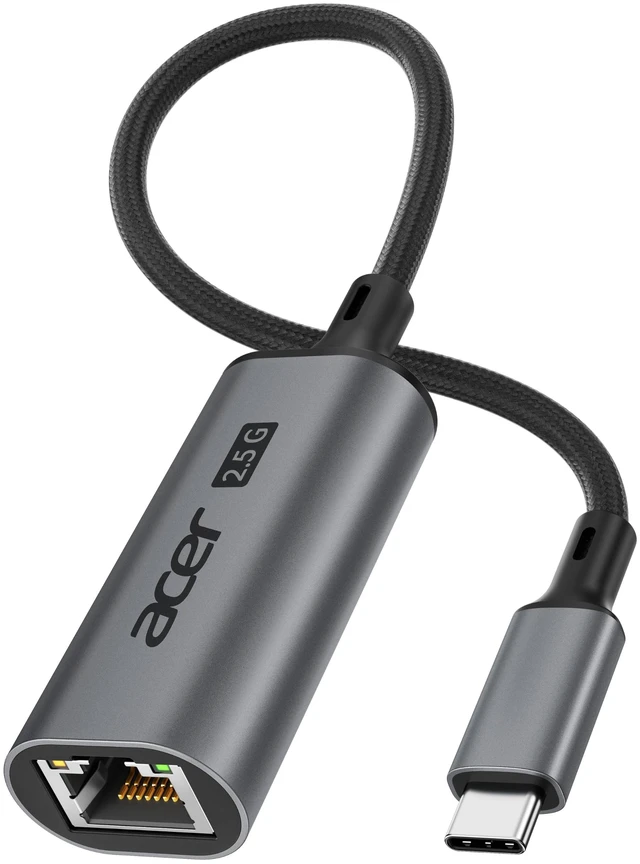
    2.5Gbps USB C to Ethernet Adapter for Laptop, RJ45 Network Adapter | Aluminum Alloy Type C to 2.5Gbps LAN Adapter, Plug & Play, Thunderbolt 4/3 Compatible for NAS, MacBook Pro/Air & iPhone 18/17

    • Pre-Use NoticeFor this USB C to ethernet adapter to reach up to 2.5Gbps, use a USB-C 5Gbps+ port, Cat6+ cable, and 2.5G network equipment. Some older systems/Linux/Windows 10/Windows 7 may require a Realtek driver.
    • Unlock Full 2.5G PerformancePowered by RTL8156B, the ethernet adapter USB C delivers up to 2.5Gbps with stable transfer, lower power use, and less heat. Ideal for NAS, gaming, streaming, and large files; supports 1G/100M/10M.
    • Effortless Plug & PlayGet online in seconds with the ethernet adapter for laptop. Simply connect an Ethernet cable for fast, stable wired access at home, work, or on the go, with no complicated setup.
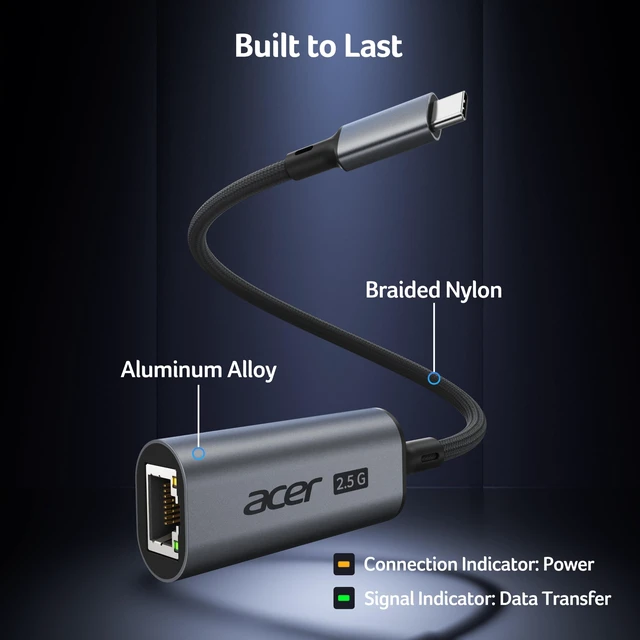
    • Premium Build & Refined DesignSleek aluminum housing gives the RJ45 to USB C adapter added durability and better heat dissipation, while the braided cable adds flexibility. Dual LEDs show power and network activity.
    • Wide CompatibilityFrom MacBook and XPS to Surface, Chromebook, iPad, and iPhone, the USB C computer network adapter works with USB-C and Thunderbolt 3/4 across Windows, macOS, ChromeOS, Linux, iPadOS, and iOS.
    +
    +
    Overview
    Specs
    Reviews

    Any questions? Ask CelesteSM will help you find out quickly.

    acer 2.5Gbps USB C to Ethernet Adapter
    acer 2.5Gbps USB C to Ethernet Adapter

    Troubleshooting

    Can’t reach 2.5Gbps? Make sure your USB-C port supports 5Gbps+ data, the Ethernet cable is Cat6 or higher, and the connected router, switch, or NAS supports 2.5Gbps. Actual speed may vary with your internet plan, router, server, network traffic, cable, device performance, and protocol overhead.
    Not recognized? Reconnect the adapter, try another USB-C port, Ethernet cable, or router port, then restart your device. Some older systems or Linux versions may require a Realtek driver.
    Adapter feel warm during use? Slight warmth is normal during high-speed data transfer. The aluminum housing helps dissipate heat for stable operation during extended use.
    How to download the driver? Realtek Official Website > Downloads > Communication Network ICs > Realtek USB FE / GbE / 2.5GbE / 5G / 10G Family Controller Software Quick Download
    acer 2.5Gbps USB C to Ethernet Adapter
    acer 2.5Gbps USB C to Ethernet Adapter

    Troubleshooting

    Can’t reach 2.5Gbps? Make sure your USB-C port supports 5Gbps+ data, the Ethernet cable is Cat6 or higher, and the connected router, switch, or NAS supports 2.5Gbps. Actual speed may vary with your internet plan, router, server, network traffic, cable, device performance, and protocol overhead.
    Not recognized? Reconnect the adapter, try another USB-C port, Ethernet cable, or router port, then restart your device. Some older systems or Linux versions may require a Realtek driver.
    Adapter feel warm during use? Slight warmth is normal during high-speed data transfer. The aluminum housing helps dissipate heat for stable operation during extended use.
    How to download the driver? Realtek Official Website > Downloads > Communication Network ICs > Realtek USB FE / GbE / 2.5GbE / 5G / 10G Family Controller Software Quick Download
    2.5G bps USB C to Ethernet Adapter for Laptop, RJ45 Network Adapter | Aluminum Alloy Type C to 2.5G bps LAN Adapter, Plug & Play, Thunderbolt 4/3 Compatible for NAS, MacBook Pro/Air & iPhone 18/17

    Warranty & Returns

    Warranty, Returns, And Additional Information

    Warranty

    • Please contact the Seller directly for warranty information. Warranty information may also be found on the Manufacturer's website.
    • CONTACT

    Return Policies

    Manufacturer Contact Info

    LOADING...