



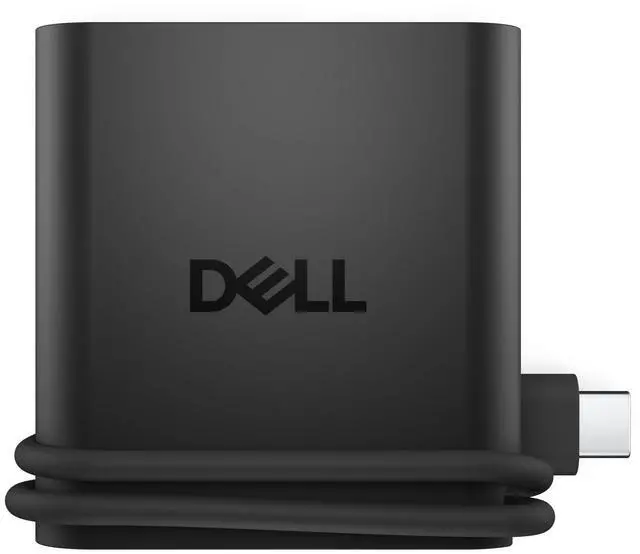






















Productivity on the go: The travel hub features a slim, portable design that effortlessly slips into your bag or laptop sleeve.
Smart Power Management: The world's first travel hub with Smart Power Management*, equipped with embedded smart technology that rebalances power based on real-time device consumption, ensuring efficient power use and preventing overconsumption.
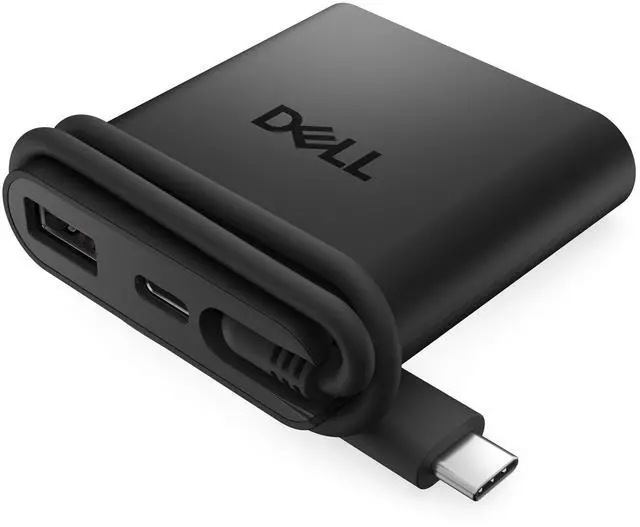
Connect with confidence: Plug in all of your essential devices no matter where you work with power from two USB-C ports and a USB-A port, and connect a monitor with an HDMI port.
Stay informed, stay connected: Easily manage your connected devices with notifications and real-time updates on power usage and port status.
+
+
Overview
Specs
Reviews
Any questions? Our AI beta will help you find out quickly.
Try me now
Dell Peripherals
Browse accessories from Dell
Complete your setup.
Featured Dell Laptops
Dell Peripherals
Browse accessories from Dell
Complete your setup.
Featured Dell Laptops
Pro 4-in-1 USB-C Travel Hub - DA225 - Plug and Play, Two USB-C Ports, USB-A Port, HDMI Port, Cable Length 10.63", 4K @ 60Hz - Black
Learn more about the Generic Brand DA225
Model
Brand
Anker
Series
DA225 Dell
Model
DA225
Part Number
JK05D
Details
Color
Black
Max Devices Supported
127
Ports
1 x USB 3.0, 3 x USB 2.0
Network Connector
1 x RJ-45
Dimensions
14.33in W x 12.83in H x 9.06in D
Weight
0.1 pounds
Features
Features
Travel
Packaging
Package Contents
Travel, DA225
Additional Information
First Listed on Newegg
June 13, 2026
Customer Reviews of the Generic Brand DA225
There are no reviews yet.
Do you own this product?
Warranty & Returns
Warranty, Returns, And Additional Information
Warranty
Please contact the Seller directly for warranty information. Warranty information may also be found on the Manufacturer's website.