




 here!
here!
I’m your shopping assistant for PC builds, upgrades, and everything tech.
Got questions? Ask away!
Start a conversation
here!
I’m your shopping assistant for PC builds, upgrades, and everything tech.
Got questions? Ask away!
Start a conversation





Any questions? Ask CelesteSM will help you find out quickly.
| Brand | ASRock |
|---|---|
| Model | THUNDERBOLT 3 AIC |
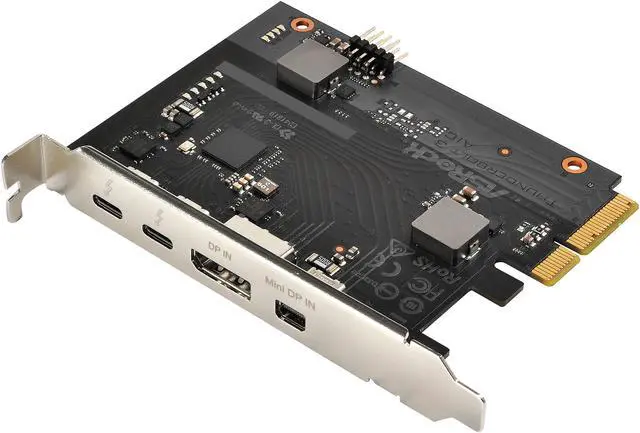
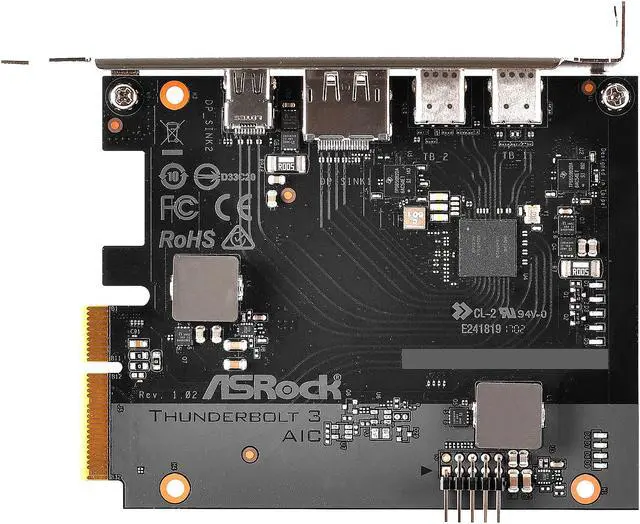
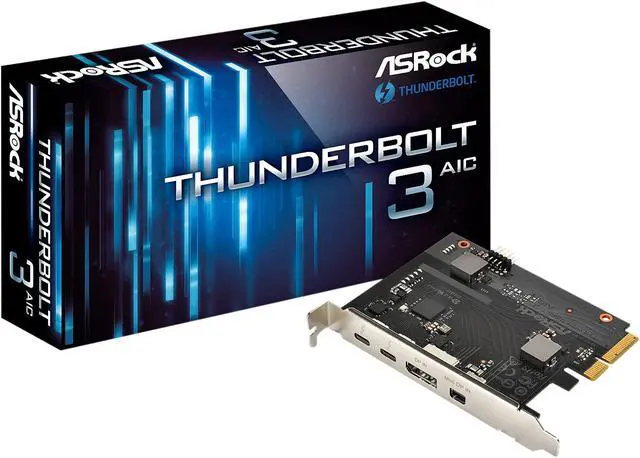
| External Ports | 2 x Thunderbolt 3 Type-C Ports (with up to 40 Gbps bandwidth) Supports daisy-chaining of up to six Thunderbolt devices 1 x DisplayPort IN Port 1 x Mini DisplayPort IN Port 1 x TBT Header |
|---|---|
| Data Transfer Rate | Supports 40 Gbps bi-directional bandwidth per channel with Thunderbolt 3 port |
| Operating Systems Supported | Microsoft Windows 10 32-bit / 10 64-bit / 8 32-bit / 8 64-bit |
| Specifications | PCI Express 3.0 x4 interface Supports ThunderboltTM 3 interface with max. resolution of 5K (5120 x 2880)@ 60 Hz for one display over a single cable connection Supports ThunderboltTM 3 interface with max. resolution of 4K x 2K (4096x2160) @ 60 Hz for dual displays over a single cable connection Supports up to two streams (eight lanes) of DisplayPort video bandwidth; supports daisy-chaining of multiple DisplayPort monitors |
| Dimensions | 4.10" x 3.30" (W x D) |
|---|
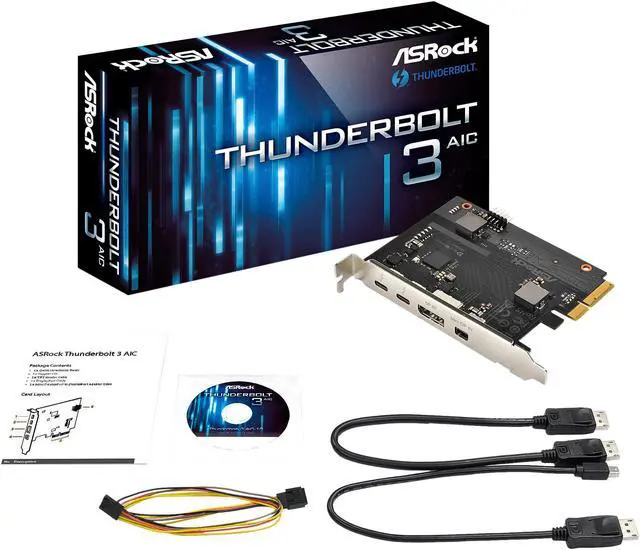
| Package Contents | Quick Installation Guide, Support CD 1 x TBT Header Cable 1 x DisplayPort Cable 1 x Mini DisplayPort to DisplayPort Adapter Cable |
|---|
| First Listed on Newegg | August 20, 2026 |
|---|
The ASRock THUNDERBOLT 3 AIC is a PCI Express 3.0 x4 add-on card that adds two Thunderbolt 3 USB-C ports with up to 40 Gbps bi-directional bandwidth. It is suitable for Windows 8 or 10 desktop users who need high-speed peripheral connectivity on a compatible motherboard with a TBT header.
| Attribute | Value |
|---|---|
| Best For | Adding Thunderbolt 3 connectivity to a compatible personal computer with high-speed peripheral access and support for single 5K or dual 4K displays |
| Thunderbolt And Display Connectivity | Provides two Thunderbolt 3 USB Type-C ports with up to 40 Gbps bi-directional bandwidth per channel, one DisplayPort input, one Mini DisplayPort input, and one TBT header; supports daisy-chaining up to six Thunderbolt devices and multiple DisplayPort monitors |
| Display Support | Supports up to 5K (5120 x 2880) at 60 Hz for one display or dual 4K x 2K (4096 x 2160) displays at 60 Hz over a single cable, with up to two DisplayPort video streams |
| Interface And Compatibility | Uses a PCI Express 3.0 x4 interface and supports Microsoft Windows 10 and Windows 8 in 32-bit and 64-bit editions |
| Included Accessories | Includes a quick installation guide, support CD, TBT header cable, DisplayPort cable, and Mini DisplayPort-to-DisplayPort adapter cable |
| Physical Details | Measures 4.10 x 3.30 inches (W x D) and weighs 0.48 pounds |
| Model Identifiers | ASRock THUNDERBOLT 3 AIC add-on card |
Q: Is the ASRock Thunderbolt 3 AIC better than a Thunderbolt 4 add-in card?
A: Choose the ASRock Thunderbolt 3 AIC when your motherboard is on ASRock's supported list and you need two 40 Gbps Thunderbolt ports, one 5K display, or two 4K displays. Choose a Thunderbolt 4 card such as the Gigabyte GC-Maple Ridge when you need newer Thunderbolt 4 requirements, broader USB-C device behavior, higher display support, or greater device-charging capability. Both generations use a 40 Gbps headline bandwidth, so the practical difference is primarily compatibility, minimum feature requirements, display support, and power delivery rather than peak link speed. ([asrock.com](https://www.asrock.com/mb/spec/product.asp?Model=Thunderbolt+3+AIC))
Q: ASRock Thunderbolt 3 AIC or Gigabyte GC-TITAN RIDGE: which should I buy?
A: The ASRock Thunderbolt 3 AIC is the more suitable choice for a compatible ASRock motherboard because it uses the required TBT header and includes the header and DisplayPort connection cables. The Gigabyte GC-TITAN RIDGE is more suitable when its motherboard support is confirmed and you need up to 100 W power delivery or daisy-chaining for up to 12 Thunderbolt devices. Both cards provide two Thunderbolt 3 Type-C ports and up to 40 Gbps bandwidth, so motherboard compatibility should decide the purchase before port count or speed. ([asrock.com](https://www.asrock.com/mb/spec/product.asp?Model=Thunderbolt+3+AIC))
Q: Should I use the ASRock Thunderbolt 3 AIC or a basic USB 3.2 add-in card?
A: Choose the ASRock Thunderbolt 3 AIC when you need Thunderbolt-specific devices such as professional docks, high-speed external storage, daisy-chained Thunderbolt peripherals, or DisplayPort tunneling. Choose a basic USB 3.2 add-in card when you only need additional USB ports for everyday peripherals and do not need Thunderbolt devices or display connectivity. The ASRock card requires a PCIe 3.0 x4 slot, a compatible motherboard TBT header, BIOS support, and DisplayPort cabling, so a USB card is the simpler option for basic expansion. ([asrock.com](https://www.asrock.com/mb/spec/product.asp?Model=Thunderbolt+3+AIC))
Q: Is the ASRock Thunderbolt 3 AIC better than a portable Thunderbolt dock?
A: Choose the ASRock Thunderbolt 3 AIC for a permanent desktop workstation that needs two Thunderbolt ports, up to 40 Gbps per port, display connectivity, and daisy-chaining for up to six Thunderbolt devices. Choose a portable Thunderbolt dock when you need to move the same connectivity between computers or use a laptop without an available internal PCIe slot. The ASRock card is an internal desktop component and requires motherboard installation, a TBT header connection, BIOS configuration, and DisplayPort input cabling; it is not a portable plug-in solution. ([asrock.com](https://www.asrock.com/mb/spec/product.asp?Model=Thunderbolt+3+AIC))
Q: Will this Thunderbolt 3 add-in card work with my motherboard?
A: It requires more than an available PCIe slot. The motherboard should provide a compatible Thunderbolt header, support the card through BIOS, and offer a PCIe 3.0 x4 connection. Check the motherboard's compatibility list and manual before buying; the product specifications do not provide a universal motherboard compatibility list.
Q: Do I need to connect the DisplayPort or Mini DisplayPort input for monitor support?
A: Yes, when using the add-in card to carry DisplayPort video through Thunderbolt. Connect the computer's graphics output to the card's DisplayPort IN or Mini DisplayPort IN using the included cables. The card supports one 5K display at 60 Hz or two 4K displays at 60 Hz, subject to the graphics hardware, motherboard, cables, and monitor configuration.
Q: Can I use this card with several Thunderbolt devices at the same time?
A: Yes. The card has two Thunderbolt 3 Type-C ports and supports daisy-chaining up to six Thunderbolt devices. Actual performance depends on the shared 40 Gbps bandwidth, the capabilities of each connected device, and whether displays are using part of the available bandwidth.
Q: Is this a good choice for adding fast external storage, docks, and professional peripherals to a desktop PC?
A: It is suitable for a compatible Windows desktop that needs Thunderbolt 3 connectivity for high-speed storage, docks, audio interfaces, displays, or other peripherals. Its 40 Gbps bidirectional interface provides substantially more bandwidth than typical USB connections, but the card is not a plug-and-play upgrade: installation requires an open PCIe slot, a compatible motherboard header, internal cabling, and likely BIOS or driver configuration.
Q: Does it support Windows 11 or macOS?
A: The supplied specifications officially list Windows 8 and Windows 10 in both 32-bit and 64-bit versions. Windows 11 and macOS are not listed, so compatibility with those operating systems should be confirmed with ASRock and the specific motherboard before purchase.
Q: Will the ASRock Thunderbolt 3 AIC work with my motherboard?
A: Compatibility is motherboard-specific. The board should provide a compatible Thunderbolt header, BIOS support, and an available PCIe 3.0 x4 slot; a Thunderbolt header alone does not guarantee operation. Check the motherboard's supported-device list before buying.
Q: Is this Thunderbolt 3 card easy to install?
A: Installation requires more than inserting the card. Users report needing the PCIe slot, the included TBT header cable, BIOS Thunderbolt settings, drivers, and sometimes DisplayPort connections from the graphics card. Setup can also depend on the motherboard's PCIe-slot layout.
Q: Is the ASRock Thunderbolt 3 AIC suitable for audio production and other high-bandwidth devices?
A: It is suitable for compatible Thunderbolt peripherals such as audio interfaces, storage, and docks, with up to 40 Gbps bandwidth and two Thunderbolt 3 Type-C ports. Community reports include successful use with audio-engineering equipment and a CalDigit TS3 Plus dock, but compatibility still depends on the motherboard and connected device.
Q: Is it still worth buying this Thunderbolt 3 AIC instead of a newer card?
A: It can be worthwhile when you need Thunderbolt 3 on a specifically compatible older motherboard, but it has trade-offs: Thunderbolt 3 is an older standard, newer AICs may offer broader or newer-platform support, and community reports describe the ASRock card as discontinued or difficult to find. Verify compatibility and condition before paying a premium.


