










At a Glance:
- 3-button optical mouse delivers smooth, reliable control
- Compatible with both PC and Mac computers
- Ambidextrous design accommodates both left- and right-handers
- 800 DPI movement resolution for precise control
- Requires an available USB-A port
Belkin 3-Button Wired USB Optical Mouse
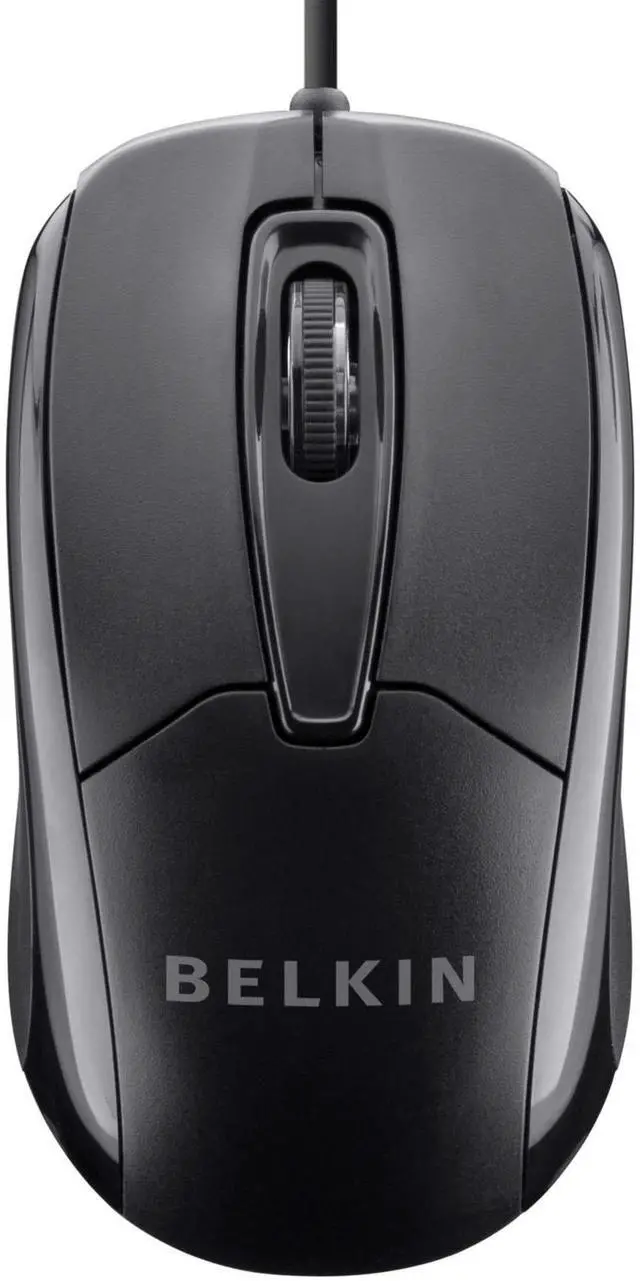
Enjoy intuitive, smooth control over your PC or Mac with the Belkin 3-Button Wired USB Optical Mouse. Featuring an ambidextrous design that’s ideal for both left- and right-handed users, this plug-and-play mouse connects to any desktop or laptop computer with an available USB-A port. The mouse’s third button offers customizable control, while the central wheel delivers fluid scrolling.
Thanks to its 800 DPI movement resolution, this mouse offers pinpoint control for excellent point-and-click accuracy.
What's in the Box:
- Belkin 3-Button Wired USB Optical Mouse with 5-Foot Cord

Ambidextrous Design
Featuring an ergonomic design that conforms to the contours of your hand, the Belkin 3-Button Wired USB Optical Mouse is ideal for extended computer sessions--whether you’re working or playing. Its ambidextrous shape is suitable for both left- and right-handed users.
Three-Button Layout with Mouse Wheel
In addition to the traditional right- and left-click buttons, the Belkin 3-Button Optical Mouse features a third button that can be custom-mapped to a variety of functions. Use it to open a new browser window, navigate back to your desktop, and more. And thanks to the mouse’s scroll wheel, scrolling through documents and web pages is fast and fluid.
High-Resolution Movement for Precise Control
Featuring a red LED sensor light, the Belkin 3-Button Wired USB Optical Mouse delivers highly reliable and responsive control. With a movement resolution of 800 DPI, it offers precise navigation and clicking.
Plug-and-Play Setup
The Belkin 3-Button Optical Mouse is easy to set up: simply plug the cord into an available USB port and immediately start using the mouse--no CD installation required. The mouse is compatible with both Macs and PCs. Its 5-foot cord offers considerable reach and gives you freedom to move freely.
Belkin 3-Button Wired USB Optical Mouse
At a Glance:
- 3-button optical mouse delivers smooth, reliable control
- Compatible with both PC and Mac computers
- Ambidextrous design accommodates both left- and right-handers
- 800 DPI movement resolution for precise control
- Requires an available USB-A port
Enjoy intuitive, smooth control over your PC or Mac with the Belkin 3-Button Wired USB Optical Mouse. Featuring an ambidextrous design that’s ideal for both left- and right-handed users, this plug-and-play mouse connects to any desktop or laptop computer with an available USB-A port. The mouse’s third button offers customizable control, while the central wheel delivers fluid scrolling.
Thanks to its 800 DPI movement resolution, this mouse offers pinpoint control for excellent point-and-click accuracy.
What's in the Box:
- Belkin 3-Button Wired USB Optical Mouse with 5-Foot Cord
Ambidextrous Design
Featuring an ergonomic design that conforms to the contours of your hand, the Belkin 3-Button Wired USB Optical Mouse is ideal for extended computer sessions--whether you’re working or playing. Its ambidextrous shape is suitable for both left- and right-handed users.
Three-Button Layout with Mouse Wheel
In addition to the traditional right- and left-click buttons, the Belkin 3-Button Optical Mouse features a third button that can be custom-mapped to a variety of functions. Use it to open a new browser window, navigate back to your desktop, and more. And thanks to the mouse’s scroll wheel, scrolling through documents and web pages is fast and fluid.
High-Resolution Movement for Precise Control
Featuring a red LED sensor light, the Belkin 3-Button Wired USB Optical Mouse delivers highly reliable and responsive control. With a movement resolution of 800 DPI, it offers precise navigation and clicking.
Plug-and-Play Setup
The Belkin 3-Button Optical Mouse is easy to set up: simply plug the cord into an available USB port and immediately start using the mouse--no CD installation required. The mouse is compatible with both Macs and PCs. Its 5-foot cord offers considerable reach and gives you freedom to move freely.
Thunderbolt Docking Stations
GaN Docks
USB-C Adapters and Hubs
Thunderbolt Cables
Ethernet Adapters