here!
here!
I’m your shopping assistant for PC builds, upgrades, and everything tech.
Got questions? Ask away!
Start a conversation
here!
I’m your shopping assistant for PC builds, upgrades, and everything tech.
Got questions? Ask away!
Start a conversation








Any questions? Ask CelesteSM will help you find out quickly.
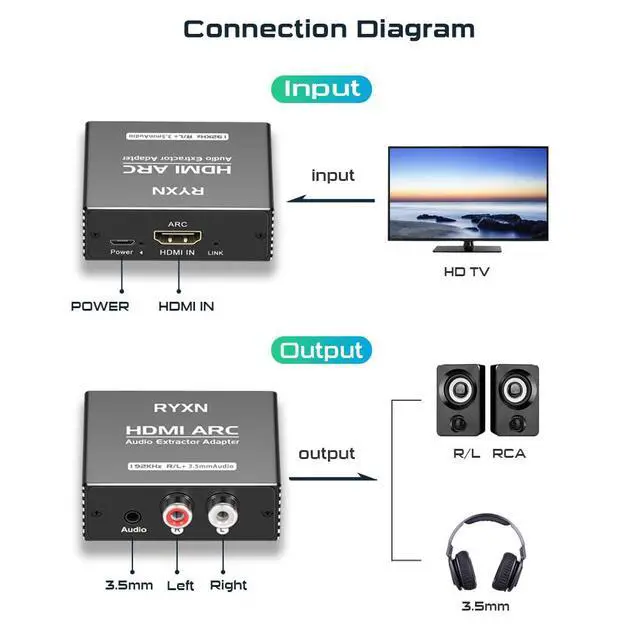
Two ways to use the ARC adapter
1. Plug the HDMI cable into the ARC port of the TV, plug the other end into the HDMI ARC adapter (HDMI IN), connect the ARC to the power supply, connect the R/L or 3.5mm to the sound bar, power amplifier, speakers and other devices, and finally set the TV audio output.
2. Using the matching Micro cable, plug the USB port of the Micro cable into the TV, plug the other end into the HDMI ARC adapter (power supply at the same time), and connect the R/L or 3.5mm sound bar, power amplifier, speakers and other devices, and finally set the TV audio output.
Different brands of TVs have different settings, please contact us if you encounter problems. We will assist you in setting up the audio output.
Some TV ARC settings
for SamsungTools--Select Speakers--External Speakers. If there is no sound, external device management--Anynet+ (HDMI CEC), or Source--select HDMI 2/3 (ARC)--Return to desktop.
for SonySound Settings--Speakers (Audio System)--Digital Audio Out (PCM). If there is no sound, Source--select HDMI 2/3 (ARC)--Return to desktop.
for LGSound -- Sound Output -- HDMI ARC. Advanced Settings - Digital Sound Output (Pass), EARC Support (On).If there is still no sound, return to the TV desktop. Connect Output device (select HDMI ARC device).
for HisenseSound Settings--Output Devices--HDMI ARC. If there is no sound, Source--select HDMI 2/3 (ARC)--Return to desktop.
for TCLSettings - Sound - Advanced Settings - ARC. If there is no sound, Source--select HDMI 2/3 (ARC)--Return to desktop.
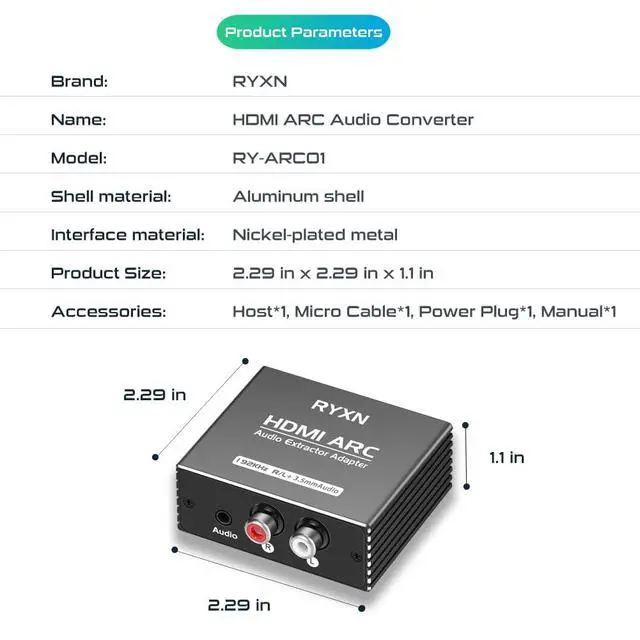
Product parameters
Model: RY-ARC01
Shell material: aluminum alloy
Interface material: gold plated
Dimensions: 5.8x 5.8 x 2.8cm
Accessories: host*1, Micro data cable*1, power plug*1, manual*1