


Your Browsing History


MARLON M.
Joined on 12/17/08
0
0
product reviews
- 14
Great RAM
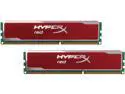
HyperX XMP Blu Red Series 16GB (2 x 8GB) DDR3 1600 Desktop Memory Model KHX16C10B1RK2/16X
Pros: XMP. Stable. Reliable brand I've used for years. Great looking finish that was a perfect fit in the black RAM slots in my MSI Z87-GD65 Gaming mobo. Not the beefiest heat sinks on the market, but I've owned HyperX memory in the past, and never been even close to having heat issues. Plus, I don't have the need to overclock, so not an issue.
Cons: None!
Overall Review: As others have said, this will run stock at 1333 unless you enable XMP or go in manually and adjust it up to 1600. I ran stock to ensure system stability then boosted up to 1600. Absolutely no issues after about two weeks. Running with 32 GB. I've used Kingston almost exclusively for RAM, SD, flash drives, and SSD (except for the speedy Samsung 840 Pro I had to have). I have yet to have any of their products fail on me. However, I have never had the need to overclock any of the memory, so I can't speak to any of that.
1/25/2014See more detail
It works...
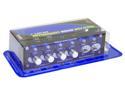
Fan Controller Panel
Pros: Controls the fans just as it is supposed to. The blue LEDs look good with my case.
Cons: The 4 knobs are somewhat cheap. After a weeks worth of use, the first knob keeps spinning after you are all the way up or down on the adjustment. I'll probably have to glue them on, but no big deal. Another odd thing is, the LEDs on the 4 adjustible channels flicker, and they are connected to ZALMAN FANS. The only one that doesn't flicker is connected to the cheapo fan that came with the case. When I first fired it up, something fried on the controller, but I don't know what it was. Stunk for a while but it works just fine.
Overall Review: Seems like a lot of cons, but this is a good looking controller, at least for my build, and it does what it says it does. It will only work with 3 pin fans and the two switch controlled channels have to have two-wire fans with no connector. Also, my BIOS won't read the fan RPMs now that I have run the fans thru this controller, even though Zalman provides split cables to keep the fans connected to the mobo. Oh well. I didn't run my CPU fan through this.
8/15/2009See more detail
It's ok...
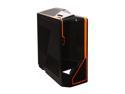
NZXT Phantom PHAN-002OR Newegg Exclusive Black Finish w/Orange Trim Steel / Plastic Enthusiast ATX Full Tower Computer Case
Pros: Lots of room inside. Seems to be sturdy. Looks pretty cool - orange on black. Decent cable management. Built-in fan controller.
Cons: Included fans are proprietary to NZXT - non-standard size and the LEDs stopped working. Front audio jacks shorted out.
Overall Review: I've had this over a year now. It came beat up from UPS and I was shocked that nothing was broken inside. This thing is huge and heavy, but I can fit anything I want inside. The LED on the top fan stopped working after a month, but I didn't care. Wanted to add more than the two included fans, but found out that I would have to buy NZXT fans as they are not normal sizes. Included fan controller still works and the fans still run and are quiet. The audio jacks shorted out right out of the box and I was not able to figure out why. Didn't matter much as I use a wireless USB headset. Came with a top USB 3 even though it only said USB 2 was included. Nice bonus given the other problems. I wanted a full tower for a gaming build with plenty of room to keep things easy to put together. This fit the bill and looks pretty cool even though it just sits under the desk. Nothing has broken or cracked on it over the last year, other than the problems described above. So far the two included fans and my aftermarket CPU cooler have kept things under control. Hopefully I won't need more fans or I'll be paying a premium for NZXT product.
11/12/2014See more detail
Just buy it
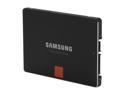
SAMSUNG 840 Pro Series 2.5" 256GB SATA III MLC Internal Solid State Drive (SSD) MZ-7PD256BW
Pros: This is a smokin' SSD. It comes with a disc of cloning software to transfer your HDD contents to this drive. Software was easy to use. I moved about 70GB off my Velociraptor boot drive to this SSD in a couple of minutes. I now use this as my boot drive and it gets me into Windows 8.1 ready to rock in 15 seconds. The SATA data and power connections fit snugly and the mounting holes lined up with my hardware.
Cons: None really other than the price of SSD. However, the price seems to have been dropping since Christmas, and I got this for under $200 (240GB). The day after I ordered, it went down another $5 with promo code. :(
Overall Review: I used a Kingston SSD as a boot drive with Windows 7 on a previous build, and it got me up and running in about 10 seconds. But this was with the OS only and no other programs and drivers installed. So a 15 second boot time with all my programs, drivers and other junk installed on this Samsung is a testament to its speed IMO. Definitely worth picking up.
1/25/2014See more detail
Great PSU
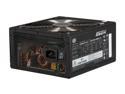
Cooler Master Silent Pro M - 850W Power Supply with 80 PLUS Bronze Certification and Semi-Modular Cables
Pros: I've had this PSU for about 6 months now and absolutely no issues. I am using almost every available connection (except molex) and running over 800W on my current build. This thing stays cool and quiet on a bottom mount in my NZXT full tower. The fan is so silent that I don't even hear it running, yet it keeps the unit nice and cool. Haswell compatible according to their website. Modular.
Cons: I've only run CM PS units since I've been building computers. I've only had one fry out on me. The packaging on these things is rather extravagant, and they pack the cables in a nice nylon bag with a drawstring closure. While that is nice, I can only imagine these would be around $20 or more less in price without the bling packaging. Oh well.
Overall Review: I lucked out as I bought this for my new build before I made the decision to run a Haswell CPU. Fortunately, their website said this model was Haswell compatible, and I have not had any of the sleep/wake issues, so I guess they're right.
1/25/2014See more detail
Cheap SSD!
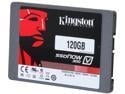
Kingston SSDNow V300 Series 2.5" 120GB SATA III Internal Solid State Drive (SSD) SV300S37A/120G
Pros: I got this for 90 bucks, which I thought was a decent deal. This is not the fastest SSD on the market, but remarkably faster than the Velociraptor I was using as a boot drive for the last several years. The SATA connections were snug and the mounting holes were all threaded correctly and lined up with my mounting hardware.
Cons: None.
Overall Review: This is the second Kingston SSD I've purchased. The first one was for a build about a year and a half ago and it was used for the boot drive. The computer is still up and running and the drive is working like new. The last one I purchased about 6 months ago and I use it to run video editing software. It too is still running strong. I've pretty much used Kingston for memory (flash drives, RAM, SD cards) exclusively and they have yet to fail me. I did switch to a Samsung 840 for the boot drive on my current build, but that was done only for the speed of the drive. Though I'm not sure if I would notice much of a difference in boot time between the two drives. If you are looking for a cheap SSD solution, I would recommend this drive if you can find it for under a bill.
1/22/2014See more detail