

Your Browsing History


David M.
Joined on 01/16/08
0
0
product reviews
- 8
awesome motherboard
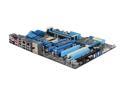
ASUS P8Z68 DELUXE/GEN3 LGA 1155 Intel Z68 USB 3.0 ATX Intel Motherboard with UEFI BIOS
Pros: I absolutely love this motherboard. It has everything I could ever want and it all works flawlessly. One of the main reasons I got this mobo was because of all the inputs; Plenty of USB, eSATA, and dual gigabit LAN (which was also one of the reasons I got this mobo since I often bridge connections). With the Z68 chipset you get Intel Rapid Storage Technology, and it was a breeze to configure and greatly decreases the time it takes to boot and open apps. I also tried out the Bluetooth with my phone and it was super easy to set up and stream music. I also love the UEFI BIOS, very easy to set things up and tweak settings. The thing also looks great. I don't know if anyone mentioned this, but the ASUS logo on the heat sink lights up blue (though if you have a large video card, it covers it up and makes it look like your video card has a LED backlight), the power button lights up red, and the reset button lights up green. It has everything you could ever want with a 1155 motherboard.
Cons: None. Can't find anything I don't like about it and there's been no problems with it after 6 weeks of moderate to heavy use.
Overall Review: I went with ASUS because I was so satisfied with their motherboard that I used in my last build from 2007 (ASUS P5N32-E SLI). It was my main computer for 4 years and for the last 3 of those years I kept it running 24/7 (only turned it off when I went out of town so it was running at least 340 days a year). I used it for everything from gaming to web browsing to photo editing and I'm still using it now as a server and I've never had a problem with it. It was really a no-brainer to go with ASUS again.
12/12/2011See more detail
Fast, great range, support from open source firmware!!!
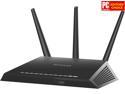
NETGEAR Nighthawk AC1900 Dual Band Wi-Fi Router, Gigabit Router, Open Source Support, Circle with Smart Parental Controls, Compatible with Amazon Alexa (R7000)
Pros: Incredible range! Router is on the first floor of the far north side of the house, my office is on the second floor on the far south side of the house (it's a 2,600 sq. ft. house). There is literally no place in the house where I am not getting 4/4 bars signal strength on 2.4GHz, and it hovers between 3-4 bars on 5GHz in my office. My old router (Linksys E3000) didn't even get 1 bar of 5GHz upstairs. Other than the excellent hardware in this router, I cannot say much more about it here as I'm not running the stock firmware, so the Pros are continued in Other Thoughts!!
Cons: UI in the stock firmware is a joke. Drop-down menus are annoying. It won't let you keep all the menus expanded. When you click to expand a different menu the one you previously had expanded retracts. Not as many advanced options as competitors like Asus. I think a lot of the complaints people are having about this router with stability issues is the fault of unstable firmware more than it is hardware.
Overall Review: It is INCREDIBLY easy to flash DD-WRT to this router. It literally takes 3-4 minutes before it's installed and you're tweaking all the advanced settings to your heart's content. I've previously installed DD-WRT on 2 Linksys routers and the process was long and painful, so I was very pleasantly surprised by how easy it was on this router. The DD-WRT build for this router is very stable and constantly updated with 4-6 updates per month. This router is an excellent piece of hardware, so why would you not want to complement it with excellent firmware?! Get this router and flash it with DD-WRT!
2/26/2014See more detail
does its job
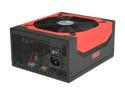
Antec High Current Gamer Series HCG-900 900W ATX12V v2.3 / EPS12V v2.91 SLI Certified CrossFire Certified 80 PLUS BRONZE Certified Active PFC Power Supply - Intel Haswell Fully Compatible
Pros: Works great and it's quiet. I've had it for 6+ weeks now with moderate to heavy use every day (it's on all day since I use it for work and I also use it for gaming).
Cons: Nothing serious. See other thoughts.
Overall Review: If you mount it upside down (mine's on the bottom drawing cool air from under the case) the label on the side will be upside down, so it'll look like you have a 006 watt power supply. For a PSU like this that's likely going to be put in a case with a side panel, they should know to make the labels on each side inverted so it'll appear right-side-up no matter which way you install it (up or down).
12/12/2011See more detail
cable management is a dream
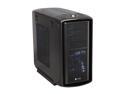
Corsair Graphite Series 600T CC600TM Graphite Grey Mid-Tower Gaming Case
Pros: CABLE MANAGEMENT!!! This made it so easy! My 900W PSU is not modular so there are quite a few unused cables. I just folded them up and put the right side panel back on and you can't see a single one. Everything looks nice and clean and there's no cables interfering with air flow. Lots of room to fit any size heat sink or video card. Everything is tool-less. Took out the top hard drive bays to provide better air flow. Dust filters on air intakes work great and easy to clean. Just vacuum it off or run it under water. Comes with every size screw you'll ever need, and more than enough.
Cons: Can't turn off the fan LEDs. If you're going to put this in your bedroom and you keep it running at night, you'll have one bright night light. Pass through cable for the front USB 3.0 connector (you have to rout it out the back of your case and hook it up to your mobo's rear USB 3.0 ports) . Would be nice if it had come with an adapter to hook it up to the internal USB 3.0 connector, I had to buy one separately.
Overall Review: In order to mount a 2.5" drive or SSD, you'll have to pull out one of the pins used to hold in a 3.5" drive. It's easy to do, you can either just pull it out from the inside, or use a pen to push it through from the outside. It's not really necessary, but you might want to consider getting a fan for the top and bottom (2 total) of the side panel to provide more air to the CPU heat sink and video cards (if you're not water cooling). It seems like the top case exhaust fan takes air away from your CPU heat sink, so your CPU heat sink isn't able to draw as much cool air. I myself don't have any fans on the side panel and I'm getting 32C idle with a Hyper 212 Plus (which is pretty good), but I'll eventually get some fans for the side panel and see if the temps go down at all.
12/12/2011See more detail
wow
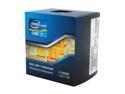
Intel Core i7-2600K - Core i7 2nd Gen Quad-Core 3.4GHz (3.8GHz Turbo Boost) LGA 1155 95W Intel HD Graphics 3000 Desktop Processor - BX80623I72600K
Pros: Just wow is this fast. My last build had a Core2 Duo E6850 and this is like a supercomputer compared to that. I use dBpoweramp to convert music from FLAC to mp3 and each core converts a song and it shows the progress for each one, so it's kind of fun watching 8 (virtual) cores at work and it gets the job done, way, way faster than my last build. Overall just extremely fast.
Cons: none
Overall Review: I'm using the Hyper 212 Plus to cool it and it idles at 31C.
12/10/2011See more detail
worked flawlessly, fast
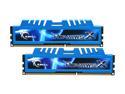
G.SKILL Ripjaws X Series 8GB (2 x 4GB) DDR3 1600 (PC3 12800) Desktop Memory Model F3-12800CL8D-8GBXM
Pros: Had no problem with the install on a Z68 motherboard. They defaulted to their advertised speed/timings, and they work great in XMP mode. I just ordered another pair of these so I'll have 16GB. They also look great and match my build's color scheme.
Cons: none
12/10/2011See more detail