

Your Browsing History


Robert K.
Joined on 02/20/13
0
0
product reviews
- 6
Speed demon
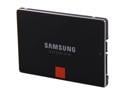
SAMSUNG 840 Pro Series 2.5" 128GB SATA III MLC Internal Solid State Drive (SSD) MZ-7PD128BW
Pros: Amazingly fast. I put this in a new build with Win7 and it boots to login prompt in less than 15 seconds, and to desktop almost instantly after putting in my credentials. After optimizing my OS settings for a solid state drive and moving my profile to a secondary HDD I can't believe how quickly everything runs.
Cons: The only negative thing I can say is that my house lost power about a week after I first built my machine, and it totally hosed my OS to the point where I had to reinstall. I had not yet put it on a UPS, which was my fault. After a little research I found out this is a known issue with SSDs. Regular HDDs can lose power without losing data, but most SSDs cannot. Some enterprise-class drives have a supercapacitor which allows the drive to stay powered long enough to shut itself down gracefully, but this one doesn't. So if you don't have your system on a battery backup this SSD is not for you.
11/22/2013See more detail
Runs hot
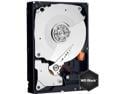
Western Digital Black WD2002FAEX 2TB 7200 RPM 64MB Cache SATA 6.0Gb/s 3.5" Internal Hard Drive Bare Drive
Pros: I put data on it and the data is still there the next day.
Cons: I have this drive in an UnRaid server with a Samsung and a Toshiba hard drive, and it always runs a few degrees hotter than the other two, even after putting it in an ICYDOCK drive enclosure and adding another 90mm case fan. It was also significantly pricier than the other two drives.
10/30/2013See more detail
Does the job
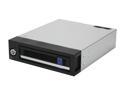
ICY DOCK MB876SK-B Aluminum 3.5" SATA I, II & III Hard Drive Mobile Rack Enclosure
Pros: I built an UnRAID file server with 3 hard drives from an old Dell Optiplex GX620, which wasn't designed for multiple hard drives, and the WD drive kept overheating. I bought this enclosure (along with another case fan), and it keeps the drive below 45C even when the drive is getting a workout. Because the PSU was old the Molex connector was actually perfect for me, although if I ever upgrade the hardware I could see this being an issue.
Cons: Even with this enclosure the WD drive still runs hotter than the other two hard drives in my server that are just air cooled. That's really more of a complaint about the drive I guess, but I kind of expected the enclosure to keep it COOLER than the other two. And yeah, the "lock" is basically just decoration.
1/9/2014See more detail
High quality PSU
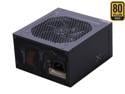
SeaSonic X Series X650 Gold (SS-650KM Active PFC F3) 650W ATX12V V2.3/EPS 12V V2.91 SLI Ready CrossFire Ready 80 PLUS GOLD Certified Full Modular Active PFC Power Supply New 4th Gen CPU Certified Hasw
Pros: I chose this because of the review on HardwareSecrets.com and have not been disappointed. Plus I originally bought this on Shell Shocker, and with the rebate I effectively got it for over 50% off. I have been running this for a little over 4 months with no issues. Modular design with plenty of connectors. Single rail design. Cables were long enough to reach all of my devices in my Antec P280 case.
Cons: Some people have complained about the cables being stiff and hard to maneuver, and there's some truth in that, but I don't think it's really much of an issue.
Overall Review: I have been completely satisfied with this PSU, and foresee it lasting through multiple builds.
1/9/2014See more detail
Works like a champ
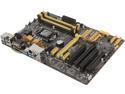
ASUS H87-PRO LGA 1150 Intel H87 HDMI USB 3.0 ATX Intel Motherboard with UEFI BIOS
Pros: Ordered this with a Haswell i5-4670, 8 GB of G.Skill RAM, 128 GB Samsung SSD, and it booted up with no problems. Great feature set. Terrific value.
Cons: -As mentioned above, there are no mounts on the back 1/4 of the board so I flexed it a couple of times while connecting the USB 3.0 controller and power connections. -Asus gives you lots of extra software, which can be great, but I found it bogged my system down so I ended up removing it.
9/6/2013See more detail
BIG - for better and worse
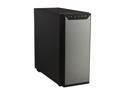
Antec P280 Black Aluminum / Steel Super Mid Tower Computer Case
Pros: 1. So quiet! I have the fans running at normal (low) speed and I can't hear them at all. 2. Spacious interior for all the devices you could ever want to install. 3. The cable management is really nice. Tons of room for running cables under and around your motherboard to keep them out of the way. 4. Dust filters in the front and under the power supply. I have 4 dogs and the insides of my PCs usually get packed with dust and hair, so I love the filters.
Cons: 1. This sucker is huge. Make sure you have enough room to store it where you want it. I didn't verify that the space where I wanted to put it was deep enough, and it sticks out from under my desk by about a foot. 2. The power supply mounts at the bottom while the combined power connection for the fans is at the top, so you need a lengthy power cable to reach, and it runs right over the processor fan. 3. SSD/hard drive mounting seems a little backward to me. Instead of mounting with the cabling toward the back of the machine, closest to the motherboard, they mount sideways, and in such a way that you have to take off both sides of the case in order to place and cable them. It seems to me like they could have figured out a way to let you cable them by only taking off one side of the case. The sides come off easily so I'm just nitpicking.
Overall Review: This is a great case, I just wish I'd measured my desk space a little better. I took off the one egg only because of the long power connector you need to power the fans.
8/25/2013See more detail