

Your Browsing History


Mac G.
Joined on 05/14/13
0
0
product reviews
- 1
Works with some work
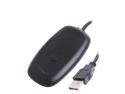
USB Wireless Game Gaming Receiver Controller PC Adapter For Microsoft XBox 360 Controller Consoles-Black
Pros: After the fix it worked. The fix I got from Sheer below, all credit to him/her. From Sheer's guide, adapted for Windows 7, square brackets indicate link or folder location: 1) Download and install drivers from here: [http://www.microsoft.com/hardware/en-us/p/xbox-360-wireless-controller-for-windows#support] 2) Navigate to [C:\Windows\System32\DriverStore\FileRepository] (or your WINDIR equivalent) 3) Locate folder that starts with xusb21.inf_... (the file type should be "Setup Information"). If there are more than one, choose the one that was created most recently 4) Copy that folder to your desktop (can't edit it where it is apparently) 5) Open the inf file in notepad. Press ctrl+h (search & replace). For the "Find What" field, enter "0719". For the "Replace with" field, enter "0291". Save and close. 6) Right click on my computer (desktop, start menu, wherever) and click "Manage" 7) In the new window on the list at the left, click Device Manager. 8) There should be an "Other Devices" section with "Unknown Device" listed, you can try the following procedure on all of them to find the right one. 9) Right click and select "Update Driver Software" 10) Select "Browse my computer for driver software" 11) Browse to the folder on your desktop with the modified inf file in it. 12) Click next and accept whatever popups follow, it's okay to install the driver even though windows might warn you That worked for me, perhaps a restart might be required for some but mine didn't need it. Again thanks to Sheer for the help!
Cons: Took some editing to get it working, but the guide below was exactly correct.
5/27/2013See more detail