




 here!
here!
I’m your shopping assistant for PC builds, upgrades, and everything tech.
Got questions? Ask away!
Start a conversation
here!
I’m your shopping assistant for PC builds, upgrades, and everything tech.
Got questions? Ask away!
Start a conversation

Joined on 05/11/05
Good inexpensive card
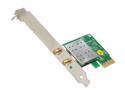
Pros: Price. I got it on sale for a really good price and so can you! I've got a really good signal off of a Linksys WRT54G2. The card seems pretty stable. I haven't randomly disconnected like other people have been stating. My ping in World of Tanks usually runs from around 90-200s. 200s only when other people are using their computers. When I first encountered the Encore brand a few years ago I was a little on the fence about getting it. I've never heard of it before and I was pretty skeptical since the products were so inexpensive. But I took the plunge and now I swear by it. I have a router, and a PCI slot card that they no longer make and they have both worked flawlessly for years. I'm sure this card will be the same so I definitely recommend this card.
Cons: None that I can think of so far. Windows 7 didn't automatically install the drivers but that's what the CD is for. No reason to knock off an egg.
Overall Review: I'm not sure what other people what other people's problems are with the drivers, but this is what I did. 1. Installed the card into a free PCI-E slot - doesn't matter what length. 2. Turned on the computer and popped the CD in. 3. Start -> Right click My Computer -> Properties -> Device Manager. 4. Under Other Devices you'll see Network Controllers. Right click that and click Update Driver. 5. Click Browse my computer for driver software. 6. If you're running a 64bit system Find the path: (CD Drive) D:\Driver_Utility\ENEWI-1XN4x_2XN4x_Driver_Utility_W4EN101104\RTL8192_CE_Driver\VistaX64 If you're running a 32bit system you need to find the x86 folder. 7. Keep clicking yes or next until it's installed.
Not for everybody
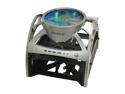
Pros: It's very unique. It's very open. And it'll heat up your room, meaning it won't heat up your computer parts. It's not a bad case, it's sturdily built and it turns heads but there are two MAJOR flaws that keep most people from getting this case.
Cons: By far the worst and most shortsighted thing about this case is the fact that you can't fit most aftermarket CPU coolers in this thing without taking off the big 250mm fan. Obviously this case is obviously aimed at the enthusiast market, and not being able to fit in an after market cooler knocks down 1 egg. Also, the cables for the front I/O ports need to be longer. The whole point of this case is for you to work on it, and obviously you can't work on it with a huge fan in your face. The cables are JUST long enough to reach most of the headers meaning that when won't be able to slide out the case without unplugging everything first, another egg marked off for that.
Overall Review: If you REALLY want an open air case. Lian Li makes ones that is not only cheaper but allows you to fit in large cpu coolers. It's called the PC-T60 Pitstop. You do lose the large fan, and you do lose the I/O ports, but you can buy those later if you really want. If you're adamant on getting this case I have two suggestions for you. Probably the best cooler you can use for this will be the Zalman 9500. There's a Thermaltake one that fits too, but I think the Zalman is better since the top fan won't just be blowing on just the top fit, and will pass air through the whole entire heat sink instead. Secondly, get a modular power supply. Believe me, get one. It's a huge pain to stuff all those extra wires in the back.
Big, Beautiful, and Wide
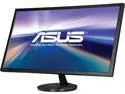
Pros: It's a large screen for the right price (when on sale). It's nice and bright and it gets the job done. I currently have two 27" monitors and I can definitely say that yes 1" does add quite a bit of difference to a panel.
Cons: A screen of this size can really benefit from having a larger resolution. Suppose the adage of you get what you pay for comes into play here. I found that the Vivid Pixel feature actually made images look worse. I suggest you keep it off.
Overall Review: I ordered two panels and one of them had a blemish in it. It looked like a dead pixel, but turned out it wasn't. Not really sure what it was at it resolved itself after a few days.
Not bad

Pros: When I bought this card this was the least expensive 7850 available. The cooler was incredibly easy to remove, just 4 screws in the back. 7870 is an extraordinary card. It lags behind the 7950 a little bit in terms of performance, but that the 7950 is $50+ more dollars. A slight overclock with MSI's afterburner program will put this card on par with the 7950.
Cons: Ugly blue PCB. When not on sale price is the same as other cards. The packaged software is useless. I tried to use it and it tells me I can't. If you want to overclock this card, or any 7950 for that matter MSI has an excellent program called Afterburner. It's available free and is much better than what HIS gives you. Also I don't recommend overclocking this card unless you have an aftermarket cooler. I'd only recommend getting this card if A. This is the cheapest 7870 available and B. If you plan on adding an after market cooler. Like water cooling.
Overall Review: Let's face it. Every single 7870 out there is pretty much identical, except for the cooler. This card is equipped with probably the worst I've ever seen. It's a dingy little aluminum cooler with a 50mm fan and an enormous shroud. Also there's nothing cooling the ram. Currently on Newegg there is a 7870 made by Asus with the excellent Direct Cu II cooler, I definitely recommend you take a look at that before making your decision on a purchase. But yeah, 7870 is the way to go in terms of sub $300 cards right now.
Fast!
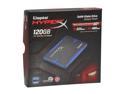
Pros: Just ran HD Tune Pro Got an average speed of 349.5 MB/s Max of 399.7 MB/s Min of 246.0 MB/s I also have a Samsung F3 the average read of that is about 130MB/s
Cons: Personally this drive is a bit expensive, and I wouldn't buy one unless there was some kind of special going on.
Overall Review: It's a pretty good drive. You don't notice that it takes 2 seconds for Chrome to load until you realize it should take less than 1. The first time I turned on my computer with my OS loaded on it I was really surprised by how quickly my windows loaded. I'd recommend one of these to a friend with little hesitation.
Backspace key
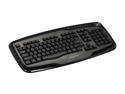
Pros: - Good Price - Wheel for volume control - Good sturdy build - Plenty of buttons
Cons: - Why is the backspace key the size of a regular key!?!? This is the only thing that keeps this keyboard from getting 5 eggs! I keep hitting the \ button when I try to backspace. It's not like there isn't enough room on the board, the enter key is MASSIVE. - Bright blue LED lights to indicate locked keys.
Overall Review: If you can deal with the tiny backspace key this is a pretty good keyboard at a pretty good price. I love the scroll wheel volume control.


