


Your Browsing History


Mark W.
Joined on 07/18/13
0
0
product reviews
- 1
How hard is it to design a Mobo?
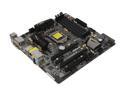
ASRock Z77 Extreme4-M LGA 1155 Intel Z77 HDMI USB 3.0 Micro ATX Intel Motherboard
Pros: The board fit in my machine, supports a goodset of chips and a fair size of memory.
Cons: The design of this motherboard is ridiculous. As mentioned, the front panel HDMI hookups to the mother board are underneath the PCIE slot. So, forget about plugging them in. My cord wouldn't even reach with the card plugged in and I couldn't get the card to slot when it was plugged in before putting the card in. No excuse here, this is just bad design. Before I get into this next section let me say that this card, which is being advertised as being Crossfire ready, IS NOT CROSS FIRE READY. From the product description: "NEXT-GEN PCI-E 3.0 SUPPORT AND QUAD SLI, QUAD CROSSFIREX SUPPORT" <- This is nothing but a bald faced lie, and now I am going to explain why. If you are like me and have 8 SATA Devices, forget hooking them up if you want a second GPU. If you are like me, and have front panel USB devices, forget having a second GPU. If you are like me and want any other sort of perephiral device hooked up to your machine....forget about having a second GPU. So if you are willing to limit yourself to all these things, then yes, it's crossfire ready. All of the overflow SATA Ports and front panel ports and laid out right underneath where the second GPU would plug in - much as the hdmi audio port is under the first GPU. It seems that when designing this board to be 'crossfire ready' they assumed no one would want to plug one - or even two GPUs into the board. When I did unplug all of these things, I was left with a machine that had only it's power button on the case working - and the GPU's I slotted would not eve line up with the holes to attach them to the case. This is making me think that, for whatever reason, the PCIE slots are closer together on this board then on other PC boards I have used in the past.
Overall Review: The cheap plastic clips to lock the GPUs to the board broke off as I was sliding them backwards to open up the slot with barely any force at all. This is more evidence of an inferior design and product manufacturing, but is not a deal breaker. Additionally when installing the CPU the instructions that came with the CPU were backwards when viewed next to the motherboard. I am not sure if this is a mobo or a chip issue.
7/28/2013See more detail