

Your Browsing History


Melissa R.
Joined on 01/31/07
0
0
product reviews
- 14
Works well, but poor support
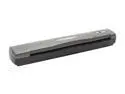
Genius Color Page - SF600 Single pass 600 x 600dpi Scanner
Pros: Small, good enough quality for any normal person (I scan receipts, old documents often with small text, and sometimes photos). I'd take this over a flatbed scanner any day, since you have to wait for each sheet on a flatbed regardless of it not being sheetfed...but you also have a big chunk of your desk wasted. (Stick to the flatbed if you need to scan anything 3-D, of course...) This one is about as big as the cardboard from an empty roll of paper towels, and comes with a vertical holder so that it takes up about 4-5" diameter circle on a desk..
Cons: Drivers from the disk don't include Windows 7. I downloaded the driver from geniusnet.com and it didn't seem to do anything when running Setup.exe or Install.exe. Emailing the company got me nowhere; they just kept saying they knew there was a certification/signing problem and to tell the system it was ok. I would have loved to - if that screen ever appeared. A readme would also have done wonders, but I couldn't find any .txt or similar file within their installation package. From a hardware standpoint, I wish that it didn't "grip" the paper so early. When you put in a sheet of paper, there's a trigger that indicates to the scanner to try to grab it. But, if you put the paper in slowly (such as when you're trying to make sure it's lining up properly), it won't grip at all since it will have gripped before the paper gets to the...grip spot...I guess. Along those lines, it's sized for A4 which causes 8.5x11 paper to have a decent chance to go through at a slight angle.
Overall Review: ****Turns out in Windows 7 (at least) you must also run "DPInst64.exe" (or DPInst32.exe, I assume) in order for the scanner to work. Upon first doing Setup.exe and then doing DPInst64.exe, I got all of the functions I was used to (in Windows XP) and the only catch was that I had to accept the fact that the driver wasn't certified - which I expect from most smaller products/companies in Windows 7 after having a few similar experiences. I really, really wish they would clarify this on their website or in (the nonexistent) driver documentation.
2/3/2010See more detail
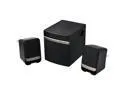
Gear Head SP3250USB 2.1 Speaker System - 14 W RMS - Gold, Black
Pros: Excellent price for a 2.1 setup for those who - like me - can't really handle a setup without some sort of sub. Very small footprint. Nice to just have USB power - I can finally downgrade to a smaller power strip.
Cons: Sub is what you'd expect for something that is only about 5"x6"x6" and runs on USB power: It outputs bass, just not very loud. Left & Right speakers are worse than expected - extremely metallic at any volume.
Overall Review: Since a fried RCA port on my old sub was my reason for speaker shopping, I can still use my old speakers with this new mini-subwoofer. If that wasn't the case, I'd probably be returning it. The sub has an integrated 3.5mm input (I couldn't reuse my nice volume control cord, unfortunately) and an integrated USB cord for power. The RCA jacks do allow you to swap in other speakers, though. There is also a volume control dial on the BACK of the SUB - just about the worst place I can think of. Newegg really needs more than a front-only picture of this item...
11/2/2012See more detail
It's an SSD.
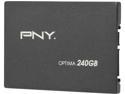
PNY Optima SSD7SC240GOPT-RB 2.5" 240GB SATA III Synchronous-Mode Internal Solid State Drive (SSD)
Pros: Everything arrived as expected. Did a reinstall of Win7Pro 64-bit - previously ran it from a 7200RPM 32mb cache HDD - and can see immediate improvements when multitasking (i.e., opening "too many" web browser tabs while doing other things). The OS reinstall was the least painful ever once I got it started, since the usual 3-hour process took about 10 minutes including restarts.
Cons: Does not come with a 3.5" adapter bracket - but then again, it doesn't claim to include one.
Overall Review: Bought heavily on sale, with a rebate. Unlike another reviewer who stated he got his unsealed with no UPC, mine came in a black box surrounded by product-related cardstock (with a UPC) and sealed in shrink wrap. I have no idea how fast mine is technically, because I don't feel the need to run benchmarks. But, as someone who's using it for gaming & 'productivity', I don't see how a faster SSD could improve performance more than it already has. Glad I upgraded, and money well spent!
5/30/2014See more detail
Poor design on male connector
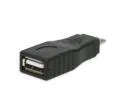
USB Micro B (M) to USB A (F) Adapter- (Black Color)
Pros: Connects...briefly and intermittently. Might work on other devices.
Cons: Does not work on Nexus 7 for any useable length of time. At first, I thought the software I had for reading USB drives, etc., was faulty, but then I tried connecting a device my camera - which has a cord that lights up when it has a connection. About 10% of the time, as I moved the connecter ever-so-slightly back and forth, it lit up. It never lit up for more than a couple seconds at a time. The male connector is only about 1mm shorter than my charging cable connector, so it's either this very slight difference, or just faulty hardware.
Overall Review: I normally wouldn't give a cord/adapter 1 star for not working on my particular device, but in this case, the Nexus 7 (or 10) is the obvious most likely use: It's popular, has a large enough screen to want to use desktop computer peripherals/attachments/storage, but it's got no expandable storage space of its own. Wish I had just bought a short USB OTG cord instead. Could have wrapped it around the back of the device when using a USB drive to watch movies, etc.
2/3/2013See more detail
Can't hear it.
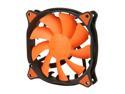
COUGAR Vortex PWM 120mm (CF-V12HP) Cooling Fan with Hydro-Dynamic Bearing and Pulse Width Modulation (Orange Version)
Pros: Extremely quiet. Simple installation.
Cons: Can still feel some heat on the case, so more air movement would be better - but that's pretty much always true.
Overall Review: Husband's graphics card started acting up, so he bought a new one. Turns out, it was just a dead case fan causing the card to overheat...so after buying the vid card and we ended up buying this fan to solve the REAL problem. Very satisfied with the purchase, and glad we spent the extra $10 over cheaper fans. From 3 feet away, I can't even hear that his computer is running now over the (not-too-loud) sound of my fans. Thinking of buying another one for my setup...
7/10/2012See more detail
As advertised, but extra greasy/shiny
eForCity 3 Packs Of Premium Crystal Clear LCD Screen Protector Cover Guard Film Shields Compatible With Motorola Droid Xtreme Mb810 / Droid X
Pros: Cheap. 3 to a pack. Each one is packaged separately with its own lint-free cloth and squeegee (aka, credit-card like item to flatten out bubbles). The squeegee, while super cheap looking, was actually precise enough on the corners that it allowed me to scrape away a piece of lint from the edge of my "final" protector - on the adhesive side. Only had to use two of the three before I got one to work!
Cons: This screen protector is much shinier than my old one, causing reflections to be more of an issue. (Both the old and new protectors were low-end and glossy, not matte.) Fingerprints and grease are more of an issue, i.e., a single swipe against my pants leg causes the greasy stuff to just smear instead of wipe off. I'll keep using it, but if I could track down the old brand I'd switch back. Also, the lint-free cloth IS lint free on the surface...but the edges are just cut with pinking shears (zig-zag pattern) and threads came loose easily if that area was used, defeating the purpose.
Overall Review: I never buy a single screen protector. The first one I attempt always fails because I forget just how dust-free the environment must be while applying it in order to avoid a single piece of lint from landing on the adhesive surface. If I was applying these again, I'd go into a rarely-used room where there is little air moving, rather than trying to apply it on my desk - with computer fans and an air conditioning vent immediately adjacent.
6/28/2012See more detail