


Your Browsing History


Todd T.
Joined on 03/22/09
0
0
product reviews
- 23
TLER - This is not a RAID Drive
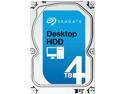
Seagate Desktop HDD ST4000DM000 4TB 64MB Cache SATA 6.0Gb/s 3.5" Internal Hard Drive Bare Drive
Pros: The drive seems to be fine as a desktop drive.
Cons: This is not a NAS or RAID Drive. Enterprise Drives have a setting called TLER, which stands for Time Limited Error Recovery. This causes a drive to limit error recovery attempts to within 7 seconds.
Overall Review: Raid controllers, and yes this also means home NAS boxes, expect a response within 8 seconds, and if they don't get it, they fail the drive and take it out of the Raid array. Desktop drives will try longer than 8 seconds to recover from a read error. That is the difference between the WD Red drives and the Black drives. The Red drives are "made" to be used in Raid arrays, although I think the only difference is that TLER is set in the Red Drives. There used to be a utility named WDTLER.exe, that would set TLER so that a desktop drive could be used in a Raid array, but now WD and I guess Seagate make it not a settable parameter.
11/28/2013See more detail
Not 60W Equivalent
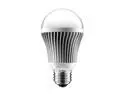
Aluratek ALB8W 60W Equivalent Warm White A19 LED Light Bulb
Pros: Probably OK as a 40W Light
Cons: 60W incandescent light bulbs produce 800 to 850 lumen. This bulb only produces 490 to 630. It is not a 60W equivalent. 630 lumen is way below 60W equivalence, and 490 lumen is pathetic.
Overall Review: I don't know why there is such a wide range of brightness in this product. 490 to 630 seems like a lot. Does it vary with wall voltage, or is there that much variance in the product itself? If so, they need to improve their process control.
10/27/2012See more detail
Dell Optiplex 755
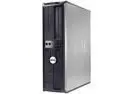
Dell Optiplex 755 Desktop - 2.0GHz Intel Core 2 Duo Processor - 4GB Memory - Windows 7 Professional
Pros: I like this particular model of computer. I wish there was a version with an i5/i7 processor. I also has a Dell 755 with a core 2 Quad processor.
Cons: Two of the four memory slots have stopped working, and it only has 2GB of memory
Overall Review: I bought mine used not refurbished, like there is really a difference, and not from Newegg • 2.33GHz Intel Core 2 Duo Processor • 2GB Memory • 250GB Hard Drive • DVD-ROM • Windows 7 Professional (64bit)
6/10/2014See more detail
Good for the money
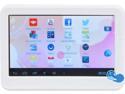
iView CyberPad 420TPC Android Tablet - 1.2GHz 512MB DDR3 4GB flash memory 4.3" Tablet WIFI Android 4.2 White (iVIEW-420TPC-WT)
Pros: Cheap!! This is an amazing tablet for the money! It works. I connected to my home router, and connected to a web site that has a lot of ads. I think it's browser performance was actually better than my desktop on the same web site.
Cons: None.
Overall Review: It is underpowered, it doesn't have much memory or storage, the touch screen could be more sensitive, and it can only run on the battery for a couple of hours. Connecting to my home router was "interesting". The connection failed several times, but I kept doing the same thing that I had already done, and finally it gave up and connected. I don't know why it didn't connect at first, or why it finally did. On a tablet this cheap, these are not cons, they are what you should expect.
6/2/2014See more detail
32-bit?
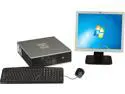
HP Compaq DC7900 Small Form Factor Desktop PC Intel Core 2 Duo 3.0 Ghz, 2GB RAM, 160 GB HDD, Windows 7 Professional 32 Bit with 17" Monitor
Pros: None. Even though I wouldn't buy this, it is what it is, and I'm not going to mark it down.
Cons: I have a similar set-up, a Dell Optiplex 755, with 2GB memory, a 250GB hard drive, and Windows 7 Professional 64-bit. I liked it when I got it, and I still use it almost every day, but I wouldn't buy it again now. And I could get it for less than $199.00. I upgraded the memory to 4Gb, but then a few months ago the second pair of memory slots went bad, and I had to pull half the memory out to get the machine to run. (all four sticks work in the first two slots)
Overall Review: A 3.0 Ghz Core 2 Duo processor is pretty good, I could upgrade the memory to 8GB, and I could get by with 160GB hard drive, but why a 32-bit operating system? Someone didn't think that through.
10/17/2013See more detail
Great Light
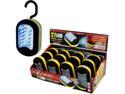
27-LED Superbright Worklight Flashlight with Hook Hanger and Magnet
Pros: Nice bright light for examining things, and looking behind and inside computers and under desks.
Cons: I almost always use the three LEDs on the end, so I have to push the button three times to get the light I want.
Overall Review: My office is lit by a "60 watt equivalent" CFL, so it's pretty dim. It's okay, because most of the time I'm looking at a monitor, but when I need to look at something else, I need more light, and this is perfect. I keep it in my desk drawer. And even if my office were better lit, I would still need something handy to look behind, under, and inside things. Yesterday I bought 3 used Seagate Momentus laptop hard drives, and I wanted to use Seatools to test them. I started by plugging them into a USB toaster, but I couldn't run the tests over a USB link, so I took the side off of one of my computers, and hooked it up to SATA power and data cables. I used the light to get everything plugged in. Off Topic Rant: When you are buying either CFLs or LED "60 watt equivalent" bulbs, check the lumens. Most of the claims of watt equivalence are outright lies. Many CFL and LED bulbs that are claimed to be 60 watt equivalents have lumen ratings that are closer to 45 watts. I just checked the box that I have for 60 watt light bulbs and it says 850 lumens, but I know that they can vary from 800 to 880 lumens. The long life bulbs are cooler and less efficient, they would have the lower numbers.
1/6/2013See more detail