

Your Browsing History


Colt M.
Joined on 07/07/20
0
0

product reviews
- 8
Wicked fast card, with a few caveats
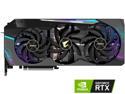
GIGABYTE AORUS GeForce RTX 3080 XTREME 10GB GDDR6X PCI Express 4.0 ATX Video Card GV-N3080AORUS X-10GD (rev. 2.0) (LHR)
Pros: - Runs extremley cool thanks to gigantic cooler - Built in LCD screen is cool, if it will work for you - Plenty of RGB
Cons: - Really thicc, hurting exapndability - Gigabyte Aorus Engine and RGB software sucks - BIOS OC mode is not worth it at all
Overall Review: I got the card a few months in August. I am writing in October. The card is huge, 4 slots. This means that it removes most PCIe expansions. My full ATX board keeps 2 slots, but that means I had to choose between my 3 PCIe cards. Goodbye extra USB ports. I also dont know of any case that will support a four slot card vertically mounted. Having room for airflow is a whole nother story. It only uses two PCIe brackets though, so the main obstacle is case width. OC mode pulls a lot more power and heat, doesnt really do much compared to the silent mode, which is already faster than any founders edition and even some of the AIB 3080s. BIOS OC mode is good for about 16,000 in Time Spy, while Silent mode will do 14,500. BIOS OC mode will run the card over its rated TDP by about 20 W, while silent mode runs it about 20 W under. The main draw of Nvidia is the DLSS, and the better drivers. As soon as they were installed, all of my weird graphics driver issues disappeared. Games I couldnt play due to crashing became playable. I like AMD CPUs, but the GPU drivers leave something to be desired. It always could have been localized to my system though. The card requires a minimum of 850W PSU. Anything less, and you are asking for trouble. This card is not refundable on Newegg, just replaceable, so be aware of that. Has a 4 year warranty included. I cant get RGB fusion 2.0 to work with the card, so I just have to live with the rainbow puke RGB and the default animation on the LCD screen, which for some reason is not the cards temperature. Hopefully this will be fixed in an update for the software. It also isnt like you can mount it vertically to avoid seeing the screen. If you are one of the many 1080p or 1440p gamers out there, good chance you will never see this thing hit full utilization. Most games run into a built in FPS cap or engine limits first. Especially with V-sync on and DLSS in even quality mode. In COD Warzone I have hit above 300 FPS, just barely. Thats at 1080P, DLSS ultra performance, and everything on lowest settings or disabled. Thats the kind of FPS one might expect in an e-sports title. All that and I didnt crack 70 C. If using this for media creation, good news. Its a beast. Using Windows photos to trim down video, which is mostly what I do, I was impressed. Able to trim a 43 min video down to 2:30 in under 20 seconds. Much better than my old card, which would take 10minutes or so to do the same thing. 10 GB of VRAM seems to be plenty. Ive seen it hit 7 GB in RDR2 everything on ultra, 1440p DLSS quality setting. Using the CudaHashcat tool in Kali Linux I never cracked 75c. Hashing is basically the hardest you can hit a GPU, so those temps are pretty good. Hashcat isnt used for crypto, its for password cracking. Running the Port Royal stress test in 3D Mark I saw max temps of 75c GPU, 82 hotspot, and about 83 memory temp. It would appear this card does not suffer from the overheating RAM issue. Power draw under max load during this stress test rose to 380+ Watts. It was run in BIOS OC mode. You need to use three separate power cables for this card. If you intend to run it in Silent mode, and you do not have any other PCIe cards, you might be fine with two. As for the PCIe debate, dont worry if youve only got 3.0. Running RDR2 benchmark at 1440p completely maxed no DLSS, the highest I ever saw was 16% interface load. Using GPU-Z from techpowerup to monitor. PCIe 3.0 is about half the speed of 4.0 so assuming we double that its still only 32%. Even running in PCIe 3.0X8 mode you probably would not see a decrease is performance in gaming. Some people seem to have been having issues with the card being DOA, so good luck with that. My card was fine right out of the box. I just decided to embrace the rainbow puke, and went full bore getting new RGB strips and whatnot.
10/9/2021See more detail
Absolute beast at 1080p, extremely good at 1440p
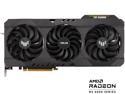
ASUS TUF Gaming Radeon RX 6700 XT OC Edition Graphics Card (AMD RDNA 2, PCIe 4.0, 12GB GDDR6, HDMI 2.1, DisplayPort 1.4a, Dual Ball Fan Bearings, All-aluminum Shroud, Reinforced Frame, GPU Tweak II) - TUF-RX6700XT-O12G-GAMING
Pros: Runs cool with proper case airflow OC edition I got was able to OC a bit higher still Doesn't use a terrible amount of power Triple digit framerates on almost every game at 1080p Triple digit at 1440p, but not usually at ultra settings Fast enough in productivity tasks for casual users
Cons: Fans at 100% are loud, but I manually turned up the fan speed curve By default doesn't like to run hotter than 75 degrees, so a bit more performance to have there
Overall Review: I would recommend this card to everyone who plans to game at 1080p. It can run anything at ultra settings, almost always above 100 FPS. RDR2 will run at ultra settings on 1440P above 60FPS, which is more than playable for a game like that. Shadow of the Tomb Raider runs around 120 FPS at 1440p Ultra, dipping down to 90 FPS in heavy areas. COD Warzone will run 1080p Maxed settings above 200 FPS, with occasional dips down to 180 FPS during really heavy moments. If you turn the Render resolution down to 720p, prepare to go nuts. The card was forced upon me with a $200 MOBO, so actual price was about $950. Thank you Newegg. Fairly high, but still better than scalped prices, and you can always sell the MOBO later if you like. I was able to use the MOBO in a different build, so no big deal. Not a great amount of money to spend, but overall I'm not unhappy with it. It is a massive improvement over my last GPU.
6/2/2021See more detail
Works fine
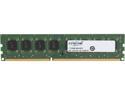
Crucial 8GB DDR3L 1600 (PC3L 12800) Desktop Memory Model CT102464BD160B
Pros: Decent compatability
Overall Review: Used this in an existing system that had two 4GB modules in it. DDR3 can be a bit finnicky with compatibility, but this booted just fine with the existing RAM installed.
5/6/2021See more detail
It does what a TPM should do
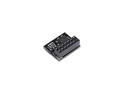
Asus Accessory TPM-SPI SPI 14-1pin Nuvoton NPCT750 TPM2.0 Bulk Pack
Pros: Stores data and keeps it protected
Overall Review: This does what a TPM should do. It stores encryption keys. Never had any issues with it. My favorite part was the packaging, or lack there of. Just a plain envelope with the TPM wrapped in bubble wrap. I guess once you get to the point of putting a TPM in system, ASUS figures you wont be swayed by flashy packaging. Or maybe they just sell so few of these retail that they don't bother with packaging.
5/6/2021See more detail
Good SSD
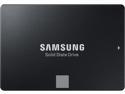
SAMSUNG 860 EVO Series 2.5" 500GB SATA III V-NAND 3-bit MLC Internal Solid State Drive (SSD) MZ-76E500B/AM
Pros: Great speed for the SATA interface Decent IOPs, so makes a fairly fast boot drive
Overall Review: I would recommend this SSD for anyone going from a HDD, or looking to replace one, etc. It is fairly competitively priced, so if you are building on a budget this is not a bad choice.
5/6/2021See more detail
Great RAM, but be wary
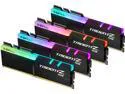
G.SKILL TridentZ RGB Series 32GB (4 x 8GB) 288-Pin PC RAM DDR4 4000 (PC4 32000) Desktop Memory Model F4-4000C15Q-32GTZR
Pros: -Terribly fast. At full XMP this RAM has a 7.5 nanosecond latency
Cons: -Hard to run 4 sticks at this speed
Overall Review: So I am giving this 4 eggs, because I can't blame the product for my mistake, but here goes. This is not, not, not designed for any Motherboard lower than $350-ish dollars. RAM at this speed and this timings will put a major strain on your CPU and the MOBO, and may refuse to even POST at full XMP speed. I have an 5600X and an ASUS X570 MOBO, would not run this RAM at full speed. It would boot at 2133 Mhz. Normally with companies like ASUS and G.Skill, and with decent hardware like Samsung B-Die RAM and mid tier MOBOs, you can pretty much ignore the QVL and "certified for" listings. This may hold true for this RAM, but my hardware was not good enough to run it. Unless you have a much better MOBO than me, a CPU that can handle this speed and these timings, make sure it is on the QVL before purchase. That being said, I could run 2 sticks at full XMP speed no problem. So if you need 32GB of RAM at this speed, I would suggest that you buy a 2x16 configuration, at which point the QVL once again becomes something to ignore.
5/6/2021See more detail